
1. Introduction
This manual provides essential information for the safe and effective operation, assembly, maintenance, and troubleshooting of your Batavia Cordless Grass Trimmer 18V MAXXPACK. Please read this manual thoroughly before first use and keep it for future reference.
2. Safety Instructions
Always observe basic safety precautions to reduce the risk of fire, electric shock, and personal injury. Familiarize yourself with the controls and proper use of the appliance.
- Wear appropriate personal protective equipment, including eye protection, long pants, and sturdy footwear.
- Keep children and bystanders away while operating the trimmer.
- Inspect the work area for objects that could be thrown or entangled in the cutting line.
- Do not operate the trimmer in wet conditions or in the presence of flammable liquids or gases.
- Ensure the battery is fully charged before use and remove it when not in use or during maintenance.
- Use only original Batavia replacement parts and accessories.
3. Package Contents
Upon unpacking, ensure all items listed below are present and undamaged:
- 1x Batavia 7062515 Battery Grass Trimmer
- 1x 2.0Ah Battery
- 1x 2.4Ah Charger
- 1x Instruction Manual (this document)
- 1x Invoice (proof of warranty)

Image: The Batavia Cordless Grass Trimmer 18V MAXXPACK as it appears in its retail packaging.
4. Setup and Assembly
Follow these steps to assemble your grass trimmer before first use.
- Attach the Main Handle: Securely attach the main handle to the trimmer shaft. Ensure it clicks into place or is tightened according to the markings.

Image: A complete view of the Batavia Cordless Grass Trimmer, illustrating the assembled components including the main handle, telescopic shaft, and trimmer head.
- Insert the Battery: Align the 2.0Ah battery with the battery slot on the trimmer's handle and slide it in until it locks securely.

Image: A close-up view showing the 18V MAXXPACK battery correctly inserted into the designated slot on the trimmer's handle, ready for operation.
- Adjust Telescopic Handle: Loosen the locking mechanism on the telescopic shaft and extend or retract the shaft to a comfortable working height. Secure the locking mechanism. The handle is adjustable from 90cm to 119cm.
- Adjust Second Handle: Position the adjustable second handle for optimal comfort and control during operation. Tighten its locking mechanism.
- Swivel Head Adjustment: The trimmer head can swivel for both trimming and edging functions. Adjust the head to the desired angle for your task.

Image: A hand demonstrating the adjustment of the trimmer head's angle, highlighting its swivel capability for versatile use.
- Plant Protection Shield: The trimmer features a plant protection shield to prevent damage to delicate plants or objects. Ensure it is properly positioned when working near sensitive areas.

Image: A detailed view of the trimmer head, showcasing the integrated plant protection shield designed to safeguard nearby vegetation and objects during operation.
5. Operating Instructions
Learn how to effectively use your Batavia Cordless Grass Trimmer for optimal results.
- Starting the Trimmer: Ensure the battery is fully charged and inserted. Press the safety lock-off button and then squeeze the trigger to start the trimmer. Release the trigger to stop.
- Trimming Grass: Hold the trimmer firmly with both hands. Swing the trimmer from side to side, keeping the cutting line parallel to the ground. Avoid hitting hard objects.

Image: A user demonstrating the proper technique for trimming grass in a garden setting, holding the Batavia trimmer comfortably.
- Edging: Rotate the trimmer head to the vertical position for edging. Guide the trimmer along the edge of your lawn, using the grass edge guide for clean lines.
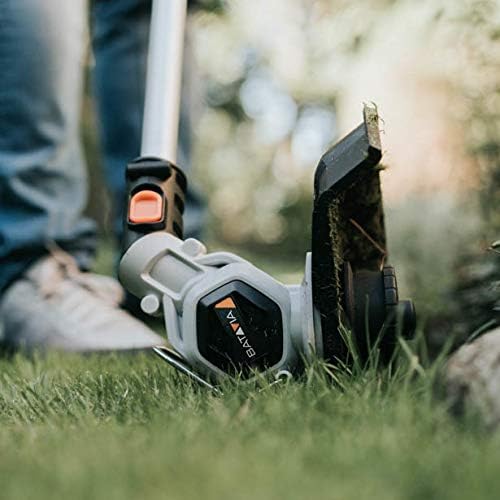
Image: A close-up shot of the trimmer head in edging mode, precisely cutting along a lawn border to create a neat finish.
- Using the Plant Protection Shield: When trimming near trees, shrubs, or delicate garden features, position the plant protection shield to prevent accidental contact and damage.

Image: The grass trimmer being used near the base of a tree, with the plant protection shield extended to prevent the cutting line from damaging the tree bark.
- Tap & Go Wire Feed: To advance the cutting line, gently tap the trimmer head on the ground while the motor is running. This mechanism automatically feeds out more line.
6. Maintenance
Regular maintenance ensures the longevity and optimal performance of your trimmer.
- Cleaning: After each use, remove the battery and clean the trimmer housing, cutting head, and air vents with a soft, damp cloth. Do not use harsh chemicals.
- Line Replacement: When the cutting line becomes too short, replace the bobbin with a new one. Refer to the product specifications for the correct line type and diameter.
- Storage: Store the trimmer in a dry, secure place, out of reach of children. Remove the battery before long-term storage.
7. Troubleshooting
This section addresses common issues you might encounter.
| Problem | Possible Cause | Solution |
|---|---|---|
| Trimmer does not start. | Battery not inserted correctly or discharged. Safety lock-off not engaged. | Ensure battery is fully charged and properly seated. Press safety lock-off button before squeezing trigger. |
| Cutting line does not advance. | Line is tangled or too short. Tap & Go mechanism jammed. | Inspect and untangle line. Replace bobbin if line is too short. Clear any debris from the Tap & Go mechanism. |
| Reduced cutting performance. | Dull or worn cutting line. Trimmer head clogged with debris. | Replace the cutting line/bobbin. Clean the trimmer head thoroughly. |
8. Specifications
Detailed technical specifications for the Batavia Cordless Grass Trimmer.
- Model: B_7062515
- Battery Voltage: 18V Li-Ion
- No Load Speed: 8000 min-1
- Product Weight (without battery): 1.85 kg
- Product Dimensions (L × W × H): 90/119 × 26 × 28 cm (adjustable length)
- Certifications: CE, GS, RoHS, REACH
9. Warranty and Support
Your Batavia Cordless Grass Trimmer, including the included battery and charger, comes with a 2-year warranty from the date of purchase. Please retain your invoice as proof of warranty.
For support, spare parts, or warranty claims, please contact Batavia customer service. Visit the official Batavia website for contact information and further details: Batavia Official Store.