
Yesido HM05
Yesido HM05 3-in-1 HDMI Cable User Manual
Model: HM05 | Brand: Yesido
1. Introduction
This manual provides detailed instructions for the safe and efficient use of your Yesido HM05 3-in-1 HDMI Cable. Please read this manual thoroughly before use and retain it for future reference. This cable is designed to connect your compatible smartphone or tablet to an HD television or projector, enabling high-definition video and audio output.
2. Product Overview
The Yesido HM05 is a versatile 3-in-1 HDMI cable designed for seamless connectivity between mobile devices and larger displays. It features multiple connectors to support a wide range of smartphones and tablets.
Key Features:
- 3-in-1 Connectivity: Equipped with Lightning, Micro USB, and USB-C connectors for broad device compatibility.
- High-Definition Output: Supports video output up to 1080p resolution.
- Wide Compatibility: Connects to projectors, smartphones, and televisions.
- Tangle-Free Design: Engineered for ease of use and storage.
- Simultaneous Charging: Allows for device charging while connected and displaying content.
What's Included:
- 1 x Yesido HM05 3-in-1 HDMI Cable
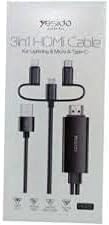
Image 1: Packaging of the Yesido HM05 3-in-1 HDMI Cable, showing the cable with Lightning, Micro USB, USB-C, and HDMI connectors.
3. Setup Instructions
Follow these steps to connect your Yesido HM05 3-in-1 HDMI Cable to your devices.
- Identify Connectors: Locate the appropriate connector on the Yesido HM05 cable for your mobile device (Lightning for iPhone/iPad, Micro USB for older Android devices, or USB-C for newer Android devices).
- Connect to Mobile Device: Plug the identified connector firmly into the charging/data port of your smartphone or tablet.
- Connect to Display: Insert the HDMI end of the Yesido HM05 cable into an available HDMI input port on your television or projector.
- Select Input Source: On your television or projector, use the remote control to select the corresponding HDMI input source (e.g., HDMI 1, HDMI 2) that the cable is connected to.
- Provide Power (if necessary): The cable may require external power for stable operation, especially for longer usage or with certain devices. Connect the USB-A connector of the Yesido HM05 cable to a USB power adapter (5V/1A or higher, not included) or a USB port on your TV/projector.
- Display Synchronization: Your mobile device's screen should now be mirrored on the connected display. If not, refer to the Troubleshooting section.
Important Note for USB-C Devices:
The Yesido HM05 cable supports video signals via USB-C interfaces that utilize the DisplayPort Alternate Mode (DP++) protocol. Mobile phones featuring USB-C 3.0 data transfer capabilities that do not support DP++ (e.g., some specific models like Lexus Millet mentioned in original product description) may not be compatible for video output. Please verify your device's USB-C video output capabilities.

Image 2: Diagram illustrating the synchronization between phone and TV using the Yesido HM05 cable, highlighting the Lightning, Micro USB, and Type-C connectors, and 1080P support.
4. Operating Instructions
Once successfully set up, operating the Yesido HM05 cable is straightforward.
- Screen Mirroring: The cable automatically mirrors your mobile device's screen to the connected display. Any content displayed on your phone or tablet, including apps, photos, videos, and presentations, will appear on the larger screen.
- Audio Output: Audio will typically be transmitted through the HDMI cable to your television or projector's speakers. Ensure your display device's volume is adjusted appropriately.
- Resolution: The cable supports up to 1080p high-definition resolution. The actual output resolution may depend on your mobile device's capabilities and the content being displayed.
- Charging Functionality: When the USB-A connector is plugged into a power source, your mobile device will charge simultaneously while connected to the display.

Image 3: Close-up of the Yesido HM05 HDMI connector, illustrating its capability for 1080P high-definition visual effects and clear image quality on a television screen.
5. Maintenance
Proper care and maintenance will extend the life of your Yesido HM05 HDMI Cable.
- Cleaning: Use a soft, dry, lint-free cloth to clean the cable and connectors. Avoid using liquid cleaners or solvents.
- Storage: Store the cable in a cool, dry place away from direct sunlight and extreme temperatures. Avoid tightly coiling or sharply bending the cable, as this can damage internal wires. The tangle-free design helps with neat storage.
- Handling: Always grasp the connector ends when plugging or unplugging the cable. Do not pull on the cable itself, as this can strain the connections and cause damage.
- Protection: Keep the connectors free from dust and debris. Consider using dust caps if the cable is stored for extended periods.
6. Troubleshooting
If you encounter issues with your Yesido HM05 HDMI Cable, refer to the following common problems and solutions.
| Problem | Possible Cause | Solution |
|---|---|---|
| No signal or blank screen on TV/projector. | Incorrect input source selected; loose connections; insufficient power; incompatible device. | Ensure the correct HDMI input is selected on your display. Check all cable connections are secure. Connect the USB-A power cable to a reliable power source. Verify your mobile device supports video output via the connected port (especially for USB-C, check DP++ compatibility). |
| Poor image quality or resolution. | Mobile device settings; display device settings; cable limitation. | Ensure your mobile device's display settings are configured for optimal output. Check your TV/projector's resolution settings. The cable supports up to 1080p; ensure your content and display are also 1080p capable. |
| No audio output. | TV/projector audio settings; mobile device audio settings. | Check the volume levels on both your mobile device and the connected TV/projector. Ensure the TV/projector's audio input is set to the HDMI source. |
| Intermittent connection or flickering screen. | Loose connection; power fluctuations; cable damage. | Secure all connections. Ensure the USB-A power source is stable and provides sufficient power. Inspect the cable for any visible damage. |
| USB-C device not working. | Device incompatibility with DP++ protocol. | As noted in the Setup section, some USB-C devices do not support video output via DP++ protocol. Confirm your device's compatibility. |
7. Specifications
Detailed technical specifications for the Yesido HM05 3-in-1 HDMI Cable.
- Brand: Yesido
- Model: HM05
- Connector Type: HDMI, Lightning, Micro USB, USB-C
- Cable Type: HDMI
- Compatible Devices: Projector, Smartphone, Television
- Special Features: Tangle Free
- Color: Black
- Cable Connection Type: Male-to-Male
- Item Shape: Round
- Compliance: CE
- Max Resolution Support: 1080p
8. Warranty and Support
For warranty information or technical support, please refer to the product packaging or contact the retailer where the product was purchased. Keep your proof of purchase for any warranty claims.
Related documentsHM05


Ask a question about this manual
Ask about setup, troubleshooting, compatibility, parts, safety, or missing instructions. Manuals+ will review the question and use this page’s manual context to help answer it.