
Introduction
This manual provides essential information for the safe and effective use of your GYMAX 2-in-1 Folding Rollator Walker. This versatile device functions as both a rollator walker and a transport wheelchair, designed to assist with walking, sitting, and mobility. Please read these instructions thoroughly before assembly and use, and retain this manual for future reference.
Key features include a durable aluminum frame, adjustable handle height, ergonomic hand brakes, a reversible backrest for wheelchair conversion, foldable footrests, a removable storage bag, and a cane/umbrella holder. The four solid wheels are suitable for various indoor and outdoor terrains.
Safety Information
- Weight Capacity: Do not exceed the maximum weight capacity of 300 lbs (136 kg).
- Brakes: Always engage the parking brakes before sitting on the rollator or when stationary. Ensure brakes are functioning correctly before each use.
- Stability: Ensure all four wheels are on a stable, level surface before use. Avoid uneven terrain, steep inclines, or obstacles that could cause instability.
- Adjustments: Verify that all adjustable components, such as handle height and footrests, are securely locked in place before use.
- Supervision: When used as a wheelchair, ensure the user is properly seated and supervised by an attendant.
- Folding: Exercise caution when folding or unfolding the rollator to prevent pinching fingers or hands.
- Maintenance: Regularly inspect the rollator for loose parts, worn components, or damage. Do not use if damaged.
Package Contents
Upon unpacking, please ensure all the following components are present:
- Main Rollator Frame with Wheels
- Reversible Backrest
- Footrests (2)
- Removable Storage Bag
- Cane/Umbrella Holder
- User Manual
If any parts are missing or damaged, please contact customer service immediately.
Setup and Assembly
The GYMAX 2-in-1 Rollator Walker requires minimal assembly and no tools. Follow these steps:
- Unfold the Frame: Carefully pull the sides of the rollator apart until the frame locks into its open position. Ensure the seat is flat and secure.
- Attach Footrests: If using as a wheelchair, attach the footrests to the designated slots on the front frame. Ensure they click securely into place. The footrests can be folded up when not in use by releasing the buckle.
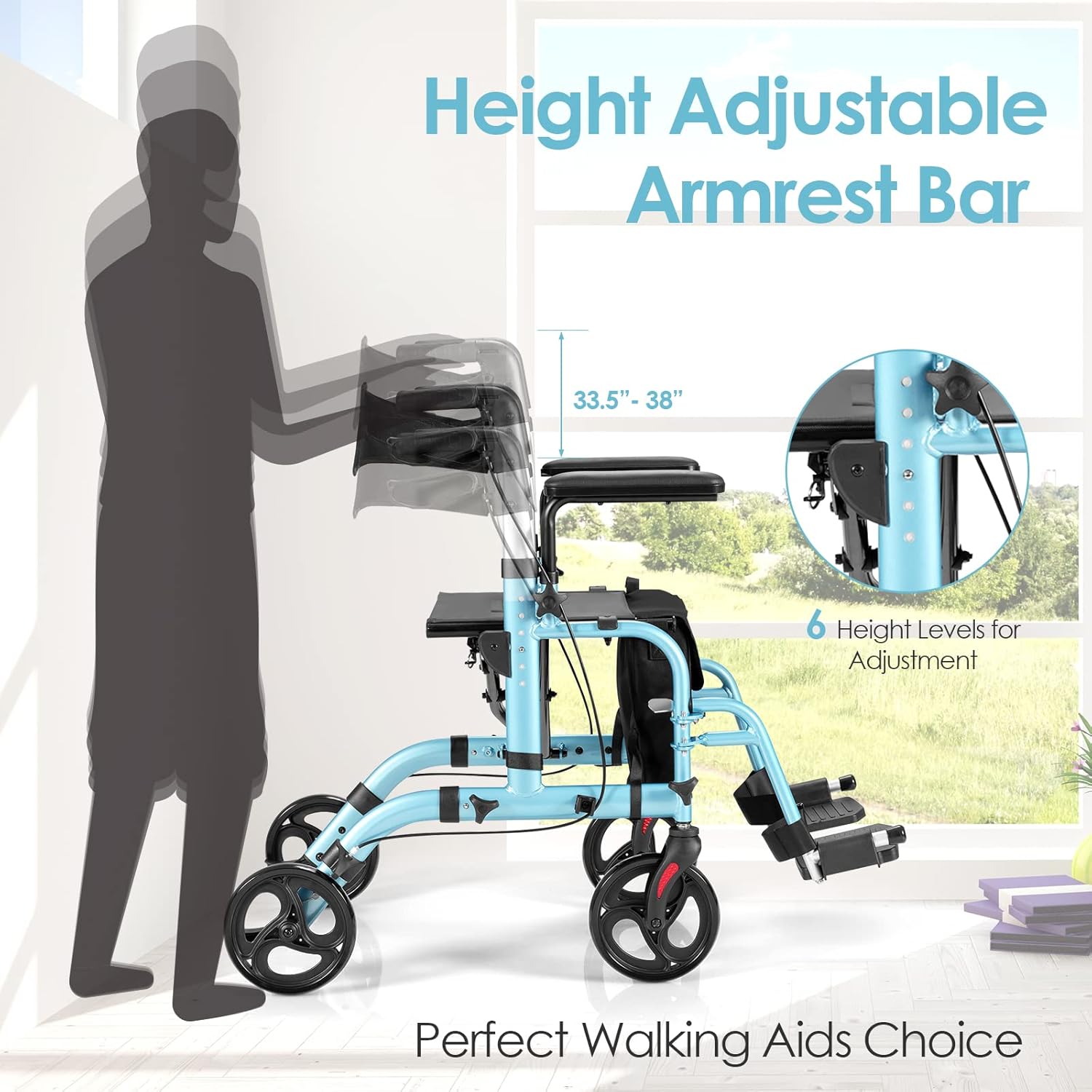
- Adjust Handle Height: Press the adjustment buttons on the handle tubes and slide the handles up or down to the desired height. Release the buttons and ensure the handles lock securely into one of the 6 available height levels. The handles should be at wrist level when standing upright with arms relaxed.
- Install Storage Bag: Attach the removable storage bag to the frame under the seat.
- Install Cane/Umbrella Holder: Secure the cane/umbrella holder to the side of the frame as desired.
Operating Instructions
A. Using as a Rollator Walker
- Walking: Push the rollator forward a short distance, then step forward with one foot, followed by the other. Maintain a comfortable distance from the rollator.
- Braking:
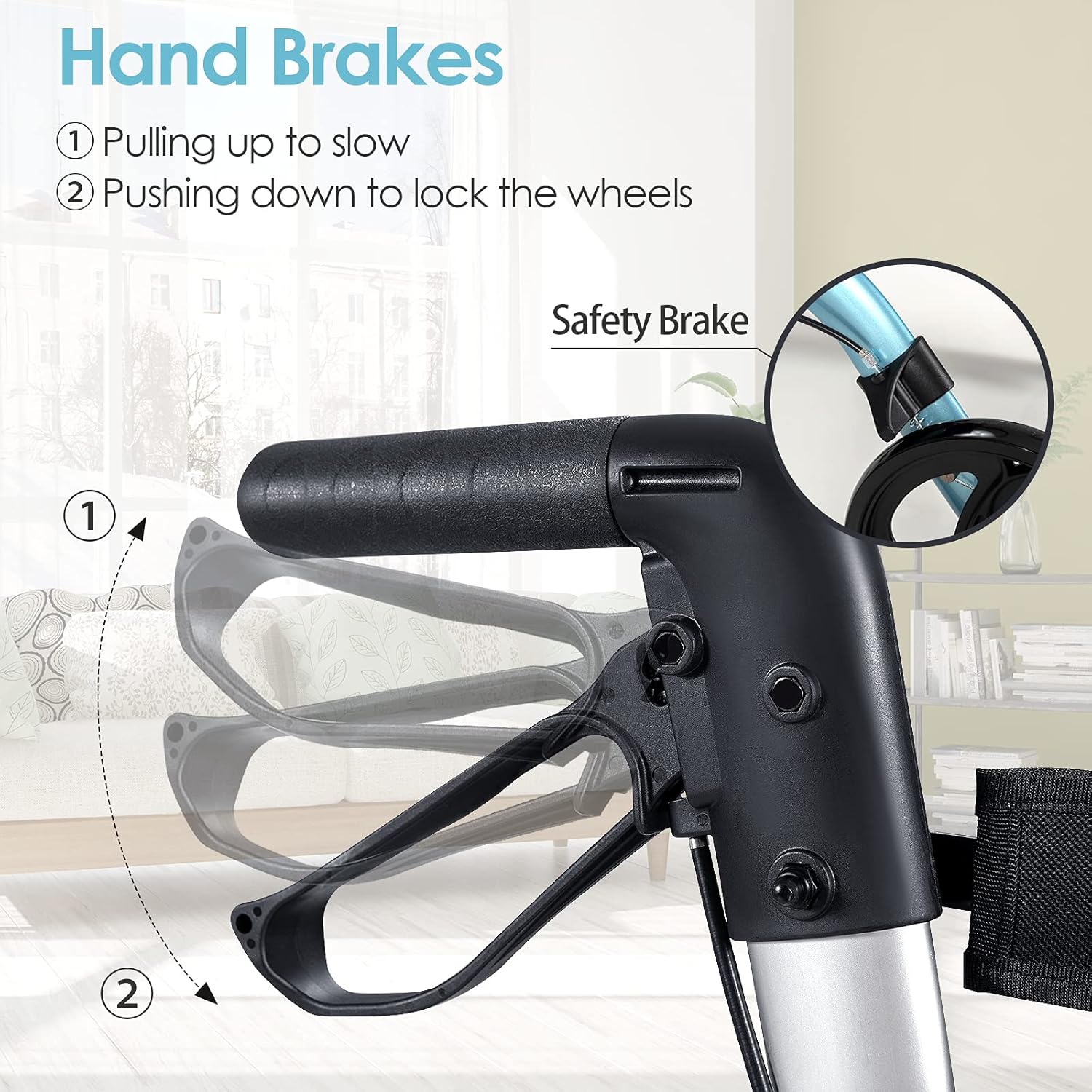
- To Slow Down: Gently pull the hand brake levers upwards.
- To Lock Wheels (Parking Brake): Push the hand brake levers downwards until they click into the locked position. Always engage parking brakes before sitting or when stationary.
- Sitting: Engage both parking brakes. Turn around so your back is facing the seat. Slowly lower yourself onto the seat. Ensure the backrest is in the upright position for support.
B. Converting to a Wheelchair
- Engage Brakes: Ensure the parking brakes are engaged.
- Flip Backrest: Flip the reversible backrest over to face the front, converting the rollator into a wheelchair configuration.
- Deploy Footrests: Unfold the footrests and ensure they are securely in place for the user's feet.
- Seating: Assist the user to sit on the seat, ensuring their feet are placed on the footrests.
- Attendant Operation: An attendant should push the wheelchair from behind using the handles.


C. Folding for Storage and Transport
To fold the rollator for compact storage or transport:
- Ensure the storage bag is empty and removed if desired.
- Pull the strap located in the middle of the seat upwards. The rollator frame will begin to collapse inwards.
- Continue to fold until the unit is compact. You may need to fold the footrests first if they are deployed.

Maintenance
- Cleaning: Clean the frame with a damp cloth and mild soap. Do not use abrasive cleaners. The fabric seat and storage bag can be wiped clean.
- Inspection: Regularly check all bolts, screws, and fasteners to ensure they are tight. Inspect the wheels for wear and tear. Check brake cables for fraying and ensure brakes engage smoothly and effectively.
- Storage: Store the rollator in a dry place, away from direct sunlight and extreme temperatures.
Troubleshooting
| Problem | Possible Cause | Solution |
|---|---|---|
| Brakes not engaging or too loose. | Brake cable needs adjustment or is damaged. | Inspect brake cables. If loose, adjust the tension. If damaged, contact customer service for replacement parts. |
| Rollator feels unstable or wobbly. | Loose fasteners or uneven ground. | Check all bolts and screws and tighten if necessary. Ensure use on level surfaces. |
| Difficulty folding the rollator. | Obstruction or mechanism not fully released. | Ensure the seat strap is pulled firmly upwards. Check for any obstructions. Ensure footrests are folded if applicable. |
| Wheels not rolling smoothly. | Debris in wheels or worn bearings. | Clean wheels of any debris. If problem persists, contact customer service. |
Specifications
- Model: B09LXDDGW1
- Material: Aluminum Alloy
- Overall Dimensions (L x W x H): 40.5" x 25" x 33.5"-38" (103.5 cm x 63 cm x 85 cm-96 cm)
- Folding Dimensions (L x W x H): 30" x 12" x 33.5" (76.5 cm x 30 cm x 85 cm)
- Net Weight: 21.5 lbs (9.73 kg)
- Weight Capacity: 300 lbs (136 kg)
- Handle Height Adjustment: 6 levels

Warranty and Support
For warranty information, technical support, or to order replacement parts, please contact GYMAX customer service. Refer to your purchase documentation for specific contact details or visit the official GYMAX website.
Please have your model number (B09LXDDGW1) and date of purchase available when contacting support.


