
INNOREL KT324C
INNOREL KT324C Carbon Fiber Tripod Instruction Manual
Introduction
Thank you for choosing the INNOREL KT324C Carbon Fiber Tripod. This professional portable tripod is designed for DSLR cameras, offering stability, portability, and versatility for various photography needs. This manual provides detailed instructions for setup, operation, maintenance, and troubleshooting to ensure optimal performance and longevity of your tripod.

Image: Photographer utilizing the INNOREL KT324C tripod for outdoor photography.
Package Contents
Please verify that all items listed below are included in your package:
- Tripod Bag x 1
- Main Tripod Body x 1 (KT324C)
- External 2-Section Center Column x 1
- Gravity Hook x 1
- Allen Key x 3
- Stainless Steel Spikes x 3

Image: All components of the INNOREL KT324C tripod package, including the tripod, bag, and accessories.
Specifications
The INNOREL KT324C tripod features high-quality construction and robust performance. Key specifications are detailed below:

Image: Visual overview of INNOREL KT324C tripod specifications.
| Feature | Detail |
|---|---|
| Brand | INNOREL |
| Model Name/Number | KT324C |
| Material | 10-layer Carbon Fiber, Aluminum Alloy, Rubber, Stainless Steel |
| Product Weight | 1.52 kg (3.4 lbs) |
| Maximum Load Capacity | 25 kg (55 lbs) |
| Maximum Height | 180.5 cm (71.1 inches) |
| Minimum Height | 9.5 cm (3.7 inches) |
| Folded Length | 51.5 cm (20.3 inches) |
| Number of Leg Sections | 4 |
| Tube Diameter | 32.5mm / 29.0mm / 25.6mm / 22.2mm |
| Special Features | Lightweight, Compact |
| Compatible Devices | Camera (DSLR) |
| Tripod Head Type | Headless (tripod body only) |
| Country of Origin | China |

Image: Detailed illustration of the tripod leg tube diameters.
Setup
1. Attaching the External Center Column
The INNOREL KT324C includes an external 2-section center column to achieve additional height. To install:
- Unscrew the main platform from the tripod body.
- Screw the external center column onto the tripod body.
- Attach your camera head or platform to the top of the external center column.
This column provides an additional 41 cm (16.14 inches) of height, allowing for higher shooting angles.
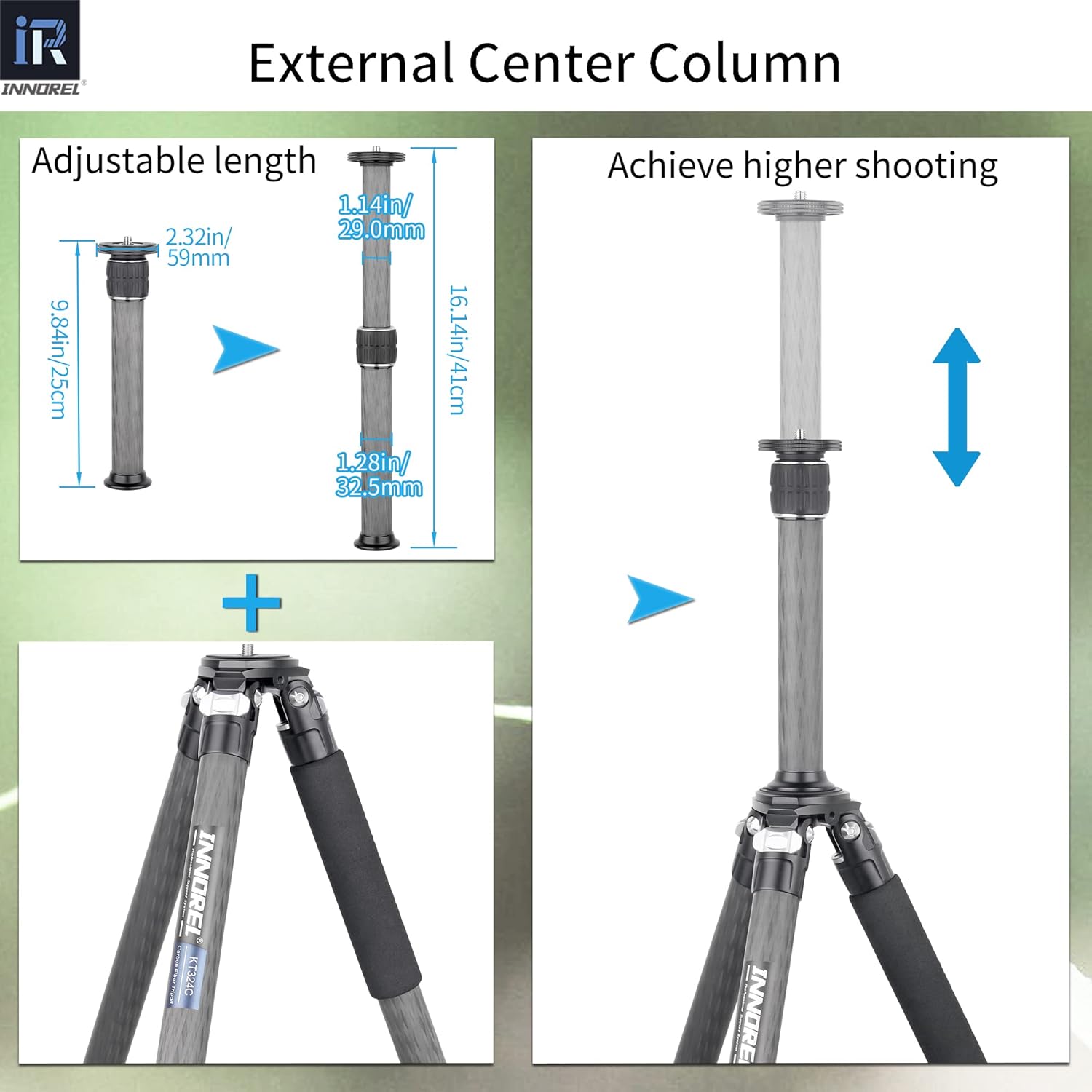
Image: Step-by-step guide for installing the external center column.
2. Adjusting Leg Angles
Each of the three legs can be independently adjusted to three different angles: 7°, 25°, and 65°. To adjust, unlock the angle adjustment mechanism at the top of each leg, set the desired angle, and then lock it securely.
3. Changing Feet (Rubber/Spikes)
The tripod comes with interchangeable rubber feet and three stainless steel spikes. Use the rubber feet for indoor or smooth surfaces. For outdoor use on uneven or soft terrain (e.g., grass, dirt, ice), replace the rubber feet with the stainless steel spikes for enhanced stability. Use the provided Allen key to change the feet.

Image: Illustration of how to install the stainless steel spikes.
Operation
1. Extending and Retracting Legs
The tripod legs consist of 4 sections. To extend a leg, twist the leg locks counter-clockwise to loosen, pull out the desired section, and then twist clockwise to tighten and secure. Repeat for all sections and legs to achieve the desired height.

Image: Various working heights and leg angle adjustments of the tripod.
2. Using the Angle Adjustment Locks
As mentioned in the setup, the angle adjustment locks allow you to quickly change the spread of the tripod legs. This is crucial for stability on uneven ground or for achieving low-angle shots.
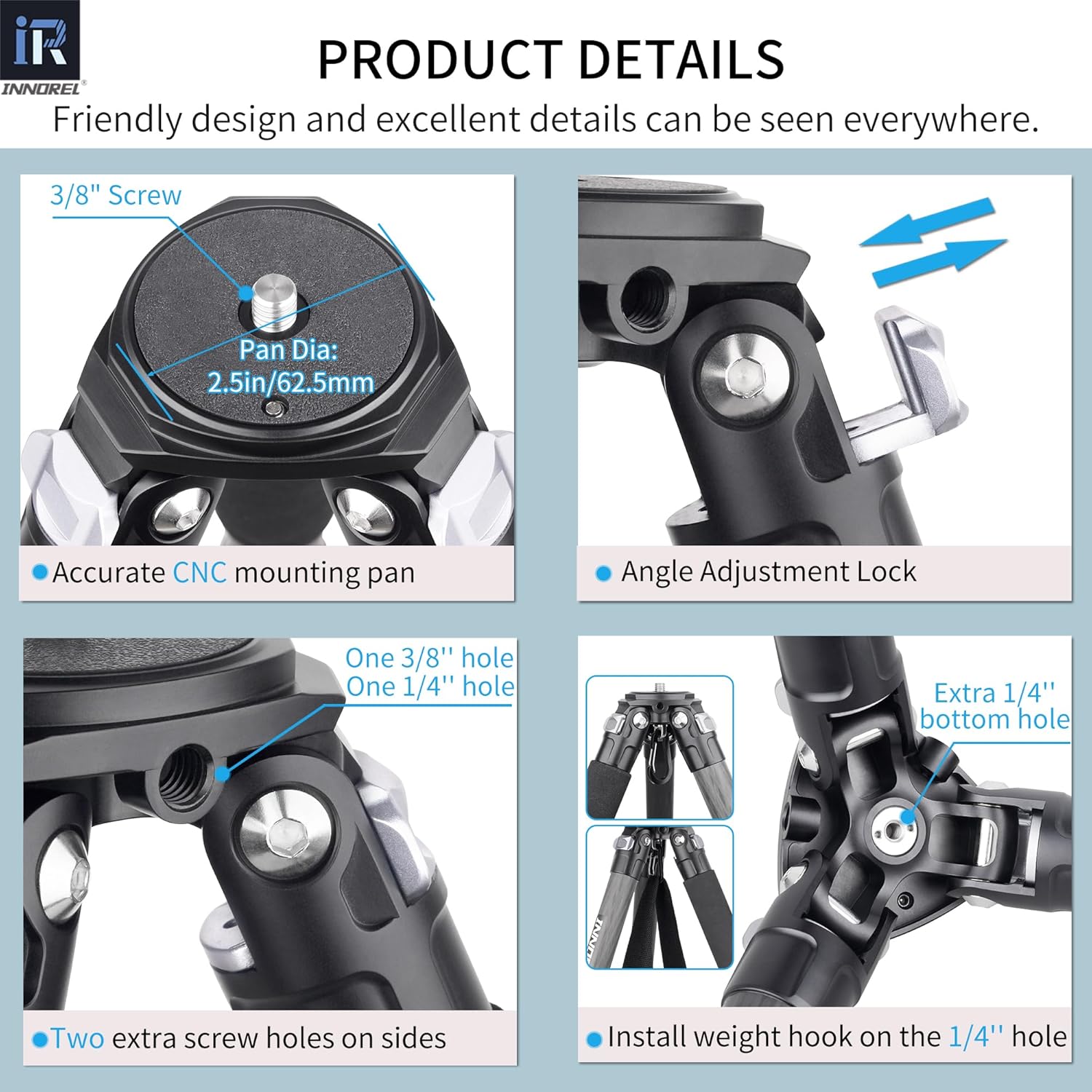
Image: Close-up of the angle adjustment lock and mounting plate details.
3. Utilizing the Gravity Hook
For added stability, especially in windy conditions or when using heavy equipment, attach your camera bag or a weight to the gravity hook located at the bottom of the center column. This lowers the center of gravity and increases the tripod's stability.
4. Compact Folding
The INNOREL KT324C is designed for compact storage and transport. All three legs can be folded completely together, making it highly portable for travel and outdoor use.
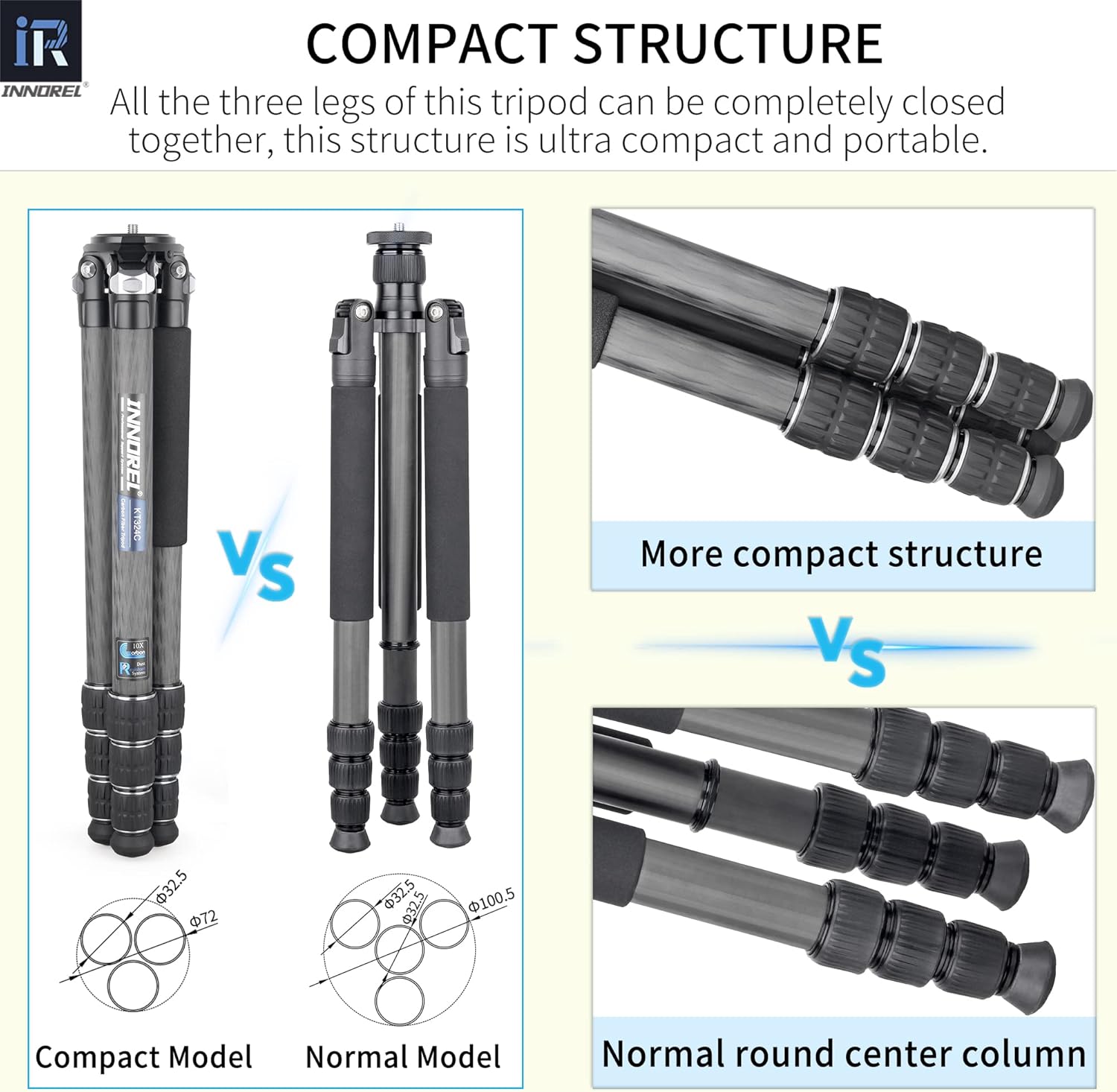
Image: Comparison illustrating the compact folded size of the KT324C.

Image: Photographers demonstrating various uses of the INNOREL KT324C tripod.
Maintenance
Proper maintenance ensures the longevity and smooth operation of your INNOREL KT324C tripod.
1. Cleaning
- After use, especially in dusty or sandy environments, wipe down the carbon fiber tubes and aluminum parts with a soft, damp cloth.
- Ensure all leg locks are free of debris. If sand or dirt gets into the locks, carefully disassemble (if comfortable) and clean, then reassemble.
- Avoid using harsh chemicals or abrasive materials that could damage the finish or carbon fiber.
2. Gasket Inspection
The tripod features a one-piece anti-falling gasket design for improved durability and smooth operation. Regularly inspect the gaskets within the leg sections for wear or damage. If a gasket appears worn, it may affect the leg's locking mechanism or stability.

Image: Detailed view of tripod leg construction, including carbon fiber layers and gasket placement.

Image: Comparison of the new one-piece anti-falling gasket design with traditional gaskets.
3. Storage
Store the tripod in its protective bag in a dry, cool place when not in use. Avoid exposing it to extreme temperatures or prolonged direct sunlight.
Troubleshooting
1. Tripod Legs Not Extending/Retracting Smoothly
Ensure the leg locks are fully loosened before attempting to extend or retract the leg sections. Check for any trapped debris (sand, dirt) within the leg locks or between the sections. Clean as described in the maintenance section.
2. Tripod Instability
- Verify that all leg locks are securely tightened after adjusting height.
- Ensure leg angles are properly set and locked.
- On uneven terrain, use the stainless steel spikes and adjust each leg independently to find a stable position.
- Consider using the gravity hook with added weight for increased stability.
3. Camera Head Wobbles
Ensure your camera head is securely mounted to the tripod's mounting plate or center column. Check that all screws and connections are tight. If using a quick-release plate, ensure it is fully engaged and locked into the head.
Warranty and Support
Warranty Information
The INNOREL KT324C Carbon Fiber Tripod comes with a 2-year warranty from the date of purchase, covering manufacturing defects. Please retain your proof of purchase for warranty claims.
Customer Support
If you require assistance, have questions about your product, or encounter any issues not covered in this manual, please contact INNOREL customer support. Our team is ready to provide prompt and helpful service.
For contact information, please refer to the INNOREL official website or the retailer where you purchased the product.
Related documentsKT324C


Ask a question about this manual
Ask about setup, troubleshooting, compatibility, parts, safety, or missing instructions. Manuals+ will review the question and use this page’s manual context to help answer it.