
1. Product Overview
The JOYEAUTO Wireless CarPlay Android Auto Retrofit Kit is designed to integrate modern smartphone connectivity into select BMW vehicles equipped with the CCC infotainment system. This kit allows for wireless Apple CarPlay and Android Auto functionality, enhancing your driving experience with navigation, music, and communication features directly on your original car display.
1.1. Compatible Vehicles
This retrofit kit is compatible with BMW vehicles featuring the CCC system and an 8.8-inch screen, manufactured between 2003 and 2008. Specific compatible models include:
- 1-Series: E81/E82/E87/E88 (06/2004 – 09/2008)
- 3-Series: E90/E91/E92/E93 (03/2005 – 09/2008)
- 5-Series: E60/E61 (12/2003 – 11/2008)
- 6-Series: E63/E64 (12/2003 – 11/2008)
- X5 Series: E70 (03/2007 – 10/2009)
- X6 Series: E72 (05/2008 – 10/2009)
For other CCC system cars, please verify compatibility by contacting support with pictures of your display screen and control panels.
1.2. Key Features
- Seamless OEM integration with original display and media controls.
- Wireless Apple CarPlay via Bluetooth pairing and Wi-Fi transfer.
- Wired Apple CarPlay support (connect via Lightning cable, disables Wi-Fi for CarPlay).
- Android Mirroring-Link for Android phones.
- Access to GPS navigation apps (Google Maps, Waze) with live traffic information.
- Audio streaming from apps like Spotify and Amazon through the factory CCC head unit.
- Voice control functionality (e.g., "Hey Siri").
- Support for aftermarket front, rear, and 360-degree cameras with dynamic guidance lines.
- USB port for playing music and videos from a USB flash drive.
- Adjustable equalizer for customized audio quality.
- Full control via original OEM buttons and joystick knob.
2. Setup and Installation
Installation of the JOYEAUTO Retrofit Kit requires technical expertise and familiarity with automotive electronics. It involves connecting the decoder unit to the vehicle's existing wiring harness and display. Professional installation is recommended.
2.1. Package Contents
Verify that all components are present in the package before beginning installation. Refer to the product packaging for a detailed list of included items.
2.2. General Installation Steps (Summary)
- Preparation: Disconnect the vehicle's battery. Remove the factory head unit and display to access the necessary connections.
- Connect Decoder: Integrate the retrofit decoder unit into the vehicle's wiring using the provided harness. This typically involves connecting to the LVDS cable for video signal and the quadlock connector for power and audio.
- External Connections: Connect the Wi-Fi antenna, USB cable, and any optional camera inputs to the decoder unit.
- Testing: Before reassembling the dashboard, reconnect the battery and test the functionality of the CarPlay/Android Auto system.
- Reassembly: Securely mount the decoder unit and reassemble the vehicle's dashboard components.
Note: Detailed, step-by-step installation instructions with diagrams are typically provided in a separate installation guide included with the product. Always refer to that specific guide for precise wiring and mounting procedures.
3. Operating Instructions
Once installed, the retrofit kit allows you to switch between the original BMW CCC system and the CarPlay/Android Auto interface.
3.1. Switching Between Systems
To switch to the CarPlay/Android Auto interface, typically a long press of the "Back" button on your iDrive controller is required. A short press usually functions as a return within the CarPlay/Android Auto menu.
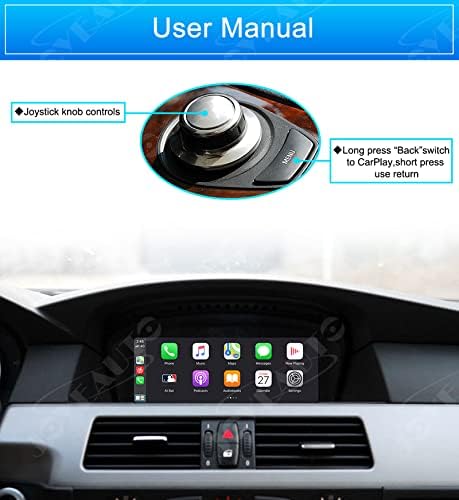
Image: BMW iDrive controller showing the joystick knob and the 'Back' button for switching to CarPlay.
3.2. Wireless Apple CarPlay / iOS AirPlay
To use wireless CarPlay:
- Ensure Bluetooth is enabled on your iPhone.
- On the CarPlay interface, navigate to the Bluetooth settings and pair your iPhone with the retrofit kit.
- Once paired, CarPlay will connect automatically via Wi-Fi.

Image: The BMW dashboard displaying the Apple CarPlay interface on the central screen, with a smartphone showing the AirPlay connection.
3.3. Android Auto
To use Android Auto:
- Connect your Android phone to the kit via a USB cable.
- Ensure Android Auto is installed and configured on your phone.
- The Android Auto interface will appear on the car's display.
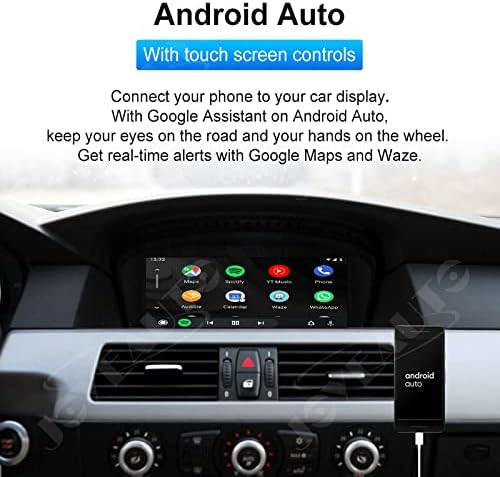
Image: The BMW dashboard displaying the Android Auto interface on the central screen, showing various navigation and media apps.
3.4. Mirroring-Link
The Mirroring-Link feature allows you to display your smartphone screen directly onto the car's display. This is useful for watching videos or playing games.

Image: The BMW dashboard displaying a mirrored smartphone screen on the central display, showing a mobile game.
3.5. USB Flash Playback
Connect a USB flash drive to the kit's USB port to play music and videos directly on the car's display.
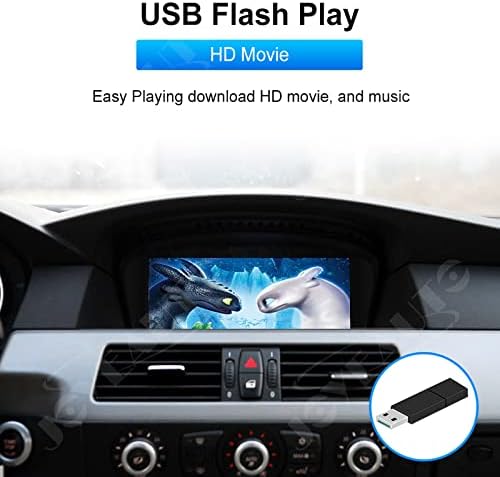
Image: The BMW dashboard displaying a movie playing from a USB flash drive on the central screen.
3.6. Camera Input
The kit supports both factory and aftermarket front/rear/360 cameras. When a compatible camera is connected, the video feed will automatically display on the screen when reversing or manually selected.

Image: The BMW dashboard displaying a rear camera view on the central screen, complete with dynamic guidance lines.
4. Maintenance
To ensure optimal performance and longevity of your JOYEAUTO Retrofit Kit, follow these general maintenance guidelines:
- Software Updates: Periodically check the manufacturer's website or contact support for any available firmware updates. Keeping the software updated can improve performance and add new features.
- Cleaning: Keep the unit and connections free from dust and debris. Use a soft, dry cloth for cleaning. Avoid using harsh chemicals or abrasive materials.
- Connection Integrity: Ensure all cables and connections remain secure. Loose connections can lead to intermittent functionality.
- Environmental Conditions: Avoid exposing the unit to extreme temperatures or excessive moisture.
5. Troubleshooting
If you encounter issues with your JOYEAUTO Retrofit Kit, refer to the following common troubleshooting steps:
5.1. No Display / Black Screen
- Check Power: Ensure the unit is receiving power. Verify all power connections are secure.
- LVDS Cable: Confirm the LVDS cable (video signal cable) is correctly connected between the car's display, the original head unit, and the retrofit kit.
- Input Source: Make sure you have switched to the correct input source (CarPlay/Android Auto) using the iDrive controller.
5.2. No Audio
- AUX Input: Ensure your car's AUX input is selected as the audio source on the original BMW CCC system. The retrofit kit typically routes audio through the AUX input.
- Volume Levels: Check volume levels on both your phone and the car's audio system.
- Bluetooth/USB Connection: For wireless CarPlay, verify the Bluetooth and Wi-Fi connection. For wired CarPlay/Android Auto, ensure the USB cable is properly connected.
5.3. CarPlay/Android Auto Not Connecting Wirelessly
- Bluetooth Pairing: Confirm your phone is paired via Bluetooth to the retrofit kit.
- Wi-Fi Enabled: Ensure Wi-Fi is enabled on your phone for CarPlay to establish a connection.
- Forget Device: Try forgetting the Bluetooth device on your phone and re-pairing.
- Restart: Restart both your phone and the car's infotainment system.
5.4. Controls Not Responding
- iDrive Connection: Verify that the iDrive controller connections to the retrofit kit are secure.
- Firmware: Ensure the kit's firmware is up to date.
If these steps do not resolve the issue, please contact customer support for further assistance.
6. Specifications
| Feature | Detail |
|---|---|
| Brand | JOYEAUTO |
| Model Number | WJBM-4-CCC |
| Connectivity Technology | Bluetooth, USB, Wi-Fi |
| Controller Type | Android (for Android Auto functionality) |
| Special Feature | Equalizer |
| Compatible Devices | Mobile Phone (iOS and Android) |
| Connector Type | USB |
| Audio Output Mode | Stereo |
| Supported Internet Services | Spotify (via connected smartphone) |
| Control Method | Voice (Siri, Google Assistant) |
| Audio Output Type | Speakers (via vehicle's audio system) |
| Wireless Technology | Bluetooth, Wi-Fi |
| ASIN | B09LTQH4VF |
| UPC | 761325993766 |
7. Warranty and Support
For any questions or technical assistance regarding your JOYEAUTO Wireless CarPlay Android Auto Retrofit Kit, please contact customer support via Amazon message at any time. Information regarding specific warranty terms and conditions may be provided with your product packaging or upon request from customer support.


