
Lenovo ZAA30007US
Lenovo Smart Clock Essential with Alexa Built-in User Manual
Model: ZAA30007US
1. Introduction
The Lenovo Smart Clock Essential with Alexa Built-in is designed to simplify your morning routine and enhance your home environment. This smart alarm clock features a clear LED display that shows time, temperature, and weather at a glance. With Alexa integrated, you can easily set alarms, timers, reminders, and manage your shopping lists using voice commands. It also functions as a smart speaker, allowing you to stream music, audiobooks, and podcasts. Designed with privacy in mind, it includes a microphone mute switch and no camera.
2. Key Features
- Integrated Alexa: Set timers, alarms, reminders, and add items to your Amazon shopping cart using voice commands.
- Large LED Display: Clearly shows time, weather, humidity, and outside temperature.
- Auto-Dimming Display: Adjusts brightness automatically for a peaceful night's sleep, while remaining visible when needed.
- Tap-to-Snooze: Conveniently dismiss alarms or snooze by tapping the top of the device.
- Privacy Features: No camera and a physical microphone mute switch for enhanced privacy.
- Smart Speaker Functionality: Stream music from Amazon Music and other providers, listen to audiobooks and podcasts.
- Home Speaker Group Compatibility: Integrate into your existing home speaker groups for continuous listening.
- Connectivity: Supports WiFi 5 802.11 b/g/n for reliable network connection.
3. Package Contents
Ensure all items are present in the box:
- Lenovo Smart Clock Essential with Alexa Built-in
- Power Adapter/Charger
- Quick Start Guide (not included in this digital manual)
4. Product Overview

Figure 4.1: Front view of the Lenovo Smart Clock Essential, displaying the time, day, temperature, and humidity on its LED screen. The device features a Misty Blue fabric finish.

Figure 4.2: Rear view of the Lenovo Smart Clock Essential, showing the power input port and the microphone mute switch on the side. The device is covered in a Misty Blue fabric.

Figure 4.3: A user looking at the Lenovo Smart Clock Essential, which displays the time and weather information. A speech bubble indicates Alexa providing a weather update: "Today, you can look for showers, with a high of 49 degrees and a low of 36 degrees."

Figure 4.4: The Lenovo Smart Clock Essential on a coffee table, with a speech bubble showing "Hi, Alexa". The clock's display shows two zeros, indicating it's ready for a voice command. A person is relaxing on a couch in the background.

Figure 4.5: The Lenovo Smart Clock Essential placed on a white ledge, displaying the time, day, temperature, and humidity. A person is visible in the background, looking towards the clock.
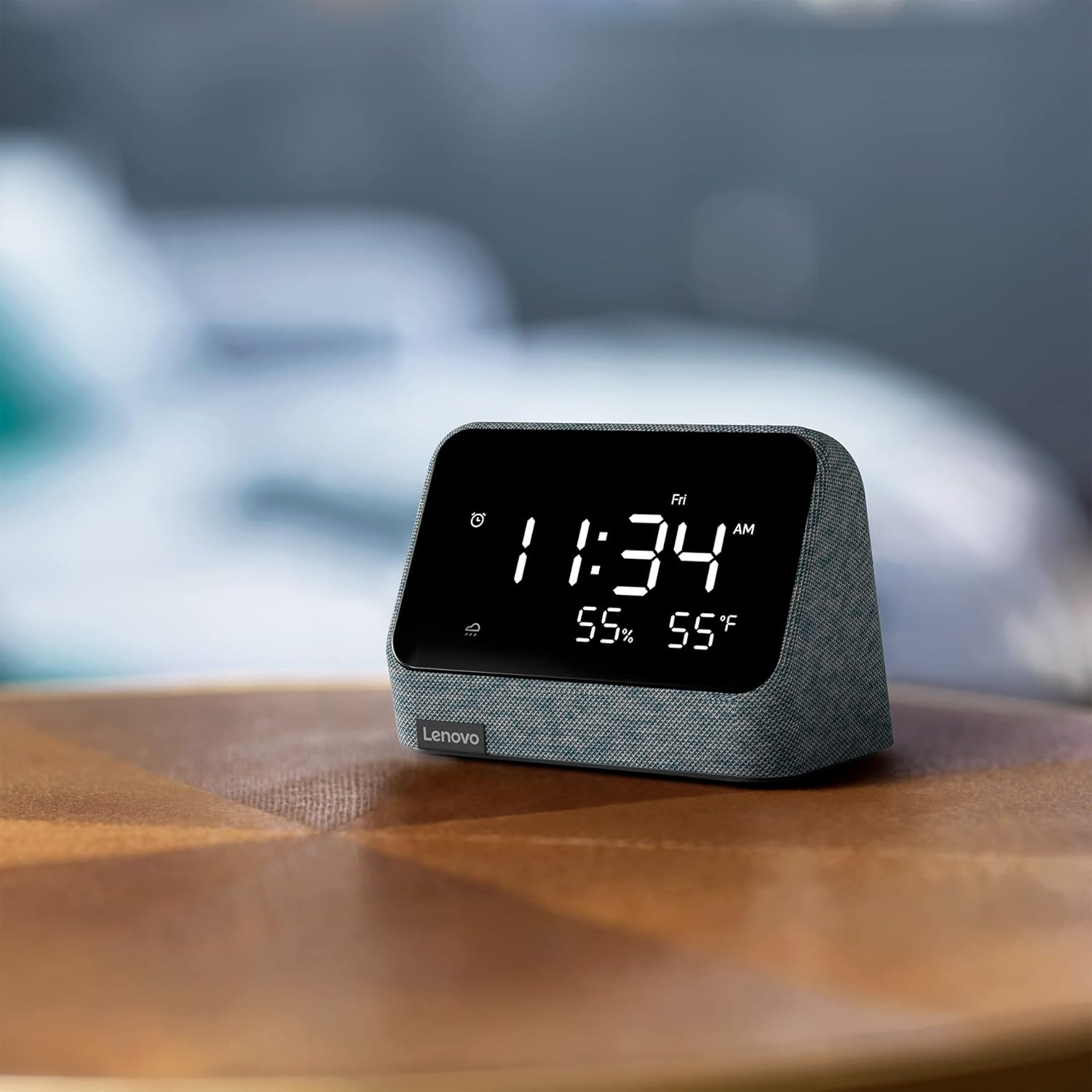
Figure 4.6: The Lenovo Smart Clock Essential on a wooden table, showing the time, day, and two temperature readings. The device's fabric exterior is visible.

Figure 4.7: The Lenovo Smart Clock Essential on a bedside table in a dimly lit room, displaying the time, day, temperature, and humidity. The auto-adjusting brightness feature is evident.

Figure 4.8: A diagram illustrating the dimensions of the Lenovo Smart Clock Essential, showing a width of 4 inches and a height of 3 inches.
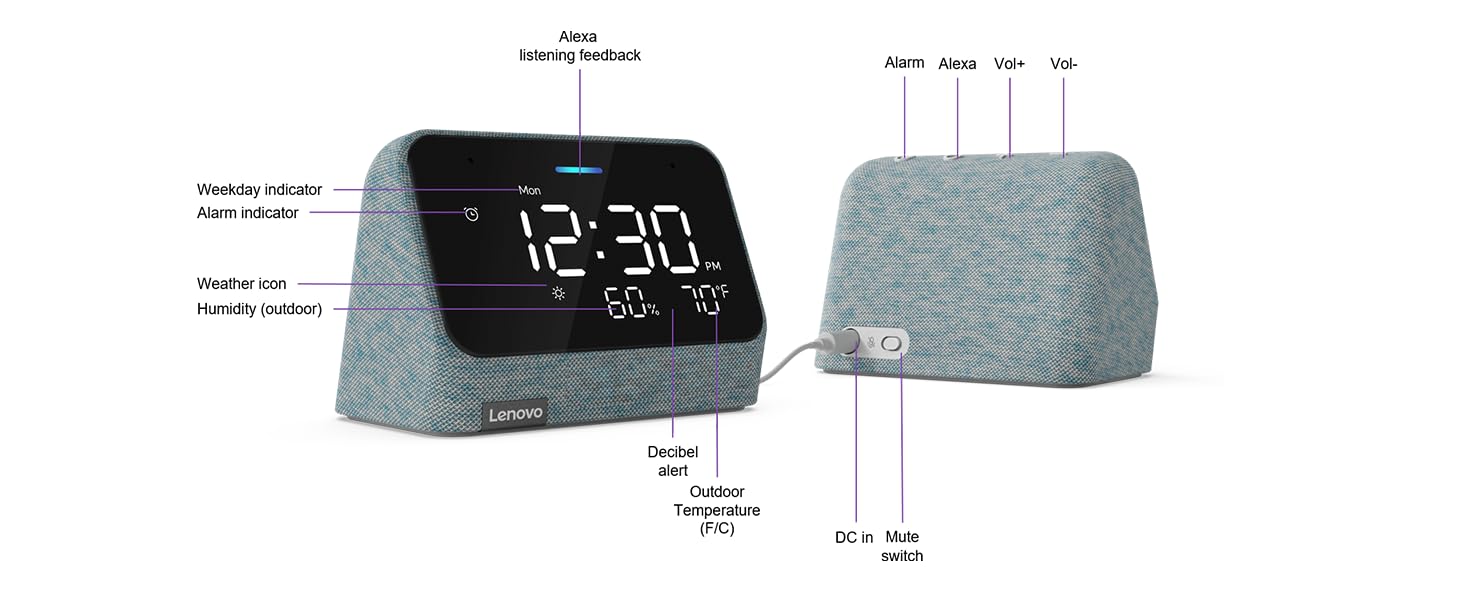
Figure 4.9: A detailed diagram of the Lenovo Smart Clock Essential, highlighting key features and controls. Labels point to the Weekday indicator, Alarm indicator, Weather icon, Humidity (outdoor), Decibel alert, Outdoor Temperature (F/C), DC in port, Mute switch, Alarm button, Alexa button, Vol- (Volume Down), and Vol+ (Volume Up).
5. Setup
- Power Connection: Connect the provided power adapter to the DC in port on the back of the Smart Clock Essential and plug it into a wall outlet.
- Initial Boot-up: The device will power on automatically. Follow the on-screen prompts to select your language and connect to your Wi-Fi network.
- Alexa App Setup: Download the Amazon Alexa app on your smartphone or tablet. Log in with your Amazon account. The app will guide you through connecting your Lenovo Smart Clock Essential to your Alexa account.
- Time and Location: Once connected, the clock will automatically set the correct time and display local weather information based on your location settings in the Alexa app.
6. Operating Instructions
6.1. Basic Controls
- Volume Control: Use the Vol+ and Vol- buttons on the top of the device to adjust the speaker volume.
- Alarm Management: Press the Alarm button on the top to view or set alarms. Tap the top of the device to snooze a sounding alarm.
- Microphone Mute: Use the physical Mute switch on the back of the device to enable or disable the microphone for privacy. When muted, a red indicator light will appear on the display.
6.2. Using Alexa Voice Commands
To activate Alexa, simply say "Alexa" followed by your command. Ensure the microphone is not muted.
- Setting Alarms: "Alexa, set an alarm for 7 AM."
- Setting Timers: "Alexa, set a timer for 15 minutes."
- Checking Weather: "Alexa, what's the weather like today?"
- Playing Music: "Alexa, play pop music." (Requires linked music service in Alexa app)
- Adding to Shopping List: "Alexa, add milk to my shopping list."
- Asking Questions: "Alexa, what's 5 plus 7?"
7. Maintenance
- Cleaning: Use a soft, dry cloth to wipe the display and fabric surfaces. Do not use liquid cleaners or abrasive materials.
- Placement: Place the device on a stable, flat surface away from direct sunlight, heat sources, and excessive moisture.
- Software Updates: The device will automatically receive software updates over Wi-Fi. Ensure it remains connected to the internet for optimal performance.
8. Troubleshooting
| Issue | Possible Solution |
|---|---|
| Device not powering on. | Ensure the power adapter is securely connected to the device and a working power outlet. Try a different outlet. |
| Alexa is not responding. | Check if the microphone mute switch on the back is enabled (red indicator light off). Ensure the device is connected to Wi-Fi. Restart the device by unplugging and replugging it. |
| No sound from speaker. | Increase the volume using the Vol+ button. Check if the device is connected to a music service or playing content. |
| Incorrect time or weather. | Ensure the device is connected to Wi-Fi. Verify your location settings in the Amazon Alexa app. |
| Wi-Fi connection issues. | Restart your Wi-Fi router. Ensure the device is within range of your Wi-Fi signal. Reconfigure Wi-Fi settings through the Alexa app. |
9. Specifications
| Feature | Detail |
|---|---|
| Brand | Lenovo |
| Model Number | ZAA30007US |
| Color | Misty Blue |
| Display Type | Digital LED |
| Style | Modern |
| Special Features | Adjustable Brightness, Alarm, Snooze, Temperature Display, Alexa Built-in |
| Product Dimensions | 4"W x 3"H |
| Item Weight | 0.55 Pounds (approx. 8.8 ounces) |
| Power Source | Electrical (Charger included) |
| Connectivity | WiFi 5 802.11 b/g/n |
| Room Type | Bedroom |
| Mounting Type | Tabletop |
10. Warranty & Support
The Lenovo Smart Clock Essential comes with a 1-year limited warranty. For technical support, product registration, or further assistance, please visit the official Lenovo support website or contact their customer service. Refer to the original product packaging or the Lenovo website for the most up-to-date contact information and warranty details.
Visit the Lenovo Store: Lenovo Official Store on Amazon
Related documentsZAA30007US


Ask a question about this manual
Ask about setup, troubleshooting, compatibility, parts, safety, or missing instructions. Manuals+ will review the question and use this page’s manual context to help answer it.