
1. Introduction
This manual provides instructions for the Night Owl SP 4 Channel Bluetooth 4K UHD Home Security Camera System (Model BTD8-41-4L). This system features a 4-channel Digital Video Recorder (DVR) with a 1TB hard drive and four wired 4K UHD indoor/outdoor spotlight cameras. It is designed for comprehensive home surveillance with advanced features like app-based Bluetooth setup, human detection, facial capture alerts, and motion-activated spotlights.
The system utilizes a wired connection for cameras to ensure uninterrupted viewing and includes a mobile application for remote control and access to recordings without monthly fees.

Figure 1: Night Owl 4K UHD Security System overview, highlighting key features.
2. Package Contents
Verify that all items listed below are included in your package. If any items are missing or damaged, please contact Night Owl support.
- 1 x 4-Channel 4K UHD Digital Video Recorder (DVR) with 1TB Hard Drive
- 4 x Wired 4K UHD Indoor/Outdoor Spotlight Cameras
- 4 x 60 ft. BNC Video/Power Cables
- 1 x DVR Power Adapter
- 1 x USB Mouse
- 1 x HDMI Cable
- Mounting Hardware for Cameras
- Quick Setup Guide

Figure 2: Included 4K wired cameras and cables.
3. Setup
3.1 Initial Bluetooth Setup (App-Based)
The Night Owl system features secure app-based Bluetooth setup, eliminating the need for a TV or monitor during the initial configuration. You can configure your system directly from the Night Owl Protect app on your smartphone or tablet.
- Download the Night Owl Protect app from your device's app store.
- Ensure Bluetooth is enabled on your smartphone or tablet.
- Power on the DVR.
- Open the Night Owl Protect app and follow the on-screen instructions to add a new device. The app will use Bluetooth to discover and connect to your DVR for initial setup.
- Complete the guided setup process within the app, which includes setting up network access and basic system preferences.

Figure 3: App-based Bluetooth setup process.
Video 1: An official Night Owl video demonstrating the setup and features of the 4 Channel Bluetooth Home Security Camera System. This video provides a visual guide to the installation and operational aspects of the product.
3.2 Camera Installation and Wiring
The 4K UHD cameras are wired for a secure and uninterrupted connection. Each camera requires a BNC video/power cable connection to the DVR.
- Mounting Cameras: Choose suitable indoor or outdoor locations for your cameras, ensuring they cover desired areas. Use the provided mounting hardware to securely attach the cameras. The camera mounts are adjustable for optimal viewing angles.
- Connecting Cables: Connect one end of the 60 ft. BNC video/power cable to the corresponding port on the camera.
- Connecting to DVR: Route the other end of the cable to the DVR. Connect the BNC connector to one of the "Wired Cameras" inputs on the back of the DVR. Connect the power connector to the corresponding power input.
- Powering the DVR: Connect the DVR power adapter to the DVR's "POWER 12V" input and then plug it into a power outlet.

Figure 4: DVR rear panel with wired camera connections.

Figure 5: Example of a wired camera connection to the DVR.
4. Operation
4.1 Night Owl Protect Mobile App
The Night Owl Protect app is your primary interface for managing and monitoring your security system. It provides access to live view, playback, and system settings from your smartphone or tablet.
- Live View: Access real-time footage from all connected cameras.
- Playback: Review recorded video events stored on the DVR's hard drive.
- Save and Share: Download and share important video clips directly from the app.
- Multi-Channel Viewing: View multiple camera feeds simultaneously.
- Real-Time Alerts: Receive notifications for detected events.

Figure 6: Night Owl Protect Mobile App interface.
4.2 Smart Detection Features
Your Night Owl system is equipped with advanced detection capabilities to enhance security and reduce false alarms.
- Human Detection Technology: The system can differentiate between human and non-human motion, minimizing alerts from pets or inanimate objects.
- Facial Capture Alerts: When a human is detected, the system can capture a still image of the face and send it as an alert to your smart device.
- Motion-Activated Spotlights: The cameras feature integrated spotlights that activate when human motion is detected, serving as a visual deterrent.
4.3 Google Assistant Integration
For hands-free operation, you can integrate your Night Owl system with Google Assistant. Use simple voice commands to stream camera footage directly to a compatible TV or monitor.
- Ensure your DVR is connected to your network and linked to your Google Assistant account via the Night Owl Protect app.
- Use commands such as "Hey Google, show me the front door camera" to view live feeds.
5. Maintenance
5.1 Hard Drive Storage
The DVR includes a pre-installed 1TB hard drive for local storage of all recordings. Night Owl does not charge fees for storage or access to your videos.
- Recordings are stored continuously or based on motion detection schedules, depending on your configuration.
- When the hard drive is full, the system will automatically overwrite the oldest recordings to make space for new ones (loop recording).
- You can view and download recordings as needed through the Night Owl Protect app.
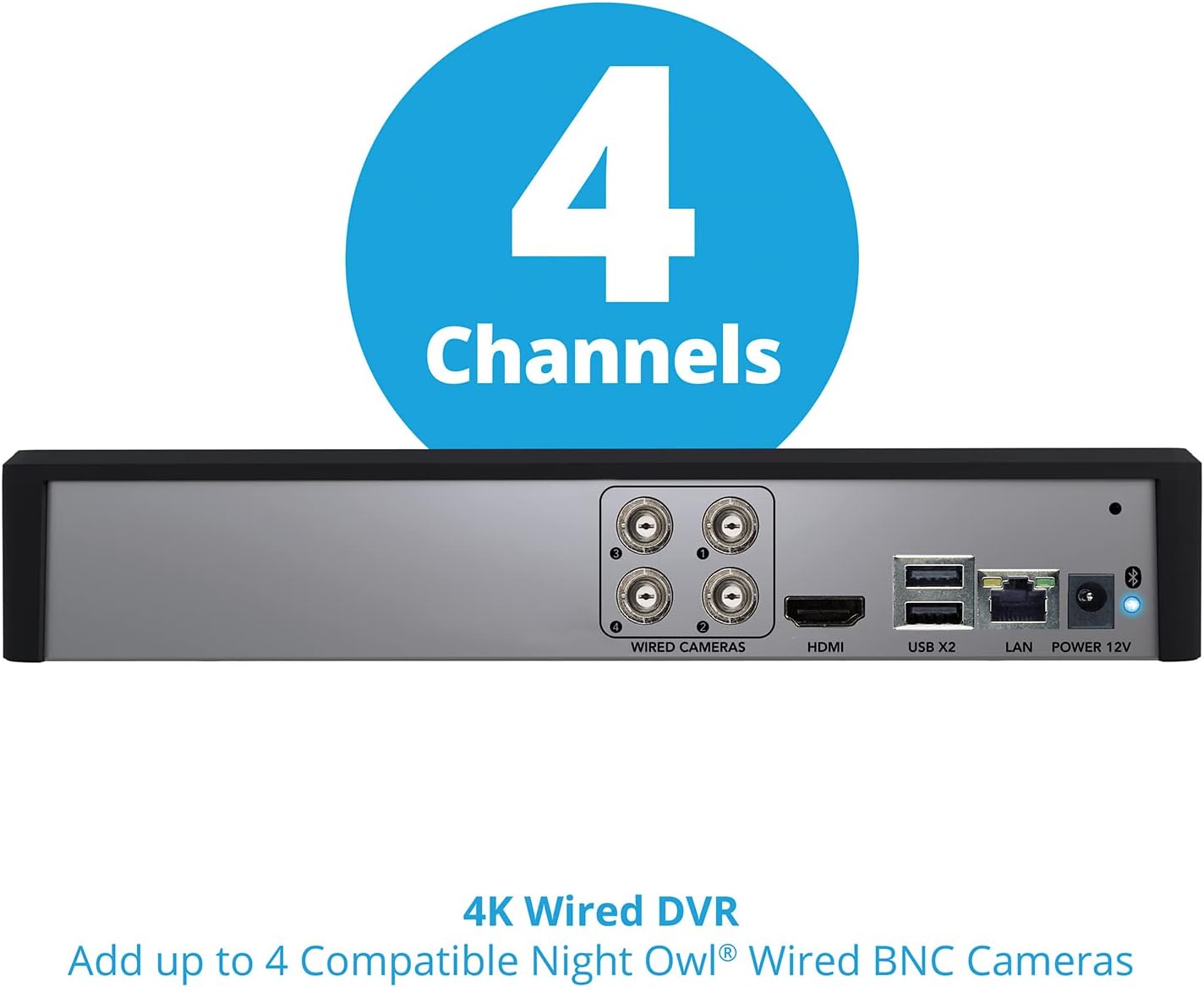
Figure 7: DVR with 1TB internal hard drive.
5.2 System Cleaning
Periodically clean the camera lenses and DVR exterior with a soft, dry cloth to ensure optimal performance. Avoid using harsh chemicals or abrasive materials.
6. Troubleshooting
6.1 No Video Feed from Cameras
- Check Connections: Ensure all BNC video/power cables are securely connected to both the cameras and the DVR.
- Power Supply: Verify that the DVR is powered on and receiving power. Check camera power indicators if available.
- Cable Integrity: Inspect cables for any visible damage.
6.2 Cannot Connect DVR via Bluetooth/App
- Bluetooth Enabled: Confirm Bluetooth is active on your smartphone/tablet.
- App Version: Ensure you have the latest version of the Night Owl Protect app installed.
- DVR Power: Make sure the DVR is powered on.
- Proximity: Be within close range of the DVR during Bluetooth setup.
6.3 False Motion Alerts
- Adjust Sensitivity: Within the Night Owl Protect app, adjust the motion detection sensitivity settings for individual cameras.
- Detection Zones: Configure specific motion detection zones to exclude areas prone to false triggers (e.g., moving trees, busy roads).
6.4 DVR Compatibility
NOTE: The DVR is compatible with Night Owl DP2, DP8, WNIP2, and WNIP8 Series cameras. It is not backward compatible with other Night Owl products.
7. Specifications
| Feature | Detail |
|---|---|
| Brand | Night Owl |
| Model Number | BTD8-41-4L |
| Connectivity Technology | Wired (Cameras), Bluetooth (Setup) |
| Video Capture Resolution | 2160p (4K UHD) |
| Number of Channels | 4 |
| Memory Storage Capacity | 1 TB (Hard Drive) |
| Power Source | Corded Electric |
| Compatible Devices | Cameras, TV (via HDMI/Google Assistant) |
| Night Vision Range | 50 feet |
| Frame Rate | 30 fps |
| Recording Mode | Motion Detection, Schedule |
| Hardware Interface | Bluetooth, RJ45 (LAN), HDMI, USB |
| Optical Sensor Technology | CMOS |
| Item Dimensions (DVR) | 12.4 x 9.44 x 11.45 inches (approximate, based on product info) |
| UPC | 816522024314 |
8. Support and Warranty
For technical assistance, product registration, or warranty information, please visit the official Night Owl website or contact their customer support. Keep your purchase receipt and model number (BTD8-41-4L) handy when contacting support.
Night Owl provides 24/7 support for its products.
Online Resources: www.nightowlsp.com


