
WACACO Exagram
WACACO Exagram Coffee Scale User Manual
Model: Exagram
1. Introduction
The WACACO Exagram Coffee Scale is a compact and precise digital scale designed for coffee enthusiasts. It features a built-in timer, tare function, and multiple unit conversions (grams, ounces, milliliters) to help you achieve consistent and accurate measurements for your coffee brewing. Its portable design makes it ideal for both home use and travel.

Figure 1: The WACACO Exagram Coffee Scale, held in hand, showcasing its compact size and sleek black design with a digital display.
2. What's in the Box
Upon opening the package, you should find the following items:
- WACACO Exagram Coffee Scale
- Silicone Pad (removable)
- User Manual (this document)
Please note: Batteries are not included. The scale requires 2x AAA batteries.

Figure 2: The WACACO Exagram Coffee Scale, its removable silicone pad, and the user manual, as they appear when unboxed.
3. Setup
- Install Batteries: Locate the battery compartment on the underside of the scale. Open the cover and insert 2x AAA batteries, ensuring correct polarity. Close the battery compartment cover securely.
- Place on a Flat Surface: Place the scale on a stable, flat, and level surface to ensure accurate readings.
- Attach Silicone Pad: Place the removable silicone pad onto the weighing platform. This pad protects the stainless steel surface from heat transfer and liquid spills, and also provides a non-slip surface for your brewing equipment.

Figure 3: The WACACO Exagram Coffee Scale with its silicone pad detached, revealing the stainless steel weighing surface underneath.
4. Operating Instructions
4.1. Power On/Off
To power on the scale, press the ON/OFF button located on the underside of the unit. To power off, press and hold the ON/OFF button for approximately 5 seconds.
4.2. Unit Conversion (g/oz/ml)
The scale supports measurements in grams (g), ounces (oz), and milliliters (ml). To switch between units, double-tap the TIMER button.
4.3. Tare Function
The tare function allows you to reset the scale to zero after placing a container on it, so you can measure only the weight of the contents. Place your container on the weighing platform, then press the TARE button. The display will show "0.0", indicating the weight of the container has been subtracted.
4.4. Using the Built-in Timer
The built-in timer is ideal for pour-over coffee brewing. To start the timer, press the TIMER button. To pause/resume the timer, press the TIMER button again. To reset the timer, long-press the TIMER button.

Figure 4: The scale in use, accurately weighing coffee beans in a small wooden bowl, demonstrating its precision for brewing.

Figure 5: An espresso cup placed on the scale, illustrating its suitability for precise espresso preparation.
5. Maintenance
To ensure the longevity and accuracy of your WACACO Exagram Coffee Scale, follow these maintenance guidelines:
- Cleaning: Wipe the scale surface with a soft, damp cloth. Do not immerse the scale in water or use abrasive cleaners. The silicone pad can be removed and washed with mild soap and water.
- Storage: Store the scale in a dry place away from extreme temperatures and direct sunlight.
- Battery Replacement: Replace batteries when the low battery indicator appears on the display. Always use 2x new AAA batteries.
- Handle with Care: Avoid dropping the scale or subjecting it to strong impacts, as this can affect its accuracy.
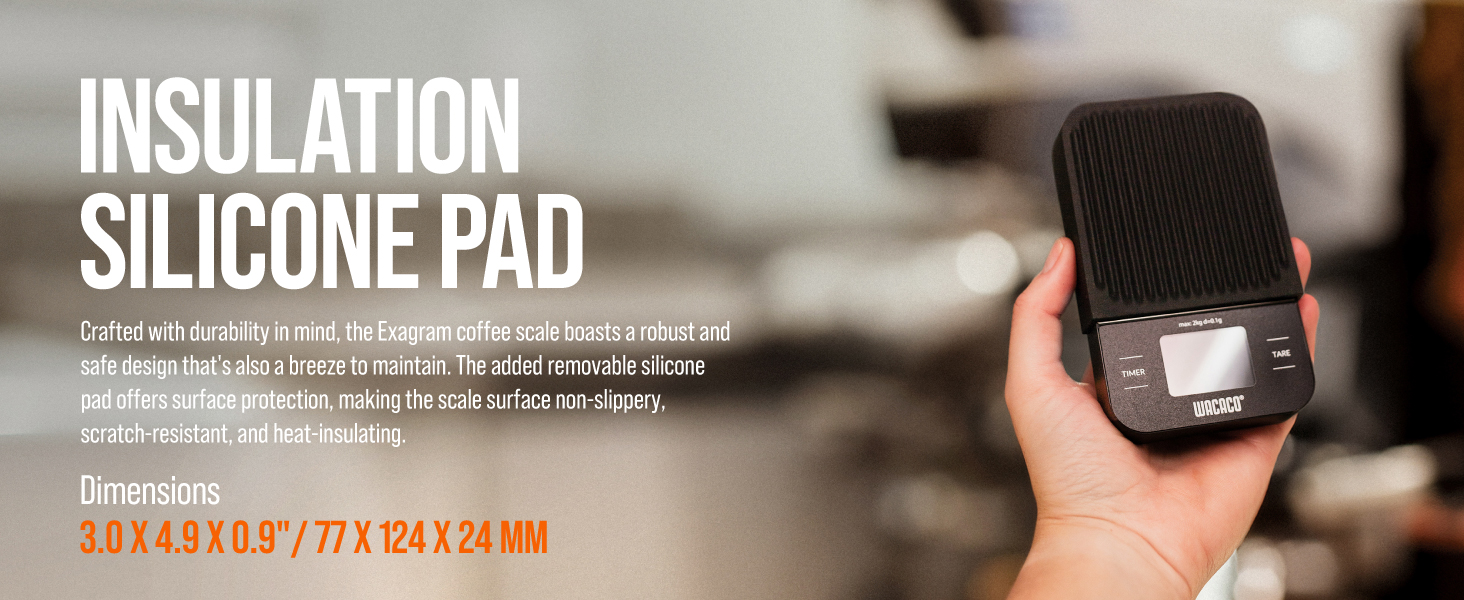
Figure 6: The removable silicone pad, designed for insulation and protection, shown on the scale.
6. Troubleshooting
| Problem | Possible Cause | Solution |
|---|---|---|
| Scale does not turn on. | Low or dead batteries; incorrect battery installation. | Replace batteries with new AAA batteries, ensuring correct polarity. |
| Inaccurate readings. | Scale not on a flat, stable surface; overloaded; damaged sensor. | Ensure scale is on a level surface. Do not exceed 2kg weight limit. If problem persists, contact support. |
| Display shows "Lo". | Low battery power. | Replace batteries. |
| Display shows "O-Ld". | Overload. | Remove items from the scale immediately to prevent damage. |
7. Specifications
| Feature | Detail |
|---|---|
| Model Number | Exagram |
| Brand | WACACO |
| Weight Limit | 2 Kilograms (2000g) |
| Graduation | 0.1 g / 0.0035 oz |
| Display Type | LCD |
| Power Source | 2x AAA Batteries (not included) |
| Dimensions | 7.28 x 5.28 x 1.93 inches (approx. 18.5 x 13.4 x 4.9 cm) |
| Materials | ABS, Stainless Steel, Silicone |
| Built-in Timer | Yes |
| Tare Function | Yes |

Figure 7: A visual representation of the scale's key characteristics and specifications.
8. Support
For any problems with your WACACO Exagram Coffee Scale or if you require assistance, please contact WACACO customer support through Amazon. We are committed to providing timely responses and satisfactory solutions.
You can typically find contact information on the product's Amazon listing page or by visiting the official WACACO store on Amazon: WACACO Amazon Store.
Related documentsExagram


Ask a question about this manual
Ask about setup, troubleshooting, compatibility, parts, safety, or missing instructions. Manuals+ will review the question and use this page’s manual context to help answer it.