Introduction
This manual provides comprehensive instructions for the setup, operation, and maintenance of your XTREME Monster HDTV Wireless Headphones Kit with Bluetooth Transmitter. Please read this manual thoroughly before using the product to ensure proper functionality and to maximize your listening experience.
Package Contents

Image: Diagram illustrating the package contents and how to connect the transmitter to a TV and headphones.
- Bluetooth Headphones
- Bluetooth Transmitter
- Self-adhesive Transmitter Mount
- 1.5ft (45.7cm) 3.5mm Audio Cable
- 6in (15.24cm) RCA to 3.5mm Adapter
- 4ft (1.2m) Micro USB Power Cable
- USB Wall Adapter
Product Overview

Image: Close-up view of the XTREME Monster over-ear Bluetooth headphones.

Image: Top view of the XTREME Monster Bluetooth audio transmitter.
Bluetooth Headphones
The over-ear headphones are designed for comfort and provide noise isolation for an immersive audio experience. They feature integrated controls for media playback and volume adjustment.
Bluetooth Transmitter
The compact Bluetooth transmitter enables wireless audio streaming from your HDTV or other audio sources to the headphones. It can be powered via a USB port on your TV or the included USB wall adapter.
Setup Instructions
- Connect the Transmitter to your TV:
- Identify the audio output ports on your TV. The transmitter supports 3.5mm audio jack or RCA (Red/White) audio outputs.
- Using the included 3.5mm audio cable, connect one end to the transmitter's audio input and the other end to your TV's 3.5mm audio output.
- If your TV only has RCA outputs, use the included RCA to 3.5mm adapter. Connect the RCA ends to your TV's audio output (red to red, white to white) and the 3.5mm end to the 3.5mm audio cable, then connect to the transmitter.

Image: The Bluetooth transmitter mounted on the back of a television, connected via an audio cable.
- Power the Transmitter:
- Connect the micro USB power cable to the transmitter's power input.
- Plug the other end of the USB cable into an available USB port on your HDTV or use the included USB wall adapter and plug it into a power outlet.
- Turn the transmitter ON using the switch on its side. The Bluetooth indicator light will begin to flash, indicating it is in pairing mode.
- Pair the Headphones:
- Ensure the headphones are charged.
- Power on the headphones. They should automatically enter pairing mode if not previously paired.
- The headphones and transmitter will automatically connect. A solid blue light on both devices indicates a successful connection.
- Adjust TV Audio Settings:
- Access your TV's audio settings menu.
- Ensure the audio output is set to "External Speakers" or "Headphones" if applicable, or that the 3.5mm/RCA output is active.
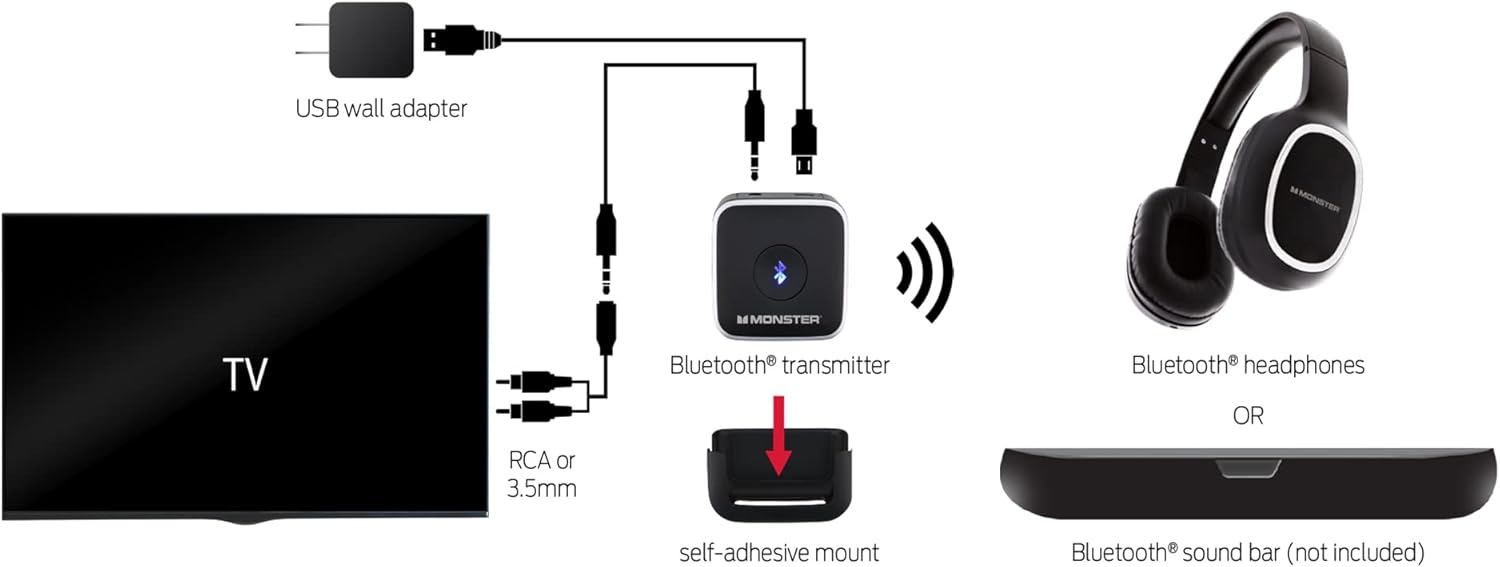
Image: A detailed diagram showing the various connection options for the Bluetooth transmitter to a TV and its wireless connection to headphones or a soundbar.
Operating Instructions
Headphone Controls
- Power On/Off: Press and hold the power button for approximately 3 seconds.
- Volume Adjustment: Use the volume up (+) and volume down (-) buttons located on the headphones.
- Play/Pause: Press the multi-function button once to play or pause audio.
- Next/Previous Track: Double-press the multi-function button for the next track, triple-press for the previous track (functionality may vary based on connected device).
Transmitter Operation
- Once connected and paired, the transmitter will automatically stream audio from your TV to the headphones.
- Ensure the transmitter's ON/OFF switch is in the 'ON' position.
- The Bluetooth indicator light on the transmitter will be solid blue when successfully connected to a device.
Maintenance and Care
- Keep the headphones and transmitter dry. Do not expose them to moisture or extreme temperatures.
- Clean the devices with a soft, dry cloth. Avoid using harsh chemicals or abrasive materials.
- Store the kit in a cool, dry place when not in use.
- Charge the headphones regularly to maintain battery health.
Troubleshooting
| Problem | Possible Solution |
|---|---|
| No audio from headphones. |
|
| Headphones not pairing. |
|
| Audio cutting out or static. |
|
Specifications
- Model Name: MTH9-1001-BLK
- Connectivity Technology: Wireless (Bluetooth)
- Headphones Jack: 3.5 mm Jack
- Wireless Communication Technology: Bluetooth
- Material: Plastic
- Specific Uses For Product: Movies and Gaming
- Compatible Devices: Televisions, Gaming Consoles
- Control Type: Media Control
- Item Weight: 0.36 Kilograms (Headphones) / 12.7 ounces (Total Package)
- Bluetooth Range: 10 Meters (approximately 33 feet)
- Earpiece Shape: Over Ear
- Special Feature: Noise Isolation, USB connectivity, wireless
- Batteries: 1 Lithium Ion battery required (included)
Warranty and Support
For warranty information or technical support, please refer to the documentation included with your purchase or visit the official XTREME product support website. Keep your proof of purchase for warranty claims.


