
SIGMA BC1200 WL
SIGMA BC1200 WL Wireless Bicycle Computer
User Manual
1. Introduction
Thank you for choosing the SIGMA BC1200 WL Wireless Bicycle Computer. This device is designed to provide accurate and essential cycling data, enhancing your riding experience. It features a wireless transmission system for easy installation and a clear display for quick readability. This manual will guide you through the installation, operation, and maintenance of your new bicycle computer.
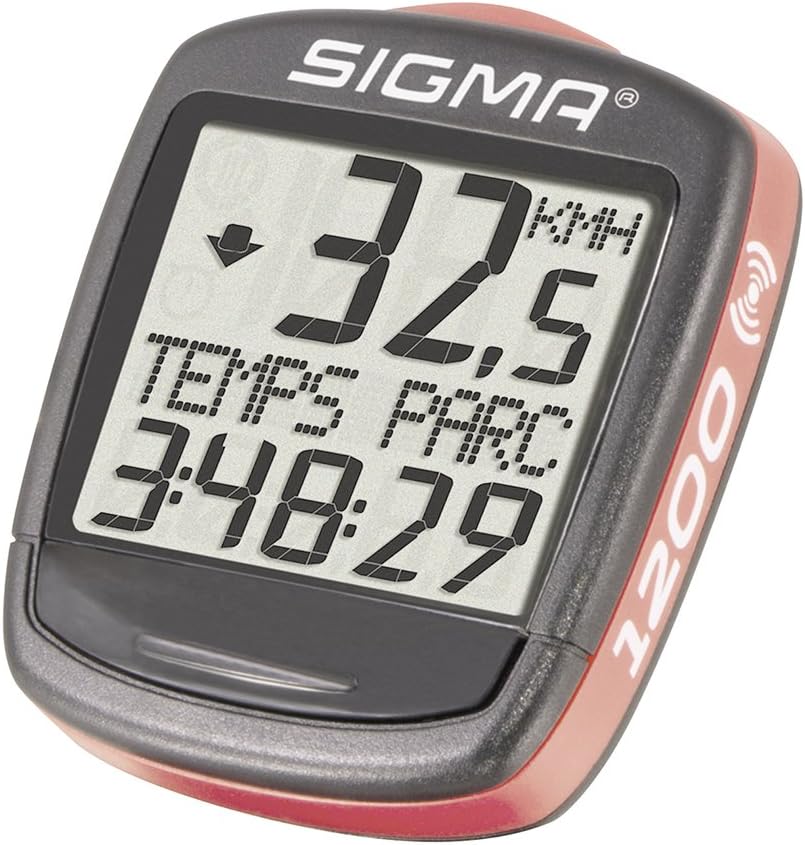
Image 1.1: The SIGMA BC1200 WL Wireless Bicycle Computer, showing its display with current speed and ride duration.
2. Safety Information
- Always prioritize road safety. Do not operate the computer or adjust settings while riding.
- Ensure all components are securely mounted before each ride to prevent detachment.
- Keep the device away from extreme temperatures and direct sunlight for prolonged periods.
- Do not attempt to disassemble or repair the device yourself. Contact authorized service personnel for assistance.
- Dispose of batteries responsibly according to local regulations.
3. Package Contents
Verify that all items are present in your package:
- SIGMA BC1200 WL Bicycle Computer Unit
- Wireless Speed Sensor
- Handlebar/Stem Mount
- Spoke Magnet
- Mounting O-rings (various sizes)
- User Manual (this document)
- Battery (pre-installed or separate)
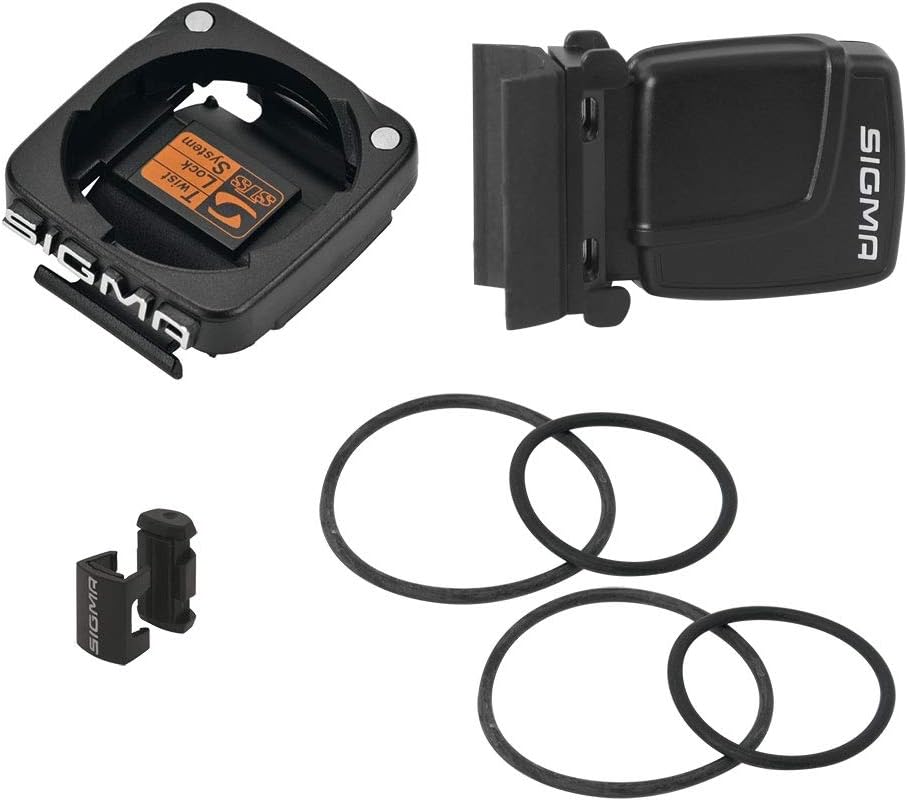
Image 3.1: Included components: computer mount, wireless speed sensor, spoke magnet, and mounting O-rings.
4. Setup and Installation
4.1. Battery Installation
The BC1200 WL uses one Lithium metal battery. If not pre-installed, open the battery compartment on the back of the computer unit and the speed sensor, insert the battery with the correct polarity, and close securely.
4.2. Mounting the Handlebar/Stem Mount
- Choose a suitable location on your handlebar or stem that does not obstruct your view or control.
- Place the mount on the desired position.
- Secure the mount using the provided O-rings. Wrap the O-rings around the mount and the handlebar/stem, hooking them onto the mount's tabs. Ensure it is tight and stable.
4.3. Mounting the Speed Sensor
- Attach the speed sensor to the front fork, on the same side as the spoke magnet will be.
- Use the provided O-rings to secure the sensor firmly to the fork.
- Position the sensor so that its marked area (usually a small arrow or line) aligns with the path of the spoke magnet.
4.4. Mounting the Spoke Magnet
- Attach the spoke magnet to a spoke on your front wheel.
- Adjust the magnet's position so that it passes the speed sensor with a gap of approximately 1-3 mm. The magnet should pass the sensor's marked area.
- Ensure the magnet is securely fastened and will not slip during riding.
4.5. Initial Setup (Wheel Size, Language, Units)
After battery installation, the computer will prompt you for initial settings:
- Language Selection: Use the buttons (usually 'SET' and 'MODE') to navigate and select your preferred language (e.g., English, French, German). Confirm your selection.
- Unit Selection (KMH/MPH): Choose between kilometers per hour (KMH) and miles per hour (MPH) for speed and distance measurements.
- Wheel Size Setting: This is crucial for accurate speed and distance readings. Refer to your bicycle tire's sidewall for the ETRTO or ISO size (e.g., 23-622 for 700x23C). Consult the table below or your tire manufacturer's specifications for the corresponding circumference in millimeters (mm). Enter this value into the computer. If your exact size is not listed, measure your wheel's circumference manually by rolling the wheel one full rotation and marking the distance.
- Time Setting: Set the current time (24-hour or 12-hour format).
Common Wheel Circumference Values (approximate):
| Tire Size | Circumference (mm) |
|---|---|
| 16 inch | 1272 |
| 20 inch | 1590 |
| 26 x 1.0 | 1953 |
| 26 x 1.5 | 2030 |
| 27.5 inch | 2100 |
| 29 inch | 2300 |
| 700 x 23C | 2096 |
| 700 x 38C | 2180 |
5. Operating Instructions
5.1. Functions Overview
The SIGMA BC1200 WL offers 12 key functions:
- Current Speed: Displays your real-time speed.
- Maximum Speed: Shows the highest speed achieved during the current ride.
- Average Speed: Calculates your average speed for the current ride.
- Trip Distance: Measures the distance covered in the current ride.
- Total Distance: Accumulates the total distance covered since the computer was reset (or first used).
- Ride Time: Records the duration of the current ride.
- Total Ride Time: Accumulates the total time spent riding.
- Clock: Displays the current time.
- Speed Comparator: An arrow indicator shows if your current speed is above or below your average speed.
- Temperature: Displays the current ambient temperature.
- Language Choice (x7): Allows selection from seven different languages.
- KMH/MPH Programming: Option to switch between metric and imperial units.
5.2. Button Functions
The BC1200 WL typically has two main buttons, often labeled 'MODE' and 'SET' or similar, usually located on the bottom or back of the unit.
- MODE Button: Short press to cycle through different display functions (e.g., Trip Distance, Ride Time, Max Speed). Long press to enter or exit certain menus.
- SET Button: Used to confirm selections, reset values, or enter setup mode. Short press for selection, long press for confirmation/reset.
5.3. Navigating Functions and Menus
To view different functions, short press the MODE button. The display will change to show the next available data point. To enter settings or reset trip data, typically a long press of the SET button is required while on a specific function display.
5.4. Resetting Trip Data
To reset trip-specific data (Trip Distance, Ride Time, Average Speed, Max Speed) for a new ride:
- Ensure the computer is displaying one of the trip-related functions (e.g., Trip Distance).
- Press and hold the SET button for a few seconds until the values reset to zero.
- Note: Total Distance and Total Ride Time are cumulative and generally cannot be reset by the user.
6. Maintenance
6.1. Cleaning
Clean the computer unit and sensor with a soft, damp cloth. Do not use abrasive cleaners or solvents, as these can damage the display or casing. The device is watertight, but avoid submerging it in water or using high-pressure water jets.
6.2. Battery Replacement
The battery life is approximately 2 years. When the display becomes dim or erratic, it's time to replace the battery. Open the battery compartment on the back of the computer unit (and the speed sensor if applicable), remove the old battery, and insert a new Lithium metal battery (CR2032 or equivalent) with the correct polarity. Securely close the compartment. You may need to re-enter some basic settings after battery replacement.
6.3. Storage
When not in use for extended periods, store the computer in a cool, dry place away from direct sunlight. Removing the battery is recommended for very long storage periods to prevent leakage.
7. Troubleshooting
- No Speed Display:
- Check if the computer unit is correctly seated in its mount.
- Verify the battery in both the computer and the speed sensor. Replace if necessary.
- Ensure the speed sensor and spoke magnet are correctly aligned and the gap is 1-3 mm.
- Check for any obstructions or damage to the sensor or magnet.
- Incorrect Speed/Distance:
- Re-check your wheel size setting. An incorrect circumference value will lead to inaccurate readings.
- Ensure the magnet is securely attached and not slipping on the spoke.
- Display is Dim or Blank:
- Replace the battery in the computer unit.
- Ensure the battery is inserted with the correct polarity.
- Buttons Not Responding:
- Try removing and reinserting the battery to perform a soft reset.
- Ensure no dirt or debris is lodged around the buttons.
If problems persist after attempting these solutions, please contact SIGMA customer support.
8. Specifications
| Feature | Specification |
|---|---|
| Model | BC1200 WL (Model No. 01960) |
| Brand | SIGMA |
| Functions | 12 (Current Speed, Max Speed, Avg Speed, Trip Distance, Total Distance, Ride Time, Total Ride Time, Clock, Speed Comparator, Temperature, Language Choice, KMH/MPH Programming) |
| Connectivity Technology | Wireless (Kabellos) |
| Display Type | LED |
| Screen Size | 1.9 Inches |
| Color | Black |
| Item Weight | 23 Grams |
| Product Dimensions (L x W x H) | 30 x 30 x 30 cm |
| Battery Type | 1 Lithium Metal battery (CR2032) |
| Battery Life | Approx. 2 years |
| Included Components | Computer Sigma Baseline BC 1200 |
9. Warranty and Support
9.1. Warranty Information
SIGMA products are manufactured with high quality standards. For specific warranty terms and conditions, please refer to the warranty card included with your product or visit the official SIGMA website. Typically, a limited warranty covers manufacturing defects for a specified period from the date of purchase.
9.2. Customer Support
For technical assistance, troubleshooting beyond this manual, or warranty claims, please contact SIGMA customer support. You can usually find contact information (phone, email, or support portal) on the official SIGMA website or on your product packaging.
Related documentsBC1200 WL


Ask a question about this manual
Ask about setup, troubleshooting, compatibility, parts, safety, or missing instructions. Manuals+ will review the question and use this page’s manual context to help answer it.