
1. Introduction
This manual provides essential instructions for the safe setup, operation, and maintenance of the Global Industrial Power Scissor Lift Table, Model 989036. This electric lift table is designed to raise and lower heavy loads to ergonomic working heights, thereby reducing worker strain and enhancing safety in industrial and commercial environments. It features a powerful 110V 1-phase motor, hydraulic pump assembly, and dual control options: a hand-held push button pendant and a foot pedal. Please read this manual thoroughly before installation and operation to ensure proper use and to prevent injury or damage to the equipment.
Safety Information
- Always operate the lift table on a level, stable surface.
- Do not exceed the maximum load capacity of 4840 lbs (2200 kg).
- Ensure the load is centered and stable on the platform before lifting or lowering.
- Keep hands, feet, and clothing clear of moving parts, especially the scissor mechanism.
- Disconnect power before performing any maintenance or inspection.
- Only trained personnel should operate or service this equipment.
- Regularly inspect the lift table for any signs of wear, damage, or malfunction.
2. Product Overview
The Global Industrial Power Scissor Lift Table consists of a robust steel frame, a hydraulic lifting mechanism, an electric motor and pump assembly, and a durable platform. It is equipped with both a hand pendant and a foot pedal for operational control.

Figure 2.1: Global Industrial Power Scissor Lift Table in raised position.
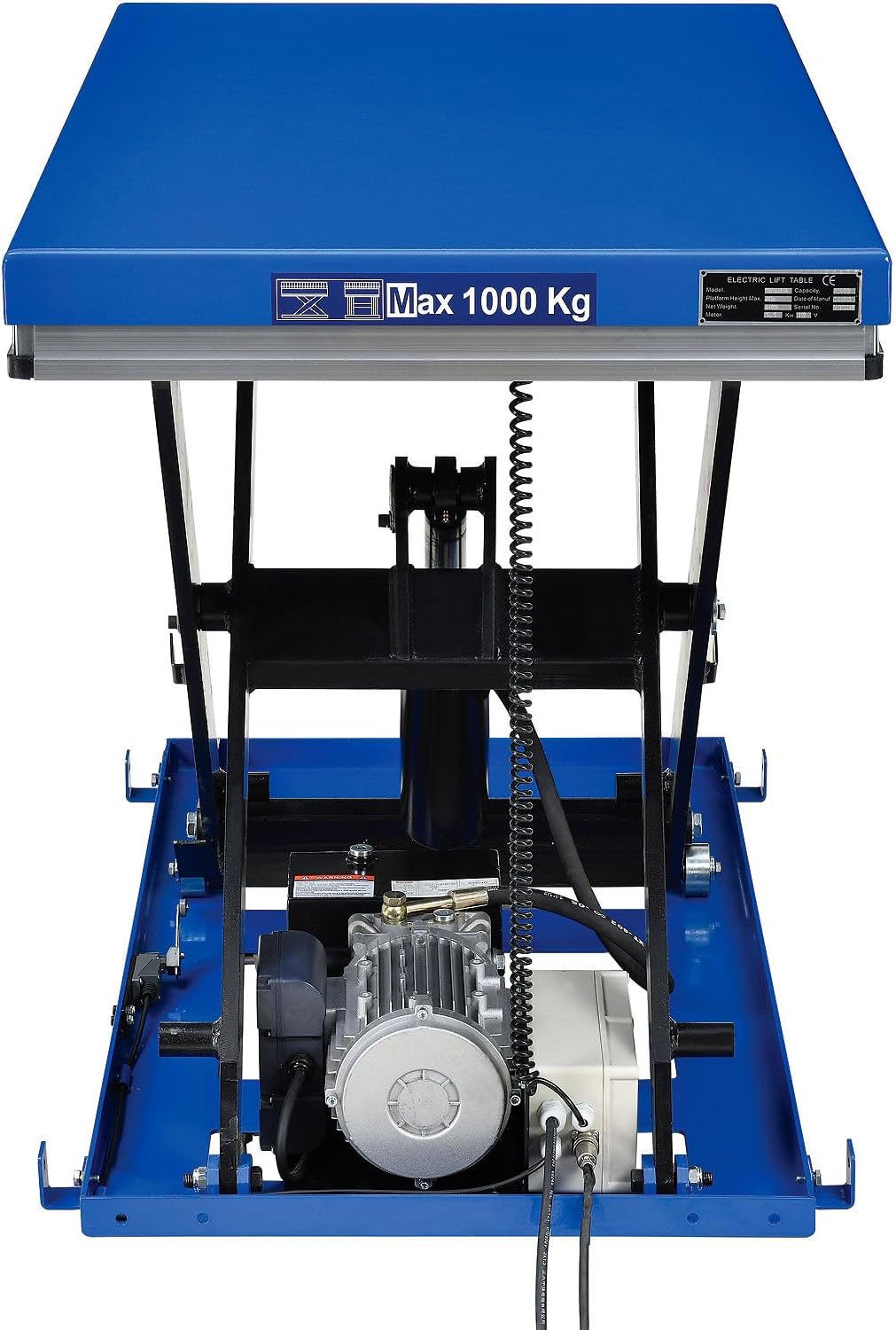
Figure 2.2: Underside view of the lift table showing the motor and hydraulic components.
Key Components:
- Platform: 72"L x 48"W, blue powder coat finish.
- Scissor Mechanism: Provides vertical lifting motion.
- Hydraulic Cylinder: Actuates the scissor mechanism.
- Electric Motor & Pump Assembly: 110V 1-phase power for hydraulic operation.
- Hand Pendant Control: Push-button control with an 8-foot cord for raising (UP) and lowering (DN) the platform, includes an emergency stop button.
- Foot Pedal Control: Additional control option with an 8-foot cord for hands-free operation.
- Wall Mount Bracket: For safely storing the hand pendant control.
- Captured Rollers: Designed to reduce injury risk.
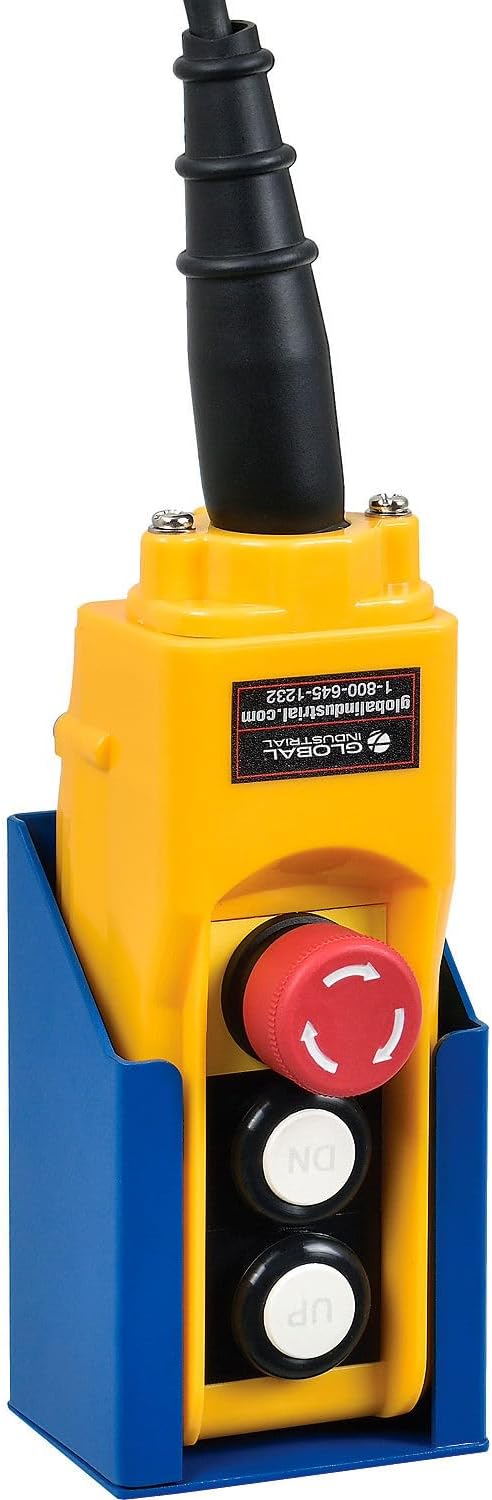
Figure 2.3: Hand Pendant Control with Wall Mount Bracket.
3. Setup and Installation
3.1 Unpacking
- Carefully remove the lift table from its packaging. Inspect for any shipping damage. Report any damage to the carrier immediately.
- Ensure all components listed in the packing list are present.
3.2 Placement
- Position the lift table on a firm, level, and stable surface capable of supporting the combined weight of the lift table and its maximum load.
- Ensure adequate clearance around the lift table for safe operation and maintenance, especially for the scissor mechanism during lifting and lowering.
3.3 Electrical Connection
- The lift table requires a 110V, 1-phase power supply.
- Connect the power cord to a grounded electrical outlet. Ensure the outlet is properly rated for the lift table's power requirements.
- Verify that the emergency stop button on the hand pendant is disengaged (pulled out) before applying power.
4. Operating Instructions
4.1 Pre-Operation Checks
- Inspect the lift table for any visible damage, loose connections, or hydraulic fluid leaks.
- Ensure the area around the lift table is clear of obstructions and personnel.
- Confirm the emergency stop button is accessible and functional.
4.2 Loading the Platform
- Place the load centrally on the platform.
- Ensure the load is stable and will not shift during lifting or lowering.
- Do not exceed the maximum load capacity of 4840 lbs (2200 kg).
4.3 Lifting and Lowering
The lift table can be operated using either the hand pendant control or the foot pedal control.
Using the Hand Pendant Control:
- Ensure the hand pendant is connected and the emergency stop button is disengaged.
- To raise the platform, press and hold the "UP" button. Release the button to stop at the desired height.
- To lower the platform, press and hold the "DN" button. Release the button to stop at the desired height.
- In case of an emergency, press the red emergency stop button to immediately cut power to the lift table.
Using the Foot Pedal Control:
- Ensure the foot pedal is connected.
- To raise the platform, press and hold the "UP" pedal. Release to stop.
- To lower the platform, press and hold the "DN" pedal. Release to stop.

Figure 4.1: Lift table in lowered position.

Figure 4.2: Lift table dimensions and adjustable height range.
5. Maintenance
Regular maintenance is crucial for the safe and efficient operation and longevity of your lift table. Always disconnect power before performing any maintenance.
5.1 Daily/Shift Checks
- Visually inspect for any damage, loose fasteners, or unusual wear.
- Check for hydraulic fluid leaks around the cylinder and hoses.
- Test the functionality of both hand and foot controls, including the emergency stop button.
5.2 Monthly Checks
- Inspect all pivot points and rollers for wear and ensure they are properly lubricated.
- Check hydraulic fluid level and top off if necessary (use recommended hydraulic fluid type).
- Examine electrical wiring and connections for fraying or damage.
- Clean the platform and base to prevent accumulation of debris.
5.3 Annual Checks
- Perform a thorough inspection of all structural components for cracks or deformation.
- Replace hydraulic fluid as per manufacturer's recommendations or if fluid appears contaminated.
- Have a qualified technician inspect the hydraulic system, motor, and electrical components.
6. Troubleshooting
This section provides solutions to common issues. For problems not listed here or if solutions do not resolve the issue, contact customer support.
| Problem | Possible Cause | Solution |
|---|---|---|
| Lift table does not operate. | No power supply. Emergency stop engaged. Faulty control switch. | Check power connection and circuit breaker. Disengage emergency stop button. Inspect control switches and wiring. |
| Lift table lifts slowly or with difficulty. | Low hydraulic fluid level. Air in hydraulic system. Overload. Worn pump. | Check and refill hydraulic fluid. Bleed air from the system (consult service manual). Reduce load to within capacity. Contact service for pump inspection. |
| Lift table drifts down. | Internal hydraulic leak. Faulty check valve. | Contact qualified technician for hydraulic system inspection and repair. |
| Unusual noise during operation. | Low hydraulic fluid. Loose components. Motor issue. | Check hydraulic fluid level. Inspect and tighten all fasteners. Contact service for motor inspection. |
7. Specifications
| Specification | Value |
|---|---|
| Model Number | 989036 |
| Manufacturer | Global Industrial |
| Platform Dimensions (L x W) | 72 inches x 48 inches |
| Maximum Load Capacity | 4840 lbs (2200 kg) |
| Adjustable Table Height Range | 8.875 inches - 40 inches |
| Power Supply | 110V, 1-phase |
| Material | Steel |
| Finish | Blue Powder Coat |
| Item Weight | 793 pounds |
| Product Dimensions (L x W x H) | 72 x 48 x 8 inches (lowered) |
| Included Components | Assembly Guide, Hand-held push button pendant control, Foot pedal control, Wall mount bracket |
8. Warranty and Support
For warranty information, technical support, or to order replacement parts, please contact Global Industrial customer service. Refer to your purchase documentation for specific warranty terms and contact details.
Global Industrial Customer Service: Visit Global Industrial Website


