
Introduction
Welcome to the GLIDiC TW-6100 Wireless Earbuds instruction manual. These earbuds are designed to provide a superior audio experience with features like Active Noise Cancelling (ANC), IPX5 water resistance, and the convenient Tile tracking function. This manual will guide you through the setup, operation, maintenance, and troubleshooting of your new device.
Package Contents
Please ensure all items are present in your package:
- Earbuds (Left and Right) x 1 set
- Charging Case x 1
- Eartips (XS/S/M/L) x 2 sets
- Charging Cable (Type-C) x 1
- Quick Start Guide x 1
Product Overview
Familiarize yourself with the components of your GLIDiC TW-6100 wireless earbuds and charging case.
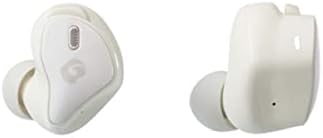
Image: GLIDiC TW-6100 Wireless Earbuds (Left and Right). This image shows the individual earbuds, highlighting their ergonomic design.
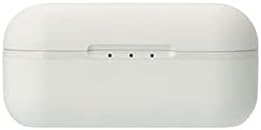
Image: GLIDiC TW-6100 Charging Case (Top View). The closed charging case is shown from a top-down perspective.
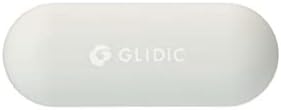
Image: GLIDiC TW-6100 Charging Case (Front View). This image displays the front of the charging case, featuring the GLIDiC logo.
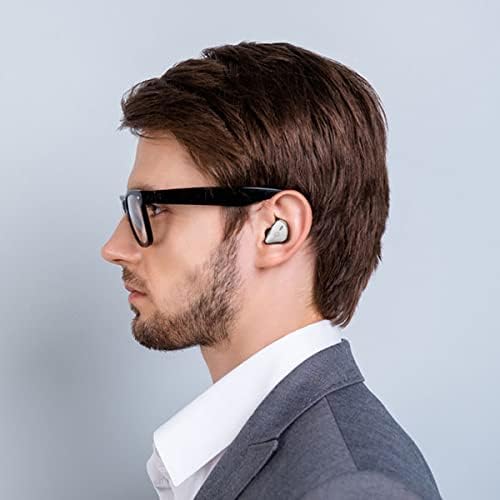
Image: User wearing GLIDiC TW-6100 Earbuds. A person is shown wearing the earbuds, demonstrating their in-ear fit.
Setup
Charging the Earbuds and Case
Before first use, fully charge the earbuds and charging case. Place the earbuds into the charging case. Connect the provided USB Type-C cable to the charging case and a USB power adapter (not included). The indicator lights on the case will show the charging status. A full charge provides up to 35 hours of playback, with 10 minutes of quick charging offering 2 hours of use.
Bluetooth Pairing
To pair your GLIDiC TW-6100 earbuds with a device:
- Open the charging case. The earbuds will automatically enter pairing mode.
- On your device (smartphone, tablet, etc.), go to Bluetooth settings and enable Bluetooth.
- Select "GLIDiC TW-6100" from the list of available devices.
- Once connected, a confirmation sound will play, and the indicator lights on the earbuds will change.
For subsequent connections, the earbuds will automatically connect to the last paired device when removed from the case.
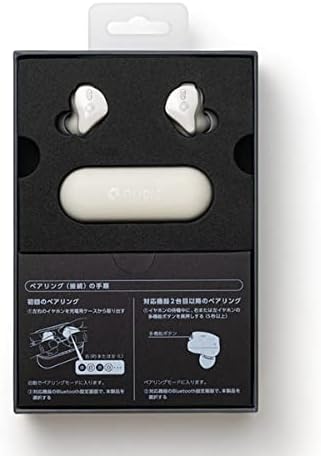
Image: GLIDiC TW-6100 Product Packaging with Pairing Instructions. This image shows the inside of the product box, including a visual guide for the initial pairing process.
Operating Instructions
Power On/Off
- Power On: Open the charging case, or press and hold the multi-function button on each earbud for approximately 3 seconds.
- Power Off: Place the earbuds back into the charging case and close the lid, or press and hold the multi-function button on each earbud for approximately 5 seconds.
Music Playback
- Play/Pause: Tap the multi-function button on either earbud once.
- Next Track: Double-tap the multi-function button on the right earbud.
- Previous Track: Double-tap the multi-function button on the left earbud.
- Volume Up: Triple-tap the multi-function button on the right earbud.
- Volume Down: Triple-tap the multi-function button on the left earbud.
Call Management
- Answer/End Call: Tap the multi-function button on either earbud once.
- Reject Call: Press and hold the multi-function button on either earbud for approximately 2 seconds.
Active Noise Cancelling (ANC) and Ambient Sound Mode
The GLIDiC TW-6100 features Hybrid ANC to reduce ambient noise and an Ambient Sound mode to allow you to hear your surroundings.
- Switch Modes: Press and hold the multi-function button on the left earbud for approximately 2 seconds to cycle through ANC On, Ambient Sound, and ANC Off modes.
Tile Function
Your GLIDiC TW-6100 earbuds are compatible with the Tile tracking function, allowing you to locate them if misplaced. Download the Tile app on your smartphone and follow the in-app instructions to set up and use this feature.
Maintenance
Care and Cleaning
- Regularly clean the earbuds and charging case with a soft, dry cloth.
- Remove eartips and clean them with mild soap and water, then dry thoroughly before reattaching.
- Avoid using abrasive cleaners or solvents.
- Ensure the charging contacts on both the earbuds and case are clean and free of debris.
Storage
When not in use, store the earbuds in their charging case to protect them and keep them charged. Store in a cool, dry place away from extreme temperatures and direct sunlight.
Troubleshooting
If you encounter issues with your GLIDiC TW-6100 earbuds, refer to the following common solutions:
| Problem | Solution |
|---|---|
| Earbuds do not power on. | Ensure the earbuds and charging case are fully charged. Place earbuds in the case and close the lid, then open again. |
| Cannot pair with device. | Make sure Bluetooth is enabled on your device. Ensure earbuds are in pairing mode (indicator lights flashing). Try forgetting the device in your Bluetooth settings and re-pairing. |
| No sound or low volume. | Check the volume level on both your device and the earbuds. Ensure earbuds are properly seated in your ears. Reconnect the earbuds to your device. |
| Sound cuts out or is intermittent. | Ensure your device is within the Bluetooth range (typically 10 meters/33 feet) and there are no major obstructions. Avoid strong electromagnetic interference. |
| Earbuds not charging. | Check the charging cable and adapter. Ensure the charging contacts on the earbuds and case are clean and free of debris. |
Specifications
Detailed technical specifications for the GLIDiC TW-6100 wireless earbuds:
| Feature | Detail |
|---|---|
| Model Number | TW-6100 (GL-TW6100-WH) |
| Wireless Technology | Bluetooth 5.2 |
| Noise Control Type | Active Noise Cancelling (Hybrid ANC) |
| Headphone Form Factor | In-Ear |
| Water Resistance Level | IPX5 (Waterproof) |
| Battery Life (Max) | Up to 35 hours (with charging case) |
| Quick Charge | 10 minutes charge for 2 hours playback |
| Charging Port | USB Type-C |
| Special Features | Tile tracking function, Lightweight |
| Earbud Dimensions | Approx. 45.0mm (W) × 30.0mm (H) × 45.0mm (D) |
| Product Weight | 0.2 g (earbuds only, likely per earbud or total, but original says 0.2g for product weight) |
Important Safety Information
Please read and follow these safety guidelines to prevent injury or damage to your device:
- Do not disassemble, repair, or modify the product.
- Keep the product away from water, moisture, and extreme temperatures.
- Avoid prolonged exposure to high volume levels to prevent hearing damage.
- Keep out of reach of children and pets.
- Dispose of the product and its battery responsibly according to local regulations.
Warranty and Customer Support
The GLIDiC TW-6100 wireless earbuds come with a 6-month warranty from the date of purchase. This warranty covers manufacturing defects under normal use. For warranty claims or technical support, please contact your retailer or visit the official GLIDiC website for further assistance.
For more information about GLIDiC products, you can visit the GLIDiC Brand Store.


