
1. Introduction
The HUAKUA M7 Bluetooth Headset is designed for clear communication in various environments, featuring AI noise-cancelling technology and versatile connectivity. This manual provides detailed instructions to help you get the most out of your headset.
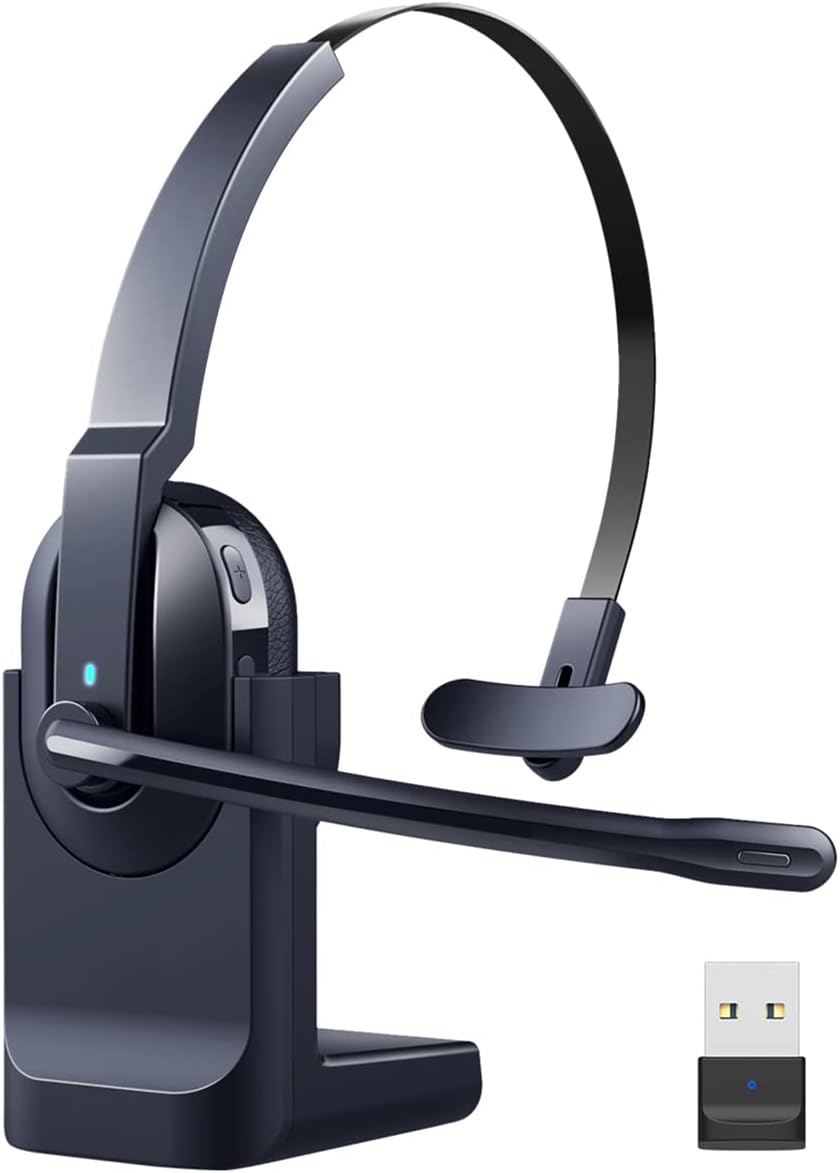
Image: The HUAKUA M7 Bluetooth Headset with its charging base and USB dongle.
2. What's in the Box
- Headset
- Charging Cable (USB-C)
- USB Dongle
- User Manual
3. Setup and Connection
3.1. USB Dongle Connection (for PC/Laptop without Bluetooth)
- Insert the USB Dongle into an available USB port on your PC or Laptop.
- The LED light on the dongle will flash blue during pairing.
- Once paired, the LED light will turn solid blue.
- Open the Sound Settings on your PC/Laptop.
- Set the USB Dongle as both the input (microphone) and output (speaker) device.

Image: The headset's USB dongle providing a stable wireless connection to a laptop.
3.2. Bluetooth Connection (for Bluetooth-enabled devices)
- Ensure the headset is powered on and in pairing mode (refer to headset indicator lights).
- On your device (cellphone, laptop, PC, tablet), open the Bluetooth settings.
- Select 'Add Bluetooth or other devices'.
- Search for and click on 'M7' in the list of available devices.
- Once connected, open your device's Sound Settings.
- Set 'M7 Stereo' as both the input (microphone) and output (speaker) device.

Image: Illustrates the headset's wide compatibility with various devices like PCs, laptops, smartphones, and tablets.
3.3. Dual Device Connectivity
The HUAKUA M7 supports simultaneous connection to two Bluetooth devices. This allows you to seamlessly switch between calls on your phone and meetings on your computer without re-pairing.
4. Operating Instructions
4.1. AI Noise Cancelling Microphone
The headset features an AI noise-cancelling microphone that eliminates up to 96% of background noise, ensuring clear voice transmission. This is ideal for noisy environments such as call centers, construction sites, or busy offices.

Image: Visual representation of the Environmental Noise Cancellation (ENC) feature of the microphone.
4.2. Mute Function
To mute your voice during a call, simply press the mute button located on the microphone boom. This allows for private conversations without disconnecting from your call.

Image: Demonstrates the quick mute function on the microphone boom for privacy during calls.
4.3. Hands-free Calls and Online Conferences
The headset provides a comfortable and stable solution for hands-free communication, perfect for online conferences, remote work, and driving.
Video: An official product video demonstrating the HUAKUA M7 Wireless Bluetooth Headset's features, including automatic connection, comfortable wearing, stable Bluetooth, easy mute, AI noise canceling, and hands-free calls for various scenarios like online conferences and working from home.

Image: The headset being used in diverse professional settings, highlighting its versatility for call centers, meetings, driving, and video calls.
5. Battery Life and Charging
The headset offers up to 50 hours of talk time and 200 hours of standby time on a single charge. It can be charged using the magnetic charging base or directly via the USB-C charging cable.

Image: Overview of the headset's long-lasting battery performance and charging time.

Image: The headset can be charged conveniently using either the magnetic charging base or a direct USB-C cable connection.
6. Maintenance
To ensure the longevity and optimal performance of your HUAKUA M7 headset, follow these maintenance guidelines:
- Cleaning: Use a soft, dry cloth to wipe the headset. For earpads, a slightly damp cloth can be used, but ensure no moisture enters the speaker grilles.
- Storage: Store the headset in a cool, dry place away from direct sunlight and extreme temperatures. When not in use, placing it on the charging base is recommended.
- Battery Care: Avoid fully discharging the battery frequently. Charge the headset regularly, even if not in daily use, to maintain battery health.
- Microphone Care: Handle the microphone boom gently. Avoid excessive bending or twisting.
7. Troubleshooting
If you encounter issues with your HUAKUA M7 headset, please refer to the following common solutions:
- No Sound/Microphone Not Working:
- Ensure the headset is properly connected (via Bluetooth or USB dongle).
- Check your device's sound settings to confirm the headset is selected as the input/output device.
- Verify the headset is not muted.
- Adjust the volume on both the headset and your connected device.
- Connectivity Issues:
- Ensure the headset is fully charged.
- Move the headset closer to your device to ensure it's within the 10-meter Bluetooth range.
- Turn off and on the headset and your device's Bluetooth.
- If using the USB dongle, try plugging it into a different USB port.
- Poor Audio Quality:
- Check for interference from other wireless devices.
- Ensure the microphone is positioned correctly near your mouth for optimal clarity.
- Confirm that the AI noise-cancelling feature is active in noisy environments.
If the problem persists, please contact HUAKUA customer support for further assistance. You can typically find contact information on the product packaging or the seller's Amazon store page.
8. Specifications
| Feature | Detail |
|---|---|
| Model Name | M7 |
| Brand | HUAKUA |
| Connectivity Technology | Bluetooth, Wireless |
| Wireless Communication Technology | Bluetooth |
| Bluetooth Version | 5 |
| Bluetooth Range | 10 Meters |
| Noise Control | Active Noise Cancellation (AI Noise Cancelling Mic) |
| Headphones Jack | USB |
| Ear Placement | On Ear |
| Form Factor | On Ear |
| Microphone Rotatability | 270° Rotatable |
| Talk Time | Up to 50 hours |
| Standby Time | Up to 200 hours |
| Charging Time | 2 Hours |
| Battery Capacity | 400mAh (Lithium Polymer) |
| Item Weight | 72 Grams (2.54 ounces) |
| Product Dimensions | 7.09 x 6.69 x 2.76 inches |
| Material | Memory Foam, Plastic (Earpads: Protein Leather) |
| Control Type | Button Control |
9. Warranty and Support
HUAKUA products are designed for reliability and performance. For information regarding warranty coverage, product registration, or technical support, please refer to the contact details provided with your purchase or visit the official HUAKUA store on Amazon. Protection plans are also available for extended coverage.
For direct support, you may contact the seller 'FANYANQING' via Amazon's messaging system by navigating to your order history and selecting 'Contact with us' for the HUAKUA M7 headset.
