
Introduction
This manual provides essential information for the safe and efficient operation of your BLACK+DECKER Verve Designer LED Clamp Light, Model LED2100-CL. Please read these instructions thoroughly before installation and use, and retain them for future reference.
Safety Information:
- Ensure the power source matches the lamp's requirements.
- Do not disassemble or modify the lamp.
- Keep away from water and high humidity.
- Avoid direct eye exposure to the LED light for prolonged periods.
Package Contents
Verify that all items are present in the package:
- 1 x BLACK+DECKER Verve Designer LED Clamp Light
- 1 x USB Cable

Image: The BLACK+DECKER Verve Designer LED Clamp Light, showing its sleek design and clamp base.
Setup and Installation
The Verve Designer LED Clamp Light features a versatile 2-in-1 clamp design, allowing for secure attachment to both horizontal and vertical surfaces up to 3 inches thick.
- Identify a suitable mounting surface (shelf, cubicle wall, headboard, desk edge).
- Adjust the clamp opening by turning the screw mechanism until it fits snugly over the surface.
- Securely tighten the clamp to ensure stability.
- Connect the provided USB cable to the lamp's power input and then to a compatible USB power adapter (not included) or USB port.

Image: The clamp light mounted horizontally on a shelf and vertically on a headboard, demonstrating its 2-in-1 versatility.
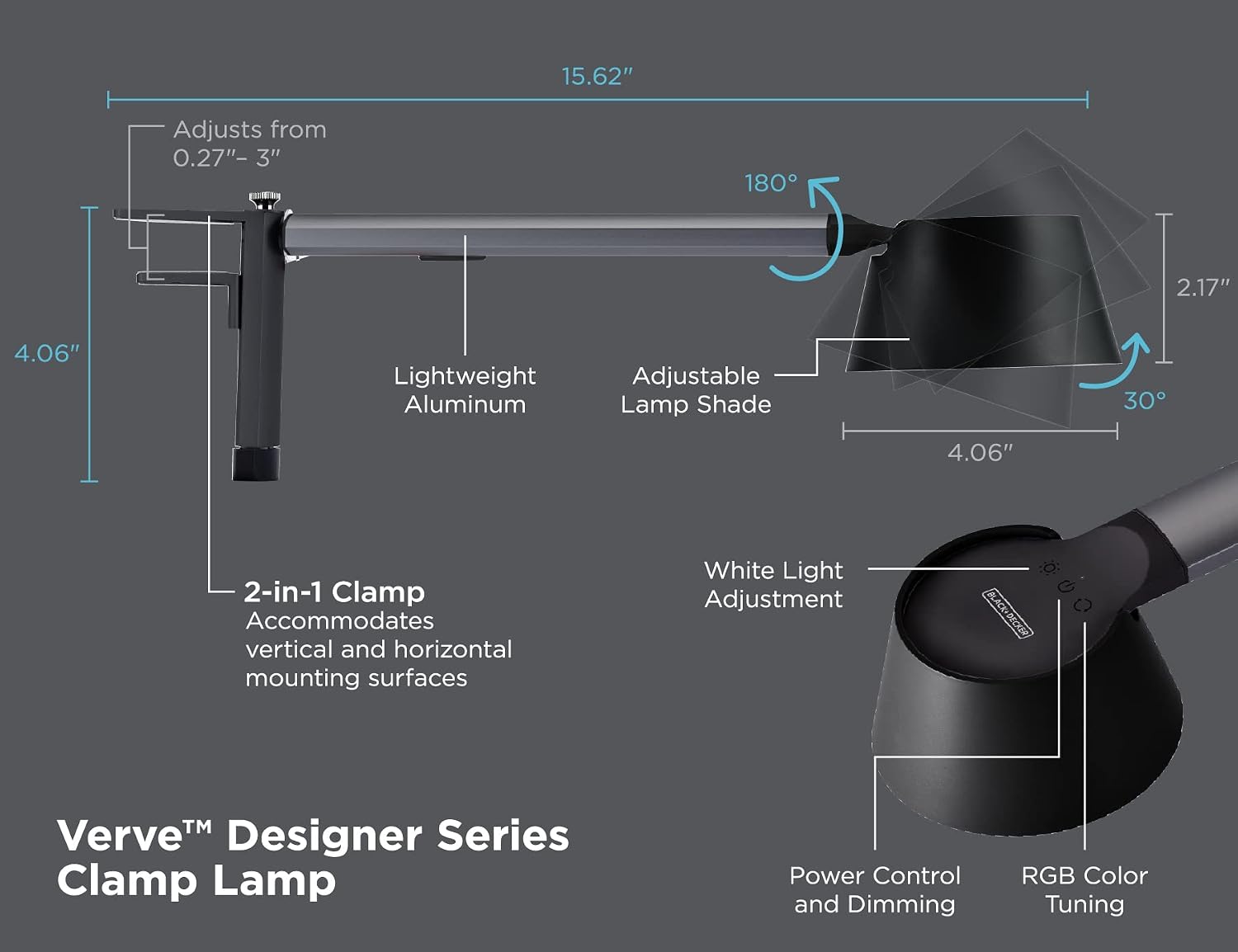
Image: A diagram illustrating the lamp's dimensions, 2-in-1 clamp mechanism, 180-degree adjustable lamp shade, and 30-degree tilt capability.
The lamp head is adjustable, allowing for 180 degrees of rotation and 30 degrees of tilt to direct light precisely where needed.
Operating Instructions
The lamp features touch-capacitive buttons located on the lamp head for easy control.

Image: Visual representation of the lamp's control functions, including 0-100% stepless dimming, adjustable white light (3000K, 4000K, 5000K), and 16 million RGB color options.
Power Control and Dimming
- Power On/Off: Touch the power control button (refer to diagram in Setup section) to turn the lamp on or off.
- Dimming: While the lamp is on, press and hold the power control button to adjust brightness from 0% to 100% steplessly. Release at the desired brightness level.
Adjustable White Light
The lamp offers three color temperature modes for white light:
- 3000K (Warm White): Ideal for relaxing environments.
- 4000K (Natural Daylight): Suitable for general reading and tasks.
- 6000K (Cool White): Best for focused tasks requiring high clarity.
Touch the "White Light Adjustment" button (refer to diagram in Setup section) to cycle through these color temperatures.
RGB Color Tuning
Access 16 million colors for mood lighting:
- Single Color Mode: Touch the "RGB Color Tuning" button (refer to diagram in Setup section) to cycle through various static colors.
- Color-Changing Mode: Press and hold the "RGB Color Tuning" button to activate a dynamic color-changing sequence. Release to select a specific color during the sequence, or press again to pause/resume.
Maintenance
To ensure the longevity and optimal performance of your LED Clamp Light, follow these simple maintenance guidelines:
- Cleaning: Disconnect the power before cleaning. Use a soft, dry cloth to wipe the lamp's surfaces. Do not use abrasive cleaners, solvents, or harsh chemicals, as these can damage the finish or electronic components.
- Storage: If storing the lamp for an extended period, ensure it is clean and dry. Store in a cool, dry place away from direct sunlight.
- LEDs: The integrated LED light source is designed for long-term use and is not user-replaceable.
Troubleshooting
If you encounter issues with your BLACK+DECKER Verve Designer LED Clamp Light, refer to the following common solutions:
| Problem | Possible Cause | Solution |
|---|---|---|
| Lamp does not turn on. | No power connection or faulty USB cable/adapter. |
|
| Light flickers or is unstable. | Insufficient power supply or loose connection. |
|
| Cannot change color or dim. | Controls not responding or lamp in an unresponsive state. |
|
Specifications
| Model Number | LED2100-CL |
| Brand (Manufacturer) | PureOptics LED |
| Product Dimensions | 15.75 x 4.06 x 4.06 inches |
| Item Weight | 1.5 Pounds |
| Color | Black/Gray |
| Material | Aluminum |
| Finish Type | Anodized |
| Light Source Type | LED |
| Power Source | DC |
| Wattage | 5.5 watts |
| Maximum Compatible Light Source Wattage | 12 Watts |
| Mounting Type | Clamp (Table/Shelf Mount) |
| Bulb Features | Dimmable |
| Color Temperature | Adjustable (3000K, 4000K, 6000K) |
| Color Rendering Index (CRI) | 90 |
| Switch Style | Touch |
| Special Features | Color Changing, Dimmable |
| UPC | 842048035824 |
Warranty Information
This BLACK+DECKER Verve Designer LED Clamp Light (Model LED2100-CL) is covered by a 3-year limited warranty from the date of purchase. This warranty covers defects in materials and workmanship under normal use.
The warranty does not cover damage resulting from accident, misuse, abuse, improper installation, unauthorized repair or modification, or failure to follow the instructions in this manual.
Please retain your proof of purchase for warranty claims.
Customer Support
For further assistance, technical support, or warranty inquiries, please contact the manufacturer, PureOptics LED, through their official website or customer service channels.
You may find contact information on the product packaging or by visiting the PureOptics LED website.
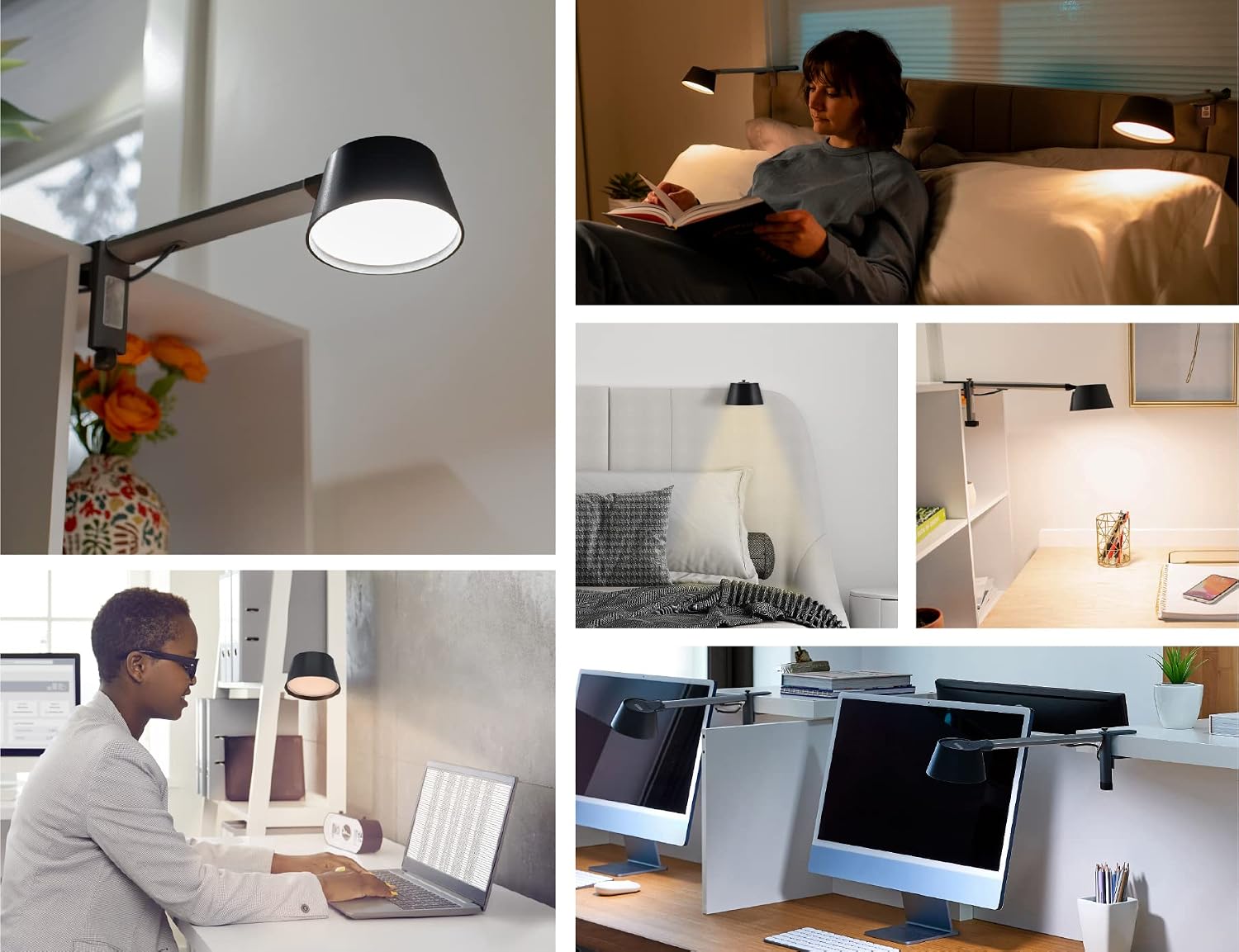
Image: The BLACK+DECKER Verve Designer LED Clamp Light shown in various applications, such as illuminating a desk, a headboard, and a shelf.


