
BEST LEARNING Ring Toss Tower
BEST LEARNING Ring Toss Tower – 3-in-1 Interactive Game Instruction Manual
Model: Ring Toss Tower
1. Introduction
The BEST LEARNING Ring Toss Tower is an innovative 3-in-1 interactive game designed to enhance hand-eye coordination, dexterity, and focus. This manual provides comprehensive instructions for setting up, operating, and maintaining your game to ensure a fun and engaging experience.
2. Safety Information
- Always supervise children during play.
- Keep small parts away from children under 3 years old to prevent choking hazards.
- Do not throw rings or balls at people or animals.
- Ensure the game is placed on a stable, flat surface during use.
- Use only the specified AAA batteries. Do not mix old and new batteries, or different types of batteries.
- Remove batteries if the product is not used for an extended period.
3. Package Contents
Please check that all items are present in the package:
- 1x Ring Toss Tower Main Unit
- 2x Ring Toss Game Set (rings with strings)
- 2x Bounce Game Set (balls with strings)
- 2x Light Catcher Game Set (USB-like pieces)
- 3x AAA Batteries (alkaline, included)

Figure 1: Overview of the Ring Toss Tower and its included game accessories.
4. Setup Instructions
- Battery Installation: The game requires 3 AAA batteries. These are included. Locate the battery compartment at the base of the tower, open it, insert the batteries according to the polarity markings, and close the compartment securely.
- Extend Side Arms: Gently pull out the yellow side arms from the main tower unit until they lock into place. These arms provide the structure for the games.
- Attach Game Accessories: Select the desired game accessory (Ring Toss, Light Catcher, or Bounce Game). Each accessory has a USB-like connector. Insert the connector firmly into the designated ports on the side arms of the tower.
- Power On: Locate the power switch at the base of the tower. Slide it to the "1" for single-player mode or "2" for two-player mode. The tower will light up and emit sounds, indicating it is ready for play.
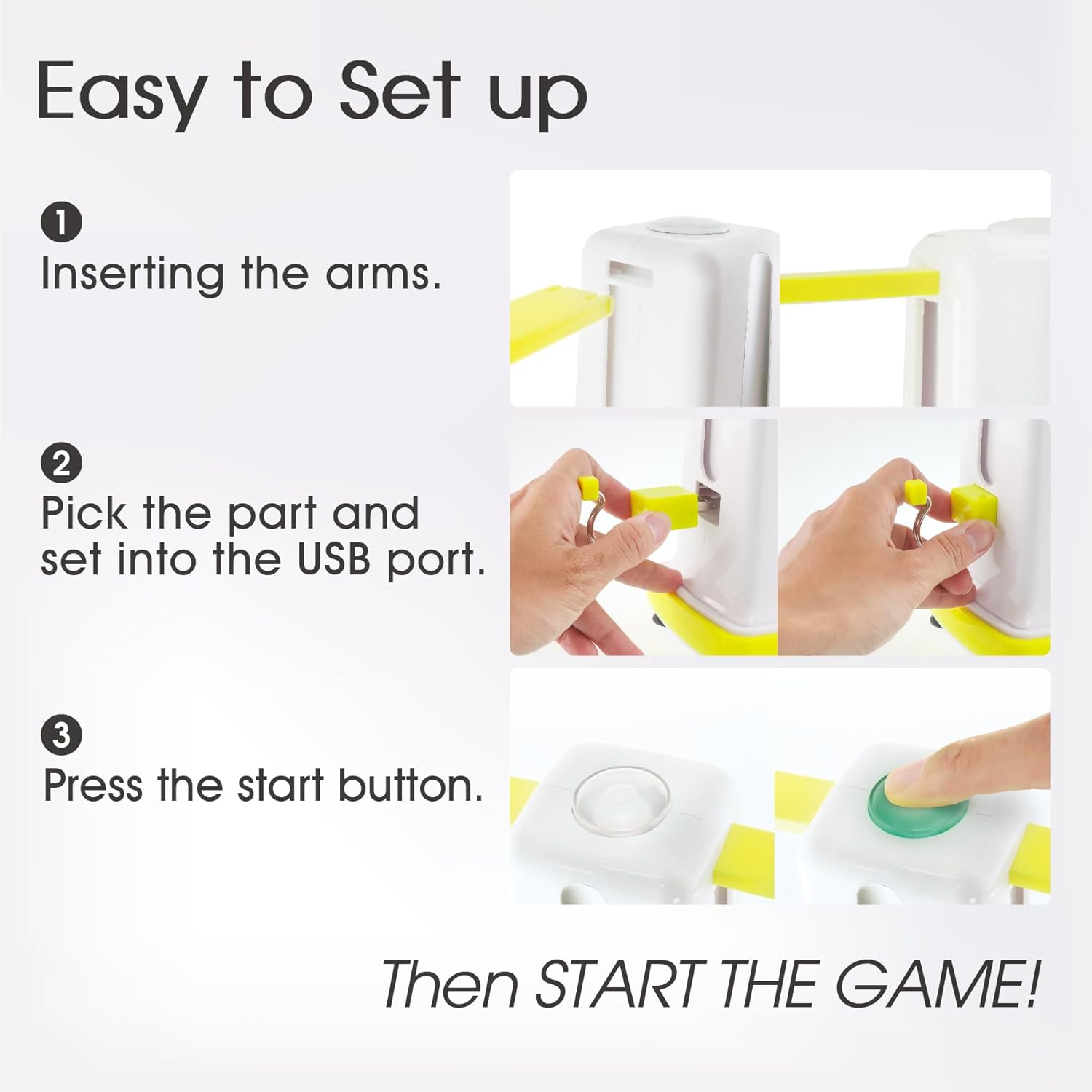
Figure 2: Visual guide for quick setup of the game accessories.
5. Operating Instructions
The Ring Toss Tower offers three distinct game modes: Ring Toss, Light Catcher, and Bounce Game. You can play in Single Mode (solo challenge) or Versus Mode (compete with family & friends).
5.1. Ring Toss Game
- Attach the Ring Toss Game Set to the side arms.
- Press the main button on top of the tower to start the game.
- Players take turns tossing the rings to hook them onto the designated pegs.
- The tower will register successful hooks with lights and sounds.
5.2. Light Catcher Game
- Attach the Light Catcher Game Set to the side arms.
- Press the main button on top of the tower to start the game.
- Lights on the tower will flash in various colors. When a specific color (e.g., red) appears, press the corresponding button on the attached accessory.
- The game challenges reflexes and reaction time.
5.3. Bounce Game
- Attach the Bounce Game Set (balls with strings) to the side arms.
- Press the main button on top of the tower to start the game.
- Players bounce the ball to hit targets or specific areas on the tower.
- The tower will provide feedback for successful bounces.
Video 1: Official product video demonstrating the rotation and various game modes of the BEST LEARNING Ring Toss Tower.
6. Smart Storage Design
The Ring Toss Tower features a convenient built-in storage design. All game accessories can be neatly stored on the back of the tower unit when not in use. This helps prevent loss of pieces and keeps your play area organized.

Figure 3: Rear view of the tower demonstrating the integrated storage for game components.
7. Maintenance and Care
- Clean the unit with a soft, dry cloth. Do not use abrasive cleaners or immerse in water.
- Avoid exposing the product to direct sunlight or extreme temperatures.
- Regularly check for any loose or damaged parts. Discontinue use if damage is found.
8. Troubleshooting
- No Power: Ensure batteries are correctly installed and not depleted. Replace with new batteries if necessary. Check that the power switch is in the ON position (1 or 2).
- Game Not Registering: Ensure game accessories are firmly inserted into their respective ports. Check for any obstructions or debris in the ports.
- Sound/Light Issues: If sounds are distorted or lights are dim, replace the batteries.
9. Specifications
| Feature | Detail |
|---|---|
| Material | ABS Plastic |
| Item Dimensions (L x W x H) | 4.13 x 4.13 x 12.2 inches |
| Item Weight | 610 Grams |
| Number of Players | 1-2 |
| Power Source | 3x AAA Batteries (included) |
| Recommended Age | 3+ Years |
10. Warranty and Support
This product comes with a manufacturer's warranty for 30 days from the date of purchase. For warranty claims, technical support, or any inquiries, please contact BEST LEARNING customer service through their official website or the retailer where the product was purchased.
For more information, visit the BEST LEARNING Store on Amazon.
Ask a question about this manual
Ask about setup, troubleshooting, compatibility, parts, safety, or missing instructions. Manuals+ will review the question and use this page’s manual context to help answer it.