
1. Introduction
This manual provides comprehensive instructions for the safe and efficient operation of your WOWLUMEN 42W 3700LM LED Torchiere Floor Lamp, Model WL-FL-White. Please read this manual thoroughly before assembly and use, and retain it for future reference.

Image: The WOWLUMEN 42W 3700LM LED Torchiere Floor Lamp in white, showcasing its sleek design and included remote control.
2. Safety Instructions
- Ensure the lamp is placed on a stable, level surface to prevent tipping.
- Do not expose the lamp to water or excessive moisture. This product is designed for indoor use only.
- Keep the lamp away from heat sources and direct sunlight.
- Do not attempt to disassemble or modify the lamp. Refer all servicing to qualified personnel.
- Unplug the lamp from the power outlet before cleaning or performing any maintenance.
- Keep out of reach of children and pets to prevent accidental damage or injury.
3. Package Contents
Verify that all components are present before beginning assembly:
- LED Torchiere Floor Lamp (unassembled sections)
- Lamp Head with integrated LED
- Remote Control
- Power Adapter
- User Manual (this document)
4. Setup and Assembly
Follow these steps to assemble your floor lamp:
- Carefully unpack all components from the packaging.
- Connect the lamp pole sections by gently twisting them clockwise until secure. Ensure the internal wiring is not pinched.
- Attach the lamp head to the top pole section, ensuring a firm connection.
- Connect the power adapter to the base of the lamp and then plug it into a standard electrical outlet.

Image: Visual guide demonstrating the simple assembly process of the floor lamp, showing pole connections and base attachment.
Video: An official WOWLUMEN video demonstrating the revolutionary design and assembly process of the modern floor lamp.
5. Operating Instructions
5.1 Control Methods
Your WOWLUMEN floor lamp can be controlled using either the integrated touch buttons on the lamp pole or the included remote control.
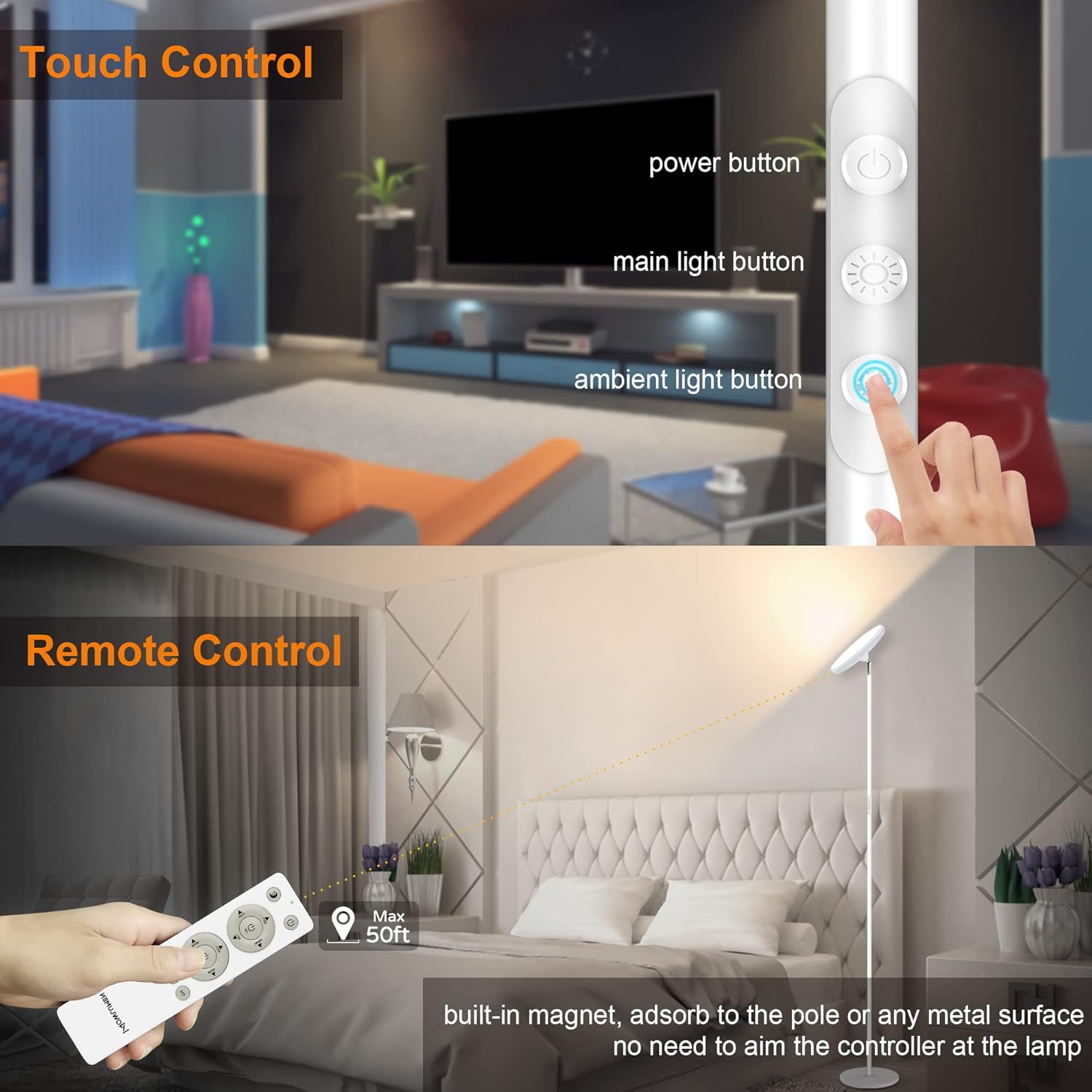
Image: Illustration of both the remote control and the touch control buttons located on the lamp pole, highlighting their functions.
Touch Control Buttons:
- Power Button: Turns the lamp On/Off.
- Main LED Button: Controls the main white light (color temperature and brightness).
- RGB Button: Controls the ambient RGB ring light (modes, speed, and brightness).
Remote Control:
The remote control offers full functionality, including power, main light adjustments, RGB light adjustments, and timer settings. The remote is magnetic and can be conveniently attached to the lamp pole or any metal surface.

Image: The remote control displaying buttons for various lighting modes such as Reading, Leisure, Nursing, and Sleep, along with timer options.
5.2 Main Light Operation (White Light)
- Power On/Off: Press the Power button on the remote or the top touch button on the lamp.
- Color Temperature Adjustment: Use the 'Warm' and 'Cool' buttons on the remote, or short press the Main LED button on the lamp to cycle through 2700K (warm white) to 6500K (cool white) settings.
- Brightness Adjustment: Use the 'BRT+' and 'BRT-' buttons on the remote, or long press the Main LED button on the lamp for stepless dimming from 10% to 100%.

Image: The floor lamp demonstrating different color temperatures: 2700K Warm White for leisure, 4500K Natural White for reading, and 6500K Daylight White for working.
5.3 RGB Ambient Light Operation
- Activate/Deactivate: Use the 'RGB' button on the remote or the bottom touch button on the lamp.
- Mode Selection: Use the 'MODE' button on the remote or short press the RGB button on the lamp to cycle through 12 preset colorful modes (e.g., Static, Rainbow, Magic, Whirl, Aura, Breath, Party).
- Brightness/Speed Adjustment: Use the 'BRT+' and 'BRT-' buttons on the remote, or long press the RGB button on the lamp to adjust brightness (static mode) or speed (dynamic mode) from 10% to 100%.

Image: The floor lamp showcasing various RGB ambient lighting effects, including Static Mode, Rainbow Flow, and Magic Flow, creating dynamic atmospheres.
Video: An official WOWLUMEN video demonstrating the 42W 3700LM LED Torchiere Floor Lamp's features, including its various lighting modes and controls.
5.4 Timer Function
The remote control includes 1H, 2H, and 3H timer buttons. Press the desired button to set the lamp to automatically turn off after 1, 2, or 3 hours.
5.5 Memory Function
The lamp features a memory function that retains your last brightness and color settings even after being turned off or during power outages.
6. Key Features
- Dual Lighting: Combines a powerful 42W 3700LM main white light with a vibrant RGB ambient ring light.
- Adjustable Color Temperature: Main light offers 2700K (warm white) to 6500K (cool white) settings.
- Stepless Dimming: Both main and RGB lights are 10%-100% stepless dimmable.
- 12 Preset RGB Modes: Customize your ambiance with various dynamic lighting effects.
- Flexible Head: The lamp head is 350° rotatable and 180° adjustable up/down for precise lighting direction.
- Convenient Controls: Features both touch control buttons on the pole and a magnetic remote control.
- Timer Options: 1H/2H/3H automatic shut-off timer.
- Memory Function: Recalls previous settings upon restart.
- Eye Protection: Designed with upgraded anti-blue light technology for reduced eye strain.

Image: A diagram illustrating the multi-layered upgraded anti-blue light technology for eye protection, including fliter purple light and fliter blue light components.
Video: An official WOWLUMEN video showcasing the UFO Floor Lamp, highlighting its versatile lighting options and modern design.
7. Maintenance
- Cleaning: Wipe the lamp with a soft, dry cloth. Do not use abrasive cleaners or solvents.
- Bulb Replacement: The LED light source is integrated and not user-replaceable.
- Storage: If storing the lamp for an extended period, unplug it and store it in a cool, dry place.
8. Troubleshooting
| Problem | Possible Cause | Solution |
|---|---|---|
| Lamp does not turn on. | Not plugged in; power outlet malfunction; remote battery low. | Check power connection; test outlet with another device; replace remote batteries. |
| Remote control not working. | Remote battery low; obstruction between remote and lamp; remote out of range. | Replace remote batteries; ensure clear line of sight; operate within 50ft/15m range. |
| Light flickers or is dim. | Loose connection; power supply issue. | Check all connections; try a different power outlet. |
9. Specifications
| Feature | Detail |
|---|---|
| Model Number | WL-FL-White |
| Power Source | Corded Electric (120 Volts AC) |
| Wattage | 42 Watts |
| Brightness | 3700 Lumens (Max) |
| Color Temperature | 2700K - 6500K (Main Light) |
| RGB Modes | 12 Preset Modes |
| Control Method | Remote, Touch |
| Product Dimensions | 10"D x 10"W x 70"H |
| Item Weight | 8 Pounds |
| Material | Metal, Plastic |
| Indoor/Outdoor Usage | Indoor Only |
10. Warranty and Support
Your WOWLUMEN floor lamp comes with a 24-month product warranty. If you encounter any issues or have questions regarding your product, please contact WOWLUMEN customer support for assistance. Contact information can typically be found on the product packaging or the official WOWLUMEN website.