
SANODESK EP1
SANODESK EP1 Electric Sit-Stand Desk Frame User Manual
Model: EP1
Introduction
This manual provides detailed instructions for the assembly, operation, maintenance, and troubleshooting of your SANODESK EP1 Electric Sit-Stand Desk Frame. Please read this manual thoroughly before installation and use to ensure proper function and safety.

Image: The SANODESK EP1 Electric Sit-Stand Desk Frame, shown without a desktop, highlighting its adjustable legs and control unit.
Safety Information
- Ensure all components are present and undamaged before assembly.
- Keep children and pets away from the desk during operation.
- Do not place hands or other objects near moving parts during height adjustment.
- Ensure the power cord is not pinched or damaged.
- Do not exceed the maximum weight capacity of 70 kg.
- The anti-collision system is designed to prevent damage, but always exercise caution.
Package Contents
Verify that all parts are included in your package. If any parts are missing or damaged, please contact customer support.
- Desk Legs (2)
- Crossbar (1)
- Side Brackets (2)
- Control Box (1)
- Smart Digital Control Panel (1)
- Power Adapter (1)
- Cable Management Tray (1)
- Hardware Kit (screws, Allen keys, etc.)
- Instruction Manual (this document)
Setup and Assembly
Follow these steps carefully to assemble your SANODESK EP1 desk frame. A drill may be required for attaching the desktop (not included).
- Unpack Components: Carefully remove all parts from the packaging and lay them out on a clean, soft surface to prevent scratches.
- Assemble Legs and Crossbar: Attach the desk legs to the central crossbar using the provided screws. Ensure all connections are secure.
- Attach Side Brackets: Secure the side brackets to the top of the leg assemblies. These will support your desktop.
- Mount Control Box and Panel: Mount the control box and the smart digital control panel to the underside of the desk frame, typically near the front edge, using the provided hardware.
- Connect Cables: Connect the motor cables from the legs to the control box. Connect the control panel cable to the control box. Ensure all connections are firm.
- Attach Desktop: Carefully place your chosen desktop (recommended dimensions: 100-140 cm width, 50-70 cm depth, 2 cm+ thickness) onto the assembled frame. Align it as desired and secure it to the side brackets using appropriate screws. Pre-drilling pilot holes in the desktop is recommended to prevent splitting.
- Cable Management: Use the cable management tray and ties to organize all power and control cables, preventing them from dangling or getting caught.
- Connect Power: Plug the power adapter into the control box, then plug the adapter into a wall outlet.

Image: Diagram illustrating the enhanced structure of the desk frame, highlighting its stability, low noise level (<50dB), 70kg weight capacity, and 15mm/s lifting speed.
Operating Instructions
Your SANODESK EP1 features an intuitive smart digital control panel for easy height adjustment and memory functions.
Control Panel Overview
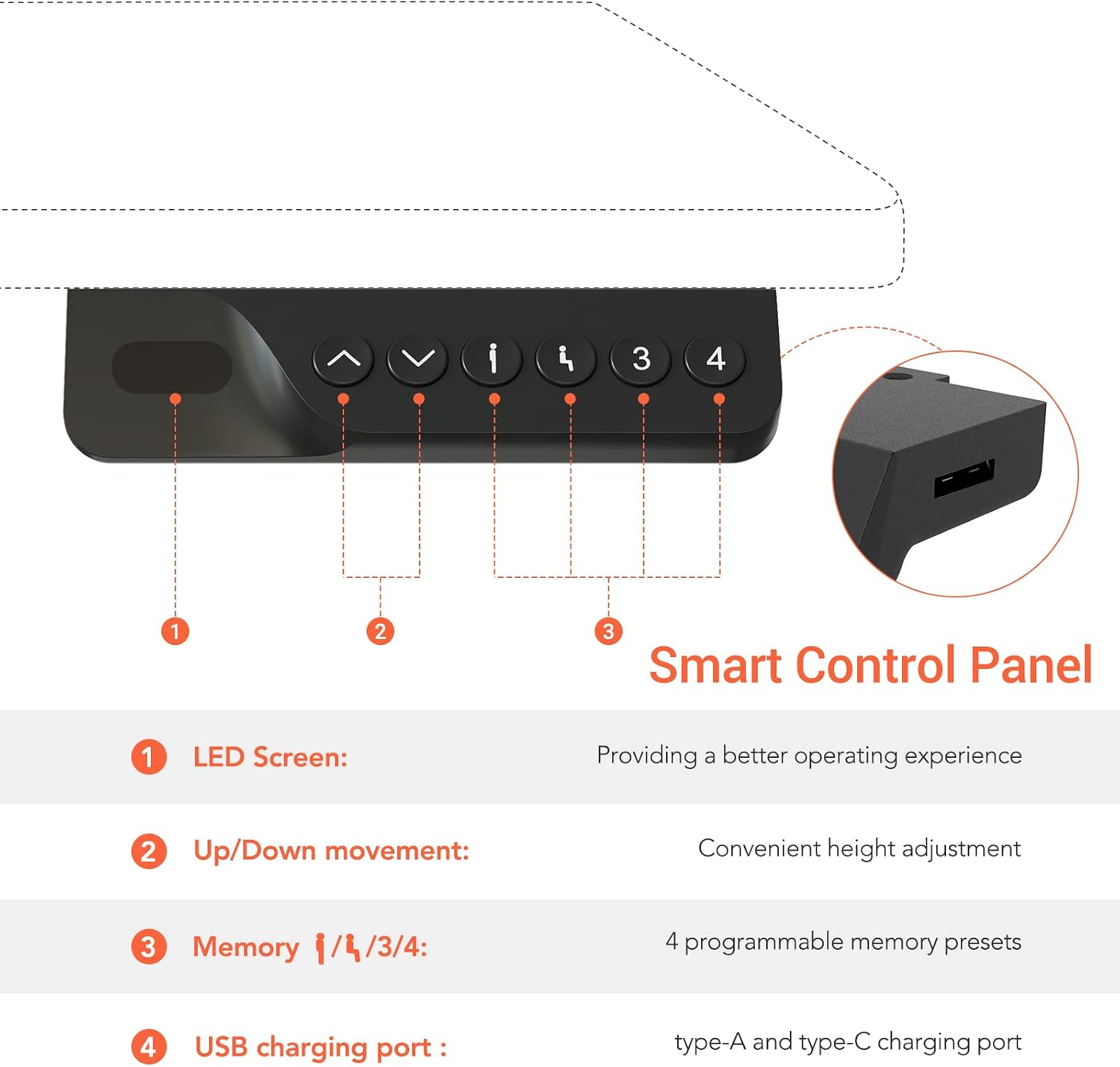
Image: Detailed diagram of the smart control panel, showing the LED screen, up/down movement buttons, four memory preset buttons (1, 2, 3, 4), and USB charging ports (Type-A and Type-C).
- LED Screen: Displays current desk height.
- Up/Down Buttons (^ / v): Press and hold to adjust the desk height manually. Release to stop.
- Memory Buttons (1, 2, 3, 4): Store and recall preferred height settings.
- USB Charging Ports (Type-A, Type-C): Located on the side of the control panel for convenient device charging.
Height Adjustment
- Press and hold the ^ (Up) button to raise the desk.
- Press and hold the v (Down) button to lower the desk.
- Release the button at your desired height. The desk height range is 71 cm to 116 cm.

Image: The SANODESK EP1 desk frame illustrating its adjustable height range from 71 cm to 116 cm.
Setting Memory Presets
- Adjust the desk to your desired height using the Up/Down buttons.
- Press the "M" (Memory) button (if present, otherwise proceed to step 3). The LED screen may flash "S-".
- Immediately press one of the numbered memory buttons (1, 2, 3, or 4). The current height is now saved to that preset.
Recalling Memory Presets
- Simply press the desired numbered memory button (1, 2, 3, or 4). The desk will automatically move to the saved height.
USB Charging Ports
The control panel includes built-in USB-A and USB-C ports for convenient charging of your electronic devices.

Image: Close-up view of the SANODESK EP1 control panel, highlighting the integrated USB-A and USB-C charging ports.
Anti-Collision System
The desk frame is equipped with an anti-collision system. If the desk encounters an obstacle during height adjustment, it will automatically stop and reverse slightly to prevent damage.

Image: Diagram demonstrating the anti-collision system, showing the desk stopping and reversing upon encountering an obstacle.
Adjusting Sensitivity: The anti-collision sensitivity can often be adjusted. Refer to the full product manual or contact support for specific instructions on how to modify this setting if needed.
Maintenance
- Cleaning: Wipe the desk frame with a soft, damp cloth. Avoid abrasive cleaners or solvents.
- Cable Management: Periodically check and reorganize cables to ensure they are not tangled or obstructing movement.
- Fasteners: Occasionally check all screws and bolts to ensure they remain tight. Retighten if necessary.
- Lubrication: The lifting mechanism is generally maintenance-free. Do not attempt to lubricate internal components unless specifically instructed by SANODESK support.
Troubleshooting
| Problem | Possible Cause | Solution |
|---|---|---|
| Desk does not move. | Power cord disconnected; control box error; overload. | Check power connections. Unplug and replug the power cord. Reduce weight on the desk. Perform a reset (see below). |
| Desk moves unevenly or makes unusual noises. | Loose connections; uneven weight distribution; obstruction. | Check all assembly screws. Redistribute weight evenly. Check for obstructions under the desk. |
| Anti-collision system triggers too easily or not at all. | Sensitivity setting needs adjustment. | Refer to the full manual or contact support for instructions on adjusting anti-collision sensitivity. |
| Memory presets not working. | Presets not saved correctly. | Re-save your desired height presets following the "Setting Memory Presets" instructions. |
Reset Procedure
If the desk is not functioning correctly, a reset may resolve the issue:
- Unplug the power cord from the wall outlet.
- Wait for at least 30 seconds.
- Plug the power cord back into the wall outlet.
- Press and hold the v (Down) button until the desk reaches its lowest position and then slightly rises or makes a small movement. Release the button. This typically calibrates the desk.
If problems persist after performing a reset, please contact SANODESK customer support.
Specifications
| Model | EP1 |
| Brand | SANODESK |
| Height Adjustment Range | 71 cm - 116 cm (without desktop) |
| Weight Capacity | 70 kg |
| Lifting Speed | 15 mm/s |
| Noise Level | < 50 dB |
| Material | Alloy Steel |
| Recommended Desktop Dimensions | Width: 100-140 cm, Depth: 50-70 cm, Thickness: ≥ 2 cm |
| Control Panel | Smart Digital Panel with LED display, 4 memory presets, USB-A and USB-C charging ports. |
| Safety Features | Integrated Anti-Collision System |

Image: Close-up view of the SANODESK EP1's 2-stage column design, illustrating the telescopic leg mechanism.

Image: Visual representation of the SANODESK EP1's weight capacity (70 kg), height adjustment range (71-116 cm), and recommended desktop dimensions (100-140 cm width, 50-70 cm depth).
Warranty Information
SANODESK provides the following warranty for the EP1 Electric Sit-Stand Desk Frame:
- 5-Year Warranty: Covers the frame, motor, and other mechanical components.
- 2-Year Warranty: Covers the controller, switch, and electronic components.
This warranty covers manufacturing defects and material failures under normal use. It does not cover damage caused by misuse, accidents, unauthorized modifications, or failure to follow the instructions in this manual. Please retain your proof of purchase for warranty claims.
Customer Support
For further assistance, technical support, or warranty claims, please contact SANODESK customer service. Refer to your purchase documentation or the SANODESK official website for contact details.
When contacting support, please have your model number (EP1) and proof of purchase ready.
Related documentsEP1


Ask a question about this manual
Ask about setup, troubleshooting, compatibility, parts, safety, or missing instructions. Manuals+ will review the question and use this page’s manual context to help answer it.