
Cheerwing CW10
Cheerwing CW10 Mini Drone Instruction Manual
Model: CW10 | Brand: Cheerwing
1. Introduction
The Cheerwing CW10 Mini Drone is a compact and versatile quadcopter designed for both beginners and experienced pilots. It features WiFi FPV transmission, app control, auto hovering, voice control, and multiple speed modes, offering an engaging flight experience. Its durable design includes protective guards for enhanced safety.

Image: The Cheerwing CW10 Mini Drone, its remote controller, and three rechargeable batteries.
2. What's in the Box
Verify that all components are present in the package:
- Cheerwing CW10 Mini Drone
- Remote Control
- 3 x Lithium Polymer Batteries
- USB Charging Cable
- Spare Propellers
- Screwdriver
- Instruction Manual

Image: A visual representation of all items included in the Cheerwing CW10 Mini Drone package.
3. Setup
3.1. Charging the Drone Battery
Before first use, fully charge the drone batteries. Connect the USB charging cable to the drone's charging port and a USB power source. The red USB indicator light will remain bright during charging and turn green when fully charged. Ensure the drone is powered off before charging.

Image: The drone connected to its USB charging cable.
Video: Instructions for charging the drone battery. (Segment from 'CW10 Mini Drone Operation' video, 4:38-4:46)
3.2. Propeller Installation and Check
Ensure propellers are correctly installed and facing the right direction for optimal flight performance. Refer to the manual for specific propeller placement (A/B markings).
Video: Demonstrates checking propellers before flight. (Segment from 'CW10 Mini Drone Operation' video, 0:07-0:16)
3.3. Frequency Pairing (Remote Control)
To pair the drone with the remote control, turn on both the transmitter and the drone. Pull down the throttle stick on the remote to its lowest position. Successful pairing is indicated when both the drone's and remote's indicator lights turn solid.
Video: Shows the frequency pairing process between the drone and its remote control. (Segment from 'CW10 Mini Drone Operation' video, 0:17-0:26)
4. Operating Instructions
4.1. Basic Flight Controls (Remote Control)
Familiarize yourself with the remote control functions for precise flight.
- Unlocking Motors: Pull down both the Throttle and Rudder sticks (45 degrees inward) simultaneously until the propellers rotate.
- Take Off: Push up the Throttle slowly to take off.
- One Key Take-off / Landing: Press the dedicated button for automatic take-off or landing.
- Altitude Hold: The drone will automatically maintain a fixed height.
- Headless Mode: Allows you to fly the drone without needing to recognize its front or rear, simplifying control.
- Up / Down: Push/Pull the Throttle UP/Down.
- Left / Right-handed Rotation: Push the Throttle to Left/Right.
- Forward / Backward: Push/Pull the Rudder UP/Down.
- Left-side Fly / Right-side Fly: Slide the Rudder to Left/Right.
- High / Low Speed Mode: Press the H/L button to switch between speed modes.

Image: Visual guide to easy flight features like One Key Start, Headless Mode, and Altitude Hold.
Video: Comprehensive demonstration of various flight controls and modes using the remote control. (Segments from 'CW10 Mini Drone Operation' video, 0:27-2:05)
4.2. App Control (Support iOS & Android)
Enhance your flight experience by connecting the drone to your smartphone via the Flyingsee app.
- Download APP: Search for "Flyingsee" in the App Store (iOS) or Google Play (Android).
- Connect Phone with Drone: Turn on WiFi on your phone and connect to the drone's WiFi network (e.g., "udi-wifi-XXXXXX"). Open Flyingsee, then enter the Virtual Control Interface.
- Gesture Selfie: Use specific hand gestures to automatically take photos.
- Waypoint Flight: Draw a flight path on your smartphone screen, and the drone will follow the specified route.
- Gravity Induction Mode: Tilt your phone to control the drone's movement (Forward/Backward/Left/Right).
- HD Aerials: Capture high-definition photos and videos directly from the app interface.

Image: The drone's WiFi FPV camera view on a smartphone, showing real-time transmission and gesture selfie capability.

Image: A smartphone screen displaying the Waypoint Flight feature, allowing users to draw custom flight paths.
Video: Demonstrates app control features including pairing, take-off, headless mode, speed control, trajectory flight, gravity induction, and HD aerials. (Segments from 'CW10 Mini Drone Operation' video, 2:23-4:37)
Video: A short preview showcasing the CW10 Mini Drone's camera capabilities.
5. Safety Features
The Cheerwing CW10 Mini Drone is equipped with features to ensure a safer flight experience.
- Full Protection: The drone features special protective guards around its propellers, making it safer and more collision-resistant, especially for indoor flight.
- Low Battery Alarm: When the drone or transmitter battery is low, the transmitter will emit a "di-di" beep to alert the user.
- Out of Range Alarm: The transmitter will beep "didi..didi.." to remind you when the drone is about to fly out of its maximum controllable distance.
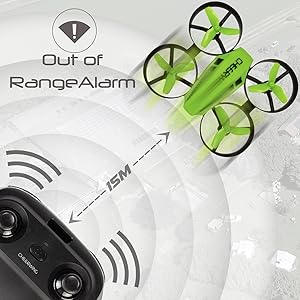
Image: The drone flying, illustrating the out-of-range alarm feature.
Video: Demonstrates the drone's special protective guards, low battery alarm, and out of range alarm. (Segments from 'CW10 Mini Drone Operation' video, 1:04-1:23, 2:06-2:22)
6. Maintenance
Proper maintenance ensures the longevity and performance of your drone.
- Cleaning: Use a soft, dry cloth to clean the drone. Avoid using solvents or harsh chemicals.
- Propeller Inspection: Regularly check propellers for damage (bends, cracks) and replace them if necessary.
- Storage: Store the drone and its components in a cool, dry place away from direct sunlight and extreme temperatures. Remove batteries if storing for extended periods.
7. Troubleshooting
If you encounter issues with your Cheerwing CW10 Mini Drone, refer to the following common problems and solutions:
| Problem | Possible Cause | Solution |
|---|---|---|
| Drone does not respond to remote/app. | Not paired; low battery; interference. | Re-pair the drone; charge batteries; move to an open area. |
| Drone drifts during flight. | Needs calibration; damaged propeller. | Perform calibration as per manual; replace damaged propellers. |
| Short flight time. | Battery not fully charged; old battery. | Ensure full charge; consider replacing battery if old. |
| Camera feed is blurry or distorted. | Poor WiFi connection; dirty lens. | Ensure strong WiFi signal; clean camera lens gently. |
8. Specifications
Key technical specifications for the Cheerwing CW10 Mini Drone:
- Model Name: CW10
- Brand: Cheerwing
- Color: Green
- Material: Plastic, Carbon Fiber
- Product Dimensions: 3.54"L x 3.12"W x 1.3"H
- Item Weight: 13.4 ounces
- Video Capture Resolution: 480p
- Effective Still Resolution: 0.3 MP
- Connectivity Technology: Wi-Fi
- Control Type: Voice Control, Remote Control, App Control
- Skill Level: Beginner
- Recommended Age: 14 years and up
- Batteries: 3 Lithium Polymer batteries (included)
9. Warranty & Support
For warranty information, technical support, or any inquiries regarding your Cheerwing CW10 Mini Drone, please contact Cheerwing USA directly. You can find more information and contact details by visiting the official Cheerwing store on Amazon:
Ask a question about this manual
Ask about setup, troubleshooting, compatibility, parts, safety, or missing instructions. Manuals+ will review the question and use this page’s manual context to help answer it.