
1. Introduction
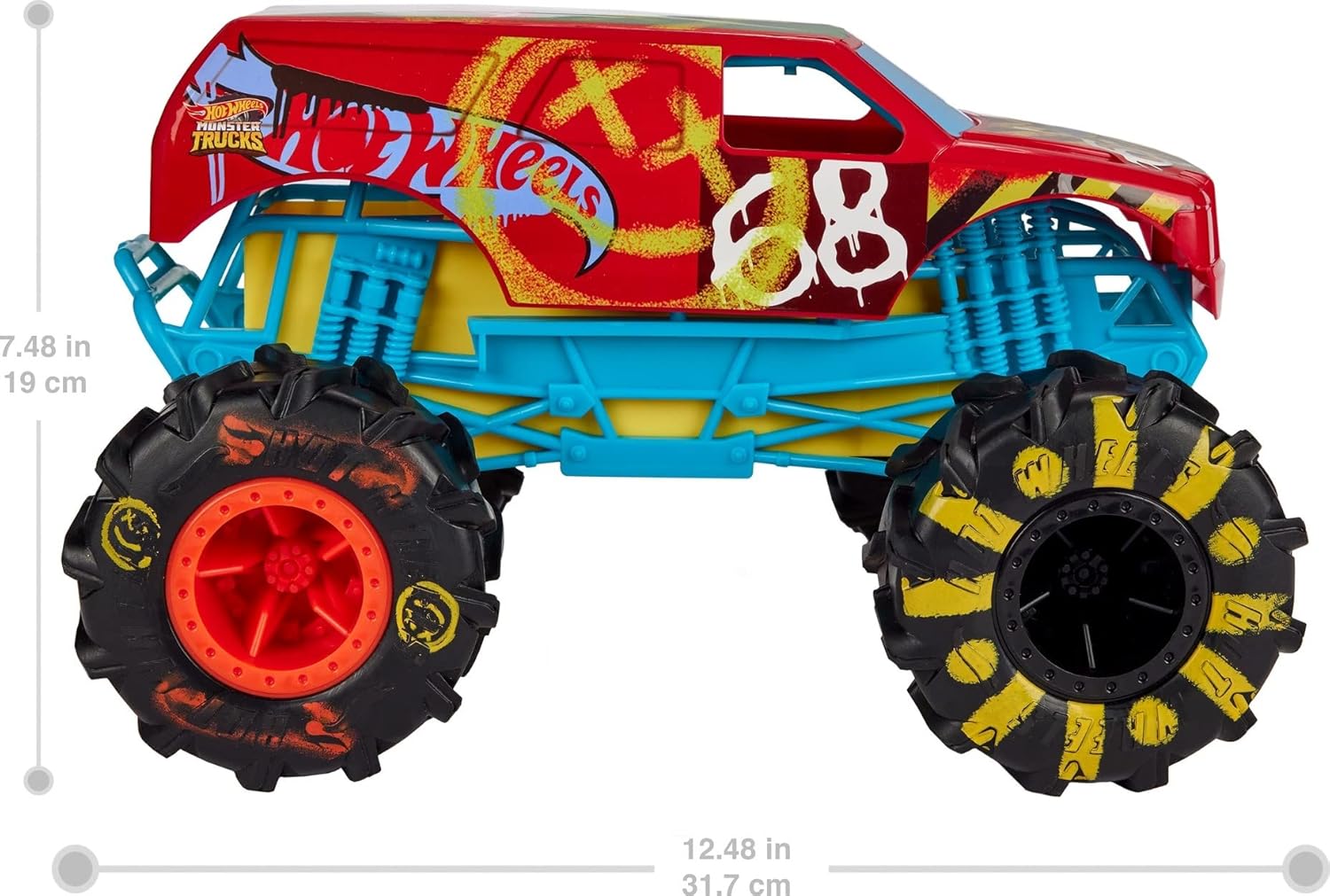
This manual provides essential information for the safe and effective operation of your Hot Wheels RC Monster Trucks HW Demo Derby. This 1:15 scale remote-control toy truck features full-function remote-control capabilities and Terrain Action Tires designed for various surfaces. It includes a USB charging cord for convenient recharging and operates on a 2.4 GHz frequency to prevent interference with other RC devices.
2. Safety Information
- Adult Supervision: Always ensure adult supervision during play, especially for younger children.
- Battery Safety: Use only the specified charging method (included USB cord). Do not attempt to open or modify the battery compartment.
- Choking Hazard: This product may contain small parts. Not suitable for children under 3 years.
- Operating Environment: Avoid operating the vehicle near water, heat sources, or electrical outlets. Ensure a clear play area to prevent accidents.
- Impact Warning: Avoid intentional collisions with people, pets, or fragile objects.
- Motor Heat: The motor surface may become warm after extended use. Allow the vehicle to cool down before handling.
3. What's in the Box
Your Hot Wheels RC Monster Trucks HW Demo Derby package includes:
- 1 Hot Wheels R/C Monster Trucks HW Demo Derby vehicle
- 1 USB charge cord

4. Setup and Charging
Follow these steps to prepare your Monster Truck for play:
- Unboxing: Carefully remove the Hot Wheels RC Monster Trucks HW Demo Derby from its packaging.
- Locate USB Port: On the underside of the vehicle, locate the hidden USB charging port. It is typically covered by a small flap.
- Connect Charger: Connect the included USB charge cord to the vehicle's USB port.
- Power Source: Connect the other end of the USB charge cord to a compatible USB power source (e.g., computer, USB wall adapter).
- Charging: Allow the vehicle to charge until the battery indicator (if present) shows it is fully charged. A full charge typically takes approximately 20 minutes and provides up to 2 hours of playtime.
- Disconnect: Once fully charged, disconnect the USB charge cord from both the vehicle and the power source.

Note: The remote control requires 2 AAA batteries (not included). Ensure these are installed correctly before use.
5. Operating Instructions
5.1 Basic Driving
- Power On: Turn on the power switch located on the underside of the Monster Truck.
- Remote Control: Use the remote control to navigate the vehicle. The 2.4 GHz frequency allows for simultaneous play with other RC vehicles without interference.
- Terrain Action Tires: The Terrain Action Tires are designed to handle various surfaces, including indoor flooring, grass, and dirt.
- Speed: The HW Demo Derby can reach speeds up to 5 mph.

5.2 Special Features & Tricks
- Wheelies & Spins: The truck can perform wheelies and 360-degree spins when maneuvered correctly with the remote control.
- Transformation to Launcher: The HW Demo Derby can transform into a launcher for smaller Hot Wheels Monster Trucks (additional vehicles sold separately). To transform:
- Press the designated button on the vehicle to pop open the top section.
- The wheels will slide out to create a ramp-like structure.
- Place a smaller Hot Wheels Monster Truck on the ramp and use the remote control to launch it.

5.3 Official Product Videos
Video: Hot Wheels Monster Trucks RC Toy Overview
This video provides a comprehensive overview of the Hot Wheels Monster Trucks RC Toy, demonstrating its driving capabilities, transformation into a launcher, and charging process. It highlights the toy's durability and ease of use for children.
Video: How to Use and Tricks with Hot Wheels Monster Truck
This video demonstrates various tricks and operational aspects of the Hot Wheels Monster Truck, including driving forward, backward, spinning, and performing wheelies. It also shows the transformation feature and how to use the remote control effectively.
Video: Easy Transformation of Hot Wheels Monster Truck
This video focuses on the easy transformation feature of the Hot Wheels Monster Truck, showing how it converts from a driving vehicle to a launcher for smaller cars. It highlights the simplicity of the mechanism for interactive play.
6. Maintenance
- Cleaning: Wipe the vehicle with a dry, soft cloth to remove dust and dirt. Avoid using water or cleaning solutions that could damage electronic components.
- Storage: Store the vehicle and remote control in a cool, dry place away from direct sunlight and extreme temperatures.
- Battery Care: For prolonged storage, ensure the vehicle is fully charged. Remove AAA batteries from the remote control if not used for an extended period to prevent leakage.
7. Troubleshooting
| Problem | Possible Cause | Solution |
|---|---|---|
| Vehicle not responding to remote. | Low battery in vehicle or remote; interference; vehicle/remote not paired. | Charge vehicle battery. Replace AAA batteries in remote. Ensure no other 2.4 GHz devices are causing interference. Re-pair vehicle and remote (refer to product packaging for specific pairing instructions if needed). |
| Vehicle moves slowly or inconsistently. | Low battery in vehicle. | Recharge the vehicle's battery fully. |
| Transformation mechanism not working. | Obstruction; mechanism jammed. | Check for any debris or obstructions preventing movement. Gently try to clear any blockages. Do not force the mechanism. |
8. Specifications
| Feature | Detail |
|---|---|
| Brand | Hot Wheels |
| Model Name | Hot Wheels Rc Monster Truck Truck #2 - 21A |
| Model Number | HGV93 |
| Scale | 1:15 |
| Power Source | Battery Powered (Lithium-Ion) |
| Charging | USB Charge Cord (included) |
| Remote Control Frequency | 2.4 GHz |
| Maximum Speed | 5 Miles per Hour |
| Material Type | Plastic |
| Recommended Age | 4 years and up |
| Item Dimensions | 15 x 9.5 inches |
| GTIN/UPC | 194735058600 |
9. Warranty and Support
Manufacturer Warranty: This product comes with no stated manufacturer warranty. Please refer to your retailer's return policy for details on returns or exchanges.
For further assistance or inquiries, please contact the retailer or visit the official Hot Wheels website for support resources.
Hot Wheels is a brand of Mattel.


