
Introduction
Thank you for purchasing the Yamipho S525 Bluetooth Headset. This manual provides comprehensive instructions for the safe and efficient use of your new headset. Please read this manual thoroughly before use and retain it for future reference.
The Yamipho S525 is designed for clear hands-free communication and audio playback, featuring advanced noise reduction technology and broad compatibility.
Package Contents
Verify that all items are present in the package:
- Yamipho S525 Bluetooth Headset
- USB Type-C Charging Cable
- Ear Hooks (removable)
- User Manual

Image: Contents of the Yamipho S525 Bluetooth Headset package, including the headset, charging cable, ear hooks, and manual.
Product Overview
Key Features
- Unidirectional Microphone & CVC8.0 Noise Cancellation: Ensures clear voice transmission by focusing on your voice and suppressing ambient noise.
- Qualcomm 3020 Smart Chip: Supports AAC and aptX HD codecs for stable, high-speed audio transmission with reduced latency.
- Bluetooth 5.2 Technology: Provides a more stable and faster connection compared to previous versions, improving transmission efficiency and reducing battery consumption.
- Long Battery Life: Up to 16 hours of continuous music playback or talk time, with a standby time of 240 hours.
- Lightweight & Ergonomic Design: Weighing only 8.5g with a removable ear hook, it offers comfortable wear for extended periods, suitable for both left and right ears.
- Multi-function Button (MFB): Simple one-touch control for playback, calls, and voice assistant activation.
- Mute Function: Allows you to mute your microphone during calls to protect your privacy.
- Siri Assistant Support: Activate your voice assistant for hands-free control.
- Wide Compatibility: Connects to most Bluetooth-enabled devices including smartphones, PCs, and tablets (iOS, Android, Windows).
- Dual Device Connection: Simultaneously connect to two devices and switch between them with ease.
- TELEC Certified: Acquired Japanese radio wave certification (Certification Number: 217-210241).

Image: An overview of the Yamipho S525 headset's key features, including Bluetooth 5.2, 16-hour battery life, left/right ear compatibility, mute function, battery display, dual microphone, 2-device connection, and CVC 8.0 noise cancellation.
Headset Components
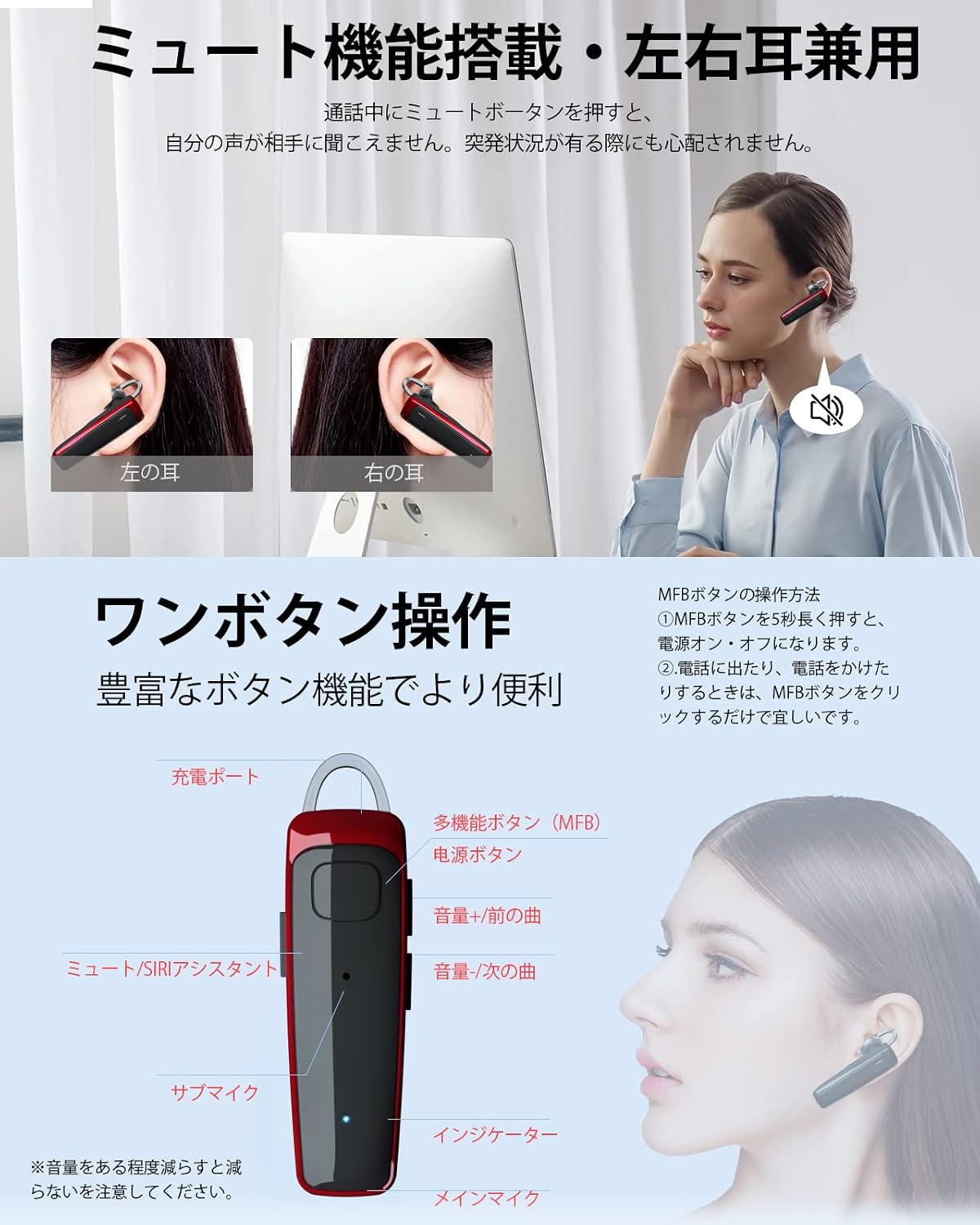
Image: Diagram showing the components of the Yamipho S525 headset, including the charging port, multi-function button (MFB), power button, volume up/previous track, volume down/next track, mute/Siri assistant button, sub microphone, indicator light, and main microphone.
Setup
1. Charging the Headset
Before first use, fully charge the headset. Use the provided USB Type-C cable and a 5V adapter (not included).
- Connect the Type-C cable to the charging port on the headset.
- Connect the other end of the cable to a USB power source.
- The indicator light will show charging status (e.g., red while charging, blue when fully charged).
- A full charge takes approximately 2 hours.

Image: The Yamipho S525 headset connected to a Type-C charging cable, illustrating the charging process. The image also shows battery life indicators for talk time (16H), standby time (240H), and charging time (2.5H).
2. Powering On/Off
- Power On: Press and hold the Multi-function Button (MFB) for 5 seconds until the indicator light flashes.
- Power Off: Press and hold the Multi-function Button (MFB) for 5 seconds until the indicator light turns off.
3. Bluetooth Pairing
- Ensure the headset is powered off.
- Press and hold the Multi-function Button (MFB) for approximately 5-7 seconds until the indicator light flashes red and blue alternately, indicating pairing mode.
- On your device (smartphone, PC, tablet), enable Bluetooth and search for available devices.
- Select "S525" from the list of found devices.
- Once connected, the indicator light on the headset will flash blue slowly.
Note: If your device prompts for a password, enter "0000".
4. Dual Device Connection
The S525 headset can connect to two Bluetooth devices simultaneously.
- Pair the headset with the first device as described above.
- Disable Bluetooth on the first device.
- Put the headset back into pairing mode (red and blue flashing).
- Pair the headset with the second device.
- Re-enable Bluetooth on the first device. The headset should automatically connect to both devices.

Image: Illustration of the Yamipho S525 headset simultaneously connected to two smartphones, labeled for "work" and "personal" use, demonstrating its dual device connection capability.
Operating Instructions
Call Functions
- Answer Call: Press the MFB once.
- End Call: Press the MFB once during a call.
- Reject Call: Press and hold the MFB for 2 seconds.
- Redial Last Number: Double-press the MFB.
- Mute Microphone: During a call, press the dedicated mute button once. Press again to unmute.

Image: A collage showing scenarios where the mute function and Siri assistant are useful. One image shows a person driving and using the headset, another shows people in an office setting, and a third shows a person on a call, highlighting the mute button.
Music Playback
- Play/Pause: Press the MFB once.
- Next Track: Press the Volume Down button (labeled as next track) once.
- Previous Track: Press the Volume Up button (labeled as previous track) once.
- Volume Up: Press and hold the Volume Up button.
- Volume Down: Press and hold the Volume Down button.
Voice Assistant (Siri/Android)
- Activate Voice Assistant: Press the dedicated Siri/Voice Assistant button once.
Video: An official product video demonstrating the features and usage of the Yamipho S525 Bluetooth Headset, including call handling and voice assistant activation.
Maintenance
- Clean the headset regularly with a soft, dry cloth.
- Avoid using abrasive cleaners or solvents.
- Do not expose the headset to extreme temperatures, humidity, or direct sunlight.
- Store the headset in a cool, dry place when not in use.
- Keep the charging port free of dust and debris.
- While the product is listed as "waterproof" in specifications, one customer review mentioned it broke after rain exposure. It is recommended to avoid direct exposure to water to prevent damage.
Troubleshooting
| Problem | Possible Cause | Solution |
|---|---|---|
| Headset does not power on. | Low battery. | Charge the headset fully. |
| Cannot pair with device. | Headset not in pairing mode; Bluetooth off on device; device too far. | Ensure headset is in pairing mode (red/blue flashing). Turn on device Bluetooth. Move device closer to headset. |
| No sound or poor sound quality. | Volume too low; headset not connected; interference. | Adjust volume on headset and device. Reconnect headset. Move away from sources of interference. |
| Microphone not working. | Microphone muted; headset not selected as audio input. | Unmute the microphone. Check device settings to ensure S525 is selected for audio input. |
| Connection issues with two devices. | Incorrect dual-pairing procedure. | Follow the dual device connection steps carefully. Note: Simultaneous connection to two PCs is not supported. |
Specifications
| Feature | Detail |
|---|---|
| Brand | Yamipho |
| Model Number | S525 |
| Color | Red (This specific variant) |
| Ear Placement | In-ear |
| Headphone Form Factor | In-ear |
| Impedance | 32 Ohms |
| Item Weight | 0.06 Kilograms (60g) |
| Noise Control | Active Noise Cancellation (CVC8.0) |
| Connectivity Technology | Bluetooth, Wireless |
| Wireless Type | Bluetooth 5.2 |
| Compatible Devices | Smartphones (Galaxy S25/S24/S23/S22/S21/S20/S20+/S10/S10+/S9/S9 Plus/Note10/10+/Note9/Note8/S8/S8 Plus/S7/S7 Edge/Note 5/S6 Edge Plus), iPhones (16E/16/16PLUS/16PRO/16PROMAX/15/15PLUS/15PRO/15PROMAX/14/14PLUS/14PRO/14PROMAX/13/13MINI/13PRO/13PROMAX/12/12MINI/12Pro/12Pro Max/Mini/SE (2nd Gen)/11/11 Pro/X/XS/XR/XS Max/8/8 Plus), Sony Xperia 1 II/XZ3/XZ2 Premium/XZ2, LG G7/V30+/V30/V35, PCs, Tablets (iOS, Android, Windows). |
| Cable Feature | Retractable (referring to the charging cable) |
| Waterproof | Yes (Note: Exercise caution with water exposure based on user feedback.) |
| Special Features | Android Phone Control, Noise Cancelling, Microphone Included, Lightweight, Volume Control |
| Control Type | Bluetooth, Remote |
| TELEC Certification Number | 217-210241 |
Warranty and Support
This product comes with a 1-year warranty from the date of purchase. If you encounter any issues or have questions, please contact our customer support team.
Customer Support Email: support@yamipho.com
Our support team typically responds within 24 hours.