
1. Introduction and Overview
The TOPDON AD600S is a professional-grade OBD2 diagnostic scan tool designed to provide comprehensive vehicle system analysis and maintenance functions. It is an upgraded version of previous models, offering enhanced capabilities for both automotive enthusiasts and professional mechanics.
Key features include 9 essential reset services, 4-system diagnostics (Engine, Transmission, ABS, SRS), full OBD2 test modes, and lifetime free software updates via Wi-Fi. The device features a user-friendly 5-inch TFT color touchscreen and supports automatic VIN identification for quick vehicle recognition. It is compatible with a wide range of vehicles, including those using the CAN-FD protocol.

Image: The TOPDON AD600S diagnostic scan tool with its main interface displayed.

Image: Overview of the AD600S features including 4 Systems Diagnostics, 9 Hot Special Services, OBD2 Full Functions, One-Touch AutoVIN, Free Lifetime Update, DTC Lookup Library, and CAN-FD protocol support.
2. What's in the Box
Upon unboxing your TOPDON AD600S, please verify that all components are present:
- AD600S OBD2 Scanner Unit
- Detachable Diagnostic Cable
- Quick Start Guide
- User Manual

Image: Contents of the AD600S package, including the scanner, diagnostic cable, quick start guide, and user manual.
3. Setup
To begin using your TOPDON AD600S, follow these initial setup steps:
- Power On: Connect the diagnostic cable to the AD600S unit and then to your vehicle's OBD2 port. The device will power on automatically.
- Initial Configuration: Follow the on-screen prompts to select your preferred language (English is default), time zone, and other initial settings.
- Connect to Wi-Fi: Navigate to the 'Settings' menu and select 'Wi-Fi'. Choose your Wi-Fi network and enter the password to connect. A stable internet connection is crucial for software updates.
- Software Update: After connecting to Wi-Fi, go to the 'Update' section. The system will check for available updates. Download and install all pending updates to ensure your device has the latest vehicle coverage and functions. This process may take some time depending on your internet speed.
Video: Instructions on how to set up Wi-Fi for the TOPDON ArtiDiag600S.
4. Operating Instructions
4.1. General Operation
The AD600S features a 5-inch TFT color touchscreen for intuitive navigation. Use the touch interface to select options and input data. Physical buttons are also available for navigation and confirmation.

Image: Close-up view of the 5-inch TFT color touchscreen of the AD600S.
Video: Demonstration of the TOPDON AD600S OBD2 Scanner in use by a mechanic.
4.2. 4 Systems Diagnostic Tool
The AD600S can diagnose four core vehicle systems: Engine, Transmission, Anti-lock Braking System (ABS), and Supplemental Restraint System (SRS/Airbag). This allows for reading and clearing fault codes, viewing live data, and performing various tests within these systems.

Image: Visual representation of the 4 system diagnostic capabilities: Engine, Transmission, SRS, and ABS.

Image: Diagram illustrating the 4 system diagnostics for Engine, Transmission, ABS, and SRS.
4.3. 9 Reset Services
The AD600S provides 9 commonly used maintenance reset services. Note that function menu and vehicle compatibility may vary by vehicle's specifics.
- Oil Reset: Resets the oil life system after an oil change.
- BMS Reset: Resets the battery management system after battery replacement.
- Injector Coding: Codes new injector numbers to the ECU.
- ABS Bleeding: Bleeds air from the brake system.
- DPF Reset: Resets the Diesel Particulate Filter system.
- Brake Reset: Resets the electronic parking brake (EPB) system.
- TPMS Reset: Resets the Tire Pressure Monitoring System.
- Throttle Adaptation: Initializes the throttle actuators to the default state.
- SAS Reset: Resets the Steering Angle Sensor.

Image: Visual guide to the 9 special functions, including Oil Reset, BMS Reset, Injector Coding, ABS Bleeding, DPF Reset, Brake Reset, TPMS Reset, Throttle Adaptation, and SAS Reset.

Image: Detailed view of the 9 hot special services offered by ArtiDiag 600S, highlighting Injector Coding as a new addition.
Video: Demonstration of TOPDON AD600S performing 9 reset services.
4.4. Full OBD2 Diagnosis Functions
The AD600S supports all 10 OBD2 test modes for comprehensive emission-related diagnostics:
- Read Codes: Retrieves Diagnostic Trouble Codes (DTCs).
- Clear Codes: Erases DTCs from the vehicle's computer.
- O2 Sensor Test: Retrieves O2 sensor monitor test results.
- I/M Readiness: Checks the readiness of the emission monitoring systems.
- DTC Library: Built-in library for quick interpretation of error codes.
- Live Data: Displays real-time data stream from the vehicle's sensors.
- Freeze Frame: Records a snapshot of vehicle conditions when a fault code is set.
- EVAP Test (Mode $8): Initiates a test of the evaporative emission control system.
- On-board Monitor Test: Retrieves results for on-board diagnostic monitoring tests.
- Vehicle Info: Retrieves vehicle identification information (VIN, CID, CVN).

Image: Overview of the full OBD2 diagnosis functions, including Read Codes, Clear Codes, O2 Sensor Test, I/M Readiness, DTC Library, Live Data, Freeze Frame, EVAP Test, On-board Monitor Test, and Vehicle Info.
4.5. Live Data Stream
The Live Data function allows you to view real-time sensor data in text or graphical format. This is useful for monitoring vehicle performance and diagnosing intermittent issues. You can save, share, print, or email the diagnostic report for further analysis.

Image: Screenshot of the real-time data stream display on the AD600S, showing various sensor readings in graph format.
Video: A mechanic using the TOPDON AD600S to view live data streams and perform maintenance services on a truck.
4.6. AutoVIN Technology
The AD600S features automatic VIN technology, which can quickly identify the vehicle's information without manual input. This streamlines the diagnostic process. Note that AutoVIN may not work on all vehicles.

Image: Features of the AD600S including Auto VIN, Artifolder for record and report, email, feedback, and DTC Library.
5. Maintenance
5.1. Software Updates
The TOPDON AD600S offers lifetime free software updates. Regularly updating your device ensures you have the latest vehicle coverage, bug fixes, and new features. Updates are performed via Wi-Fi with a one-click process.

Image: Details on lifetime free updates via Wi-Fi and the 5-inch TFT color touchscreen with 2G+32G memory.

Image: Visual representation of the lifetime free update feature via Wi-Fi.
6. Troubleshooting
6.1. DTC Lookup Library
The AD600S includes an onboard DTC library. If you encounter a Diagnostic Trouble Code, you can use this feature to quickly look up its definition and potential causes, saving time on external searches.
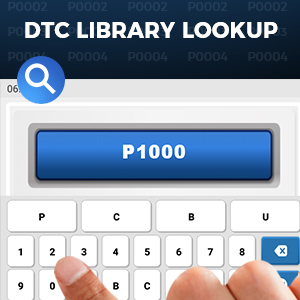
Image: Screenshot of the DTC Library Lookup feature on the AD600S.
6.2. Online Feedback
If you encounter issues that cannot be resolved using the manual or built-in features, the AD600S has an inbuilt 'Feedback' module. This allows you to send diagnostic reports and receive customized repair suggestions directly from certified professionals.

Image: Diagram illustrating the timely online feedback process from user to engineer.
7. Specifications
| Specification | Detail |
|---|---|
| Brand | TOPDON |
| Model | TOPDON AD600S (ArtiDiag600S) |
| Product Dimensions | 8.7"L x 1.46"W x 5.23"H |
| Operating System | Android 11.0 |
| Language | English (Multi-language menu available) |
| Display Resolution | 1280x720 |
| Screen Size | 5 inches TFT Color Touchscreen |
| Memory | 2G RAM + 32G Storage |
| Item Weight | 1.39 pounds |
| Batteries | 1 Lithium Ion battery required (included) |
| Connectivity | Wi-Fi (2.4GHz/5GHz), Detachable Diagnostic Cable |
| Supported Protocols | OBD2/EOBD/JOBD&CAN/CAN-FD |
| Vehicle Coverage | 90+ Vehicle Brands (1996 US-Based, 2005 EU-Based, 2008 Asia-Based or newer) |

Image: Display showing various language options for the AD600S menu.

Image: Information on wide vehicle coverage, indicating compatibility with 1996 US-Based, 2005 EU-Based, and 2008 Asia-Based vehicles or newer.
8. Warranty and Support
The TOPDON AD600S comes with lifetime free software updates, ensuring your device remains current with the latest vehicle data and diagnostic capabilities.
For technical assistance or troubleshooting, utilize the built-in 'Feedback' module on the device to send diagnostic reports and receive tailored support from TOPDON's certified professionals. You can also refer to the comprehensive User Manual (PDF) available for download via the provided link: User Manual (PDF).


