Introduction
This manual provides detailed instructions for the setup, operation, and maintenance of your LEKATO USB Type-C MIDI Interface Cable, Model LUM-03. This device is designed to facilitate the connection between your MIDI-enabled musical instruments and your computer or compatible Type-C device, enabling seamless editing and recording of musical data.
Product Features
- High Quality MIDI Interface: Features 1 MIDI In and 1 MIDI Out, with indicators to simplify troubleshooting. Supports up to 16 input and output channels for comprehensive MIDI control.
- Fast and Stable Transmission: Engineered for ultra-low latency MIDI input and output, ensuring reliable and rapid data transfer. The cable is constructed from soft bare copper with strong electrical conductivity and resistance to electromagnetic interference, safeguarding MIDI signal integrity.
- Plug & Play Functionality: Equipped with a built-in driver, this USB Type-C MIDI cable connects directly to any MIDI device without requiring special driver installations. It is compatible with Windows (7, 8, 10) and Mac OS.
- Intelligent LED Indicators: Features an intelligent LED system: a Red indicator for power status and a Blue indicator for signal transfer and connection activity, allowing for easy monitoring.
- Wide Compatibility: Suitable for connecting various electronic instruments such as pianos, keyboards, electric pianos, hand roll pianos, synthesizers, and electric drums to computers.
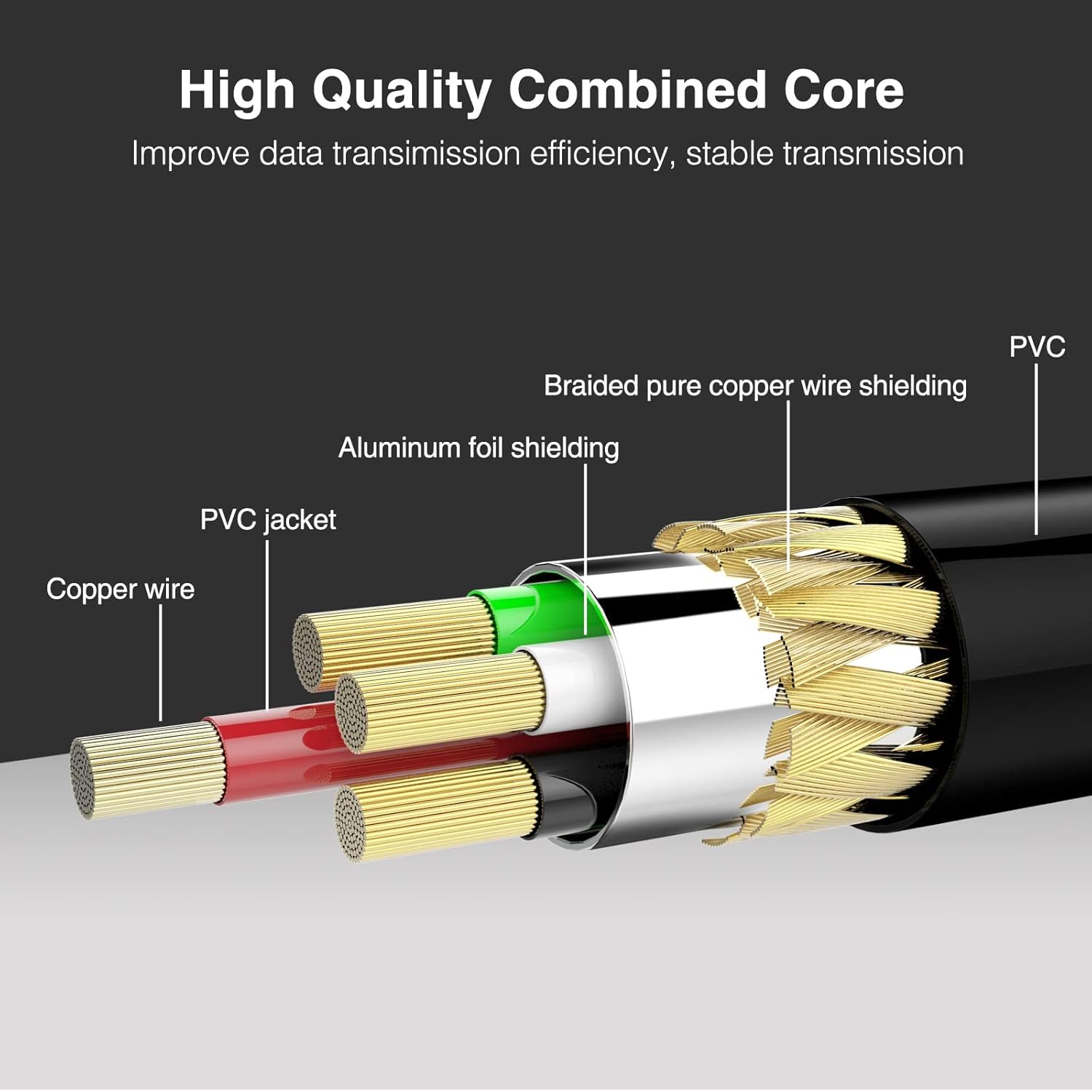
Figure 1: Internal cable structure demonstrating high-quality combined core for improved data transmission efficiency.

Figure 2: Examples of wide compatibility with different musical instruments.
Package Contents
The LEKATO USB Type-C MIDI Interface Cable package typically includes:
- 1 x LEKATO USB Type-C MIDI Interface Cable (Model LUM-03)
Setup Instructions
Follow these steps to correctly connect your LEKATO USB Type-C MIDI Interface Cable:
- Identify MIDI Ports: Locate the MIDI IN and MIDI OUT ports on your musical instrument (e.g., keyboard, synthesizer).
- Connect MIDI OUT: Plug the MIDI IN connector of the LEKATO cable into the MIDI OUT port of your musical instrument. This sends MIDI data from your instrument to your computer.
- Connect MIDI IN: Plug the MIDI OUT connector of the LEKATO cable into the MIDI IN port of your musical instrument. This allows your computer to send MIDI data to your instrument.
- Connect to Computer: Insert the USB Type-C end of the LEKATO cable into an available USB Type-C port on your computer (PC or Mac) or compatible device.
- Power On: Once connected, the Red LED indicator on the interface box will illuminate, indicating power.
- Driver Installation: No special drivers are required. The cable features a built-in driver for automatic recognition by your operating system.

Figure 3: Correct connection diagram for MIDI IN and MIDI OUT ports.

Figure 4: Overview of the LEKATO MIDI interface connecting a sound module and electronic keyboard to a computer.
Operating Instructions
After successful physical connection, proceed with the following steps to operate your MIDI interface:
- System Recognition: Your computer's operating system (Windows or Mac) should automatically detect and recognize the LEKATO USB Type-C MIDI Interface.
- Launch Software: Open your preferred Digital Audio Workstation (DAW) or music production software (e.g., GarageBand, Ableton Live, FL Studio, Cubase).
- Configure MIDI Settings: Navigate to the MIDI settings or preferences within your software. Select the LEKATO MIDI Interface as your desired MIDI input and/or output device.
- Verify Signal: Begin playing your musical instrument or sending MIDI data from your software. The Blue LED indicator on the LEKATO interface box will flash, confirming active MIDI signal transfer.
- Recording/Playback: You can now record MIDI data from your instrument into your software or send MIDI data from your software to control your instrument.
Maintenance
To ensure the longevity and optimal performance of your LEKATO USB Type-C MIDI Interface Cable, observe the following maintenance guidelines:
- Cleaning: Keep the cable and interface box clean and free from dust. Use a soft, dry cloth for cleaning. Avoid liquid cleaners.
- Storage: When not in use, store the cable in a cool, dry place, away from direct sunlight and extreme temperatures. Avoid tightly coiling or crimping the cable.
- Handling: Always grasp the connectors when plugging or unplugging the cable. Avoid pulling directly on the cable itself, as this can damage internal wiring.
- Environmental Conditions: Protect the device from excessive moisture and humidity.
Troubleshooting
If you encounter issues with your LEKATO USB Type-C MIDI Interface Cable, refer to the following common problems and solutions:
Problem: Device Not Recognized / No Signal
- Check Connections: Ensure all MIDI IN/OUT and USB Type-C connections are secure and correctly oriented. Remember: cable's MIDI IN to instrument's MIDI OUT, and cable's MIDI OUT to instrument's MIDI IN.
- Verify USB Port: Try connecting the USB Type-C cable to a different port on your computer. Ensure the port is functional.
- Restart Devices: Restart your computer and musical instrument.
- Check LED Indicators: Confirm the Red power LED is illuminated. If the Blue signal LED does not flash when MIDI data is sent, there might be a connection or software issue.
- Software Settings: In your DAW or music software, verify that the LEKATO MIDI Interface is selected as the active MIDI input/output device. Check for any disabled MIDI ports within the software.
- Instrument Settings: Ensure your musical instrument is powered on and configured to send/receive MIDI data.
Problem: Latency Issues
- System Resources: Close any unnecessary applications running on your computer to free up system resources.
- DAW Buffer Size: If your DAW allows, try increasing the audio buffer size in its preferences. Note that this may increase overall audio latency but can reduce crackling or dropouts.
- USB Port: Ensure you are using a high-speed USB Type-C port.
Specifications
| Brand | LEKATO |
| Model | LUM-03 |
| Connector Type | USB Type-C, 5-Pin DIN MIDI (Input & Output) |
| Cable Type | USB |
| Compatible Devices | Musical Instruments (Keyboard, Synthesizer, Piano, etc.), Personal Computers |
| Special Features | High Speed, Plug & Play, LED Indicators |
| Operating System Compatibility | Windows 7/8/10, Mac OS |
| Cable Length | 6.5 Feet (approximately 2 meters) |
| Item Weight | 100 Grams |
| Product Dimensions | 14 x 9.5 x 2 Centimeters |
| Certifications | CE, FCC, RoHS |

Figure 5: USB Type-C and MIDI DIN connectors.
Warranty and Support
For warranty information or technical support regarding your LEKATO USB Type-C MIDI Interface Cable (Model LUM-03), please refer to the product packaging or contact LEKATO customer service directly through their official website or the retailer where the product was purchased. Please have your product model number (LUM-03) and purchase details ready when contacting support.


