
Introduction
This manual provides essential instructions for the safe and efficient use of your Honor 50 5G smartphone, model NTH-NX9. Please read this guide thoroughly before operating your device to ensure proper functionality and to understand its features.
1. Setup
1.1 Package Contents
Verify that your package contains the following items:
- Honor 50 5G Smartphone (NTH-NX9)
- Power Adapter
- USB Type-C Cable
- SIM Ejector Tool
- Quick Start Guide (if included)
1.2 SIM Card Installation
The Honor 50 5G supports Dual SIM functionality using Nano-SIM cards.
- Power off your device before inserting or removing SIM cards.
- Locate the SIM card tray on the side of the phone.
- Insert the SIM ejector tool into the small hole next to the tray and push gently until the tray pops out.
- Place your Nano-SIM card(s) into the designated slots on the tray, ensuring the gold contacts face downwards.
- Carefully reinsert the SIM card tray into the phone.
- Power on your device.
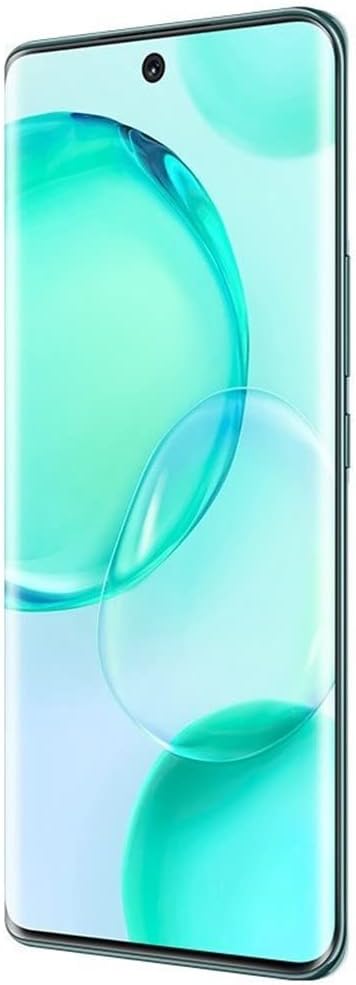
Image: Front view of the Honor 50 5G smartphone, showing the curved display and front camera cutout.
1.3 Initial Power On and Configuration
Press and hold the Power button until the Honor logo appears. Follow the on-screen prompts to complete the initial setup, including language selection, Wi-Fi connection, Google account login, and security settings.
2. Operating Instructions
2.1 Display Features
The device features a 6.57-inch OLED display with a 120Hz refresh rate and 2340 x 1080 resolution. The display intelligently adjusts its refresh rate for various activities like gaming and reading to optimize viewing and power consumption.

Image: Visual representation of the Honor 50 5G display, highlighting its 6.57-inch OLED screen with 1.07 billion colors and DCI-P3 color gamut.
2.2 Camera Usage
The Honor 50 5G is equipped with a versatile camera system:
- Rear Camera System:
- 108MP Ultra Clear Camera (f/1.9 aperture, 1/1.52-inch sensor)
- 8MP Wide Camera
- Bokeh Camera
- Macro Camera
- Front Camera: 32MP Camera with a 90-degree field of view.
To access the camera, tap the Camera icon on your home screen. Select desired shooting modes (e.g., Photo, Video, Portrait, Pro) from the interface. Tap the shutter button to capture images or start/stop video recording.

Image: Diagram illustrating the Honor 50 5G's multi-camera setup, including the 108MP main sensor and 32MP front camera.
2.3 Charging
The device supports 66W HONOR SuperCharge technology. Use the provided power adapter and USB Type-C cable for optimal charging speed. The 4300 mAh battery can reach approximately 70% charge in 20 minutes and 100% in 45 minutes under ideal conditions.

Image: Illustration of the 66W HONOR SuperCharge technology, demonstrating its internal design for efficient power delivery.
2.4 Fingerprint Recognition
The Honor 50 5G features in-display fingerprint recognition for secure unlocking. To set up, navigate to Settings > Biometrics & password > Fingerprint ID and follow the on-screen instructions to register your fingerprint(s).
3. Maintenance
3.1 Cleaning Your Device
Use a soft, lint-free cloth to clean the screen and body of your phone. Avoid using harsh chemicals or abrasive materials, as these can damage the device's finish or screen coating. The device is water-resistant, but avoid intentional submersion.
3.2 Software Updates
Regularly check for and install software updates to ensure optimal performance, security, and access to new features. Go to Settings > System & updates > Software update to check for available updates.
3.3 Battery Care
To prolong battery life, avoid exposing the device to extreme temperatures. It is recommended to keep the battery charge between 20% and 80% for daily use. Use only approved chargers and cables.
4. Troubleshooting
4.1 Network Connectivity Issues
If you experience issues with cellular network connectivity (e.g., no signal, call drops), ensure your SIM card is correctly inserted and your mobile data is enabled. Verify that your device is compatible with your carrier's network bands and services (e.g., VoLTE). Some carriers may require specific settings or may not fully support international unlocked models.
- Restart your phone.
- Check network settings: Settings > Mobile network > Mobile data.
- Reset network settings: Settings > System & updates > Reset > Reset network settings.
- Contact your mobile carrier for support regarding network compatibility and service activation.
4.2 Incorrect Time Display
If your phone displays an incorrect time or time zone, ensure automatic time synchronization is enabled. Go to Settings > System & updates > Date & time and toggle on Set automatically and Automatic time zone. If the issue persists, manually set the time and time zone.
4.3 Device Not Responding
If your device becomes unresponsive, press and hold the Power button for approximately 10 seconds to force a restart.
4.4 Factory Reset
A factory reset will erase all data from your device and restore it to its original factory settings. Back up all important data before proceeding. To perform a factory reset, go to Settings > System & updates > Reset > Reset phone.
5. Specifications
| Model Name | Honor 50 (NTH-NX9) |
| Operating System | Android 11.0 |
| Processor | Qualcomm Snapdragon 778G 5G (2.4 GHz CPU Speed) |
| RAM | 8 GB |
| Internal Storage | 256 GB |
| Display | 6.57-inch OLED, 2340 x 1080 Resolution, 120Hz Refresh Rate |
| Rear Camera | 108 MP (Main), 8 MP (Wide), Bokeh, Macro |
| Front Camera | 32 MP |
| Battery Capacity | 4300 mAh (Lithium-Polymer) |
| Charging | 66W HONOR SuperCharge (USB Type-C) |
| SIM Card | Dual Nano SIM |
| Connectivity | 5G, GSM, LTE, Bluetooth, Wi-Fi |
| Biometric Security | Fingerprint Recognition |
| Dimensions | 6 x 4 x 2 inches (approximate) |
| Weight | 45 Grams (approximate) |
| FCC ID | 2AYGCNTH-NX9 |

Image: The Honor 50 5G display showing certification logos and FCC ID: 2AYGCNTH-NX9.
6. Warranty Information
Your Honor 50 5G smartphone is covered by a limited manufacturer's warranty. The terms and conditions of this warranty may vary by region and retailer. Please refer to the warranty card included with your product or visit the official HONOR website for detailed information regarding warranty coverage, duration, and claims procedures.
This warranty typically covers defects in materials and workmanship under normal use. It does not cover damage caused by accidents, misuse, unauthorized modifications, or external factors.
7. Customer Support
For technical assistance, troubleshooting beyond this manual, or service inquiries, please contact HONOR customer support. You can typically find contact information (phone numbers, email, online chat) on the official HONOR website or through the support section within your device's settings.
Before contacting support, please have your device model (NTH-NX9) and serial number ready. The serial number can usually be found in Settings > About phone > Status.


