
CYBORIS S5
CYBORIS Portable Bluetooth IPX7 Waterproof Speaker User Manual
Model: S5
1. Introduction
Welcome to the user manual for your new CYBORIS S5 Portable Bluetooth Speaker. This speaker is designed to provide high-quality audio with robust features for both indoor and outdoor use. Its IPX7 waterproof rating ensures durability in various environments. Please read this manual carefully to ensure proper operation and to maximize your listening experience.
2. Safety Information
To ensure safe and optimal use of your speaker, please observe the following precautions:
- Do not expose the speaker to extreme temperatures or direct sunlight for prolonged periods.
- Do not disassemble, repair, or modify the speaker. Unauthorized modifications may void the warranty and pose safety risks.
- Keep the speaker away from medical devices, as its magnetic components may interfere with their operation.
- Ensure the charging port cover is securely closed when the speaker is exposed to water to maintain its IPX7 waterproof rating.
- Use only the specified charging cable and a compatible USB power adapter (5V/1A recommended).
- Clean the speaker with a soft, dry cloth. Avoid using harsh chemicals, cleaning solvents, or strong detergents.
3. Package Contents
Please check the package for the following items:
- CYBORIS S5 Portable Bluetooth Speaker
- USB Charging Cable
- User Manual
- Carabiner
4. Product Overview
The CYBORIS S5 speaker features a compact design with a durable silicone casing and a robust metal grille. It includes intuitive button controls on the top panel and a secure carabiner attachment point for enhanced portability.

Figure 4.1: CYBORIS S5 Speaker showcasing its waterproof design.
The speaker is equipped with dual 10W drivers for a total of 20W powerful stereo sound, delivering rich bass and clear treble.
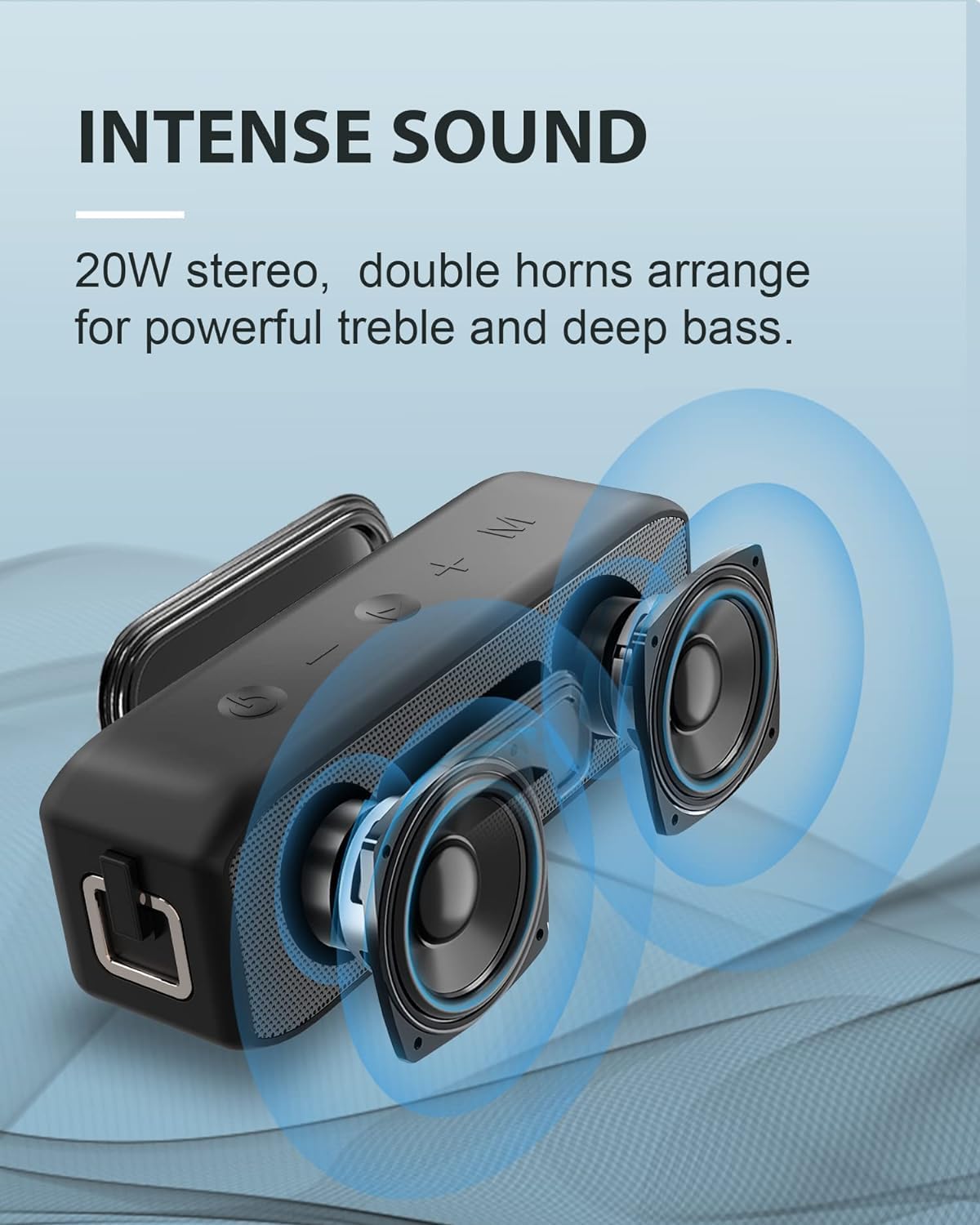
Figure 4.2: Illustration of the speaker's internal components, highlighting its 20W stereo sound capability.
Its IPX7 waterproof rating means it can withstand immersion in water up to 0.9 meters for 30 minutes, making it ideal for outdoor adventures.

Figure 4.3: The speaker's IPX7 waterproof design, suitable for various environments.
The integrated carabiner allows for easy attachment to bags or gear, enhancing its portability.

Figure 4.4: The speaker's practical design with a carabiner for easy carrying.
Button Functions:
- Power Button: Press and hold for 3 seconds to power on/off.
- Volume Up (+)/Next Track: Short press to increase volume. Press and hold for 2 seconds for next track.
- Volume Down (-)/Previous Track: Short press to decrease volume. Press and hold for 2 seconds for previous track.
- Play/Pause/Call: Short press to play/pause music or answer/end calls. Press and hold to reject calls. Double-press to redial.
- Mode Button: Short press to switch between Bluetooth, AUX, and TF Card modes.
Ports:
- USB-C Charging Port: For charging the speaker.
- AUX-in Port: For wired audio connection.
- Micro SD/TF Card Slot: For playing music directly from a memory card.
5. Setup
5.1 Charging the Speaker
Before first use, fully charge the speaker. Connect the USB charging cable to the speaker's USB-C charging port and a compatible USB power source (e.g., wall adapter, computer USB port). The LED indicator will show the charging status (e.g., red for charging, off when fully charged).
5.2 Power On/Off
Press and hold the Power button for approximately 3 seconds. You will hear a sound prompt, and the LED indicator will light up, indicating the speaker is powered on or off.
5.3 Bluetooth Pairing
To connect your speaker to a Bluetooth-enabled device:
- Turn on the speaker. It will automatically enter Bluetooth pairing mode, indicated by a flashing blue LED.
- On your device (smartphone, tablet, computer), enable Bluetooth and search for available devices.
- Select "CYBORIS S5" from the list of available devices.
- Once connected, the LED will turn solid blue, and you will hear a confirmation sound.

Figure 5.1: The speaker's stable Bluetooth 5.0 connection for high-fidelity audio.
5.4 Dual Pairing (True Wireless Stereo - TWS)
You can pair two CYBORIS S5 speakers together for a true wireless stereo experience:
- Ensure both CYBORIS S5 speakers are powered off.
- Turn on one speaker. It will enter Bluetooth pairing mode.
- Double-press the Power button on the first speaker. It will enter TWS pairing mode.
- Turn on the second speaker. It will automatically search for and connect to the first speaker.
- Once connected, both speakers will emit a confirmation sound. The LED on the main speaker will flash blue, while the secondary speaker's LED will be solid blue.
- Connect your device to the main speaker via Bluetooth as described in section 5.3.

Figure 5.2: Dual pairing for an immersive 360° stereo surround sound experience.
5.5 AUX Mode
To play audio from a device using a 3.5mm audio cable:
- Insert a 3.5mm audio cable (not included) into the AUX-in port of the speaker and the audio output port of your device.
- The speaker will automatically switch to AUX mode. If not, short press the Mode button to select AUX mode.
5.6 Micro SD/TF Card Mode
To play music directly from a memory card:
- Insert a Micro SD/TF card (up to 32GB, FAT32 format) with audio files into the card slot.
- The speaker will automatically switch to TF card mode and begin playback. If not, short press the Mode button to select TF Card mode.
6. Operating Instructions
6.1 Music Playback
- Play/Pause: Short press the Play/Pause button.
- Next Track: Press and hold the Volume Up (+) button for 2 seconds.
- Previous Track: Press and hold the Volume Down (-) button for 2 seconds.
6.2 Call Management
When connected via Bluetooth, the speaker's built-in microphone allows for hands-free calling:
- Answer Call: Short press the Play/Pause button when an incoming call rings.
- End Call: Short press the Play/Pause button during a call.
- Reject Call: Press and hold the Play/Pause button for 2 seconds when an incoming call rings.
- Redial Last Number: Double-press the Play/Pause button.
6.3 Volume Control
- Increase Volume: Short press the Volume Up (+) button.
- Decrease Volume: Short press the Volume Down (-) button.
7. Maintenance
7.1 Cleaning
Wipe the speaker with a soft, slightly damp cloth. Do not use abrasive cleaners, solvents, or strong detergents, as these can damage the surface or internal components.
7.2 Storage
Store the speaker in a cool, dry place away from direct sunlight, extreme temperatures, and high humidity. Ensure the charging port cover is sealed when not in use, especially in dusty or wet environments.
7.3 Battery Care
To prolong battery life, fully charge the speaker at least once every three months if it is not used regularly. Avoid fully discharging the battery frequently, as this can reduce its overall lifespan.
8. Troubleshooting
If you encounter any issues with your speaker, please refer to the table below for common problems and their solutions:
| Problem | Possible Cause | Solution |
|---|---|---|
| Speaker does not turn on | Low battery | Charge the speaker fully. |
| No sound | Volume too low | Increase volume on both the speaker and the connected device. |
| Incorrect mode selected | Press the Mode button to switch to the correct input (Bluetooth, AUX, or TF card). | |
| Cannot pair via Bluetooth | Speaker not in pairing mode | Ensure the speaker is on and the LED is flashing blue. If already connected, disconnect from other devices. |
| Device Bluetooth is off | Enable Bluetooth on your device. | |
| Poor sound quality | Device too far from speaker | Move the device closer to the speaker (within 20 meters). |
| Obstructions between devices | Remove any obstacles between your device and the speaker. | |
| Dual pairing (TWS) fails | Speakers too far apart during pairing | Place speakers close to each other during TWS pairing. |
| Incorrect pairing steps followed | Review and follow the TWS pairing instructions carefully in section 5.4. |
9. Specifications
Detailed technical specifications for the CYBORIS S5 Portable Bluetooth Speaker:
| Feature | Detail |
|---|---|
| Model Name | S5 |
| Brand | CYBORIS |
| Connectivity Technology | Bluetooth 5.0, AUX, Micro SD/TF |
| Speaker Output Power | 20 Watts (2 x 10W drivers) |
| Battery Capacity | 3600 mAh |
| Playtime | Up to 24 hours (at 50% volume) |
| Charging Time | Approximately 3-4 hours |
| Waterproof Rating | IPX7 (Submersible up to 0.9m for 30 minutes) |
| Dimensions (L x W x H) | 17 cm x 4 cm x 5 cm |
| Weight | 650 grams |
| Compatible Devices | Smartphone, Tablet |
| Material | Silicone, Plastic |
| Built-in Microphone | Yes |
| Special Features | Portable, Wireless, Hands-free Calling, Dual Pairing (TWS) |
10. Warranty and Support
This product comes with a standard manufacturer's warranty. Please refer to the warranty card included in your package for specific terms and conditions regarding coverage and duration.
For technical support, troubleshooting assistance, or warranty claims, please contact CYBORIS customer service through the retailer where you purchased the product or visit the official CYBORIS website. Please retain your purchase receipt as proof of purchase for warranty purposes.
Related documentsS5


Ask a question about this manual
Ask about setup, troubleshooting, compatibility, parts, safety, or missing instructions. Manuals+ will review the question and use this page’s manual context to help answer it.