
Introduction
This manual provides detailed instructions for the setup, operation, and maintenance of your Bietrun WXM27 Wireless Microphone System. Please read this manual thoroughly before using the product to ensure proper functionality and to maximize its lifespan. This system is designed for various applications including home karaoke, meetings, parties, church events, DJ performances, and weddings, offering stable signal transmission and clear audio quality.
Package Contents
Upon unboxing, please verify that all the following components are included:
- 2 x Handheld Microphones
- 1 x 3.5mm to 3.5mm Audio Cable
- 1 x Receiver Unit
- 1 x Dual Charging Cable
- 1 x Bluetooth Antenna
- 1 x Power Adapter
- 2 x Microphone Antennas
- 1 x User Manual (this document)
- 1 x 6.35mm to 6.35mm Audio Cable
Product Overview
The Bietrun WXM27 system consists of a central receiver unit and two wireless handheld microphones. The receiver acts as the hub, connecting to your audio system, while the microphones capture sound wirelessly.

Figure 1: Bietrun WXM27 Wireless Microphone System components.
Receiver Unit
The receiver features a metal case for durability and an HD PRO display that shows microphone status, frequency, and volume levels. It includes various output interfaces for versatile connectivity.

Figure 2: Detailed view of the receiver's front panel (controls and display) and rear panel (input/output ports).
Handheld Microphones
The microphones are constructed with a metal alloy handle and feature a steel mesh head. They are equipped with a clear white LED display, an LED light ring (green for working, red for charging), and a built-in rechargeable lithium-ion battery.

Figure 3: Key features of the Bietrun handheld microphone.
Setup Guide
1. Charging the Microphones
The microphones come with built-in 1200mAh rechargeable lithium-ion batteries. Before first use, or when the battery indicator shows low charge, fully charge both microphones using the included dual charging cable. A full charge takes approximately 3-4 hours and provides up to 7 hours of usage.

Figure 4: Microphone charging details and battery life.
2. Connecting the Receiver to an Audio Device
The receiver offers multiple output options to connect to various audio systems:
- 6.35mm Output: Use the included 6.35mm to 6.35mm cable to connect the receiver to a speaker, amplifier, or mixer with a 6.35mm microphone input.
- 3.5mm TRS Audio Output: Use the included 3.5mm to 3.5mm cable to connect to devices with a 3.5mm audio input, such as some Bluetooth speakers or multimedia equipment.
- XLR L+R Outputs: For professional setups, use XLR cables (not included) to connect the receiver to an audio mixer or PA system.

Figure 5: Receiver connectivity options for various audio devices.
3. Bluetooth Connection (Receiver)
The receiver unit features Bluetooth connectivity, allowing you to stream music from your phone, tablet, or laptop to your connected speaker system for karaoke or background music. Ensure the receiver is connected to a speaker first.
- Connect the receiver to your speaker system using one of the audio output cables (6.35mm, 3.5mm, or XLR).
- On your mobile device (phone, tablet, smart TV), enable Bluetooth.
- Search for Bluetooth devices and select "Bietrun" from the list to pair.
- Once connected, you can play music through your speaker system while using the microphones for vocals.
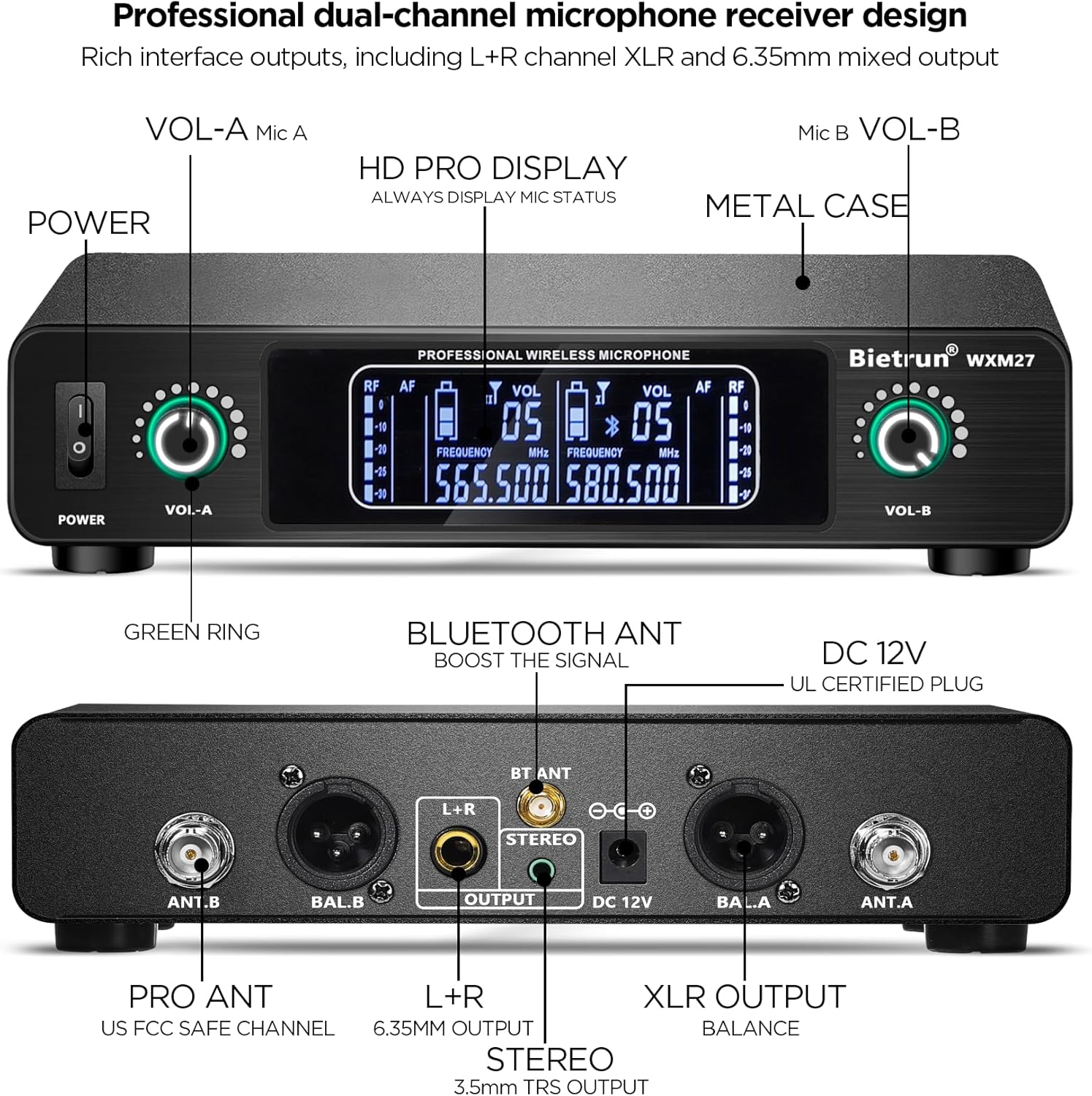
Figure 6: Bluetooth connectivity for playing music through the system.
4. Optimum Boot and Shutdown Order
To prevent potential audio pops or damage to your equipment, follow these recommended power sequences:
Optimum Boot Order:
- TV (if applicable)
- Audio Amplifier (if applicable)
- Speaker
- Receiver
- Microphone
Optimum Shutdown Order:
- Microphone
- Receiver
- Speaker
- Audio Amplifier (if applicable)
- TV (if applicable)
Operating Instructions
1. Powering On/Off
- Receiver: Connect the power adapter to the DC 12V input on the receiver and plug it into a power outlet. Press the 'POWER' button on the front panel to turn it on.
- Microphones: Press the power switch located at the tail end of each microphone to turn it on. The LED display will illuminate, and the light ring will turn green.
2. Adjusting Channels
Each microphone has 15 adjustable frequency channels. This feature is useful if you are using multiple wireless systems simultaneously or experiencing interference. To change the channel:
- With the microphone powered on, click the switch at the end of the microphone.
- The channel number on the microphone's LED display will change.
- Ensure that each microphone operates on a different channel to avoid signal interference.
3. Volume Control
Volume can be adjusted at two points:
- Microphone: Each microphone has a volume control (PWR/VOL) at its base.
- Receiver: The receiver has separate volume knobs (VOL-A and VOL-B) for each microphone channel.
4. Microphone Usage
For optimal sound quality and to ensure your voice is clearly picked up, position the microphone 2-6 inches from your mouth. The microphones feature a professional dynamic core with a unidirectional polar pattern, designed to capture sound primarily from the front while minimizing background noise.

Figure 7: Recommended distance for microphone usage.
Maintenance
Battery Care
- Fully charge microphones before extended storage to preserve battery health.
- Avoid completely draining the batteries frequently.
- If not used for a long period, charge the microphones every 3 months to prevent deep discharge.
Cleaning
- Wipe the microphones and receiver with a soft, dry cloth.
- Do not use liquid cleaners or abrasive materials, as they may damage the finish or internal components.
- Regularly inspect the microphone mesh for debris and gently clean if necessary.
Troubleshooting
If you encounter issues with your Bietrun Wireless Microphone System, refer to the following common problems and solutions:
| Problem | Possible Cause | Solution |
|---|---|---|
| No sound from microphones | Microphones or receiver not powered on; incorrect cable connection; low microphone battery; receiver volume too low; microphone channel interference. | Ensure all devices are powered on. Check all cable connections. Charge microphones fully. Increase receiver volume. Change microphone channel to avoid interference. |
| Interference or static noise | Other wireless devices operating on similar frequencies; distance too far; obstacles blocking signal. | Change the microphone channel. Reduce distance between microphone and receiver. Ensure clear line of sight. Turn off other interfering wireless devices. |
| Microphone cuts out intermittently | Low microphone battery; exceeding operating range; signal interference. | Recharge microphone battery. Stay within the specified 240ft operating range. Change microphone channel. |
| Bluetooth connection issues | Receiver not in pairing mode; incorrect device selected; receiver not connected to speaker. | Ensure receiver is powered on and connected to a speaker. Search for "Bietrun" on your device's Bluetooth settings. Try restarting both devices. |
Specifications
| Feature | Specification |
|---|---|
| Model Name | WXM27 |
| Connectivity Technology | UHF Wireless |
| Operating Range | Up to 240 feet (75 meters) |
| Microphone Form Factor | Handheld Dynamic |
| Microphone Material | Metal |
| Microphone Battery | 1200mAh Rechargeable Lithium Polymer (included) |
| Microphone Working Time | Up to 7 hours (after 3-4 hours charge) |
| Audio Sensitivity | 95 dB |
| Frequency Response | 50Hz - 16KHz |
| Number of Channels | 15 adjustable channels per microphone |
| Receiver Output Interfaces | 6.35mm Mic, 3.5mm TRS Audio, XLR L+R |
| Receiver Features | Bluetooth connectivity, HD PRO Display |
| Compatible Devices | Karaoke Machine, Mixers, Amplifiers, Speakers with Mic Input, Bluetooth Speakers, PA Systems, Multi-Media Equipment |
| Item Weight | 4.33 pounds (total package) |
Warranty and Support
Bietrun is committed to providing high-quality products and customer satisfaction. For any questions, technical assistance, or support regarding your WXM27 Wireless Microphone System, please contact Bietrun customer service. Refer to the product packaging or the official Bietrun website for the most current contact information.
While specific warranty details are not provided in this manual, Bietrun offers various protection plans for extended coverage. Please inquire about these options at the time of purchase or through authorized retailers.
