
Introduction
This manual provides detailed instructions for the setup, operation, and maintenance of your AGSHOME Garage Door Controller. Please read this manual thoroughly before installation and use to ensure proper functionality and safety.
Package Contents
Your AGSHOME Garage Door Controller package includes the following items:
- AGSHOME Garage Door Controller Unit
- Remote Control (key fob style) with attached wires
- Small button with wires (for pairing)
- USB cable (for power)
Note: The video demonstrates the remote control and pairing button. The main controller unit and USB cable are also part of the system.
Setup and Pairing Instructions
Follow these steps to pair your remote control with your garage door opener. This process involves connecting the provided accessories and performing a sequence of button presses.
Step 1: Connect the Remote Control and Pairing Button
Connect the two parts of the accessory: the remote control (key fob style) and the small button with wires. Ensure the wires are securely connected to the white connector.
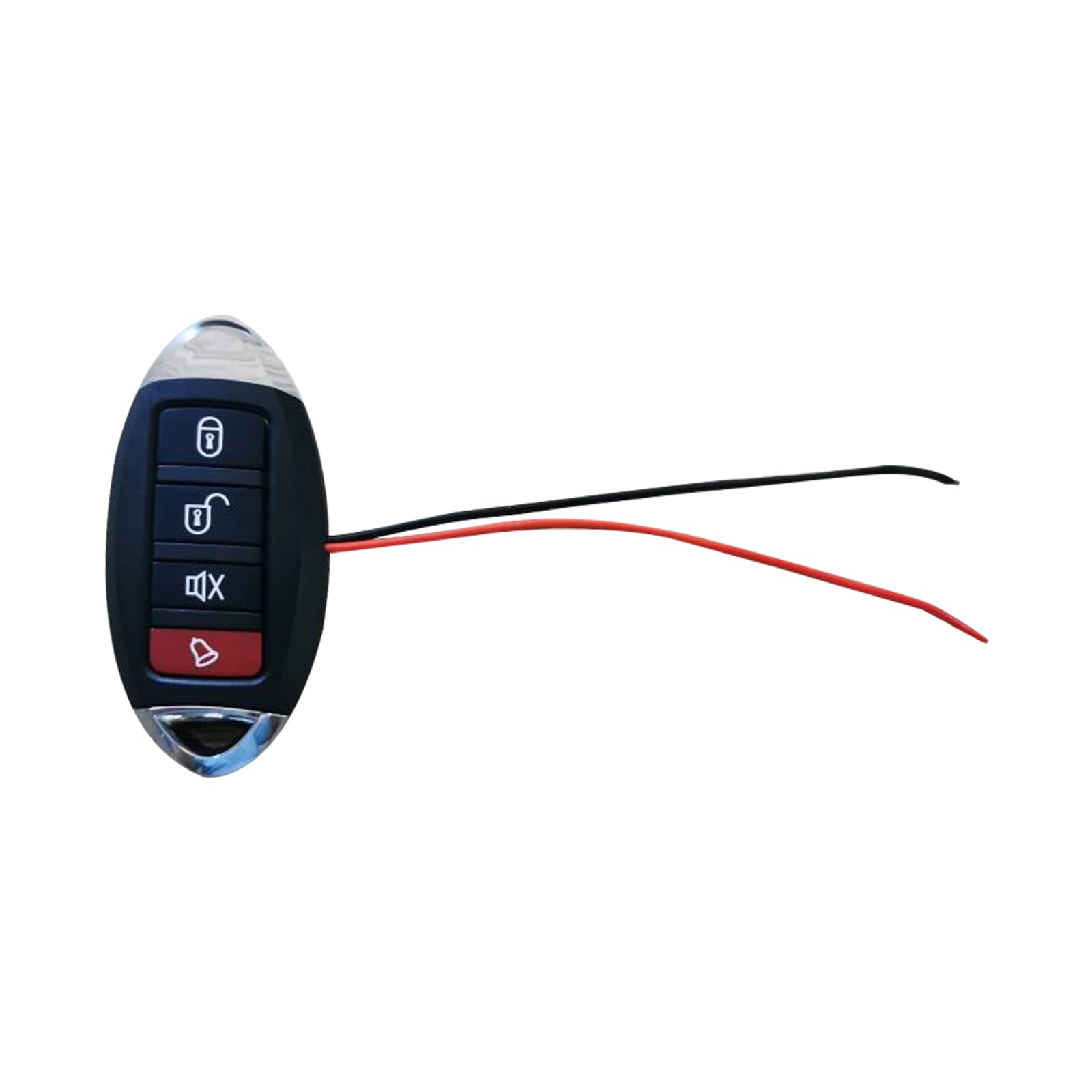
Image: The remote control and the small pairing button connected via their wires.
Step 2: Initiate Pairing Sequence
To begin the pairing process, press and hold the lock button on the remote control. While holding the lock button, press the small pairing button four times. The remote control's indicator light will change from blue to red, blinking to confirm it's in pairing mode.
Step 3: Pair with Garage Door Opener's Learn Button
Locate the "Learn" button on your garage door opener. This button is typically yellow or purple. Press and hold the "Learn" button on your garage door opener. While holding the "Learn" button, the remote control's indicator light will blink blue. Once the blue light stops blinking, the pairing is complete.
Note: The video uses a doorbell as a substitute for a garage door opener's learn button for demonstration purposes. The actual process involves your garage door opener's specific learn button.
Step 4: Test the Pairing
After completing the pairing sequence, press the small pairing button once. If your garage door opener opens or closes, the pairing was successful. If not, repeat the pairing steps from the beginning.
Step 5: Connect to the Main Controller Unit
Once pairing is successful, disconnect the small pairing button from the remote control's wires. Connect the remote control's wires to the main AGSHOME Garage Door Controller unit. Plug in the USB cable to power the controller unit.
Note: The main controller unit is shown as a black rectangular device with a USB cable.
Video Instruction: Pairing the Remote Control
Video: Detailed instructions on how to pair the AGSHOME remote control with a garage door opener's learn button. This video demonstrates the connection of the remote to the pairing button and the sequence of button presses required for successful pairing.
Operating Instructions
After successful pairing and connection to the main controller unit, you can operate your garage door using the AGSHOME system.
- Remote Control: Use the buttons on the remote control (key fob) to open and close your garage door. The specific button for opening/closing will be the one you paired in the setup process.
- Smartphone App: If your AGSHOME Garage Door Controller supports a smartphone application, you can use the app to remotely open and close your garage door. Refer to the app's specific instructions for setup and usage.
Maintenance
To ensure the longevity and optimal performance of your AGSHOME Garage Door Controller, consider the following maintenance tips:
- Keep the controller unit and remote control clean and free from dust and debris.
- Avoid exposing the devices to extreme temperatures or moisture.
- Regularly check the battery in your remote control (if applicable) and replace it when necessary.
- Ensure all wired connections are secure.
Troubleshooting
If you encounter issues with your AGSHOME Garage Door Controller, try the following troubleshooting steps:
- Remote not responding:
- Check if the remote control's battery needs replacement.
- Ensure the remote is within range of the garage door opener.
- Re-attempt the pairing process as described in the "Setup and Pairing Instructions" section.
- Garage door not opening/closing:
- Verify that the main controller unit is powered on and connected correctly.
- Check for any obstructions in the path of the garage door.
- Ensure your garage door opener itself is functioning correctly with its original remote or wall button.
- App connectivity issues:
- Ensure your smartphone has a stable internet connection.
- Restart the AGSHOME app.
- Check if the main controller unit is connected to your home Wi-Fi network (if applicable).
If problems persist, contact AGSHOME customer support for further assistance.
Specifications
| Feature | Detail |
|---|---|
| Manufacturer | ShenZhen Daping computer co,.ltd |
| Item Weight | 1.6 ounces |
| Package Dimensions | 2 x 2 x 1 inches |
| Batteries Required? | No |
| ASIN | B09KRBJK51 |
| Date First Available | November 1, 2021 |
Warranty and Support
For warranty information and customer support, please refer to the official AGSHOME website or contact their customer service directly. Keep your purchase receipt for warranty claims.
Visit the AGSHOME Store on Amazon for more products and support resources.


