
Introduction
This manual provides detailed instructions for the installation, operation, and maintenance of the MPC Remote Start System, specifically designed for Toyota Camry vehicles manufactured between 2010 and 2011, equipped with a G-Key ignition system. This system includes two 4-button 2-way remotes with a range of up to 3,000 feet, offering convenient remote engine starting and other functions.
Please read this manual thoroughly before attempting installation or operation to ensure proper functionality and to avoid damage to the product or vehicle.
Package Contents
The MPC Remote Start System package includes the following components:
- Complete remote start system compatible with Toyota Camry 2010-2011.
- (2) Extended range 4-Button 2-Way transmitters (remotes).
- All-in-one remote starter data interface module.
- T-Harness for simplified wiring connections.
- Firmware preloaded for your specific vehicle.
- All necessary components for installation.
Note: This system is designed for Automatic Transmission vehicles ONLY and does not function in vehicles without a factory immobilizer system.
Installation Guide
1. Pre-Installation Checks
- Verify vehicle compatibility: Toyota Camry 2010-2011, Automatic Transmission, G-Key ignition, with factory immobilizer.
- Ensure all package contents are present.
- Gather necessary tools (e.g., screwdrivers, wire cutters/strippers, electrical tape, multimeter).
- Disconnect the vehicle's negative battery terminal before beginning installation to prevent electrical shorts.
2. Semi Plug & Play Installation
This kit utilizes a T-Harness to simplify the installation process by reducing the number of required wiring connections. However, some direct wiring connections are still necessary. Detailed, vehicle-specific instructions with wire colors and locations are provided via a QR code included with the product.
General Steps:
- Access Vehicle Wiring: Carefully remove necessary dashboard panels to access the vehicle's ignition harness and other relevant wiring points. An interior trim removal tool (like the orange one shown below) can be helpful.
- Connect T-Harness: Connect the provided T-Harness to the vehicle's ignition system. This typically involves unplugging a factory harness and plugging the T-Harness in-line.
- Make Direct Connections: Identify and make the necessary direct wiring connections as specified in your vehicle-specific instructions. These connections may include power, ground, brake, and other signal wires. Ensure all connections are secure and properly insulated.
- Mount Module: Securely mount the remote start module in a discreet location within the dashboard, away from moving parts or excessive heat.
- Reconnect Battery: Once all connections are made and verified, reconnect the vehicle's negative battery terminal.
- Test System: Follow the programming and testing procedures outlined in your vehicle-specific instructions to ensure the system functions correctly.
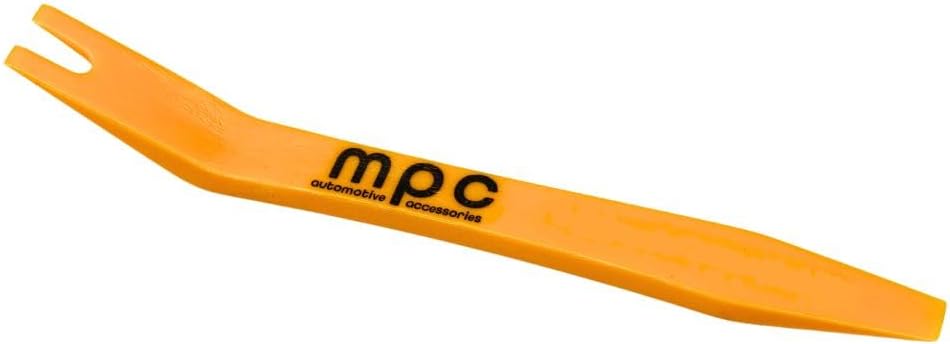
Image: An orange plastic trim removal tool, useful for safely detaching interior vehicle panels without causing damage.

Image: The remote start module and the T-harness, showing the main components of the kit.
Important: A person with basic knowledge of car electronics wiring should be able to install this product successfully. If you are unsure about any step, it is recommended to seek professional installation assistance.
Operating Instructions
The MPC Remote Start System allows you to start or stop your vehicle's engine from a distance using the provided 4-button 2-way remotes. Depending on your vehicle and data module configuration, additional functions like lock, unlock, trunk release, and AUX channel activation may also be available.
Remote Control Functions

Image: Two 4-button 2-way remote controls, showing buttons for lock, unlock, remote start, and auxiliary functions.
- Remote Start/Stop: Press the dedicated remote start button (often indicated by a circular arrow or 'Start' icon) on your 2-way remote. The vehicle will start and run for a pre-set duration (typically 15 minutes). To stop the engine remotely, press the same button again.
- Lock: Press the lock button (padlock closed icon) to lock the vehicle doors.
- Unlock: Press the unlock button (padlock open icon) to unlock the vehicle doors.
- Trunk Release: If configured, press and hold the trunk release button (often indicated by a trunk icon) to open the vehicle's trunk or rear hatch.
- AUX Channel: If configured, the AUX button can activate additional vehicle functions. Refer to your specific installation guide for details on AUX channel programming.
The 2-way remotes provide confirmation (e.g., light or sound) that the command has been received and executed by the vehicle.
Maintenance
The MPC Remote Start System is designed for reliable operation with minimal maintenance. Adhering to the following guidelines will help ensure its longevity:
- Remote Battery Replacement: The 2-way remotes are powered by small batteries. If the remote's range decreases significantly or it stops responding, replace the battery according to the instructions provided with the remote.
- Keep Components Dry: Ensure all remote start components, especially the main module and wiring connections, remain dry and free from moisture. Water damage can lead to system malfunction.
- Regular Vehicle Maintenance: Ensure your vehicle's battery and electrical system are in good working order. A weak vehicle battery can affect the performance of the remote start system.
- Avoid Physical Damage: Protect the remote controls from drops, impacts, and extreme temperatures.
Troubleshooting
If you encounter issues with your MPC Remote Start System, consider the following troubleshooting steps:
- System Not Responding:
- Check the remote control battery. Replace if necessary.
- Ensure you are within the operational range of the remote.
- Verify that the vehicle's doors, hood, and trunk are fully closed.
- Vehicle Does Not Start Remotely:
- Confirm the vehicle's gear selector is in Park.
- Check if the vehicle's battery is charged and healthy.
- Ensure all installation connections are secure and free from corrosion.
- Verify that the vehicle's factory immobilizer system is not interfering (this system is designed for vehicles with a factory immobilizer).
- Remote Range Issues:
- Replace the remote battery.
- Ensure there are no major obstructions (buildings, hills) between the remote and the vehicle.
- Avoid areas with high radio frequency interference.
- Lights or Horn Not Responding:
- Check relevant fuses in the vehicle.
- Verify wiring connections for these specific functions.
If these steps do not resolve the issue, please contact MPC Technical Support for further assistance.
Specifications
| Feature | Detail |
|---|---|
| Model Number | B-4818-437 |
| Item Weight | 3 pounds |
| Package Dimensions | 15.5 x 12 x 0.5 inches |
| Wireless Remote | Yes |
| Remote Control Included | Yes (2 x 4-Button 2-Way Remotes) |
| Remote Range | Up to 3,000 feet |
| UPC | 840056227262 |
| Date First Available | October 30, 2021 |
Warranty Information
The remote starters and alarms offered by MPC carry a limited lifetime warranty through the manufacturer. This warranty covers defects in workmanship and materials for a period of one year from the date of purchase for the original purchaser, under normal conditions of use.
Warranty Exclusions:
- Physical damage.
- Damage due to improper installation.
- Abuse or operation inconsistent with the product's design.
- Damage resulting from exposure to the elements.
Warranty Claim Process:
- Within the first year: Contact MPC for warranty issues. The product must be returned at the customer's expense for warranty service.
- After the first year: Warranty issues must be handled directly through the manufacturer. A receipt from the original purchase will be required.
If a defect is considered "under warranty," MPC will, at its option, repair or replace the product free of charge to the original purchaser. MPC is not liable for any installation charges, loss, or damage incurred in the replacement or repair of any warranted product.
Product specific warranty information will be included with the product packaging.
Technical Support
MPC provides technical support based in Tucson, AZ, USA. Several methods of support are available to assist you with installation or troubleshooting.
- QR Code Instructions: The product includes QR code instructions to ensure access to the most up-to-date information and installation guides.
- Direct Support: Contact MPC Technical Support for personalized assistance. Support hours are typically Monday - Friday, 9 AM - 5 PM (MST).

Image: A technical support representative wearing a headset, symbolizing available assistance for product users.
For the most efficient support, please have your product model number (B-4818-437) and vehicle information ready when contacting support.