
Introduction
Thank you for choosing the UrbanX Q63 Wireless Earbuds. This manual provides essential information for setting up, operating, and maintaining your earbuds to ensure optimal performance. The Q63 earbuds feature Bluetooth 5.3 connectivity, IPX7 waterproofing, touch controls, and an ergonomic design with ear hooks for a secure fit.
What's in the Box
- UrbanX Q63 Wireless Earbuds (Left and Right)
- Charging Case
- USB-C Charging Cable (not explicitly listed but implied for USB-C charging)
- Ear Tips (Multiple Sizes)

Image: UrbanX Q63 Wireless Earbuds placed inside their charging case, illustrating the product components.
Product Overview
Earbud Components and Controls
Each earbud is equipped with a multi-function button and an ergonomic ear hook for stability.

Image: Diagram showing the location of controls on the UrbanX Q63 earbuds, detailing functions for calls and music playback.
- Call/Hang Up: One click
- Reject Call: Twice click
- Play Music/Pause Music: One click
- Previous Song: Long press (2 seconds) on left earbud
- Next Song: Long press (2 seconds) on right earbud
- Power On: Long press (3 seconds)
- Power Off: Long press (5 seconds)
Charging Case LED Display
The charging case features a dual LED digital display to indicate battery levels.
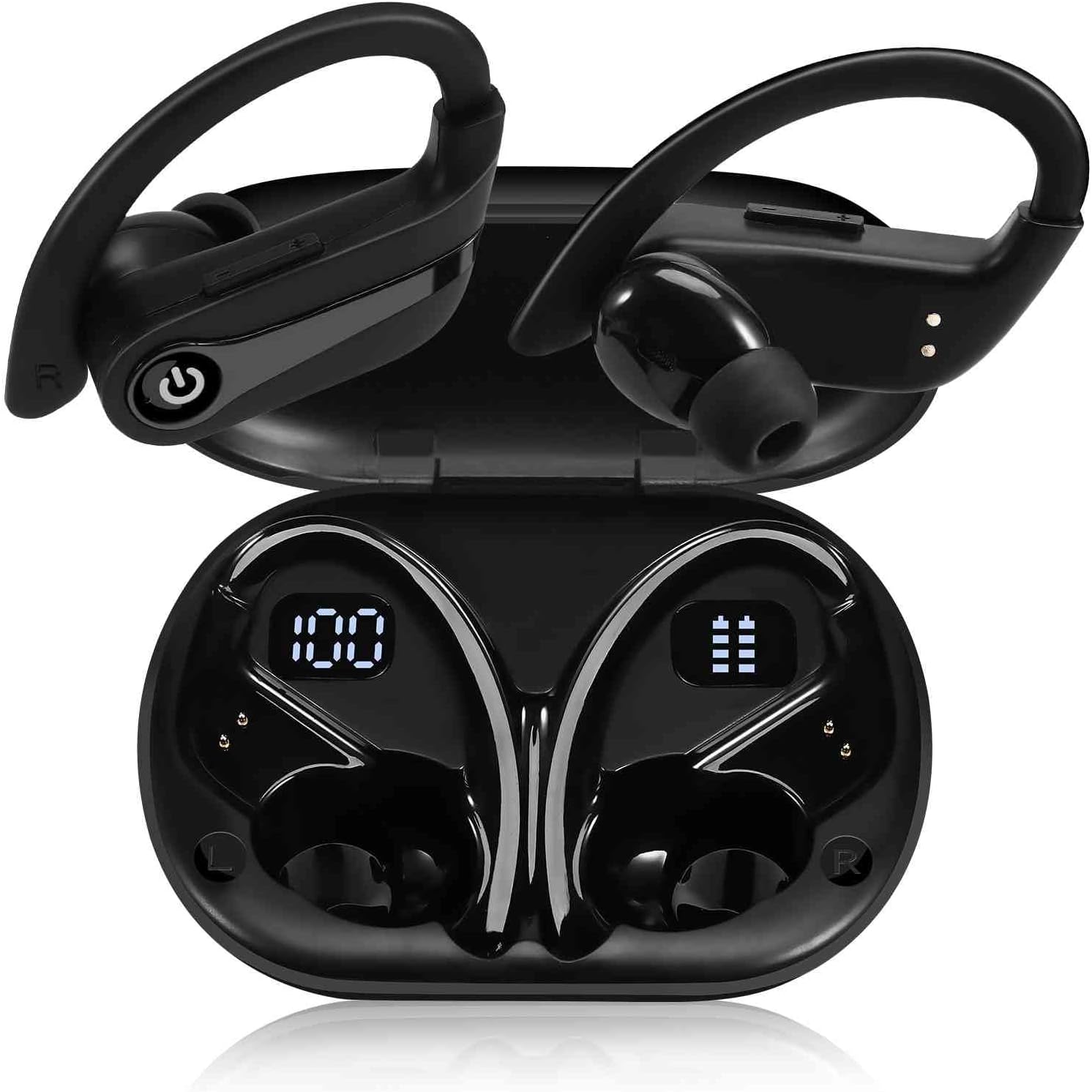
Image: The UrbanX Q63 charging case open, displaying digital readouts for both the charging case battery capacity and the individual earbud power levels.
- Charging Case Capacity: Displays the remaining battery percentage of the charging case.
- Earbud Power Display: Shows the individual battery level of each earbud.
Setup
1. Charging the Earbuds and Case
Before first use, fully charge the earbuds and the charging case.
- Charging the Earbuds: Place the earbuds into the charging case. They will begin charging automatically.
- Charging the Case: Connect the USB-C charging cable to the charging port on the case and to a power source. The LED display will show the charging progress. The case also supports wireless charging.
- Charging Time: Approximately 80 minutes for a full charge.

Image: The UrbanX Q63 charging case connected via a USB-C cable, indicating the charging process and highlighting the extended playback time.
2. Pairing with Your Device
The UrbanX Q63 earbuds feature one-step pairing for convenience.
- Ensure your device's Bluetooth is turned on.
- Open the charging case and take out both earbuds. They will automatically enter pairing mode.
- On your device, search for Bluetooth devices and select "YYK-Q63" from the list.
- Once connected, you will hear a confirmation tone, and the earbuds will be ready for use.

Image: A hand holding a smartphone displaying Bluetooth settings, with "YYK-Q63" visible in the list of available devices, demonstrating the one-step pairing process.
Operating Instructions
Music Playback
- Play/Pause: One click on either earbud.
- Next Track: Long press the right earbud for 2 seconds.
- Previous Track: Long press the left earbud for 2 seconds.
Call Management
- Answer/End Call: One click on either earbud.
- Reject Call: Double click on either earbud.
Power On/Off
- Power On: Long press the earbud button for 3 seconds.
- Power Off: Long press the earbud button for 5 seconds.

Image: A person wearing UrbanX Q63 earbuds, illustrating comfortable use during music listening.
Maintenance
Cleaning
- Gently wipe the earbuds and charging case with a soft, dry, lint-free cloth.
- Do not use harsh chemicals, cleaning solvents, or strong detergents.
- Clean the ear tips regularly with a damp cloth and mild soap, then dry thoroughly before reattaching.
Storage
- Always store the earbuds in their charging case when not in use to protect them and keep them charged.
- Store in a cool, dry place away from extreme temperatures and direct sunlight.
Water Resistance
The earbuds are IPX7 waterproof, meaning they are protected against immersion in water up to 1 meter for up to 30 minutes. They are suitable for workouts and light rain. However, they are not designed for swimming or prolonged submersion. Ensure earbuds are dry before placing them back in the charging case to prevent damage.
Troubleshooting
- Earbuds not pairing: Ensure both earbuds are out of the case and fully charged. Turn off and on your device's Bluetooth, then try pairing again.
- Only one earbud working: Place both earbuds back into the charging case, close the lid, wait a few seconds, then take them out again to re-establish the connection.
- No sound: Check the volume level on your connected device. Ensure the earbuds are properly paired and selected as the audio output.
- Charging issues: Verify the charging cable is securely connected to both the case and the power source. Ensure the charging contacts on the earbuds and inside the case are clean and free of debris.
Specifications
| Feature | Specification |
|---|---|
| Model Name | Q63 (TWS530) |
| Brand | UrbanX |
| Connectivity Technology | Wireless (Bluetooth 5.3) |
| Bluetooth Range | Up to 18.29 meters (60 feet) |
| Earbud Playtime (Single Charge) | Up to 20 Hours |
| Total Playtime (with Charging Case) | Up to 200 Hours |
| Charging Time | Approximately 80 minutes |
| Water Resistance Level | IPX7 (Waterproof) |
| Noise Control | Active Noise Cancellation, CVC Noise Reduction (for calls) |
| Audio Driver Type | Dynamic Driver (13mm speakers) |
| Control Method | Touch/Button Control |
| Compatible Devices | Mobile Phone, Tablet, Laptop, Smartphone, Home and other Bluetooth enabled devices |
| Item Weight | 6.3 ounces |
| Product Dimensions | 3 x 2 x 2 inches |
| Included Components | Charging Case |
Warranty and Support
For warranty information, please refer to the documentation provided with your purchase or contact the retailer. Specific warranty terms may vary by region and point of purchase.
If you encounter any issues or require further assistance, please contact the seller or visit the official UrbanX store on Amazon for support and additional product information. You can typically find seller contact details on your order page.
Visit the UrbanX Store: UrbanX Amazon Store