
1. Introduction
This manual provides essential instructions for the safe and effective use of your Phonak Charge & Care Charging Station. This device is designed to charge and dry compatible Phonak hearing aids simultaneously, ensuring optimal performance and longevity. Please read this manual thoroughly before operating the device and retain it for future reference.
2. Package Contents
Verify that all items listed below are included in your package:
- 1 x Phonak Charge & Care Charging Station
- 1 x Power Cable
- 1 x User Manual (this document)
3. Product Overview
The Phonak Charge & Care Charging Station is a compact unit designed for the daily care of your Phonak hearing aids. It features two charging slots and an integrated drying function utilizing UV-C light and circulating air.
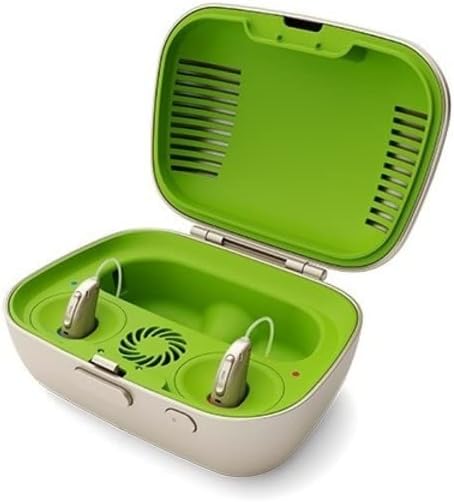
Figure 1: Phonak Charge & Care Charging Station with the lid open, illustrating the charging compartments and drying vents. Two hearing aids are shown placed inside.

Figure 2: Phonak Charge & Care Charging Station with the lid closed, showcasing its portable and discreet design.
4. Compatibility
This charging station is specifically designed for use with the following Phonak hearing aid models:
- Phonak Audeo P-R
- Phonak Audeo P-RT
- Phonak Audeo M-R
- Phonak Audeo M-RT
Important: This device is not compatible with the following models:
- Phonak Bolero M-PR
- Phonak Sky M-PR
Ensure your hearing aid model is listed under compatible devices to prevent damage or improper function.
5. Setup
- Unpack: Carefully remove the charging station and all accessories from the packaging.
- Placement: Place the charging station on a stable, flat surface away from direct sunlight, heat sources, and moisture. Ensure adequate ventilation around the device.
- Connect Power: Insert the power cable into the charging station's power input port. Plug the other end of the power cable into a standard electrical outlet.
- Initial Check: Once connected, the charging station may show an indicator light, signifying it is ready for use. Refer to the operating section for indicator light meanings.
6. Operating Instructions
6.1 Charging Your Hearing Aids
- Open the Lid: Gently open the lid of the Phonak Charge & Care station.
- Insert Hearing Aids: Place your compatible Phonak hearing aids into the designated charging compartments. Ensure they are correctly seated and make proper contact with the charging pins. The charging process will start automatically.
- Close the Lid: Close the lid to initiate the drying cycle (if enabled) and protect the hearing aids during charging.
- Charging Indicators: Observe the indicator lights on the charging station. Typically, a solid light indicates charging, and a different light or no light indicates a full charge. Refer to the device's specific light patterns for detailed information.
- Remove Hearing Aids: Once fully charged, carefully remove your hearing aids from the compartments.
6.2 Using the Drying Function
The Phonak Charge & Care station features an integrated drying function that uses UV-C light and circulating air to remove moisture and sanitize your hearing aids.
- The drying process typically starts automatically when hearing aids are placed in the charger and the lid is closed.
- You can independently activate or deactivate the cleaning/drying process at the touch of a button, if desired. Consult the specific button on your device for this function.
- The UV-C light operates during the drying cycle. Avoid looking directly at the UV-C light.
7. Maintenance and Care
- Cleaning the Station: Wipe the exterior of the charging station with a clean, dry, soft cloth. Do not use water, cleaning solvents, or abrasive materials.
- Cleaning Charging Slots: Periodically inspect the charging contacts within the slots for any debris. Use a dry cotton swab or a soft brush to gently clean them if necessary. Ensure the device is unplugged before cleaning.
- Storage: When not in use for extended periods, unplug the charging station and store it in a cool, dry place.
8. Troubleshooting
If you encounter issues with your Phonak Charge & Care Charging Station, refer to the table below for common problems and solutions.
| Problem | Possible Cause | Solution |
|---|---|---|
| Hearing aids not charging. |
|
|
| Drying function not active. |
|
|
| Indicator lights not working. |
|
|
If the issue is not resolved by the above steps, please contact Phonak customer support for further assistance.
9. Specifications
- Model: Phonak Charge & Care
- Manufacturer: Phonak
- Function: Charging and Drying (UV-C light and circulating air)
- Compatibility: Phonak Audeo P-R, P-RT, M-R, M-RT
- ASIN: B09KNN35ZG
10. Warranty and Support
For information regarding the warranty of your Phonak Charge & Care Charging Station, please refer to the warranty card included with your product or visit the official Phonak website.
For technical support, troubleshooting assistance beyond this manual, or to inquire about service, please contact your authorized Phonak dealer or visit the Phonak support portal online.


