
LASTAR CM008
LASTAR LED Desk Lamp User Manual
Model: CM008
Brand: LASTAR
1. Introduction
Thank you for purchasing the LASTAR LED Desk Lamp. This manual provides important information regarding the setup, operation, maintenance, and troubleshooting of your new desk lamp. Please read this manual thoroughly before use to ensure proper function and safety.

Figure 1: LASTAR LED Desk Lamp with integrated wireless charging pad and USB port.
2. Safety Instructions
To prevent injury or damage, please observe the following safety precautions:
- Ensure the power adapter is compatible with your local power supply (100-240V AC, 50/60Hz).
- Do not disassemble, repair, or modify the lamp yourself. Contact qualified service personnel for assistance.
- Avoid looking directly into the LED light source for extended periods to prevent eye strain.
- Keep the lamp away from water or other liquids. Do not operate in wet environments.
- Place the lamp on a stable, flat surface to prevent it from tipping over.
- Do not place metallic objects or magnetic cards on the wireless charging pad, as this may interfere with charging or damage the device.
- Unplug the lamp from the power outlet before cleaning or when not in use for a long period.
3. Product Features
The LASTAR LED Desk Lamp is designed with advanced features for optimal lighting and convenience:
- Eye-Protection Technology: Flicker-free illumination that reduces eye discomfort and fatigue by minimizing contrast between the illuminated area and surroundings.
- Adjustable Lighting: Features 5 color modes (ranging from 2700K to 6500K) and 5 adjustable brightness levels, allowing for customized illumination for various activities.
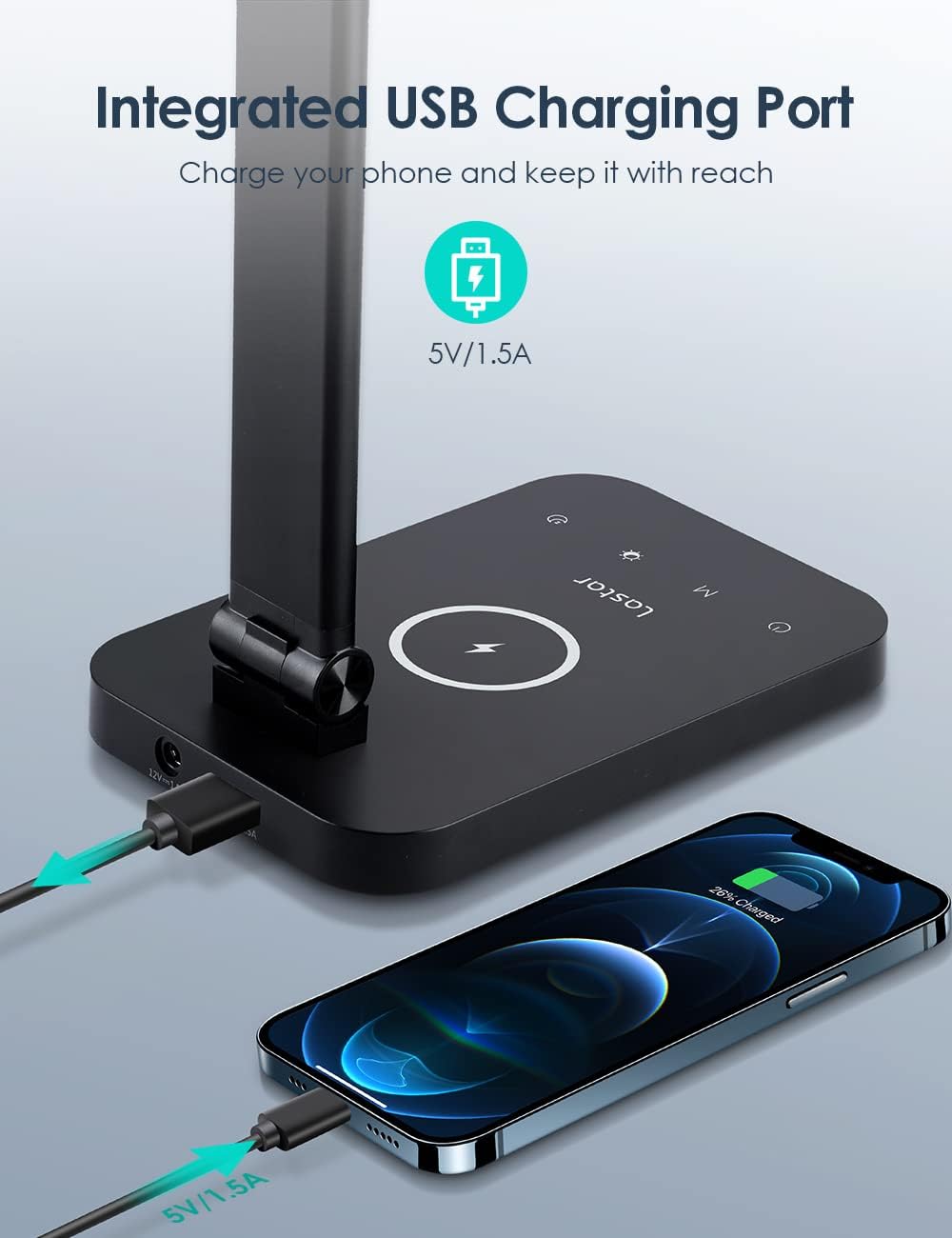
- Integrated Charging: Equipped with a 10W wireless charging pad and a 5V/1A USB charging port for convenient device charging. Note: Wireless and USB charging cannot be used simultaneously.
- Memory Function: The lamp automatically remembers the last selected color mode and brightness setting, restoring them upon next power-on.
- Durable Construction: Made from premium metal and aluminum for enhanced durability and efficient heat dissipation, ensuring a long lifespan of up to 50,000 hours.
- Flexible Design: The lamp arm is adjustable, allowing for 180-degree and 90-degree articulation to direct light precisely where needed.



4. Setup Guide
- Unpack: Carefully remove all components from the packaging. Ensure you have the LED Desk Lamp, Power Adapter, and User Manual.
- Placement: Place the lamp on a stable, flat, and dry surface, such as a desk or table.
- Connect Power: Insert the power adapter cable into the DC input port located at the back of the lamp base.
- Plug In: Plug the power adapter into a standard electrical outlet.
- Adjust Position: Gently adjust the lamp arm to your desired angle and height.

Figure 2: Power connector (12V/1A) and USB charging port (5V/1A) on the lamp base.
5. Operating Instructions
The LASTAR LED Desk Lamp features intuitive touch controls on its base:

Figure 3: Touch control panel on the lamp base.
- Power On/Off: Touch the Power button to turn the lamp on or off.
- Adjust Brightness: Touch the Brightness control (often represented by a sun icon or a slider) to cycle through 5 brightness levels.
- Change Color Mode: Touch the Color Mode button (often represented by an 'M' or color temperature icon) to switch between 5 color temperature modes (e.g., Nightlight, Relaxation, Reading, Study).
- Wireless Charging: Place your Qi-compatible smartphone or device on the wireless charging pad located on the lamp base. Ensure the device is centered for optimal charging.
- USB Charging: Connect your device to the USB charging port using a compatible USB cable.
Lighting Modes:
- Nightlight Mode (2500K-3300K): Provides comfortable soft lighting, ideal for promoting sleep.
- Relaxation Mode (2500K-3300K): Promotes relaxation and improves mood with a low range of color temperatures.
- Reading Mode (4300K-5300K): Mid-range color temperature light to enhance focus during reading.
- Study Mode (6000K-6500K): High-range color temperature to improve concentration and focus for studying.
6. Maintenance
Proper maintenance ensures the longevity and optimal performance of your LASTAR LED Desk Lamp:
- Cleaning: Before cleaning, always unplug the lamp from the power outlet. Use a soft, dry cloth to wipe the lamp's surface. Do not use abrasive cleaners, solvents, or harsh chemicals, as they may damage the finish.
- Storage: If storing the lamp for an extended period, unplug it and store it in a cool, dry place, away from direct sunlight and extreme temperatures.
- Handling: Avoid dropping the lamp or subjecting it to strong impacts, which can damage internal components or the external structure.
7. Troubleshooting
If you encounter issues with your LASTAR LED Desk Lamp, refer to the following common problems and solutions:
| Problem | Possible Cause | Solution |
|---|---|---|
| Lamp does not turn on. | Power adapter not properly connected or power outlet is not working. | Ensure the power adapter is securely plugged into both the lamp and a working electrical outlet. Test the outlet with another device. |
| Wireless charging is not working. | Device not Qi-compatible, not properly aligned, or metallic objects on pad. USB charging is active. | Ensure your device supports Qi wireless charging. Reposition the device on the charging pad. Remove any metallic objects. Disconnect any device from the USB charging port. |
| USB charging is not working. | USB cable is faulty, device is not compatible, or wireless charging is active. | Try a different USB cable. Ensure your device is compatible with 5V/1A charging. Ensure no device is on the wireless charging pad. |
| Light flickers or is unstable. | Unstable power supply or internal issue. | Try plugging the lamp into a different power outlet. If the problem persists, contact customer support. |
| Touch controls are unresponsive. | Temporary software glitch or dirty control surface. | Unplug the lamp for 30 seconds, then plug it back in. Clean the touch control surface with a soft, dry cloth. |
If the problem persists after trying these solutions, please contact LASTAR customer support for further assistance.
8. Specifications
| Feature | Detail |
|---|---|
| Brand | LASTAR |
| Model Number | CM008 |
| Light Source Type | LED (44 LED beads) |
| Power Input | 12W (max) |
| Luminous Flux | 600 lm |
| Color Temperature | 2700K-6500K (5 modes) |
| Color Rendering Index (CRI) | >90 |
| Wireless Charging Output | 10W |
| USB Charging Output | 5V/1A |
| Material | Metal, Acrylonitrile Butadiene Styrene (ABS) |
| Product Dimensions (D x W x H) | 4.53" x 6.97" x 15.51" |
| Item Weight | 2.37 pounds |
| Average Lifespan | 50,000 Hours |
| Control Method | Touch |
9. Warranty and Support
For warranty information or technical support, please refer to the warranty card included with your product or visit the official LASTAR website. You may also contact LASTAR customer service directly for assistance with product issues or inquiries.
Manufacturer: LASTAR
Date First Available: December 5, 2021
For the latest support information, please visit: LASTAR Official Store on Amazon
Related documentsCM008


Ask a question about this manual
Ask about setup, troubleshooting, compatibility, parts, safety, or missing instructions. Manuals+ will review the question and use this page’s manual context to help answer it.