
Important Safety Instructions
Read all instructions before operating this appliance. Failure to follow these instructions may result in electric shock, fire, or serious injury.
- Always unplug the air purifier before moving, cleaning, or performing any maintenance.
- Do not operate the unit if the power cord or plug is damaged.
- Keep the power cord away from heated surfaces.
- Do not use the air purifier in wet or damp environments.
- Ensure the air intake and outlet are not blocked.
- This appliance is not intended for use by persons (including children) with reduced physical, sensory, or mental capabilities, or lack of experience and knowledge, unless they have been given supervision or instruction concerning use of the appliance by a person responsible for their safety.
- Children should be supervised to ensure that they do not play with the appliance.
- Only use Medify Air replacement filters.
Product Overview
The Medify MA-45 is a high-performance air purifier designed to improve indoor air quality. It features a True HEPA H13 filter system and UV light for enhanced purification. The unit can be used freestanding or wall-mounted.

Figure 1: Front view of the Medify MA-45 Air Purifier.
Key Features:
- True HEPA H13 Filtration: Captures 99.9% of particles down to 0.1 microns, including allergens, dust, pollen, pet dander, and smoke.
- UV Light: Provides an additional layer of air purification.
- Coverage: Cleans up to 1,544 sq ft in one hour, or 772 sq ft in 30 minutes (CADR 350).
- Quiet Operation: Features 4 fan speeds, with a low noise level of 66dB at maximum setting.
- Flexible Placement: Designed for both wall mounting and floor placement.
- User-Friendly Controls: Includes a touch control panel and a remote control.
- Additional Functions: Timer, Sleep Mode, Filter Indicator Reset, Child Lock.
Package Contents
Verify that all items are present in the package:
- Medify MA-45 Air Purifier Unit
- True HEPA H13 Filter (pre-installed or separate)
- Remote Control
- Wall Mounting Accessories (screws, anchors)
- User Manual
Setup
1. Unpacking and Initial Placement
Carefully remove the air purifier from its packaging. Choose a suitable location for the unit, either on the floor or a sturdy surface, or prepare for wall mounting.

Figure 2: The Medify MA-45 Air Purifier can be wall-mounted to save space. Dimensions are approximately 19.8 inches (50.2 cm) in height.
2. Filter Installation
The MA-45 uses a 3-stage True HEPA H13 filter system. Ensure the filter is correctly installed before operation.
- Open the front cover of the air purifier.
- Remove any plastic packaging from the filter.
- Insert the filter into the unit, ensuring it is seated properly.
- Close the front cover securely.

Figure 3: Internal view showing the filter and fan for the clean air cycle.

Figure 4: The 3-stage filter system includes a pre-filter, H13 HEPA filter, and activated carbon filter.
3. Wall Mounting (Optional)
Wall mounting accessories are included for convenient placement. Follow these steps for secure installation:
- Select a suitable wall location, ensuring it is near a power outlet and away from obstructions.
- Use the provided template (if included) to mark drilling points for the mounting bracket.
- Drill pilot holes and insert wall anchors if necessary.
- Secure the mounting bracket to the wall using the provided screws.
- Carefully hang the air purifier onto the mounting bracket.
- Ensure the unit is stable and level before plugging it in.
Figure 5: The air purifier can be securely mounted on a wall using the included accessories.
Operation
The Medify MA-45 can be operated using the touch control panel on the unit or the included remote control.
Control Panel and Remote Functions:

Figure 6: Remote control with buttons for On/Off, Fan Speed, UV Light, Timer, Dimmer, and Filter Indicator Reset.
- Power Button (⏻): Turns the unit On or Off.
- Fan Speed Button (⌺): Cycles through 4 fan speeds (P1, P2, P3, P4).
- UV Light Button (UV): Activates or deactivates the UV light function.
- Timer Button (⏱): Sets the operating timer (e.g., 0-12 hours).
- Dimmer/Sleep Mode Button (☽): Dims the display lights and activates sleep mode for quiet operation.
- Filter Indicator Reset Button (▤): Resets the filter replacement indicator after a new filter is installed.
Fan Speed Adjustment:
Press the Fan Speed button to select your desired airflow. P1 is the lowest and quietest setting, while P4 provides maximum purification power.

Figure 7: The unit offers multiple fan speeds and a sleep mode for quiet operation, with a maximum noise level of 66dB.
UV Light Function:
The UV light function can be turned on or off independently. It provides an additional layer of air purification.
Timer Function:
Use the Timer button to set the air purifier to operate for a specific duration, after which it will automatically turn off.
Sleep Mode:
Activate Sleep Mode to dim the display lights and reduce the fan speed to the quietest setting, ideal for nighttime use.
Child Lock:
The unit features a child lock to prevent accidental changes to settings. Refer to the specific instructions on the unit or remote for activation/deactivation.
Official Product Video:
Video 1: Official product overview of the Medify Air MA-45 Air Purifier, demonstrating its features and usage.
Maintenance
Filter Replacement:
The True HEPA H13 filter should be replaced approximately every 2,500 hours or 3-4 months, depending on usage and air quality. The filter indicator light will illuminate when replacement is due.
- Unplug the air purifier from the power outlet.
- Open the front cover of the unit.
- Remove the old filter and dispose of it properly.
- Unpack the new Medify Air replacement filter.
- Insert the new filter into the unit, ensuring it is correctly oriented and seated.
- Close the front cover securely.
- Plug in the air purifier.
- Press and hold the Filter Indicator Reset button on the control panel or remote until the indicator light turns off.
Cleaning the Unit:
Wipe the exterior of the air purifier with a soft, dry cloth. Do not use abrasive cleaners or solvents. Ensure the unit is unplugged before cleaning.
Troubleshooting
| Problem | Possible Cause | Solution |
|---|---|---|
| Unit does not turn on. | Not plugged in; power outlet malfunction; power button not pressed. | Ensure the power cord is securely plugged into a working outlet. Press the power button. |
| Reduced airflow or unusual noise. | Clogged filter; obstructions in air intake/outlet. | Check and replace the filter if necessary. Ensure air intake/outlet are clear. |
| Filter indicator light remains on after replacement. | Filter reset not performed. | Press and hold the Filter Indicator Reset button until the light turns off. |
| UV light not working. | UV function is off. | Press the UV Light button to activate the UV function. |
Specifications
- Model: MA-45
- Dimensions (H x W x D): 20" x 11.8" x 20" (approximate, for floor placement)
- Weight: 20.7 pounds
- Coverage Area: 1,544 sq ft (1 hour), 772 sq ft (30 minutes)
- CADR: 350
- Filter Type: True HEPA H13 (3-stage filtration with pre-filter, HEPA, and activated carbon)
- Particle Retention Size: 0.1 microns
- Noise Level: Max 66 Decibels
- Wattage: 55 watts
- Power Source: Plug In (120 Volts)
- Control Method: Touch, Remote Control
- Certifications: CARB Certified, ETL Certified, Energy Star certified
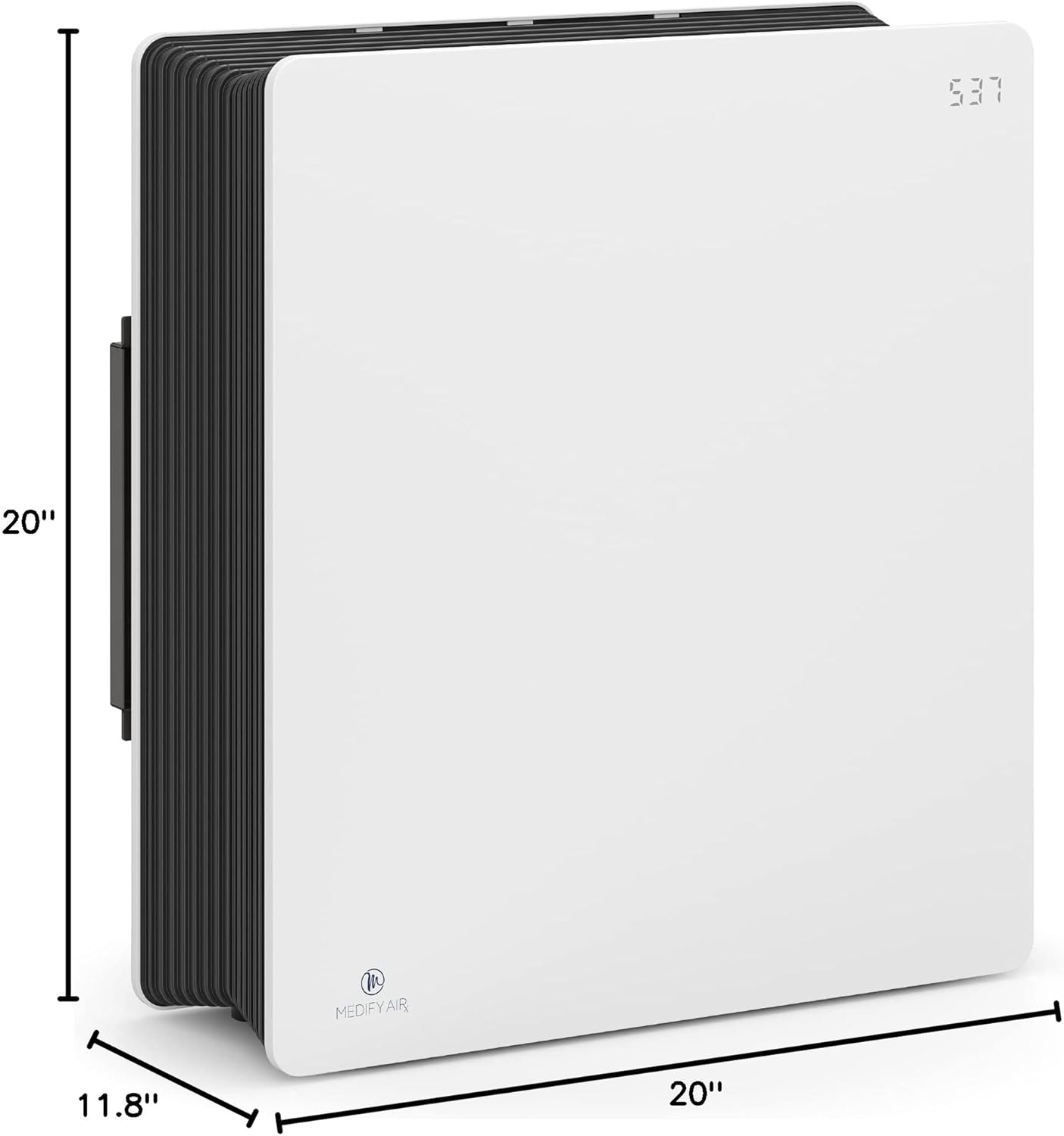
Figure 8: Dimensions of the Medify MA-45 Air Purifier.
Warranty and Support
The Medify MA-45 Air Purifier is backed by a US registered Lifetime Warranty. For warranty claims, technical support, or replacement parts, please contact Medify Air customer service. Keep your proof of purchase for warranty validation.
Contact Information: Refer to the official Medify Air website or the product packaging for the most current contact details.


