
1. Introduction
This manual provides detailed instructions for the safe and effective operation of your EVTSCAN Grain Moisture Meter. This device is designed for accurately measuring the moisture and humidity content of 24 different types of grains, including corn, paddy, and wheat. Please read this manual thoroughly before use and retain it for future reference.
2. Product Overview
2.1. Package Contents
- Grain Moisture Tester Unit
- Funnel
- Scraper Funnel
- Sampling Tube
- Switch Blanking Barrel
- User Manual (this document)
- Power Cord (US Plug 100-240V)
- Weight
- Cleaning Brush
2.2. Key Features
- Detection for 24 types of grains.
- Special metal sensor for rapid 2-second test results.
- Direct display of test data on a low power consumption LCD.
- Touch button interface for convenient operation.
- Dual AC and DC power supply capability.
- Automatic weighing and temperature compensation.
- Temperature display in °C or °F.
- Smart touch panel and chip technology for touch-to-start operation.
- Multi-point calibration for error correction.
- Intelligent sleep function.
- Automatic calculation of average moisture content and capacity conversion.

Figure 1: EVTSCAN Grain Moisture Meter with included accessories. This image shows the main tester unit, funnel, scraper funnel, sampling tube, cleaning brush, and a weight, providing a complete view of the product and its components.

Figure 2: Annotated diagram highlighting key features of the EVTSCAN Grain Moisture Meter, including automatic weighing, temperature compensation, touch panel, low power consumption LCD, smart sleep, moisture average value, capacity conversion, AC/DC power supply, and multi-point calibration.
3. Setup
3.1. Power Supply
The EVTSCAN Grain Moisture Meter can be powered by two methods:
- Battery Power: Insert 4 x AA dry batteries (not included) into the battery compartment located on the underside of the unit. Ensure correct polarity. This method is convenient for outdoor use.
- AC Power: Connect the provided US Plug 100-240V power cord to the AC input port on the side of the unit and plug it into a suitable power outlet. This method is convenient for indoor use.
Note: The two power supply methods cannot be used simultaneously. Disconnect the AC adapter when using battery power, and remove batteries if storing the unit for extended periods or when using AC power.

Figure 3: Close-up view of the external power supply ports on the EVTSCAN Grain Moisture Meter, showing the AC adapter input and a USB port (for potential data transfer or alternative power, though not explicitly detailed in product description).
3.2. Initial Assembly
Attach the funnel to the top opening of the main tester unit. The scraper funnel and sampling tube are used for preparing grain samples.

Figure 4: Schematic diagram illustrating the blanking barrel assembly with its funnel, material gate, and blanking switch, alongside the volumetric sampler (scraper funnel). These components are crucial for accurate sample preparation.
4. Operating Instructions
4.1. Powering On/Off
To power on the device, simply touch the "ON/OFF" button on the control panel. The smart chip technology allows for a touch-to-start operation without requiring a hard press. To power off, touch the "ON/OFF" button again. The device features an intelligent sleep function to conserve power during periods of inactivity.
4.2. Selecting Grain Type
Press the "Species" button to cycle through the 24 available grain types. Use the up and down arrow buttons to navigate and select the specific grain you are testing (e.g., Corn, Paddy, Wheat). The selected grain type will be displayed on the LCD screen.
4.3. Taking a Measurement
- Ensure the device is on and the correct grain type is selected.
- Carefully pour the grain sample into the funnel at the top of the unit. Use the scraper funnel and sampling tube to ensure a consistent and appropriate sample volume.
- The device will automatically weigh the sample and initiate the measurement process.
- Within approximately 2 seconds, the moisture content percentage and temperature will be displayed on the LCD screen.
- Press the "OK" button to confirm or proceed.

Figure 5: Close-up of the EVTSCAN Grain Moisture Meter's smart touch panel, showing the LCD display with a moisture reading (0.0%), "Species" button, navigation arrows, and "ON/OFF" and "OK" buttons. This panel allows for easy interaction and reading of results.
4.4. Temperature Display
The device can display the grain temperature in either degrees Celsius (°C) or Fahrenheit (°F). Refer to the on-screen indicators or specific menu options (if available) to switch between these units.
4.5. Advanced Functions
- Average Moisture Content: The meter automatically calculates and displays the average moisture content over multiple readings, providing a more representative result.
- Capacity Conversion: The device can perform capacity conversions, which may be useful for specific agricultural applications.
- Multi-point Calibration: For enhanced accuracy, the meter supports multi-point calibration. Consult the device's on-screen menu or specific instructions for performing calibration if required.
5. Maintenance
5.1. Cleaning
After each use, especially when testing different grain types, use the provided cleaning brush to remove any residual grain particles from the funnel, sampling chamber, and sensor area. This prevents cross-contamination and ensures accurate readings. Do not use abrasive cleaners or immerse the unit in water.
5.2. Storage
Store the EVTSCAN Grain Moisture Meter in a cool, dry place away from direct sunlight and extreme temperatures. If storing for an extended period, remove the AA batteries to prevent leakage.
6. Troubleshooting
| Problem | Possible Cause | Solution |
|---|---|---|
| Device does not power on. |
|
|
| Inaccurate or inconsistent readings. |
|
|
| LCD display is dim or blank. |
|
|
7. Specifications
- Model: EVTSCANcb7mg4pz58
- Brand: EVTSCAN
- Item Weight: 1.66 Kilograms
- Power Supply: 4 x AA Dry Battery (not included) or US Plug 100-240V AC Adapter
- Grain Types: 24 (e.g., Corn, Paddy, Wheat)
- Measurement Time: Approximately 2 seconds
- Display: Low Power Consumption LCD
- Temperature Display: °C / °F
- ASIN: B09KM55P3P
- Date First Available: October 28, 2021
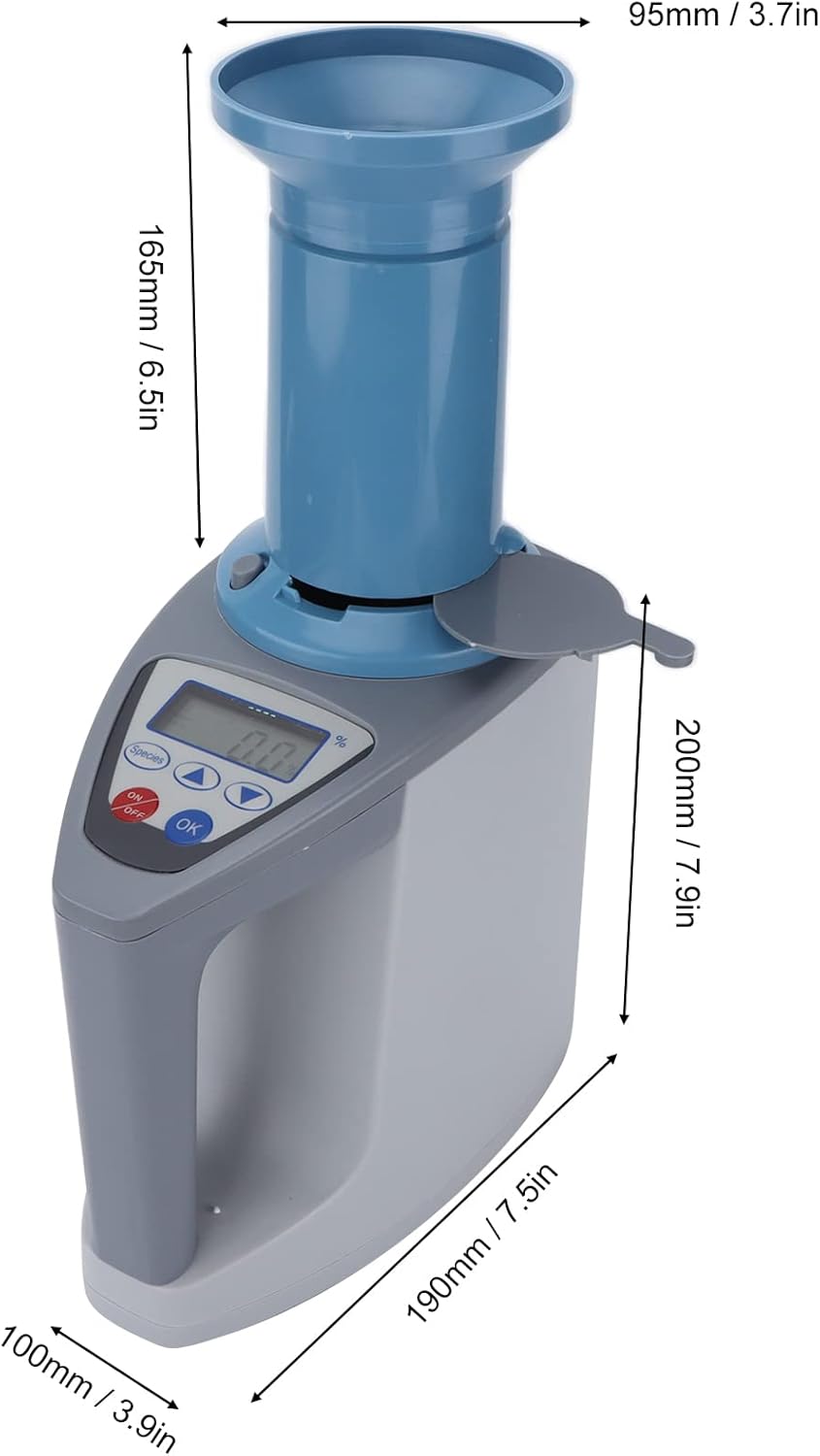
Figure 6: Diagram illustrating the dimensions of the EVTSCAN Grain Moisture Meter, including height, width, and depth measurements for the main unit and funnel assembly.
8. Warranty and Support
For warranty information or technical support, please contact your retailer or the manufacturer directly. Retain your proof of purchase for any warranty claims.
Manufacturer: EVTSCAN