
1. Introduction
This manual provides essential information for the safe operation, maintenance, and troubleshooting of your Denver SEL-80140 Electric Scooter. Please read this manual thoroughly before first use to ensure proper handling and to prevent damage or injury. Keep this manual for future reference.
The Denver SEL-80140 is an electric scooter featuring a 300W motor, an aluminum frame, and 8-inch wheels. It is designed for urban commuting and recreational use, offering a maximum speed of 20 km/h and a range of up to 12 km per charge. It includes front and rear lights, and a bell for enhanced safety.
2. Safety Instructions
Your safety is paramount. Always adhere to the following safety guidelines:
- Always wear a helmet and appropriate protective gear (knee pads, elbow pads) when riding.
- Do not ride in heavy rain or through puddles deeper than 2 cm, as the scooter is resistant to water splashes but not fully submersible.
- Ensure all screws and quick releases are securely tightened before each ride.
- Do not exceed the maximum weight capacity of 100 kg.
- Observe local traffic laws and regulations. Riding on public roads may be restricted in some areas.
- Avoid riding on slippery surfaces, steep inclines, or uneven terrain.
- Maintain a safe distance from other vehicles and pedestrians.
- Do not perform stunts or sudden maneuvers.
- Children should only operate the scooter under adult supervision. The recommended age is adult.
- Do not use the scooter if the battery is damaged or leaking.
- Charge the scooter only with the provided charger in a well-ventilated area.
3. Package Contents
Upon unpacking, please verify that all items are present and in good condition:
- Denver SEL-80140 Electric Scooter
- Instruction Manual
- Power Adapter/Charger
4. Setup
4.1 Unfolding the Scooter
- Place the scooter on a flat surface.
- Locate the folding mechanism near the base of the handlebar stem.
- Release the locking latch and carefully lift the handlebar stem until it clicks into the upright position.
- Secure the locking mechanism firmly to prevent accidental folding during operation.
- Ensure the handlebars are properly aligned and secured.
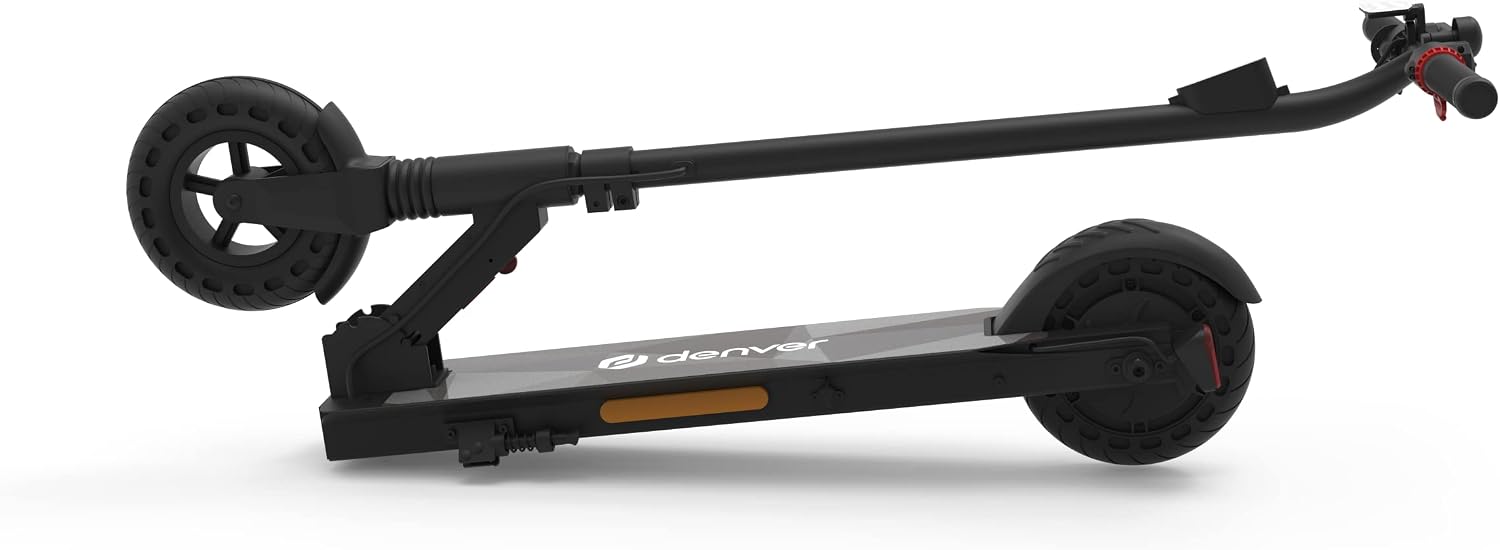
Figure 4.1: The Denver SEL-80140 Electric Scooter shown in its folded configuration, highlighting its compact design for storage and transport.
4.2 Initial Charging
Before first use, fully charge the scooter's battery.
- Locate the charging port, usually on the side of the deck.
- Connect the charger to the scooter's charging port.
- Plug the charger into a standard wall outlet.
- The charging indicator light on the charger will typically turn red during charging and green when fully charged.
- Charging time is approximately 2-3 hours for a full charge. Do not overcharge.
5. Operating Instructions
5.1 Power On/Off
- To power on: Press and hold the power button on the handlebar for a few seconds until the LED display illuminates.
- To power off: Press and hold the power button again until the display turns off.

Figure 5.1: Front view of the Denver SEL-80140 Electric Scooter, showing the handlebar, LED display, and front headlight. The display provides information on speed, distance, battery capacity, and selected gear.
5.2 Riding the Scooter
- Place one foot firmly on the deck and use the other foot to push off the ground to gain initial momentum.
- Once you have some speed, gently press the accelerator lever (throttle) on the handlebar.
- Place your second foot on the deck.
- To adjust speed, vary the pressure on the accelerator.
5.3 Braking
The scooter features both an electric front brake and a manual rear brake.
- Electric Front Brake: Located on the handlebar, typically a lever. Squeeze gently to engage the electric brake on the front wheel.
- Manual Rear Brake: Operated by pressing down on the rear fender with your foot. This acts as a friction brake on the rear wheel.
- For optimal braking, use both brakes simultaneously and apply pressure gradually.

Figure 5.2: Rear view of the Denver SEL-80140 Electric Scooter, showing the rear fender brake and the red LED taillight, which also includes reflectors.
5.4 LED Display and Controls
The integrated LED display provides real-time information:
- Speed: Current riding speed.
- Distance: Total distance traveled or trip distance (check manual for specific modes).
- Battery Capacity: Indication of remaining battery charge.
- Gear/Mode: Displays the currently selected speed mode (if applicable).
The scooter also features LED lights and reflectors for visibility, and a bell for alerting others.
6. Maintenance
6.1 Cleaning
Clean the scooter regularly with a damp cloth. Do not use high-pressure water jets or corrosive cleaning agents. Ensure the charging port cover is closed when cleaning.
6.2 Battery Care
- Charge the battery fully after each use, especially if storing for an extended period.
- If storing for a long time, charge the battery to about 50-70% every 2-3 months to prolong its lifespan.
- Do not expose the battery to extreme temperatures.
6.3 Tire and Brake Inspection
- Regularly inspect the 8-inch solid rubber wheels for wear or damage.
- Check the functionality of both the electric front brake and the manual rear brake before each ride. Ensure they respond effectively.

Figure 6.1: Side view of the Denver SEL-80140 Electric Scooter, illustrating the 8-inch solid rubber wheels and the overall aluminum frame structure.
6.4 Storage
Store the scooter in a cool, dry place away from direct sunlight and extreme temperatures. If storing for an extended period, ensure the battery is partially charged (as per 6.2).
7. Troubleshooting
| Problem | Possible Cause | Solution |
|---|---|---|
| Scooter does not power on. | Low or depleted battery. Power button not pressed correctly. Internal fault. | Charge the battery fully. Press and hold the power button firmly. Contact customer support if issue persists. |
| Short riding range. | Battery not fully charged. Riding uphill frequently. Heavy load. Low ambient temperature. | Ensure full charge before use. Avoid continuous uphill riding. Reduce load if possible. Battery performance may decrease in cold weather. |
| Brakes not effective. | Brake mechanism wear or adjustment needed. | Inspect brake levers and cables. Refer to the full manual for brake adjustment or contact service. |
| Unusual noises during operation. | Loose components. Debris in wheels. Motor issue. | Check all screws and connections. Inspect wheels for foreign objects. If noise persists, discontinue use and contact support. |
8. Specifications
| Feature | Detail |
|---|---|
| Model Name | Denver SEL-80140 |
| Model Number | 115111200195 |
| Motor Power | 300W (front wheel motor) |
| Frame Material | Aluminum |
| Max Speed | Up to 20 km/h |
| Battery Type | Integrated Rechargeable Lithium-ion (4000mAh) |
| Charging Time | 2-3 hours |
| Range per Charge | Up to 12 km |
| Wheel Size | 8 inches (solid rubber) |
| Max Load Capacity | 100 kg |
| Brakes | Electric front brake, Manual rear brake |
| Lights | Front LED light, Rear LED light with reflectors |
| Display | LED display (speed, distance, battery, gear) |
| Suspension | Front suspension |
| Weight | 10.7 kg (approx. 10 kg from specifications) |
| Dimensions (L x W x H) | 100 x 42 x 100 cm (unfolded) |
| Water Resistance | Resistant to water splashes from all directions |
9. Warranty and Support
For warranty information, technical support, or service inquiries regarding your Denver SEL-80140 Electric Scooter, please refer to the detailed warranty card or contact Denver customer service directly. Contact details can typically be found in the included instruction manual or on the official Denver website.
Please retain your proof of purchase for warranty claims.


