
Tera P3-R10
Tera P3-R10 Wireless Pager System User Manual
Model: P3-R10
1. Product Overview
The Tera P3-R10 Wireless Pager System is designed to streamline customer flow and improve service efficiency in various commercial settings such as restaurants, cafes, and hospitals. This system allows staff to notify customers when their order is ready or when it's their turn, reducing queues and enhancing customer experience. It features long-range transmission, multiple notification modes, and is highly expandable.

This image displays the complete Tera P3-R10 Wireless Pager System. It includes a stack of ten numbered pagers, a single detached pager, and the main keypad transmitter unit with an antenna. The pagers are black with red LED numbers, and the individual pager shows a blue notification area.

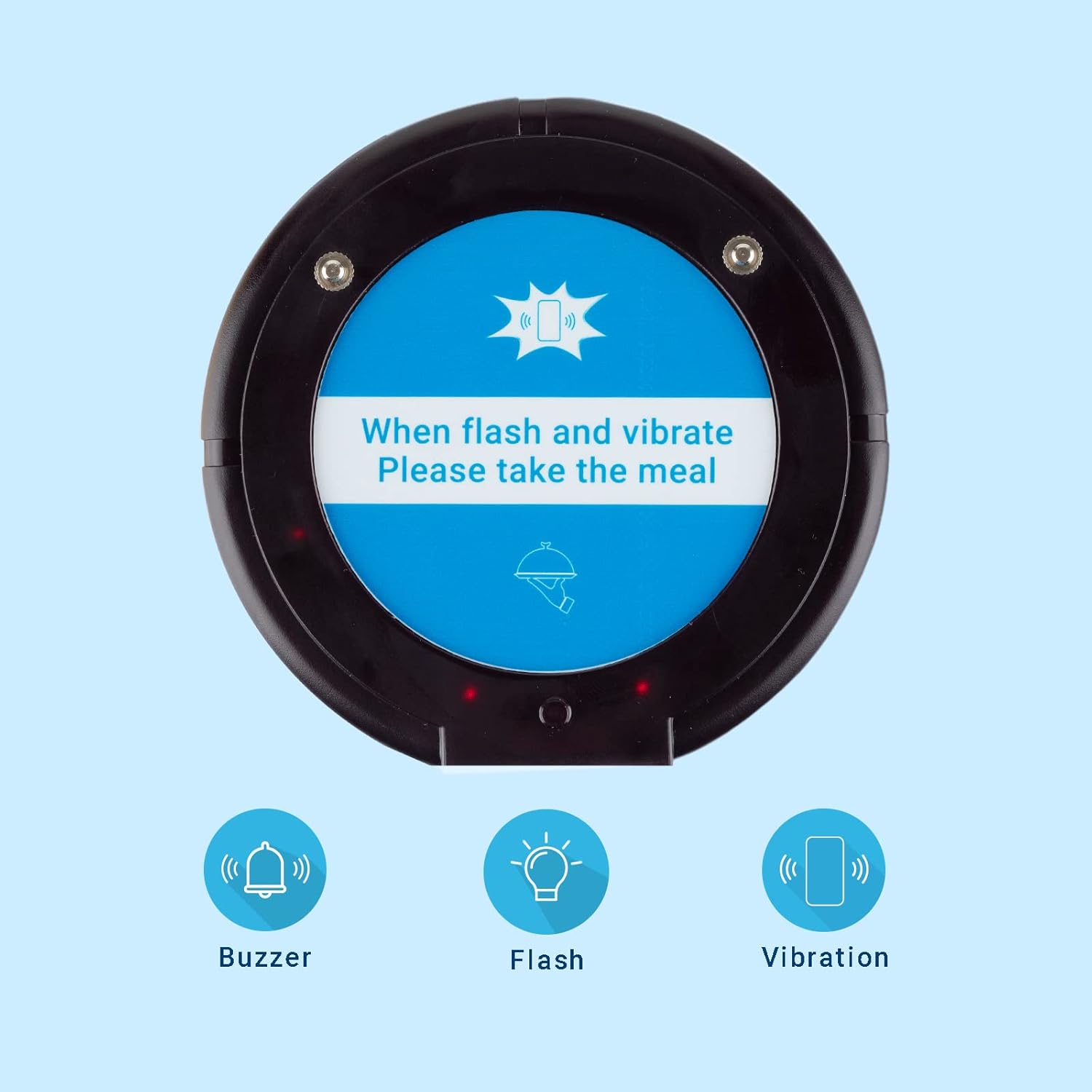
This image details the three distinct notification modes available on the Tera P3-R10 pagers: an audible buzzer, a visual flash, and a tactile vibration. These modes can be configured to suit different environments and user preferences.
2. Setup Guide
2.1 Unpacking and Initial Inspection
Carefully unpack all components from the box. Verify that all items listed in the packaging contents are present and undamaged. If any items are missing or damaged, please contact customer support immediately.
2.2 Charging the Pagers
Place the pagers onto the charging base. Ensure each pager is properly seated and the charging indicator lights up. Allow the pagers to fully charge before first use. A full charge typically takes several hours.
2.3 Powering On the Transmitter
Connect the power adapter to the transmitter unit and plug it into a standard electrical outlet. The display on the transmitter should light up, indicating it is ready for operation.
2.4 Pairing Pagers (if necessary)
The pagers are typically pre-paired with the transmitter. If you need to add new pagers or re-pair existing ones, follow these steps:
- Turn on the transmitter.
- On the transmitter, enter the pairing mode (refer to the specific button sequence in the quick start guide, usually involving a 'SET' or 'CODE' button).
- Place the pager on the charging base or press a specific button on the pager (consult the quick start guide for your model).
- The pager should indicate successful pairing (e.g., a beep or flash).
The system supports adding an unlimited number of pagers, up to 999, allowing for flexible expansion as your needs grow.

This image demonstrates the expandability of the Tera P3-R10 paging system, indicating that an unlimited number of pagers can be added, supporting up to 999 pagers in total. This feature allows the system to grow with business needs.

This image highlights the free multi-language stickers included with the Tera P3-R10 system. It shows sheets of stickers in Spanish, Italian, German, and French, designed to be applied to the pagers. An example pager is shown with a French sticker that translates to 'When it flashes or beeps, please take your meal'.
3. Operating Instructions
3.1 Calling a Pager
To call a specific pager, simply enter the pager's number on the transmitter's keypad and press the 'Call' or 'Send' button. The corresponding pager will activate according to its set notification mode.
3.2 Notification Modes
The Tera P3-R10 pagers support three notification modes: buzzer, vibration, and flash. These modes can be configured individually for each pager or globally, depending on the system's settings. This allows for flexibility in different environments, ensuring customers are notified effectively without causing disturbance.
3.3 Range and Signal
The system offers a significant transmission range. In an environment with obstacles, such as walls, the effective range is approximately 150 meters (500 feet). In a barrier-free, open environment, the range can extend up to 300 meters (1000 feet). This robust signal ensures reliable communication across large areas, allowing customers to wait comfortably without needing to remain in a queue.
This diagram visually explains the effective transmission range of the Tera P3-R10 pager system. It shows a range of 150 meters (500 feet) when obstacles like walls are present, and an extended range of 300 meters (1000 feet) in a barrier-free environment, indicating strong signal penetration and coverage.

This image illustrates how the Tera P3-R10 pager system helps maintain social distancing. A customer in a queue is holding a pager, implying they can wait at a distance and be notified when their turn comes, reducing crowding.
4. Maintenance
4.1 Cleaning
To clean the pager and transmitter units, use a soft, damp cloth. Avoid using harsh chemicals, abrasive cleaners, or solvents, as these can damage the surfaces. Ensure the devices are powered off and unplugged before cleaning.
4.2 Water and Dust Resistance
The Tera P3-R10 pagers are designed with an IP54 rating, meaning they are protected against dust ingress and splashing water from any direction. While they can withstand splashes, they are not designed for submersion in water. Avoid exposing the transmitter unit to liquids.

This image illustrates the IP54 dust and water resistance of the Tera P3-R10 pager system. A stack of pagers is shown on a wooden table with a spilled cup of coffee, emphasizing the product's durability against splashes and dust.
4.3 Battery Care
The pagers use Lithium-polymer batteries. To prolong battery life, avoid fully discharging the pagers frequently. Store the pagers on the charging base when not in use for extended periods.
5. Troubleshooting
- Pager not responding:
Ensure the pager is charged. Verify the pager number entered on the transmitter is correct. Check if the pager is within the transmission range. Re-pair the pager if necessary (refer to Section 2.4). - Short transmission range:
Ensure there are no major obstructions (thick walls, metal structures) between the transmitter and pagers. Relocate the transmitter to a more central position or higher elevation if possible. - Pagers not charging:
Ensure the charging base is properly connected to power. Check for any debris on the charging contacts of both the pagers and the base. Ensure pagers are correctly seated on the charging base. - Interference or inconsistent performance:
Other wireless devices operating on similar frequencies might cause interference. Try to minimize other wireless activity in the immediate vicinity or adjust the system's frequency if that option is available (consult advanced settings in the quick start guide).
6. Specifications
| Feature | Detail |
|---|---|
| Model Number | P3-R10 |
| Manufacturer | Tera |
| Package Dimensions | 26.8 x 24.2 x 12.3 cm |
| Item Weight | 1.47 kilograms |
| Battery Type | 1 Lithium-polymer (required) |
| Quantity of Items | 1 (system kit) |
| Ingress Protection (IP) Rating | IP54 (Dust protected, splash resistant) |
| Transmission Range (Obstacles) | Up to 150m / 500ft |
| Transmission Range (Barrier-Free) | Up to 300m / 1000ft |
| Expandability | Up to 999 pagers |
7. Warranty and Support
For warranty information and technical support, please refer to the documentation included with your purchase or visit the official Tera website. If you encounter any issues not covered in this manual, please contact Tera customer service for assistance. Please note that information regarding the availability of spare parts is not provided.
Ask a question about this manual
Ask about setup, troubleshooting, compatibility, parts, safety, or missing instructions. Manuals+ will review the question and use this page’s manual context to help answer it.