
Introduction
This manual provides essential information for the safe and effective use of your DEWALT 20V MAX XR POWERSTACK Compact Battery (DCBP034). Please read and understand all instructions before use.
Key Features
- 50% more power in a 25% more compact battery**
- DESIGNED TO RESIST WEAR-AND-TEAR: Durable, overmolded base provides impact resistance
- LONG-LASTING: Battery provides 2X lifetime**
- AVOID UNPLANNED WORK STOPPAGES: LED fuel gauge displays state-of-charge
- 20V MAX* SYSTEM COMPATIBILITY: Battery works with all DEWALT 20V MAX* tools and chargers

Image: The DEWALT 20V MAX XR POWERSTACK Lithium Ion Battery (DCBP034) showing its compact design.
Safety Information
General Safety Warnings
- Always use authentic DEWALT batteries. Use of non-authentic batteries can void warranty, cause personal injury, property damage, and unpredictable performance.
- Do not incinerate the battery pack even if it is severely damaged or completely dead. The battery can explode in a fire.
- Do not short-circuit a battery pack.
- Do not charge the battery pack in a damp or wet environment.
- Do not store the battery pack in locations where the temperature may reach or exceed 122°F (50°C).
- Do not attempt to open the battery pack.
- Keep battery pack away from children.
- Proposition 65 Warning: This product contains chemicals known to the State of California to cause cancer and birth defects or other reproductive harm.

Image: A warning graphic emphasizing the importance of using authentic DEWALT batteries for safety and reliability.
Setup
Initial Charging
- Ensure the battery pack is fully charged before first use.
- Insert the battery pack into a compatible DEWALT 20V MAX* charger.
- The charger's indicator light will show the charging status. Refer to your charger's manual for specific indicator meanings.
- Once fully charged, remove the battery pack from the charger.
Attaching to a Tool
- Align the battery pack with the battery port on your DEWALT 20V MAX* tool.
- Slide the battery pack into the tool until it clicks securely into place.
- To remove, press the battery release button and slide the battery out.
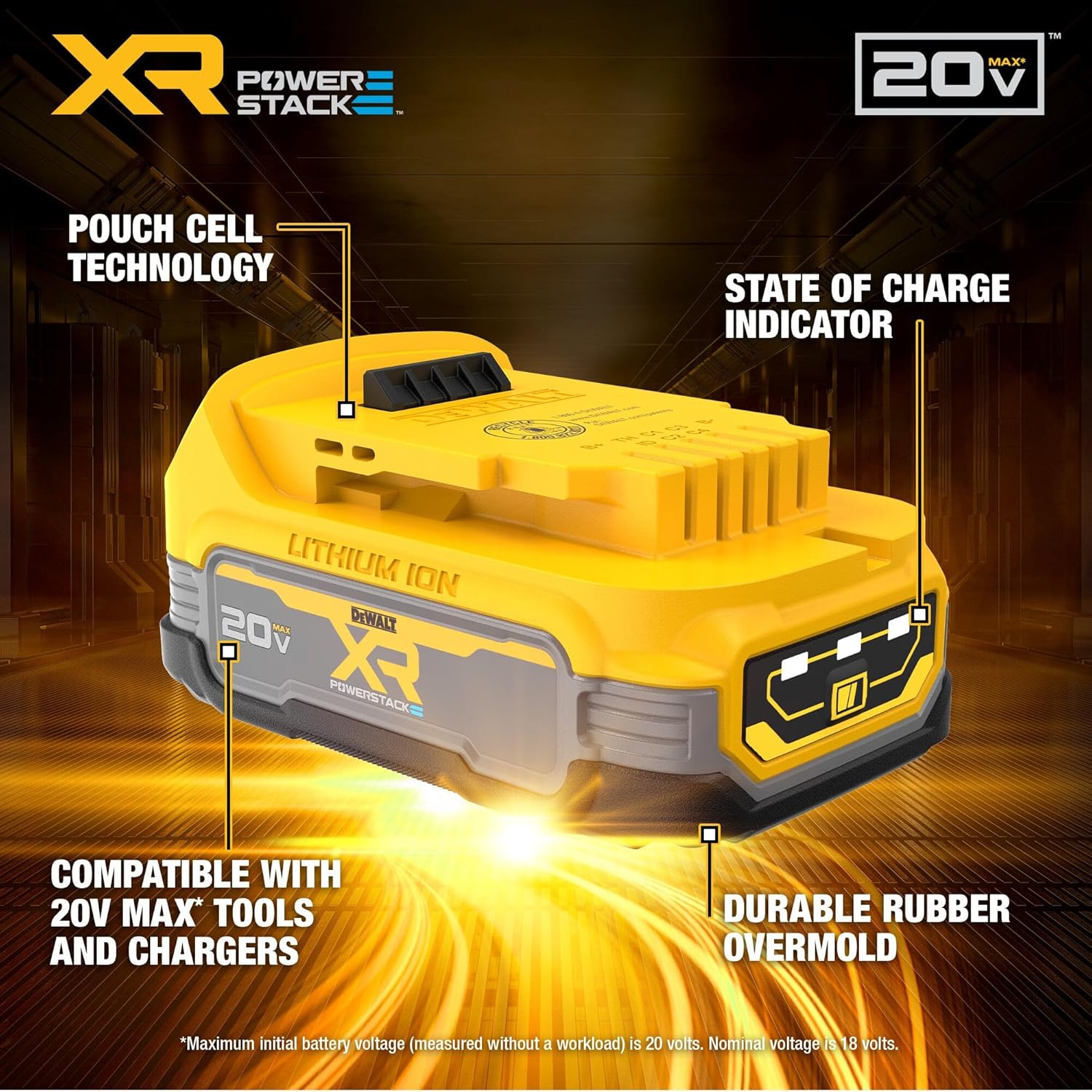
Image: A DEWALT POWERSTACK battery shown ready for insertion into a compatible power tool.
Operating
Powering Your Tool
Once securely attached, the battery pack will power your compatible DEWALT 20V MAX* tool.
State-of-Charge Indicator
The DCBP034 battery features an LED fuel gauge. Press the button on the battery pack to display the current charge level.
- 3 bars: High charge
- 2 bars: Medium charge
- 1 bar: Low charge
- No bars: Battery needs charging

Image: Close-up of the DEWALT POWERSTACK battery showing the LED state-of-charge indicator lights.
Maintenance
Charging
- Charge battery packs only with specified DEWALT chargers.
- Do not charge battery packs in temperatures below +40°F (+4.5°C) or above +104°F (+40°C).
- Allow a hot battery pack to cool down before charging.
- Do not leave battery packs on the charger for extended periods after they are fully charged.
Storage
- Store battery packs in a cool, dry place, away from direct sunlight and excessive heat.
- For long-term storage, charge the battery to approximately 50% capacity.
- Avoid storing battery packs in areas where metal objects could short the terminals.
Cleaning
- Keep the battery pack terminals clean and free of debris.
- Use a clean, dry cloth to wipe the battery pack. Do not use liquids or harsh chemicals.
Troubleshooting
Common Issues and Solutions
| Problem | Possible Cause | Solution |
|---|---|---|
| Battery not charging | Charger not plugged in; faulty charger; battery too hot/cold; faulty battery. | Check charger connection; try a different charger; allow battery to reach room temperature; contact support if battery is faulty. |
| Battery not powering tool | Battery not fully inserted; battery discharged; faulty battery; incompatible tool. | Ensure battery is clicked into place; charge battery; check battery indicator; ensure tool is compatible with 20V MAX* batteries. |
| Reduced run time | Battery nearing end of life; extreme operating conditions. | Consider replacing the battery; avoid operating in extreme temperatures. |
Specifications
Technical Data
- Brand: DEWALT
- Model Number: DCBP034
- Battery Cell Composition: Lithium Ion
- Battery Capacity: 1.7 Amp Hours
- Voltage: 20V MAX* (Nominal 18V)
- Item Weight: 0.67 Pounds (310 Grams)
- Item Dimensions: 4.1 x 2.5 x 1.7 inches
- Reusability: Rechargeable
- Recommended Uses: Power Tool
- GTIN/UPC: 885911782319
*Maximum initial battery voltage (measured without a workload) is 20 volts. Nominal voltage is 18 volts.
Warranty and Support
Warranty Information
This DEWALT product is covered by a limited warranty. For specific warranty details and duration, please refer to the official DEWALT warranty statement included with your purchase or visit the official DEWALT website.
Note: Using non-authentic DEWALT batteries may void your tool's warranty.
Customer Support
For technical assistance, service, or to locate an authorized service center, please visit the official DEWALT website or contact DEWALT customer service directly.
Official Product Video
Video: An official DEWALT video showcasing the brand's commitment to quality and performance in its products.


