
Introduction
This manual provides essential information for setting up, operating, maintaining, and troubleshooting your Motorola Moto E40 smartphone. Please read this guide thoroughly to ensure optimal performance and longevity of your device.
Setup
Unboxing
Your Motorola Moto E40 package includes the smartphone, a USB cable, and a SIM tray ejector tool.
SIM Card Installation
Locate the SIM card tray on the side of your device. Insert the SIM tray ejector tool into the small hole next to the tray and press gently until the tray pops out.
Place your Nano-SIM card(s) and/or microSD card into the tray with the gold contacts facing down. Ensure they are correctly seated.
Carefully reinsert the tray into the phone.
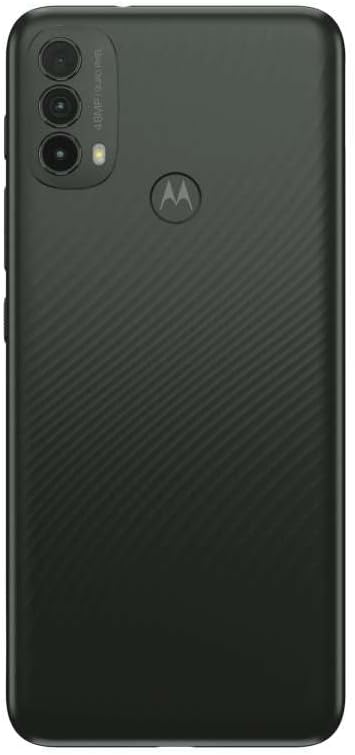
The image displays the side of the Motorola Moto E40, highlighting the SIM card tray slot and the adjacent ejector pinhole.
Charging the Battery
Before first use, fully charge your Moto E40. Connect the USB cable to the phone's charging port and the other end to a power adapter (sold separately) or a computer's USB port.
The battery indicator on the screen will show charging progress.
Powering On/Off
To power on, press and hold the Power button located on the side of the device until the Motorola logo appears.
To power off, press and hold the Power button, then select 'Power off' from the options on the screen.
Operating
Basic Navigation
The Moto E40 features a 6.5-inch HD+ 90Hz display. Use touch gestures such as tap, swipe, pinch, and spread to navigate the interface.
Fingerprint Sensor
Your device is equipped with a fingerprint recognition sensor for secure unlocking. To set up, go to Settings > Security > Fingerprint and follow the on-screen instructions.
Camera Usage
The Moto E40 has multiple cameras, including front and rear lenses. Open the Camera app to capture photos and videos.
Utilize shooting modes like High Dynamic Range (HDR) for improved image quality in varied lighting conditions.
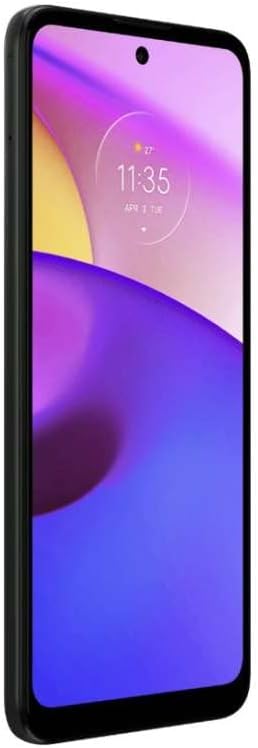
This image shows the back of the Motorola Moto E40, featuring the vertically aligned triple camera module in the upper left corner and the Motorola logo, which also functions as the fingerprint sensor, in the center.
Connectivity
- Wi-Fi: Connect to wireless networks via Settings > Network & internet > Wi-Fi.
- Mobile Data: Your phone supports CDMA, GSM, and LTE networks. Ensure your SIM card is active for mobile data access.
- Bluetooth: Pair with other Bluetooth devices (e.g., headphones, speakers) via Settings > Connected devices > Bluetooth.
Buttons
The device features physical buttons for power and volume control. The human-interface input is primarily through these buttons and the touchscreen.
Maintenance
Cleaning
Use a soft, lint-free cloth to clean your phone. Avoid abrasive materials or harsh chemicals. The device has a water-resistant design, but it is not waterproof; avoid submerging it in liquids.
Software Updates
Regularly check for and install software updates to ensure your device has the latest features and security enhancements. Go to Settings > System > System updates.
Battery Care
To prolong battery life, avoid extreme temperatures. The Lithium-Polymer battery offers up to 40 hours of talk time. For optimal performance, avoid fully discharging the battery frequently.
Troubleshooting
Device Not Responding
If your phone is unresponsive, press and hold the Power button for approximately 10-15 seconds to force a restart.
Connectivity Issues
For Wi-Fi or mobile data problems, try toggling airplane mode on and off, or restart your device. Verify SIM card insertion for mobile data issues.
App Malfunctions
If an app is not working correctly, try clearing its cache (Settings > Apps & notifications > See all apps > [App Name] > Storage & cache > Clear cache) or reinstalling the app.
Factory Reset
As a last resort, you can perform a factory data reset (Settings > System > Reset options > Erase all data (factory reset)). This will erase all data on your phone, so back up important information first.
Specifications
| Feature | Detail |
|---|---|
| Brand | Motorola |
| Model Name | Moto E40 |
| RAM Memory Installed Size | 4 GB |
| Memory Storage Capacity | 64 GB |
| Wireless Carrier | Unlocked for All Carriers |
| Connectivity Technology | Wi-Fi |
| Wireless Network Technology | CDMA, GSM, LTE |
| Connector Type | 3.5mm Jack |
| Model Year | 2021 |
| Biometric Security Feature | Fingerprint Recognition |
| Human-Interface Input | Buttons |
| Water Resistance Level | Water Resistant |
| Camera Description | Front, Rear |
| Shooting Modes | High Dynamic Range |
| Battery Description | Lithium-Polymer |
| Item Weight | 250 Grams |
| Item Dimensions | 23.62 x 23.62 x 33.46 inches |
| Phone Talk Time | 40 Hours |
| Aspect Ratio | 16:9 |
| Built-In Media | SIM Tray Ejector, USB Cable |
| Manufacturer | Motorola |
Warranty and Support
For warranty information and technical support, please visit the official Motorola support website or contact their customer service. Keep your proof of purchase for warranty claims.
You can find additional support resources and FAQs on the Motorola website.


