
Sanford SF5196IC
Sanford Infrared Cooker SF5196IC Instruction Manual
Model: SF5196IC | Brand: Sanford
Introduction
Thank you for purchasing the Sanford Infrared Cooker SF5196IC. This manual provides important information for the safe and efficient use of your appliance. Please read it thoroughly before operation and keep it for future reference.
Important Safety Instructions
To reduce the risk of fire, electric shock, or injury, always follow these basic safety precautions:
- Read all instructions before using the appliance.
- Do not touch hot surfaces. Use handles or knobs.
- To protect against electrical hazards, do not immerse the power cord, plugs, or the appliance itself in water or other liquids.
- Close supervision is necessary when any appliance is used by or near children.
- Unplug from the outlet when not in use and before cleaning. Allow to cool before putting on or taking off parts, and before cleaning the appliance.
- Do not operate any appliance with a damaged cord or plug, or after the appliance malfunctions or has been damaged in any manner. Contact customer service for examination, repair, or adjustment.
- The use of accessory attachments not recommended by the appliance manufacturer may cause injuries.
- Do not use outdoors.
- Do not let the cord hang over the edge of a table or counter, or touch hot surfaces.
- Do not place on or near a hot gas or electric burner, or in a heated oven.
- Extreme caution must be used when moving an appliance containing hot oil or other hot liquids.
- Always attach the plug to the appliance first, then plug the cord into the wall outlet. To disconnect, turn any control to 'off', then remove the plug from the wall outlet.
- Do not use the appliance for other than intended use.
- This appliance is equipped with overheat protection and low voltage protection for enhanced safety.
- Ensure adequate ventilation around the unit during operation.
Package Contents
Verify that all items are present in the package:
- Sanford Infrared Cooker SF5196IC
- Power Cord
- Instruction Manual
Product Overview
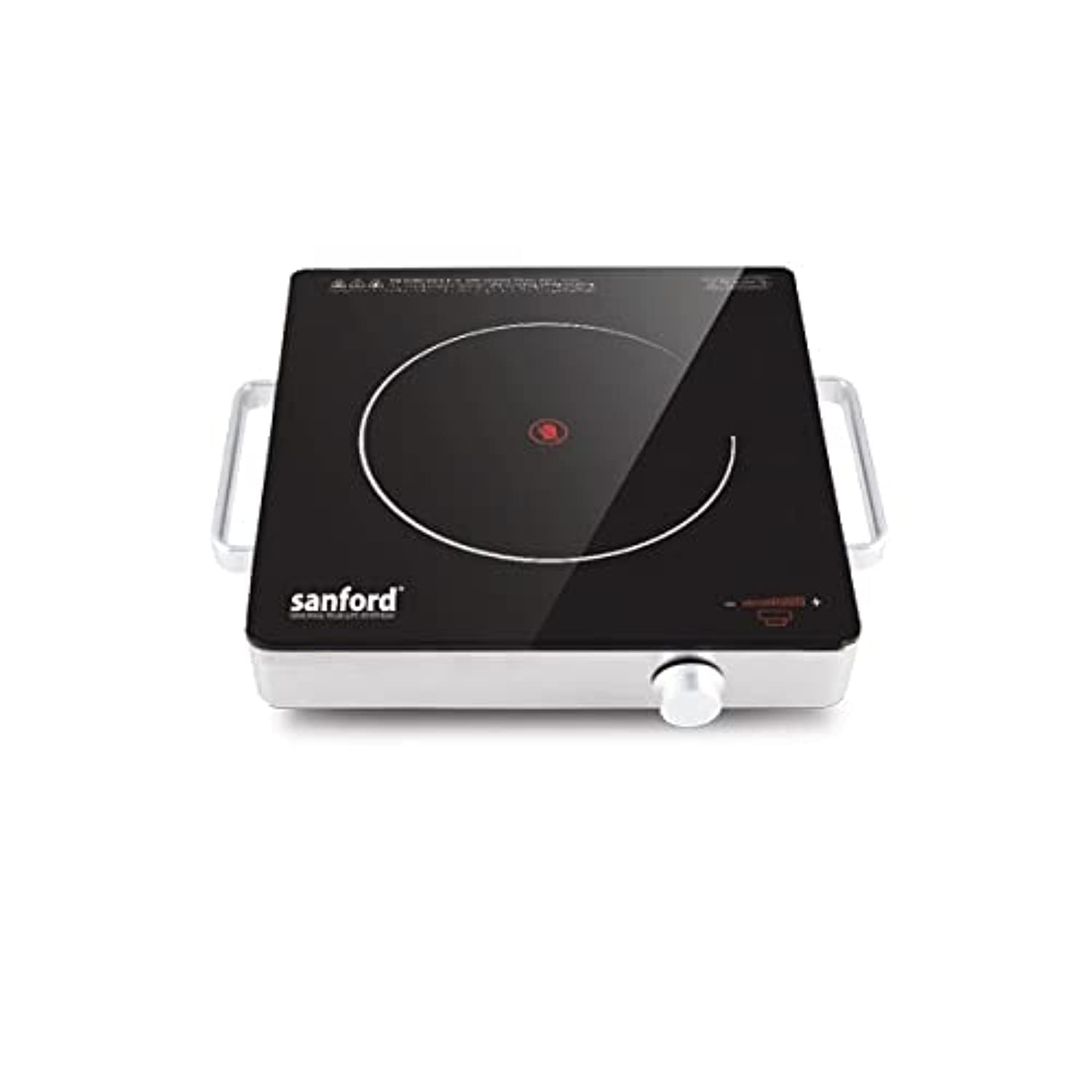
The Sanford Infrared Cooker SF5196IC features a sleek black heat-resistant glass surface with a single heating zone. It includes a touch control panel and an LED display for easy operation. A control knob is located on the front for temperature adjustment. The unit is designed to be compact and lightweight with stainless steel handles for portability.

Setup
- Unpack the cooker and all accessories from the packaging.
- Place the cooker on a flat, stable, and heat-resistant surface. Ensure there is adequate space (at least 10-15 cm) around all sides of the unit for proper ventilation.
- Plug the power cord into a suitable electrical outlet. Ensure the voltage matches the appliance's requirements (220-240V).
Operating Instructions
- Prepare Cookware: Place a suitable pot or pan on the ceramic heating surface. The infrared cooker is compatible with all types of cookware.
- Power On: Turn the control knob clockwise or use the touch controls to power on the unit. The LED display will illuminate.
- Adjust Heating Level: Use the control knob or touch controls to select the desired heating level. The LED display will show the current setting or power level.
- Cooking: The infrared heating element will quickly heat up. Monitor your cooking progress.
- Power Off: After cooking, turn the control knob counter-clockwise to the 'off' position or use the touch controls to power off the unit.
- Unplug: Unplug the power cord from the electrical outlet.
- Cool Down: Allow the ceramic surface to cool completely before cleaning or storing. The surface will remain hot for some time after use.
Care and Maintenance
Proper care and maintenance will ensure the longevity and optimal performance of your infrared cooker.
- Always Unplug: Before cleaning, always unplug the cooker from the power outlet and allow it to cool down completely.
- Cleaning the Surface: Wipe the ceramic glass surface with a damp cloth and a small amount of mild detergent. For stubborn stains, use a non-abrasive cleaner specifically designed for ceramic cooktops. Do not use abrasive cleaners, scouring pads, or metal brushes, as these can scratch the surface.
- Cleaning the Exterior: Clean the exterior body of the cooker with a soft, damp cloth. Do not use harsh chemicals or solvents.
- Avoid Immersion: Never immerse the cooker in water or any other liquid.
- Storage: Store the cooker in a dry place when not in use.
Troubleshooting
| Problem | Possible Cause | Solution |
|---|---|---|
| Cooker does not turn on | Power cord not securely plugged in Power outlet is not functional Overheat protection activated | Ensure the power cord is firmly plugged into a working outlet. Test the outlet with another appliance. Unplug the cooker and allow it to cool down completely for at least 30 minutes before attempting to use it again. |
| Heating is inconsistent or weak | Pot/pan not centered on heating zone Low voltage supply Cookware not suitable (though infrared is generally universal) | Ensure the cookware is placed centrally on the heating element. Check your household's electrical supply. If issues persist, consult an electrician. Ensure the base of the cookware is flat and makes good contact with the surface. |
| Error code on LED display | Internal malfunction or specific issue | Unplug the unit, wait a few minutes, and plug it back in. If the error persists, refer to the full product manual for specific error codes or contact customer support. |
Specifications
| Feature | Detail |
|---|---|
| Model Number | SF5196IC |
| Brand | Sanford |
| Power | 2200 Watts |
| Heating Elements | 1 |
| Control Type | Knob / Touch Control |
| Material | Stainless Steel, Heat-resistant Glass, Ceramic |
| Special Features | Infrared Electric Heating, Overheat Protection, Low Voltage Protection, LED Display |
| Color | Black/White |
| Power Source | Electric |
Warranty and Support
For warranty information, technical support, or service inquiries, please refer to the warranty card included with your purchase. You may also contact Sanford customer service through their official website or the contact details provided in your product documentation.
Ask a question about this manual
Ask about setup, troubleshooting, compatibility, parts, safety, or missing instructions. Manuals+ will review the question and use this page’s manual context to help answer it.