1. Introduction
This manual provides detailed instructions for the safe and effective use of your Mistral MBFAP500 Blade Free Fan with Air Purifier. Please read this manual thoroughly before operating the appliance and retain it for future reference. This appliance combines the functions of a fan and an air purifier, designed to enhance your indoor environment.
2. Important Safety Instructions
Always follow basic safety precautions when using electrical appliances to reduce the risk of fire, electric shock, and injury to persons.
- Read all instructions before using this appliance.
- Ensure the power supply voltage matches the rating label on the appliance.
- Do not operate any fan with a damaged cord or plug. Discard the fan or return it to an authorized service facility for examination and/or repair.
- Do not run cord under carpeting. Do not cover cord with throw rugs, runners, or similar coverings. Arrange cord away from traffic area and where it will not be tripped over.
- To disconnect the fan, turn controls to OFF, then remove plug from outlet.
- Do not insert or allow foreign objects to enter any ventilation or exhaust opening as this may cause an electric shock or fire, or damage the fan.
- Do not block air intakes or exhaust in any manner.
- Use this appliance only as described in this manual. Any other use not recommended by the manufacturer may cause fire, electric shock, or injury to persons.
- This appliance is not intended for use by persons (including children) with reduced physical, sensory or mental capabilities, or lack of experience and knowledge, unless they have been given supervision or instruction concerning use of the appliance by a person responsible for their safety.
- Children should be supervised to ensure that they do not play with the appliance.
- Unplug the appliance from the outlet when not in use, when moving it from one location to another, and before cleaning.
3. Product Overview
The Mistral MBFAP500 is a blade-free fan integrated with an air purifier, designed for safety, quiet operation, and improved air quality. Key features include:
- Blade-Free Design: Child-friendly and reduces noise during operation.
- HEPA H13 Filter: Effectively traps pollutants such as pollen, pet dander, dust mites, and tobacco smoke.
- LED Touch Panel: Intuitive controls for easy operation.
- Oscillation: Adjustable left and right oscillation modes (0°, 30°, 60°, 120°).
- Night Light: Calming blue light for a relaxed environment.
- Built-in Ionizer: Enhances air purification.
- Remote Control: For convenient operation from a distance.

Figure 1: Front view of the Mistral MBFAP500 Blade Free Fan with Air Purifier. This image displays the sleek, tall, white unit with its central air outlet and LED display panel at the top.

Figure 2: Side view of the Mistral MBFAP500, illustrating the unit with its calming blue night light activated around the base, highlighting its modern design.
4. Setup
- Unpacking: Carefully remove the appliance from its packaging. Ensure all components are present: the main fan unit and the remote control.
- Placement: Place the fan on a stable, flat surface. Ensure there is adequate space around the unit for optimal airflow. Avoid placing it near curtains or other objects that could obstruct air intake or output.
- Power Connection: Plug the power cord into a standard electrical outlet. The appliance is designed for corded electric power.
- No Assembly Required: The Mistral MBFAP500 comes fully assembled and ready for use.
5. Operating Instructions
The Mistral MBFAP500 can be operated using the LED touch panel on the unit or the included remote control.
5.1 Remote Control
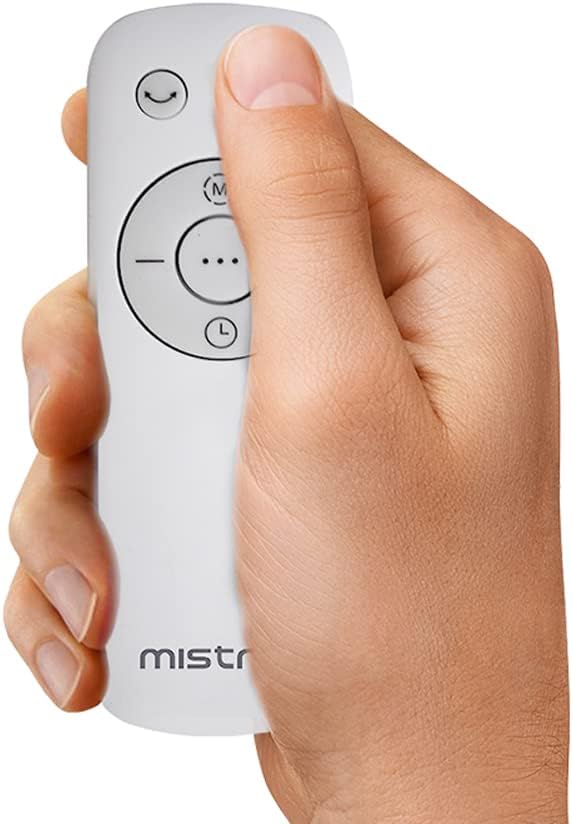
Figure 3: The remote control for the Mistral MBFAP500, showing its ergonomic design and control buttons for various functions.
The remote control allows convenient access to all functions. Ensure the remote control has working batteries (not included, typically AAA batteries) and is pointed towards the unit's sensor.
5.2 Basic Functions
- Power On/Off: Press the power button on the touch panel or remote to turn the unit on or off.
- Speed Selection: Use the '+' and '-' buttons to adjust between the 12 available fan speeds. The current speed will be displayed on the LED panel.
- Oscillation: Press the oscillation button to activate or deactivate the left and right auto-oscillation. Repeated presses may cycle through the 0°, 30°, 60°, and 120° oscillation angles.
- Timer: Press the timer button to set the automatic shut-off timer. You can set it for up to 12 hours. Each press typically increases the timer by one hour.
5.3 Advanced Functions
- Night Light: Activate the calming blue night light by pressing the dedicated button. This feature provides a low-emitting glow for a relaxed environment.
- Ionizer: The built-in ionizer can be activated to further enhance air purification. Refer to the specific icon on the touch panel or remote.
- Baby Mode / Sleep Mode: These modes are designed for quiet operation and gentle airflow, ideal for sleeping or use in a baby's room. Select the appropriate mode via the touch panel or remote.
- Smart Wind Function: This function automatically adjusts fan speed based on ambient conditions, providing optimized comfort.
6. Maintenance
Regular maintenance ensures the longevity and optimal performance of your Mistral MBFAP500.
- Cleaning the Exterior:
- Always unplug the appliance before cleaning.
- Wipe the exterior surfaces with a soft, damp cloth. Do not use abrasive cleaners or solvents.
- Ensure the unit is completely dry before plugging it back in.
- HEPA Filter Maintenance:
- The HEPA H13 filter requires periodic replacement to maintain air purification efficiency.
- Refer to the appliance's indicator light for filter replacement alerts.
- To replace the filter, consult the specific instructions provided with the replacement filter or contact customer support for guidance.
- Do not wash the HEPA filter; it is designed for dry replacement.
7. Troubleshooting
If you encounter issues with your Mistral MBFAP500, please refer to the following common problems and solutions:
| Problem | Possible Cause | Solution |
|---|---|---|
| Unit does not turn on. | No power supply. | Check if the power cord is securely plugged into a working outlet. |
| Weak airflow. | Blocked air intake/outlet or dirty filter. | Ensure air intakes and outlets are clear. Check and clean the exterior. Consider replacing the HEPA filter if it's old. |
| Unusual noise during operation. | Obstruction or unit not on a stable surface. | Check for any foreign objects near the air inlets. Ensure the unit is placed on a flat, stable surface. |
| Remote control not working. | Dead batteries or obstruction. | Replace the batteries in the remote control. Ensure there is no obstruction between the remote and the unit's sensor. |
If the problem persists after attempting these solutions, please contact customer support.
8. Specifications
| Feature | Detail |
|---|---|
| Model | MBFAP500 |
| Brand | MISTRAL |
| Product Dimensions | 10D x 10W x 42.9H centimetres |
| Power Source | Corded Electric |
| Electric Fan Design | Floor Fan |
| Special Features | Oscillating, Air Purification (HEPA H13 Filter), Ionizer, Night Light, 12 Speed Selections, 12 Hour Timer, Baby/Sleep Mode, Smart Wind Function, Remote Control |
| Assembly Required | No |
| Included Components | 1 x Fan with Air Purifier |
| Care Instructions | Wipe and Clean |
9. Warranty
The Mistral MBFAP500 Blade Free Fan with Air Purifier comes with a 1 Year Warranty from the date of purchase. Please retain your proof of purchase for warranty claims. The warranty covers manufacturing defects under normal use. It does not cover damage resulting from misuse, accident, unauthorized modification, or failure to follow the instructions in this manual.
10. Customer Support
For further assistance, technical support, or warranty inquiries, please contact your retailer or the Mistral customer service department. Please have your product model number (MBFAP500) and proof of purchase ready when contacting support.
You may also visit the official Mistral website for additional resources and contact information.