
GreenForest noyer
GreenForest 47-inch Computer Desk with Monitor Stand User Manual
Model: noyer | Brand: GreenForest
Introduction
Thank you for choosing the GreenForest 47-inch Computer Desk. This manual provides detailed instructions for assembly, operation, maintenance, and troubleshooting to ensure you get the most out of your new desk. Please read this manual thoroughly before beginning assembly or use.
Safety Information
- Ensure the desk is properly anchored to prevent tipping.
- Do not exceed the weight limit of the monitor stand.
- Keep all small parts and packaging materials away from children.
- Assemble on a soft, clean surface to prevent scratches.
- Do not overtighten screws during assembly.
Components List
Please verify that all components listed below are present before beginning assembly. If any parts are missing or damaged, please contact GreenForest customer support.
| Part | Description | Quantity |
|---|---|---|
| Desktop Panel | Main work surface | 1 |
| Monitor Stand | Elevated platform for monitor/laptop | 1 |
| Side Storage Shelves | 2-tier reversible shelves | 2 |
| Metal Frame Legs | Main support structure (40mm) | Various |
| Assembly Hardware | Screws, bolts, Allen wrench, etc. | 1 set |
Setup and Assembly
The GreenForest Computer Desk is designed for easy assembly, typically taking around 30 minutes. All necessary tools and instructions are included. Follow these steps carefully:
Step 1: Unpack and Identify Parts
Carefully remove all components from the packaging. Lay them out on a soft, clean surface to prevent damage. Refer to the components list to ensure all parts are present.

Figure 1: Overview of the GreenForest Computer Desk components.
Step 2: Assemble the Metal Frame
Connect the metal frame pieces using the provided hardware. Ensure all connections are secure but do not fully tighten screws until the entire frame is assembled.

Figure 2: Desk dimensions for planning your space. (47.24"D x 21.65"W x 29.52"H)
Step 3: Install Reversible Storage Shelves
The 2-tier storage shelves can be installed on either the left or right side of the desk, depending on your preference and space requirements. You can also remove the middle shelf to create more space for a computer tower.

Figure 3: Illustration of the two-way setup for the reversible storage shelves.

Figure 4: Demonstrating the removable middle shelf for increased space.
Step 4: Attach the Desktop Panel
Carefully place the desktop panel onto the assembled frame. Secure it using the designated screws. Once the desktop is in place, fully tighten all screws on the entire desk structure.
Step 5: Install the Built-in Monitor Stand
The monitor stand (18.89" x 7.87") is designed to be easily attached and adjusted. Position it as desired on the desktop and secure it using the adjustable screw pads.
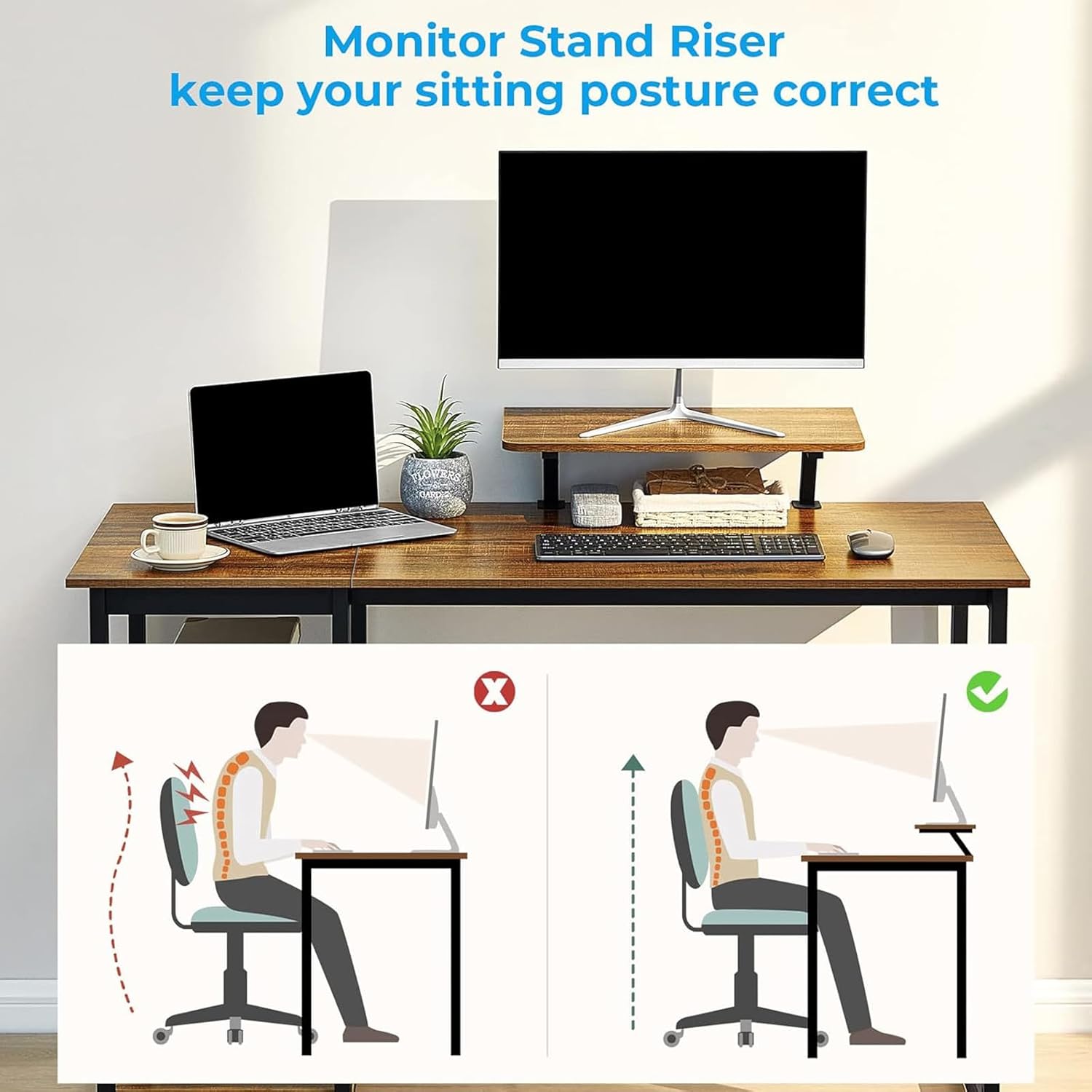
Figure 5: The monitor stand helps maintain correct sitting posture.

Figure 6: Adjustable screw pads allow for easy positioning of the monitor stand.
Operating Instructions
Your GreenForest Computer Desk is now ready for use. Here are some tips for optimal operation:
- Monitor Stand: Utilize the built-in monitor stand to elevate your screen to an ergonomic height, promoting better posture and reducing neck strain. It can accommodate a monitor or laptop.
- Reversible Shelves: Arrange your books, storage boxes, and other office supplies on the 2-tier shelves. Remember you can adjust their position (left or right) or remove the middle shelf for larger items like a computer tower.
- Spacious Desktop: The 47.24" x 21.65" desktop provides ample space for your computer, keyboard, mouse, and other work essentials. It can comfortably hold two monitors.
- Leg Room: Enjoy the generous 31.49-inch width under the desktop, allowing for comfortable movement and seating.
- Expandable Workspace: For even more space, consider purchasing a second GreenForest desk to create a large L-shaped workstation.

Figure 7: The desk provides a functional and organized workspace.

Figure 8: Example of combining two desks for an L-shaped setup.
Maintenance
To keep your GreenForest Computer Desk in excellent condition, follow these simple maintenance guidelines:
- Cleaning: Wipe the desk surfaces with a dry cloth to remove dust and spills. Avoid using harsh chemicals or abrasive cleaners that could damage the finish.
- Stability Check: Periodically check all screws and connections to ensure they remain tight. Retighten if necessary to maintain stability.
- Weight Distribution: Distribute weight evenly across the desktop and shelves to prevent undue stress on any single point.
Troubleshooting
If you encounter any issues with your GreenForest Computer Desk, please refer to the following common troubleshooting tips:
- Desk Wobbles: Ensure all screws are fully tightened. Check that the desk is on a level surface. Adjust the leveling feet if present.
- Parts Don't Fit: Double-check the assembly instructions and diagrams. Ensure you are using the correct parts for each step. Sometimes, parts may appear similar but have subtle differences.
- Scratches/Damage: For minor scratches, a furniture repair marker matching the walnut finish may be used. For significant damage, contact customer support.
Specifications
| Attribute | Detail |
|---|---|
| Brand | GreenForest |
| Model Number | noyer |
| Product Dimensions | 47.24"D x 21.65"W x 29.52"H |
| Color | Walnut |
| Style | Modern |
| Base Material | Metal |
| Top Material Type | Engineered Wood |
| Special Feature | Adjustable, Monitor Stand, Reversible Shelves |
| Maximum Weight Recommendation | 90 Kilograms (approx. 198 lbs) |
| Assembly Required | Yes (Tools included) |
Warranty and Support
The GreenForest Computer Desk comes with a Limited Warranty. For specific details regarding warranty coverage, please refer to the product packaging or contact GreenForest customer service.
For further assistance, missing parts, or any inquiries, please visit the official GreenForest store or contact their customer support:
Official GreenForest Store: GreenForest Store on Amazon
Related documentsnoyer

Ask a question about this manual
Ask about setup, troubleshooting, compatibility, parts, safety, or missing instructions. Manuals+ will review the question and use this page’s manual context to help answer it.