
Introduction
This manual provides detailed instructions for the proper installation and care of your Lamshaw 3D Full Coverage PET Soft Screen Protector for the UMIDIGI Uwatch 5 Smartwatch. Following these guidelines will help ensure optimal performance and longevity of your screen protector.
Package Contents
Your package includes:
- 3 x Lamshaw 3D Full Coverage PET Soft Screen Protectors
- Installation accessories (wet wipes, dry wipes)
Note: The UMIDIGI Uwatch 5 Smartwatch is not included.
Setup: Installation Guide
Follow these steps carefully for a bubble-free installation of your screen protector.
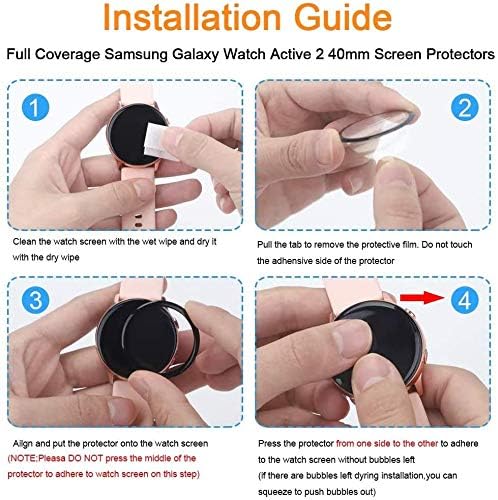
Image: Detailed four-step visual guide for applying the screen protector to a smartwatch. It shows cleaning, peeling the film, aligning, and pressing the protector.
- Clean the Watch Screen: Use the provided wet wipe to thoroughly clean the surface of your UMIDIGI Uwatch 5 Smartwatch screen. Follow with the dry wipe to ensure the screen is completely dry and free of dust, smudges, or debris. A clean screen is crucial for proper adhesion.
- Prepare the Protector: Gently pull the tab to remove the protective film from the screen protector. Important: Avoid touching the adhesive side of the protector to prevent fingerprints or dust from adhering.
- Align and Place: Carefully align the screen protector with the smartwatch screen. Once aligned, gently place the protector onto the watch screen. Note: Do not press the middle of the protector to adhere it at this stage.
- Adhere and Remove Bubbles: Starting from one side, gently push the protector to adhere it to the watch screen. Use a soft cloth or your finger to gently squeeze out any air bubbles towards the edges. If bubbles remain, gently lift the nearest corner of the protector to release the air, then slowly re-apply it. Continue this process until all air is expelled and the protector fits the entire watch face perfectly.

Image: A hand gently pressing the screen protector from the center outwards to ensure full adhesion and remove air bubbles.
Operating Characteristics
The Lamshaw 3D Full Coverage PET Soft Screen Protector is designed to maintain the original functionality of your UMIDIGI Uwatch 5 Smartwatch while providing protection.
- Touch Sensitivity: The protector adheres tightly to the watch screen, ensuring that touch sensitivity is not diminished. You should experience 100% smooth touch feeling and accurate screen response.
- HD Clarity: Designed to be optically transparent, the screen protector provides a high-definition visual experience, preserving the original display quality of your smartwatch.
- Full Coverage Protection: This protector offers edge-to-edge coverage, safeguarding your smartwatch screen from drops, scratches, and scrapes.
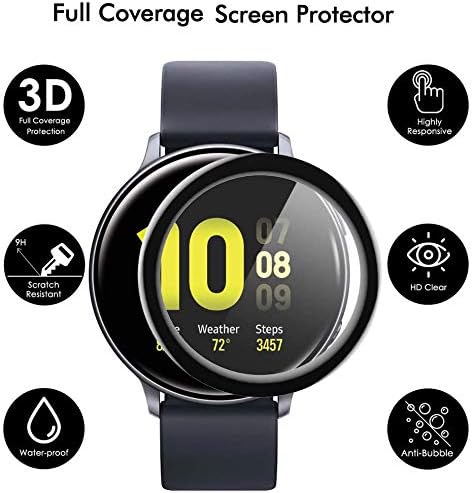
Image: An infographic highlighting key features such as 3D full coverage, scratch resistance, waterproof, highly responsive touch, HD clear display, and anti-bubble properties.
Maintenance
To ensure the longevity and clarity of your screen protector, follow these simple maintenance tips:
- Cleaning: Gently wipe the screen protector with a soft, lint-free cloth. For stubborn smudges, slightly dampen the cloth with water or a screen cleaner specifically designed for electronics. Avoid harsh chemicals or abrasive materials.
- Protection: While the protector offers significant scratch resistance, avoid placing your smartwatch in direct contact with sharp objects like keys or coins to prevent potential damage.
- Water Resistance: The protector is designed to be waterproof, but it is always advisable to follow the water resistance guidelines for your UMIDIGI Uwatch 5 Smartwatch itself.

Image: A utility knife blade shown near a smartwatch screen, illustrating the anti-scratch properties of the screen protector against common objects like keys, coins, and pens.
Troubleshooting
Here are solutions to common issues you might encounter during or after installation:
- Persistent Bubbles: If bubbles remain after initial application, gently lift the corner of the protector closest to the bubble. Slowly re-apply the protector, using a soft cloth to push the air out towards the nearest edge. Repeat until the bubble is gone. Ensure the screen is completely clean before re-application.
- Dust Under Protector: If dust particles are trapped, carefully lift the protector from the nearest edge. Use a piece of tape to gently dab the adhesive side of the protector and the watch screen to pick up the dust. Re-apply as per installation steps.
- Poor Adhesion: Ensure the watch screen was thoroughly cleaned and dried before installation. Any oils, dust, or moisture can prevent proper adhesion. If the issue persists, try a new protector from the pack.

Image: A visual comparison showing a smartwatch screen with a perfectly applied, bubble-free screen protector ("YOUKei Bubble Free") next to a screen with visible air bubbles ("OTHERS").
Specifications
| Feature | Detail |
|---|---|
| Brand | Lamshaw |
| Compatible Devices | UMIDIGI Uwatch 5 Smartwatch |
| Material | Polyethylene Terephthalate (PET) |
| Finish Type | Glossy |
| Screen Surface Description | Glossy |
| Water Resistance Level | Waterproof |
| Number of Items | 3 (Screen Protectors) |
Support
For further assistance or inquiries regarding your Lamshaw screen protector, please refer to the seller's contact information on the platform where the product was purchased.