
1. Introduction
This manual provides detailed instructions for the AKLOT Wireless Guitar System, Model MI3572. This 2.4GHz digital wireless system is designed for electric guitars, basses, and other electronic musical instruments with a 6.35mm jack. It offers uncompressed signal transmission, low noise, and low latency for a reliable wireless experience.

Image 1.1: AKLOT Wireless Guitar System, showing the transmitter and receiver units.
2. Package Contents
Verify that all items are present in your package:
- 1 x Wireless Transmitter
- 1 x Wireless Receiver
- 1 x 2-Way USB Charging Cable
- 1 x User Manual
Video 2.1: Unboxing the AKLOT Wireless Guitar System, showing all included components.
3. Product Overview
The AKLOT Wireless Guitar System consists of a transmitter and a receiver, both featuring a compact design with a wood-grain finish. Each unit is equipped with a 6.35mm rotatable plug for versatile connection to various instruments and audio equipment.

Image 3.1: Dimensions of the AKLOT Wireless Guitar System transmitter unit.
Key Features:
- 2.4GHz Digital Transmission: Ensures stable and clear signal transmission with low noise and latency (less than 5ms).
- 270° Rotatable Plug: Designed to fit various electronic musical instruments with a 6.35mm jack, including guitars with recessed input jacks.
- Rechargeable Lithium Battery: Provides over 10 hours of working time on a 1.5-hour charge.
- Multi-Device Support: Supports up to 4 sets of devices working simultaneously without interference. One transmitter can transmit to multiple receivers.
4. Setup
4.1. Charging the Devices
Before first use, fully charge both the transmitter and receiver. The included 2-way USB charging cable allows simultaneous charging of both units.
- Connect the 2-way USB charging cable to a USB power adapter (not included) or a computer USB port.
- Plug the micro USB ends into the charging ports on the transmitter and receiver.
- The power indicator light will show a red light while charging and turn off when fully charged. A full charge takes approximately 1.5 hours.

Image 4.1: Charging the AKLOT Wireless Guitar System units with the dual USB cable.
4.2. Powering On and Pairing
The transmitter and receiver are pre-paired from the factory. If re-pairing is needed, follow these steps:
- Slide the power button on both the transmitter and receiver to the "ON" position. The blue pairing indicator will flicker.
- Press the pairing button (circle button) on both devices simultaneously. The blue indicator lights will become solid, indicating successful pairing.
4.3. Connecting to Instruments and Amplifiers
The 270° rotatable plug design ensures compatibility with most instruments.
- Plug the transmitter into the 6.35mm output jack of your electric guitar, bass, or other electronic instrument. Adjust the plug angle as needed.
- Plug the receiver into the 6.35mm input jack of your amplifier, effect pedal, audio mixer, or other audio equipment.
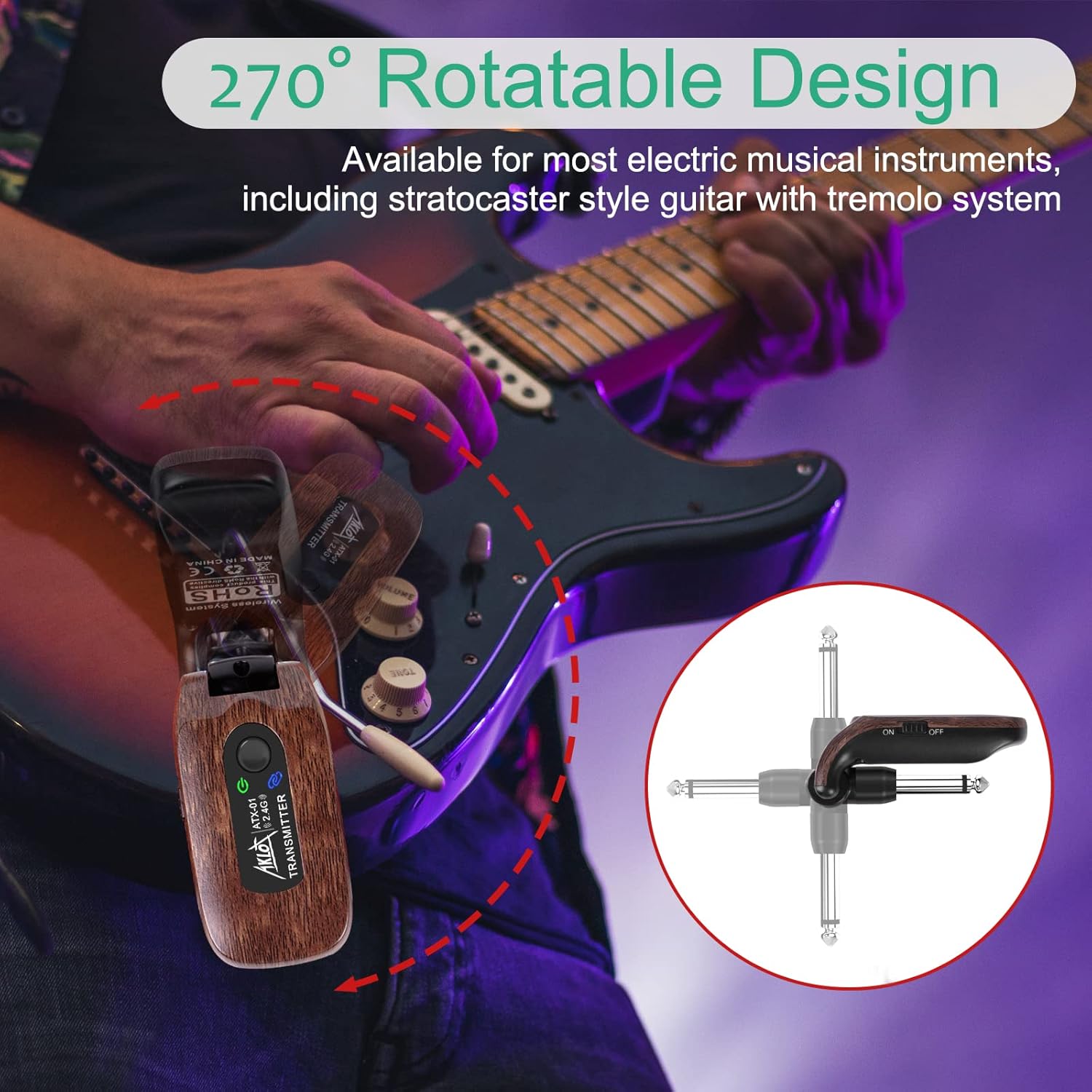
Image 4.2: The 270° rotatable plug allows flexible connection to various instruments.

Image 4.3: The system is suitable for electric guitar, bass, violin, keyboard, audio mixer, and effect pedals.
Video 4.1: Demonstration of connecting the AKLOT Wireless Guitar System to an electric guitar and amplifier.
5. Operating Instructions
5.1. Channel Switching
The system utilizes 4 channel banks to avoid mutual interference. If you experience interference, you can switch the channel:
- Double-click the pairing button on either the transmitter or receiver.
- The number of times the blue pairing indicator blinks indicates the current channel bank in use.
5.2. Signal Transmission and Range
The AKLOT Wireless Guitar System operates on a 2.4GHz chip, providing an effective transmission range of approximately 20 meters (65 feet) in open areas. Performance may vary depending on environmental factors and obstacles.

Image 5.1: Illustration of the 20m (65ft) transmission distance.
Video 5.1: Overview of the AKLOT Wireless Guitar System features and operation.
6. Maintenance
- Keep the devices clean and dry. Avoid exposure to extreme temperatures, humidity, or direct sunlight.
- Do not attempt to disassemble or modify the units, as this will void the warranty.
- Use only the provided charging cable for recharging.
- Store the devices in a cool, dry place when not in use.
7. Troubleshooting
Common Issues and Solutions:
- No Sound/Low Volume:
- Ensure both transmitter and receiver are powered on and fully charged.
- Verify that the devices are properly paired (solid blue indicator light). If not, re-pair them as described in Section 4.2.
- Check the volume settings on your instrument and amplifier.
- Interference/Signal Dropouts:
- Switch to a different channel bank (see Section 5.1).
- Ensure the transmitter and receiver are within the effective range (approx. 20m/65ft) and have a clear line of sight.
- Avoid using the system near other 2.4GHz wireless devices (Wi-Fi routers, other wireless systems) that may cause interference.
- Power Indicator Flickering Red:
- This indicates a low battery. Please charge the device immediately.
8. Specifications
| Feature | Specification |
|---|---|
| Model Number | MI3572 |
| Transmission Frequency | 2.4GHz ISM Frequency Band |
| Audio Solution | 48K/16bit |
| Frequency Response | 10Hz-22KHz (±1dB) |
| Distortion | <0.02% (@1KHz-10dBFS) |
| Effective Range | Approx. 20 meters (65 feet) |
| Signal Channels | 12, in 4 channel banks |
| Battery Capacity | Rechargeable Lithium Battery 3.7V/650mAh |
| Working Time | Over 10 hours (after 1.5 hours charging) |
| Connector Type | 6.5mm Jack, Micro USB |
| Product Dimensions | 4.7 x 1.3 x 0.5 inches |
| Item Weight | 5.6 ounces (0.16 Kilograms) |
9. Warranty and Support
AKLOT products are designed for reliability and performance. For warranty information or technical support, please refer to the contact details provided with your purchase or visit the official AKLOT website. Keep your proof of purchase for any warranty claims.