
Product Overview
The Linsoul TINHIFI P1 Plus are high-fidelity in-ear earphones featuring a 10mm planar-diaphragm driver. Designed for audiophiles and musicians, these earphones offer a clear and detailed sound experience. They come with a detachable OFC MMCX cable and a durable stainless steel shell, ensuring both sound quality and longevity.

Figure 1: Linsoul TINHIFI P1 Plus earphones with their braided copper cable.
Key Features
- Ultra-nanometer Diaphragm Technology: Features a 1-micron thick diaphragm for higher resolution and faster transient response, resulting in musical and natural sound with a wide soundstage.
- Food-grade 304 Stainless Steel Shell: Durable and elegant polished stainless steel housing with a triangular shape and angled nozzle for comfortable, long-term wear.
- Upgraded Planar Diaphragm Driver: Enhanced P1 Plus driver with a double-sided symmetrical array magnetic circuit combination and 14 evenly distributed magnets for improved sensitivity and detail.
- Audiophile-grade 5N OFC MMCX Cable: High-quality detachable copper alloy mixed braided cable designed to enhance vocals and instruments, featuring a widely used MMCX connector.
Setup
1. Unboxing and Component Identification
Carefully remove all components from the packaging. The box should contain the TINHIFI P1 Plus earphone units, the detachable OFC MMCX cable, a leather carrying case, and an assortment of ear tips.
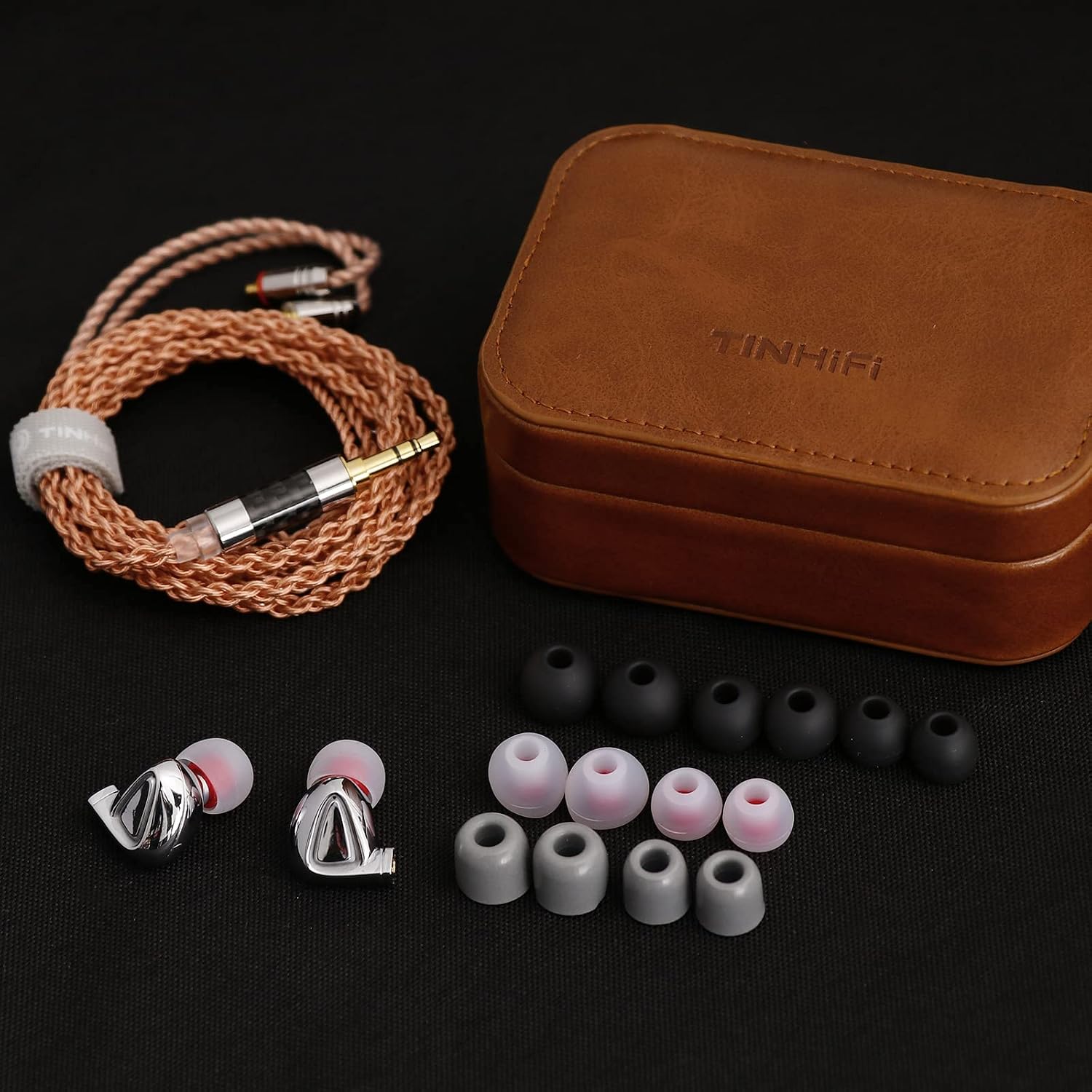
Figure 2: Included accessories: earphones, cable, various ear tips, and a leather carrying case.
2. Attaching the Cable
The TINHIFI P1 Plus uses MMCX connectors for its detachable cable. Identify the left (L) and right (R) earphone units and the corresponding connectors on the cable. Gently align the MMCX connector on the cable with the port on the earphone unit and push firmly until you hear a click. Do not force the connection. To detach, pull the cable connector straight out from the earphone unit, avoiding twisting.

Figure 3: Detail of the MMCX connection points on the earphone units.
3. Selecting and Installing Ear Tips
A proper seal is crucial for optimal sound quality and bass response. Experiment with the included ear tips of different sizes and materials to find the best fit for your ears. Gently push the chosen ear tip onto the nozzle of the earphone unit until it is securely seated.

Figure 4: Earphones with cable and ear tips ready for use.
4. Inserting Earphones
Insert the earphones into your ear canals. The cable is designed to be worn over the ear for a secure and comfortable fit, especially during movement. Adjust the earphones until they feel snug and create a good seal, blocking out external noise.
Operating Instructions
1. Connecting to an Audio Source
Connect the 3.5mm plug of the earphone cable to your audio source (e.g., smartphone, digital audio player, amplifier, computer). Ensure the connection is firm.
2. Volume Control
Adjust the volume directly from your audio source. Start with a low volume and gradually increase it to a comfortable listening level. Avoid excessively high volumes to prevent hearing damage.
3. Optimal Performance
Due to their planar magnetic drivers, the TINHIFI P1 Plus earphones may benefit from a dedicated headphone amplifier or a high-quality audio source to achieve their full potential in terms of dynamics and clarity. While they can be driven by most devices, an amplifier can provide a more robust and controlled sound.
Maintenance
1. Cleaning the Earphones
- Regularly wipe the earphone shells with a soft, dry, lint-free cloth to remove dust and fingerprints.
- Remove ear tips periodically and clean them with mild soap and water. Ensure they are completely dry before reattaching.
- Use a small, soft brush or cotton swab to gently clean any debris from the earphone nozzles. Be careful not to push debris further into the nozzle.
2. Cable Care
- Avoid sharp bends or excessive pulling on the cable, especially near the connectors.
- When storing, coil the cable loosely to prevent tangles and kinks. The included leather carrying case is ideal for this purpose.
3. Storage
Store the earphones in their provided leather carrying case when not in use to protect them from dust, moisture, and physical damage.
Troubleshooting
| Problem | Possible Cause | Solution |
|---|---|---|
| No sound or intermittent sound | Loose cable connection; incorrect audio source selection; low volume on source; damaged cable/earphone. | Ensure MMCX connectors are fully seated. Check audio source output settings. Increase volume. Test with another cable or audio source to isolate the issue. |
| Poor sound quality (e.g., lack of bass, muffled sound) | Poor ear tip seal; ear tips clogged with earwax; insufficient power from audio source. | Try different ear tip sizes for a better seal. Clean ear tips and earphone nozzles. Consider using a headphone amplifier for optimal performance. |
| Earphones fall out easily | Incorrect ear tip size; improper insertion. | Experiment with smaller or larger ear tips. Ensure earphones are inserted correctly with the cable routed over the ear. |
If problems persist, please contact Linsoul customer support or your retailer for further assistance.
Specifications
| Feature | Detail |
|---|---|
| Model Name | TINHIFI P1 Plus |
| Driver Type | 10mm Planar Diaphragm |
| Impedance | 22 Ω ± 15% |
| Sensitivity | 108±3dB @1K Hz V0.179V |
| Frequency Range | 10 Hz–20kHz |
| Rated Power | 5mW |
| Max Power | 10mW |
| Max Distortion | 1% @1k Hz 0.179V |
| Interface | Gold-plated MMCX connector |
| Cable Length | 1.25m |
| Material | Stainless Steel |
| Item Weight | 0.3 Kilograms (10.6 ounces) |
| Product Dimensions | 2.36 x 6.5 x 6.1 inches |
Warranty and Support
For warranty information and customer support, please refer to the documentation provided with your purchase or contact Linsoul directly through their official website or your retailer. Keep your proof of purchase for warranty claims.