
Monster Blaster 3.0
Monster Blaster 3.0 Portable Speaker Instruction Manual
Model: Blaster 3.0
1. Introduction
Thank you for choosing the Monster Blaster 3.0 Portable Speaker. This manual provides essential information for the safe and optimal use of your device. Please read it thoroughly before operation and retain it for future reference.
The Monster Blaster 3.0 is a high-performance portable Bluetooth speaker designed for both indoor and outdoor use, featuring powerful audio output, IPX5 water resistance, and a long-lasting rechargeable battery.
2. Package Contents
Ensure all items are present in your package:
- Monster Blaster 3.0 Portable Speaker
- Power Adapter/Charging Cable
- Instruction Manual (this document)
3. Product Overview
3.1 Controls and Ports
Familiarize yourself with the speaker's controls and connection ports.

Image: Front view of the Monster Blaster 3.0 speaker, highlighting the control panel on the left side and the main speaker grille.

Image: Detailed view of the control panel, showing buttons for Mode, Volume Up/Down, Play/Pause, and LED indicators for battery and EQ modes.
- Power Button: Turns the speaker on or off.
- Mode Button: Switches between input sources (Bluetooth, Aux).
- Volume Up/Down Buttons: Adjusts the playback volume.
- Play/Pause Button: Controls media playback.
- EQ Mode Button: Toggles between Indoor and Outdoor sound profiles.
- LED Indicators: Display battery level and active EQ mode.
- Charging Port: For connecting the power adapter.
- USB-A Port: For charging external devices.
- Auxiliary Input (3.5mm): For wired audio connection.
4. Setup
4.1 Charging the Speaker
Before first use, fully charge the speaker. The Blaster 3.0 has a built-in rechargeable battery providing up to 12 hours of continuous play.
- Connect the provided power adapter to the speaker's charging port.
- Plug the adapter into a power outlet.
- The LED indicators will show the charging status. They will typically stop blinking or change color when fully charged.
4.2 Power On/Off
- To power on: Press and hold the Power button until the indicator lights illuminate.
- To power off: Press and hold the Power button until the indicator lights turn off.
5. Operating Instructions
5.1 Bluetooth Pairing
The Blaster 3.0 connects wirelessly via Bluetooth and supports NFC pairing.
- Enable Bluetooth: Power on the speaker. It will automatically enter Bluetooth pairing mode if no device is connected. The Bluetooth indicator LED will blink.
- Activate Bluetooth on your device: Go to your smartphone, tablet, or laptop's Bluetooth settings.
- Select 'Monster Blaster 3.0': From the list of available devices, select 'Monster Blaster 3.0' to pair. The Bluetooth indicator will become solid when connected.
- NFC Pairing (if supported by your device): Tap your NFC-enabled device to the NFC area on the speaker to initiate pairing. Follow on-screen prompts to confirm.
5.2 Auxiliary Input
For wired audio playback, use the 3.5mm auxiliary input.
- Connect a 3.5mm audio cable (not included) from your audio source to the speaker's Aux input port.
- Press the Mode button on the speaker until the Aux indicator illuminates.
- Audio will now play through the wired connection.
5.3 Volume Control
Adjust the volume using the Volume Up (+) and Volume Down (-) buttons on the speaker or directly from your connected device.
5.4 EQ Modes (Indoor/Outdoor)
The Blaster 3.0 features selectable EQ modes to optimize sound for different environments.
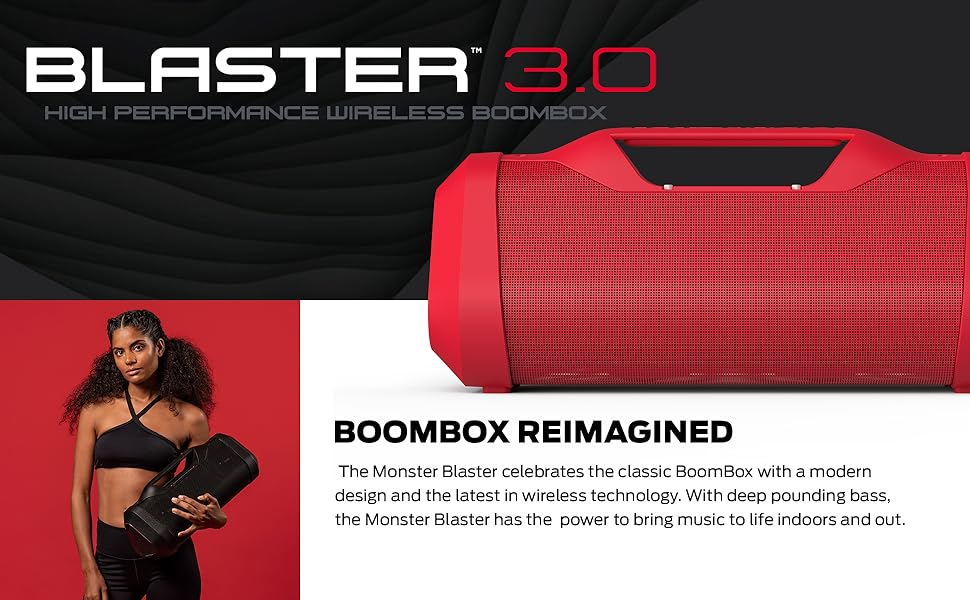
Image: The Monster Blaster 3.0 speaker positioned in an indoor kitchen setting and an outdoor park setting, illustrating its versatility with EQ modes.
- Press the EQ Mode button to switch between Indoor and Outdoor sound profiles.
- Indoor Mode: Optimized for balanced audio within enclosed spaces.
- Outdoor Mode: Boosts volume and bass for enhanced sound projection in open environments.
5.5 USB Charge Out
The speaker can charge external devices via its USB-A port.

Image: A smartphone connected via a USB cable to the Monster Blaster 3.0 speaker, indicating the USB charge-out function.
- Connect your device's USB charging cable to the USB-A port on the Blaster 3.0.
- The speaker will begin charging your device. Note that using this feature will reduce the speaker's playback time.
6. Maintenance
6.1 Cleaning
- Ensure the speaker is powered off and disconnected from any power source before cleaning.
- Use a soft, dry, lint-free cloth to wipe the exterior surfaces.
- Do not use abrasive cleaners, solvents, or chemical sprays.
6.2 Water Resistance (IPX5)
The Blaster 3.0 is IPX5 water resistant, meaning it can withstand splashes and light rain. It is not designed to be submerged in water.

Image: The Monster Blaster 3.0 speaker with water splashing over its surface, demonstrating its IPX5 water resistance.
- Ensure all port covers are securely closed to maintain water resistance.
- Do not expose the speaker to pressurized water or prolonged submersion.
- If the speaker gets wet, wipe it dry with a soft cloth before charging or opening any ports.
6.3 Battery Care
- Avoid fully discharging the battery frequently.
- Store the speaker in a cool, dry place when not in use for extended periods.
- Charge the battery at least once every three months to prolong its lifespan.
7. Troubleshooting
If you encounter issues with your Monster Blaster 3.0, refer to the following common problems and solutions:
| Problem | Possible Cause | Solution |
|---|---|---|
| Speaker does not power on | Low battery; Power button not pressed correctly | Charge the speaker; Press and hold the Power button for 3-5 seconds. |
| Cannot pair via Bluetooth | Speaker not in pairing mode; Bluetooth disabled on device; Device too far | Ensure speaker is in pairing mode (blinking LED); Enable Bluetooth on your device; Move device closer to speaker (within 10 meters). |
| No sound | Volume too low; Incorrect input source; Device not playing audio | Increase speaker and device volume; Press Mode button to select correct input; Ensure audio is playing on your connected device. |
| Sound distortion | Volume too high; Low battery; Interference | Reduce volume; Charge the speaker; Move away from other electronic devices. |
| USB charge out not working | Speaker battery too low; Cable issue; Device not compatible | Ensure speaker has sufficient charge; Try a different USB cable; Verify device compatibility. |
8. Specifications
| Feature | Detail |
|---|---|
| Model Name | Blaster 3.0 |
| Speaker Type | Portable Bluetooth Speaker |
| Connectivity Technology | Bluetooth, NFC, Auxiliary (3.5mm), USB (charge out) |
| Wireless Communication | Bluetooth |
| Speaker Maximum Output Power | 120 Watts |
| Subwoofer Power | 60 Watts (integrated) |
| Water Resistance Rating | IPX5 |
| Power Source | Battery Powered (1 Lithium Ion battery included) |
| Battery Capacity | 5200 Milliamp Hours |
| Battery Life | Up to 12 hours (continuous play) |
| Product Dimensions (D x W x H) | 20.25" x 10.3" x 12.15" |
| Item Weight | 16.3 Pounds |
| Control Method | Buttons on device |
| Recommended Uses | Indoor, Outdoor |
| UPC | 812350234666 |
| Item Model Number | 2MNSK0928W0L2 |
9. Warranty and Support
The Monster Blaster 3.0 Portable Speaker comes with a manufacturer's warranty. For specific warranty details, registration, or technical support, please refer to the warranty card included in your product packaging or visit the official Monster website.
For further assistance, you may contact Monster customer support directly.
Related documentsBlaster 3.0


Ask a question about this manual
Ask about setup, troubleshooting, compatibility, parts, safety, or missing instructions. Manuals+ will review the question and use this page’s manual context to help answer it.