
Introduction
Thank you for choosing the Fitpolo IDW19 Smartwatch. This manual provides essential information for setting up, operating, and maintaining your device. Please read it carefully to ensure optimal performance and longevity of your smartwatch.
Package Contents
- 1 x Fitpolo IDW19 Smartwatch
- 1 x User Guide
- 1 x Magnetic USB Charging Cable
Setup
1. Charging the Smartwatch
Before first use, fully charge your smartwatch. Connect the magnetic USB charging cable to the charging contacts on the back of the watch and plug the USB end into a standard USB power adapter (not included) or a computer USB port. The watch screen will display the charging status. A full charge typically takes 1-2 hours.

Image: The smartwatch charging and displaying battery information. A full charge provides approximately 7-10 days of usage or 30-40 days of standby time.
2. Downloading the App
The Fitpolo IDW19 Smartwatch uses the VeryfitPro app. Download the app from the Google Play Store (for Android devices) or the Apple App Store (for iOS devices). Ensure your smartphone meets the minimum requirements: Android 4.4 or higher, or iOS 8.1 or higher.
3. Pairing with Your Smartphone
- Enable Bluetooth on your smartphone.
- Open the VeryfitPro app and create an account or log in.
- Follow the in-app instructions to search for and connect to your Fitpolo IDW19 smartwatch. The app will guide you through the pairing process.
- Once connected, the watch will synchronize its time and data with your phone.
Operating Instructions
1. Basic Navigation
The Fitpolo IDW19 features a 1.8-inch full touch screen. Swipe up, down, left, or right to navigate through menus and functions. Press the side button to return to the previous screen or the watch face.
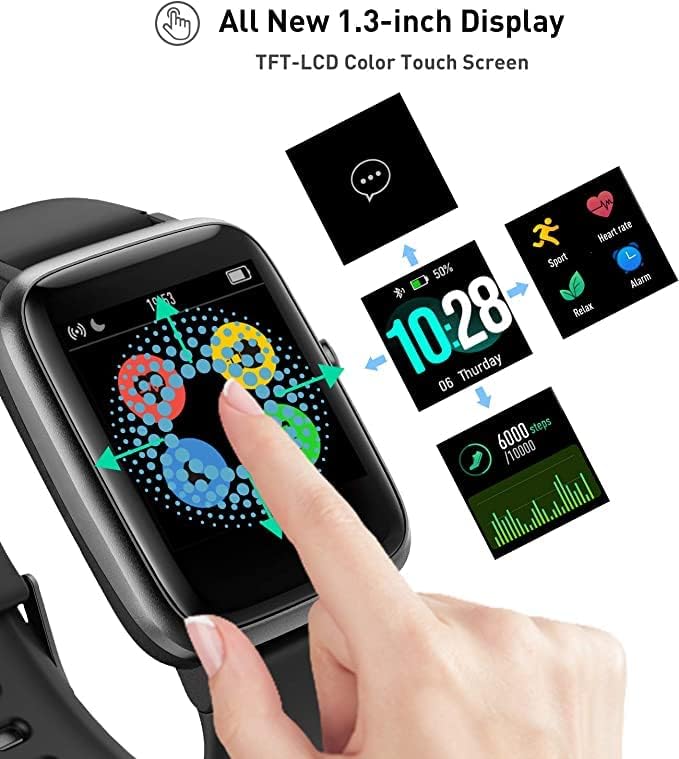
Image: The smartwatch demonstrating touch screen interaction and various display options.
2. Activity Tracking
The smartwatch automatically tracks your daily activities including steps, distance, and calories burned. View your progress directly on the watch or in the VeryfitPro app for detailed statistics.
3. Heart Rate Monitoring
The IDW19 continuously monitors your heart rate. Access the heart rate interface on the watch to view real-time data. The VeryfitPro app provides historical data and analysis of your heart rate zones.

Image: The smartwatch showing current heart rate and a graph of heart rate zones over time, as seen in the companion app.
4. Sleep Monitoring
Wear the smartwatch to bed to monitor your sleep patterns. It tracks your sleep duration and quality, providing insights into light sleep, deep sleep, and awake times. Review your sleep data in the VeryfitPro app.
5. Sport Modes
The watch supports over 9 exercise modes, including walking, running, cycling, hiking, climbing, yoga, treadmill, badminton, and basketball. Select a sport mode before starting your workout to track specific metrics. For outdoor activities, the watch can use your phone's GPS for real-time running statistics.
6. Notifications
Receive call, SMS, and social media notifications (Facebook, Twitter, WhatsApp, Instagram, LinkedIn, Skype, WeChat) directly on your wrist. Ensure notifications are enabled in the VeryfitPro app and your phone's settings.

Image: The smartwatch showing incoming call and message notifications from popular social media and communication apps.
7. Music Control
Control music playback on your smartphone directly from your smartwatch. Play, pause, skip tracks, and adjust volume without needing to take out your phone.

Image: The smartwatch displaying music playback controls, allowing users to manage their phone's music.
8. Additional Features
- Find My Phone: Use this feature on the watch to make your phone ring, helping you locate it.
- Sedentary Reminder: Get alerts when you've been inactive for too long.
- Breathing Guide: Follow guided breathing exercises for relaxation.
- Female Health Tracking: Monitor menstrual cycles and related health data.
- Stopwatch: A built-in stopwatch for timing activities.
Maintenance
1. Cleaning the Smartwatch
Regularly clean your smartwatch and strap to prevent skin irritation and maintain device functionality. Use a soft, damp cloth to wipe the screen and strap. Avoid harsh chemicals or abrasive materials.
2. Water Resistance (IP68)
The Fitpolo IDW19 is IP68 waterproof, meaning it is resistant to dust and can withstand immersion in water up to 1.5 meters for 30 minutes. It is suitable for daily use, hand washing, and light rain. Note: It is not designed for swimming or diving. Avoid hot water, steam, or high-pressure water jets.

Image: The smartwatch being worn while submerged in water, demonstrating its IP68 water resistance. Note that it is not suitable for swimming mode.
3. Battery Care
To prolong battery life, avoid fully discharging the watch frequently. Charge it when the battery level is low. Store the watch in a cool, dry place when not in use for extended periods.
Troubleshooting
- Watch not turning on: Ensure the watch is fully charged. Connect it to the charger for at least 10 minutes.
- Unable to pair with phone:
- Ensure Bluetooth is enabled on your phone and the watch is within range.
- Restart both your phone and the smartwatch.
- Check if the VeryfitPro app is updated to the latest version.
- Forget the device in your phone's Bluetooth settings and try pairing again through the app.
- Inaccurate heart rate/sleep data: Ensure the watch is worn snugly on your wrist, about one finger's width from your wrist bone. Clean the sensor on the back of the watch.
- Notifications not received:
- Verify that notifications are enabled in the VeryfitPro app for the desired applications.
- Check your phone's system settings to ensure the VeryfitPro app has notification permissions.
- Ensure the watch is connected via Bluetooth.
- Short battery life:
- Reduce screen brightness.
- Disable continuous heart rate monitoring if not needed.
- Limit the number of apps sending notifications to the watch.
Specifications
| Feature | Specification |
|---|---|
| Model Number | IDW19 |
| Brand | Fitpolo |
| Display | 1.8-inch Full Touch Screen |
| Operating System | AsteroidOS |
| Connectivity | Bluetooth |
| Compatible Devices | Smartphones (Android 4.4+, iOS 8.1+) |
| Battery Type | Lithium-Polymer |
| Battery Capacity | 210 mAh |
| Charging Time | 1-2 hours |
| Usage Time | 7-10 days |
| Standby Time | 30-40 days |
| Water Resistance | IP68 (not for swimming) |
| Memory Storage | 512 MB |
| GPS | Connected GPS (via smartphone) |
| Special Features | Heart Rate Monitor, Sleep Monitor, Activity Tracker, Message Notifications, Music Control, Find Phone, Sedentary Reminder, Breathing Guide, Female Health |
Warranty and Support
Your Fitpolo IDW19 Smartwatch comes with a standard manufacturer's warranty. Please refer to the warranty card included in your package for specific terms and conditions. For technical support, troubleshooting assistance, or warranty claims, please contact Fitpolo customer service through their official website or the contact information provided with your purchase.
For the latest information and support, visit the official Fitpolo website: Fitpolo Store


