
1. Introduction
Thank you for choosing the TechniSat DIGITRADIO CD 2GO BT. This portable device combines a CD player with DAB+ and FM radio reception, along with Bluetooth connectivity, offering versatile audio entertainment. This manual provides essential information for the safe and efficient use of your device, including setup, operation, and maintenance.
Please read this manual thoroughly before using the device and retain it for future reference.
2. Safety Information
Observe the following safety precautions to prevent damage to the device or injury to yourself:
- Do not expose the device to rain, moisture, or extreme temperatures.
- Avoid placing the device near heat sources or in direct sunlight.
- Do not open the device casing. Refer all servicing to qualified personnel.
- Use only the specified power adapter and batteries.
- Ensure proper ventilation around the device during operation.
- Avoid listening at excessively high volumes for prolonged periods to prevent hearing damage.
3. Package Contents
Please check that all items are present in the package:
- TechniSat DIGITRADIO CD 2GO BT unit
- Headphones
- 2 x BL5C rechargeable batteries
- External power cable (AC adapter)
- User Manual (this document)
4. Product Overview
Familiarize yourself with the main components and controls of your DIGITRADIO CD 2GO BT.

Figure 4.1: Front view of the TechniSat DIGITRADIO CD 2GO BT, showing the display, navigation buttons (ON/OFF OK, SKIP UP, SKIP DOWN), playback controls (PLAY/PAUSE, STOP/SEARCH), and function buttons (MENU, EQ/BT, MODE).
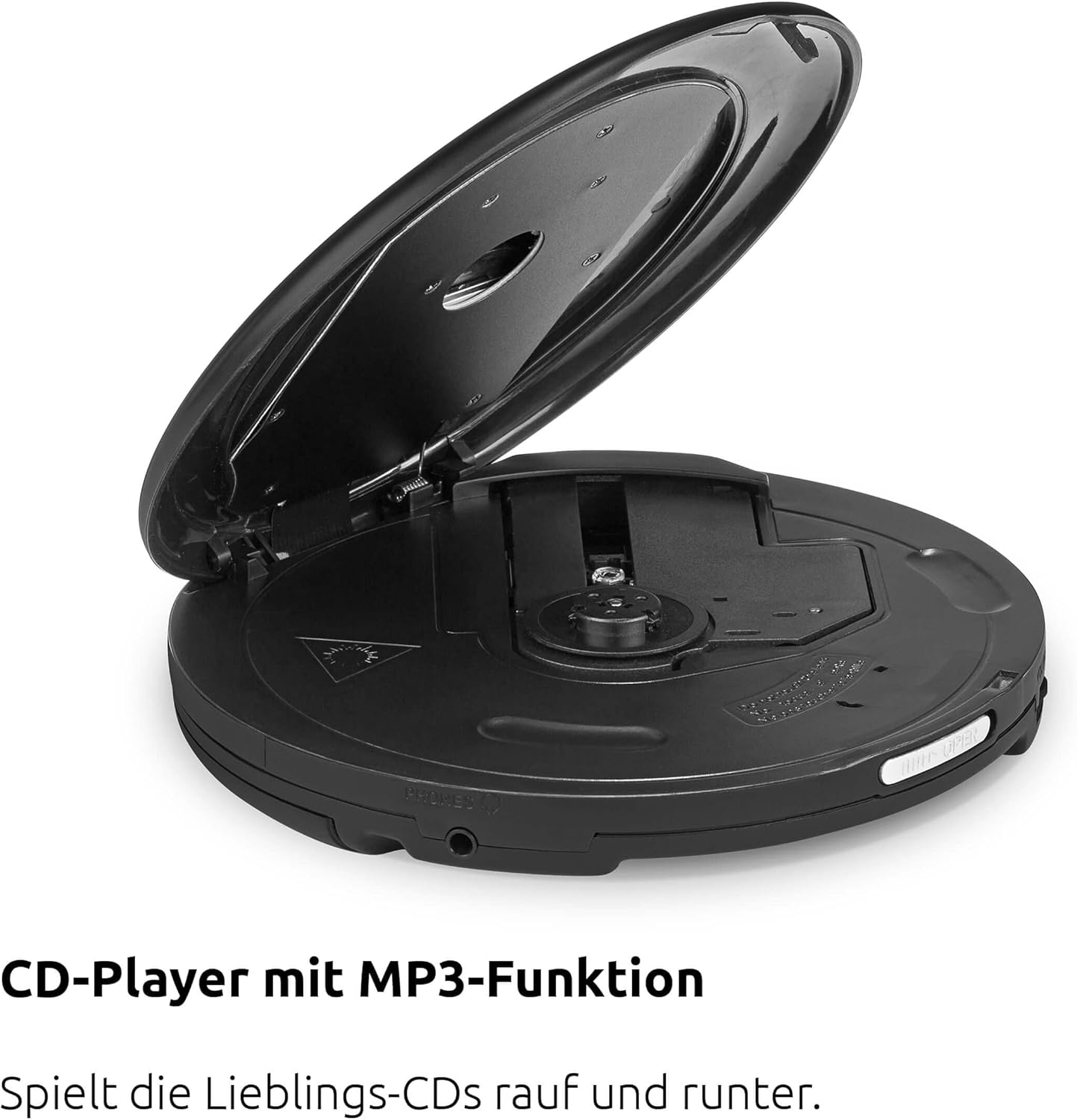
Figure 4.2: Top view of the device with the CD compartment open, revealing the CD spindle and loading area. This is where audio CDs, MP3 CDs, CD-R, and CD-RW discs are inserted.

Figure 4.3: Side view illustrating the 3.5mm headphone jack, which also serves as the antenna for FM and DAB+ radio reception when headphones are connected.
Controls:
- ON/OFF OK: Power on/off, confirm selection.
- PLAY/PAUSE: Start or pause playback.
- STOP/SEARCH: Stop playback, initiate station search in radio mode.
- SKIP UP / SKIP DOWN: Skip tracks on CD, navigate menus, tune radio stations.
- MENU: Access menu options.
- EQ/BT: Access equalizer settings, activate Bluetooth pairing.
- MODE: Switch between CD, DAB+, FM, and Bluetooth modes.
5. Setup
5.1. Battery Installation
The DIGITRADIO CD 2GO BT operates on two BL5C rechargeable batteries. To install:
- Locate the battery compartment on the underside of the device.
- Open the battery compartment cover.
- Insert the two BL5C batteries, ensuring correct polarity (+/-).
- Close the battery compartment cover securely.
5.2. Powering the Device
You can power the device using the included AC adapter or the installed rechargeable batteries.
- AC Power: Connect the external power cable to the DC IN port on the device and plug the adapter into a wall outlet.
- Battery Power: Ensure the batteries are charged. The device will automatically switch to battery power when disconnected from AC.
5.3. Initial Power On
Press and hold the ON/OFF OK button to power on the device. The display will illuminate. If this is the first time powering on, the device may prompt you for initial setup options such as language or perform an automatic DAB+ station scan.
6. Operating Instructions
6.1. CD Playback
The DIGITRADIO CD 2GO BT supports audio CDs, MP3 CDs, CD-R, and CD-RW formats.

Figure 6.1: The portable design of the DIGITRADIO CD 2GO BT makes it suitable for on-the-go use.
- Open the CD compartment cover.
- Place a CD onto the spindle with the label side facing up.
- Close the CD compartment cover firmly until it clicks.
- Press the MODE button until "CD" mode is selected.
- Press the PLAY/PAUSE button to start playback.
- Use SKIP UP and SKIP DOWN to navigate between tracks.
- Press PLAY/PAUSE to pause, and STOP/SEARCH to stop playback.
Resume Function: The player will automatically resume playback from the last listened position after being turned off and on again, ideal for audiobooks.
Anti-Shock Protection (ASP): This feature helps prevent playback interruptions during movement, ensuring a smooth listening experience.

Figure 6.2: The Anti-Shock Protection (ASP) feature ensures uninterrupted audio playback even during activities like cycling or walking.
6.2. DAB+ Radio
DAB+ (Digital Audio Broadcasting Plus) offers high-quality digital radio reception.

Figure 6.3: Enjoy a wide variety of digital radio programs with DAB+ reception.
- Connect the included headphones to the 3.5mm jack; they act as the antenna.
- Press the MODE button until "DAB+" mode is selected.
- If this is the first time in DAB+ mode, the device will perform an automatic scan for available stations.
- Use SKIP UP and SKIP DOWN to browse through available DAB+ stations.
- To save a favorite station, press and hold the MENU button, navigate to "Preset Store", select a preset number (1-10), and press ON/OFF OK to confirm.
- To recall a favorite station, press the MENU button, navigate to "Preset Recall", select the desired preset, and press ON/OFF OK.
6.3. FM Radio
For traditional analog radio reception.
- Connect the included headphones to the 3.5mm jack; they act as the antenna.
- Press the MODE button until "FM" mode is selected.
- Press STOP/SEARCH to automatically scan for the next available FM station.
- Alternatively, use SKIP UP and SKIP DOWN for manual tuning.
- To save a favorite station, press and hold the MENU button, navigate to "Preset Store", select a preset number (1-10), and press ON/OFF OK to confirm.
- To recall a favorite station, press the MENU button, navigate to "Preset Recall", select the desired preset, and press ON/OFF OK.
6.4. Bluetooth Connection
Connect your DIGITRADIO CD 2GO BT to Bluetooth headphones or speakers.
- Press the MODE button until "Bluetooth" mode is selected. The device will enter pairing mode, indicated by a flashing Bluetooth icon on the display.
- Activate Bluetooth on your external audio device (e.g., headphones, speaker) and set it to pairing mode.
- On the DIGITRADIO CD 2GO BT, press and hold the EQ/BT button to initiate a search for nearby Bluetooth devices.
- Select your desired device from the list on the DIGITRADIO CD 2GO BT's display using SKIP UP/DOWN and confirm with ON/OFF OK.
- Once connected, the Bluetooth icon will become solid. Audio will now be streamed to the connected device.
6.5. Volume Control
Adjust the volume using the dedicated volume buttons (often integrated with SKIP UP/DOWN or separate buttons, refer to your device's specific button layout if different from general description). Note that due to European standards, a default volume limitation is active. To deactivate this and increase the maximum volume, press and hold the MENU button for a few seconds. Navigate through the menu options to find the "Volume Limit" setting and adjust it as desired. Refer to page 17 of the original printed manual for precise instructions on this setting.
6.6. Equalizer Settings
Customize your audio experience with the built-in equalizer.
- Press the EQ/BT button (short press) to cycle through preset equalizer modes (e.g., Pop, Rock, Jazz, Classic, Flat).
- Some models may offer a custom equalizer setting, allowing manual adjustment of bass and treble. Consult the device display for available options.
7. Maintenance
7.1. Cleaning
To maintain the appearance and functionality of your device:
- Wipe the exterior with a soft, dry cloth.
- For stubborn marks, use a slightly damp cloth with mild detergent, then wipe dry.
- Do not use abrasive cleaners, solvents, or alcohol, as these can damage the surface.
- Periodically clean the CD lens with a specialized CD lens cleaner disc.
7.2. Battery Care
To prolong battery life:
- Fully charge the batteries before first use.
- If the device will not be used for an extended period, remove the batteries to prevent leakage.
- Dispose of used batteries according to local regulations.
8. Troubleshooting
If you encounter issues with your DIGITRADIO CD 2GO BT, refer to the following table:
| Problem | Possible Cause | Solution |
|---|---|---|
| Device does not power on. | Batteries are depleted or incorrectly inserted. AC adapter not connected or faulty. | Check battery charge and polarity. Ensure AC adapter is securely connected and functional. |
| No sound from headphones. | Headphones not properly connected. Volume too low. Volume limit active. | Ensure headphones are fully plugged in. Increase volume. Deactivate volume limit (see Section 6.5). |
| CD skips or does not play. | CD is dirty, scratched, or inserted incorrectly. CD compartment not closed. | Clean the CD. Ensure it is inserted correctly. Close the CD compartment firmly. |
| Poor radio reception (DAB+/FM). | Headphones not connected or poorly positioned. Weak signal in current location. | Ensure headphones are connected and fully extended. Try repositioning the device or moving to a different location. |
| Bluetooth pairing fails. | Device not in pairing mode. External device too far or not in pairing mode. | Ensure both devices are in pairing mode and within range. Try restarting both devices. |
9. Specifications
| Feature | Detail |
|---|---|
| Model Name | DIGITRADIO CD 2GO BT |
| Model Number | 0000/3970 |
| Brand | TechniSat |
| Connectivity Technology | Bluetooth |
| Special Features | Replaceable Battery, Anti-Shock Function, Resume Function |
| Compatible Devices | Headphones |
| Supported Audio Formats | MP3, WMA, AAC |
| Number of Discs | 1 |
| Connector Type | 3.5 mm Jack |
| Power Source | 2 x Lithium-ion batteries (included), AC adapter |
| Battery Rechargeable | Yes |
| Usage | Indoor and Outdoor |
| Dimensions (W x H x D) | 14 x 2.50 x 14 cm (approximate, from feature bullets) |
10. Warranty and Support
For warranty information and customer support, please refer to the warranty card included with your product or visit the official TechniSat website. Keep your proof of purchase for any warranty claims.
Please note that spare parts availability is currently listed as "unavailable" according to product specifications. Software updates are also listed as "information not available".


