
1. Introduction
The Cleer Audio Alpha headphones are designed to provide an immersive audio experience with advanced features for enhanced listening. This manual provides essential information for setting up, operating, and maintaining your headphones.
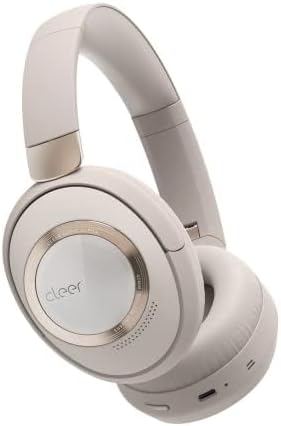
Figure 1: Cleer Audio Alpha headphones (Stone color)
2. What's in the Box
Your Cleer Audio Alpha headphones package includes the following items:
- Cleer Audio Alpha Headphones
- USB-A to USB-C Charging Cable
- 3.5 mm Audio Cable
- Hard Carrying Case
- Airplane Adapter
- Quick Start Guide
- User Manual (this document)
- Warranty Card

Figure 2: Included accessories with Cleer Audio Alpha headphones
3. Product Overview and Design
The Cleer Audio Alpha headphones are designed for comfort and durability, featuring a matte finish and gold accents. The earcups are magnetically attached for easy cleaning or replacement.

Figure 3: Headband and earcup details
The headphones feature soft, memory foam earcups and a padded headband for extended wear comfort. The earcups can swivel and fold for compact storage in the provided hard carrying case.

Figure 4: Headphones stored in their travel case
4. Setup
4.1 Charging the Headphones
Before first use, fully charge your headphones. Connect the provided USB-C charging cable to the USB-C port on the left earcup and to a power source. A 10-minute quick charge provides an additional 4 hours of playback.

Figure 5: Battery life and quick charge capabilities
4.2 Bluetooth Pairing
The Alpha headphones support Bluetooth 5.1 with Qualcomm aptX Adaptive technology for high-quality wireless audio. They also feature Multipoint Connection, allowing simultaneous connection to two devices.
- Power on the headphones by sliding the power button on the right earcup.
- Activate Bluetooth on your device (smartphone, tablet, computer).
- Select "Cleer ALPHA" from the list of available Bluetooth devices.
- Once paired, a voice prompt will confirm the connection.

Figure 6: Multipoint connection setup
4.3 Cleer+ App Control
Download the free Cleer+ app from your device's app store to unlock the full performance and customization options of your Alpha headphones. The app allows you to:
- Adjust noise-canceling and ambient noise levels.
- Customize EQ settings.
- Manage device controls.
- Receive firmware updates.

Figure 7: Cleer+ App interface for customization
5. Operating Instructions
5.1 Adaptive Noise Cancellation and Ambient Mode
The Alpha headphones feature adaptive noise cancellation to block out distractions. Use Ambient mode to allow external sounds to pass through, enabling conversations without removing your headphones.
- Toggle between Noise Cancellation, Ambient Mode, and Off using the dedicated ANC button on the left earcup.
- Smart Noise Cancellation automatically adjusts levels based on your environment.

Figure 8: Adaptive Noise Cancellation in action

Figure 9: Ambient Sound Control
5.2 Intuitive Touch Controls
The right earcup features touch controls for various functions:
- Swipe Up/Down: Adjust volume.
- Swipe Forward/Backward: Skip tracks.
- Double Tap: Play/Pause music, Answer/End calls.
- Palm over earcup: Temporarily reduces volume and noise cancellation for quick conversations.

Figure 10: Intuitive Touch Controls
5.3 Smart Wear Detection
The headphones automatically play or pause audio when you put them on or take them off, ensuring a seamless listening experience.

Figure 11: Smart Wear Detection
5.4 Dirac Virtuo Spatial Audio
Experience an expanded soundstage and immersive audio with Dirac Virtuo spatial audio technology. This feature works with all content and does not require specially encoded tracks.

Figure 12: Dirac Virtuo Spatial Audio
5.5 Wired Connection
For situations where wireless connectivity is not preferred or available, you can connect the headphones using the provided 3.5mm audio cable. This allows for continued listening even if the battery is depleted.
6. Audio Quality
The Alpha headphones are equipped with 40mm ironless drivers, delivering high-resolution audio with accurate bass for an immersive sound experience. They support Hi-Res and Lossless Audio formats.

Figure 13: 40mm Ironless Driver technology

Figure 14: Hi-Res & Lossless Audio support
7. Maintenance
The earcups are magnetically attached, allowing for easy removal for cleaning or replacement. Regularly wipe the headphones with a soft, dry cloth to maintain their appearance.
8. Troubleshooting
If you encounter any issues with your Cleer Audio Alpha headphones, please refer to the following general troubleshooting tips:
- No Power: Ensure the headphones are fully charged.
- Cannot Pair: Ensure Bluetooth is enabled on your device and the headphones are in pairing mode. Try restarting both devices.
- Poor Audio Quality: Check the audio source. Ensure the headphones are within Bluetooth range. If using a wired connection, check the cable.
- ANC Not Working: Ensure ANC is enabled and not in Ambient mode.
- Touch Controls Unresponsive: Ensure the headphones are powered on and connected. Try restarting the headphones.
For more detailed troubleshooting or persistent issues, please contact Cleer Audio customer support.
9. Specifications
| Feature | Specification |
|---|---|
| Model Name | Alpha |
| Connectivity Technology | Bluetooth 5.1 |
| Wireless Communication Technology | Bluetooth |
| Noise Control | Active Noise Cancellation |
| Audio Driver Type | Dynamic Driver (40mm Ironless) |
| Frequency Response | 20 Hz - 20 KHz |
| Battery Life | Up to 35 Hours |
| Charging Time (Quick Charge) | 10 minutes for 4 hours playback |
| Control Method | Touch |
| Microphone | Dual-Microphone with Qualcomm cVc technology |
| Item Weight | 11.4 Ounces (323 grams) |
| Product Dimensions | 8.78 x 7.13 x 2.72 inches |
| Material | Plastic |
10. Warranty and Support
For warranty information and customer support, please refer to the warranty card included in your product packaging or visit the official Cleer Audio website. Ensure you register your product for any applicable warranty benefits.


