
Product Overview
The NiteRider Vmax+ 150 is a compact and powerful USB rechargeable bike tail light designed to enhance rider safety. Featuring advanced COB (Chip-on-Board) LEDs, it delivers a bright and visible output in a lightweight package. This tail light incorporates Daylight Visible Flash (DVF) technology, ensuring you are seen during daytime rides, and includes a Group Ride Mode to prevent dazzling fellow cyclists. Built to meet FL1 Standards, it offers excellent impact resistance and is rated IP64 for dust and water resistance.

Figure 1: NiteRider Vmax+ 150 USB Tail Light, showcasing its compact design and bright red lens.
Package Contents
Upon opening your NiteRider Vmax+ 150 package, you should find the following items:
- NiteRider Vmax+ 150 USB Tail Light
- Seat Post Strap Mount
- USB-C Charging Cable

Figure 2: Contents of the NiteRider Vmax+ 150 package, including the tail light, seat post mount, and USB-C charging cable.
Setup and Installation
The NiteRider Vmax+ 150 is designed for fast and easy installation without the need for tools. Follow these steps to securely mount your tail light:
- Attach Light to Mount: Align the belt clip on the back of the Vmax+ 150 tail light with the slot on the seat post strap mount. Push the light firmly into the mount until you hear a distinct "click," indicating it is securely locked.
- Mount to Seat Post: Place the seat post strap mount onto your bicycle's seat post. Wrap the durable rubber strap around the seat post and hook it onto the appropriate notch for a secure fit. The mount features angle adjustment capability, allowing you to fine-tune the light output direction for optimal visibility.
- Test Security: Gently push the light upward to ensure there is no movement and that the lock tab has engaged into the clothing clip. Do not push the release tab when testing for a secure fitment.
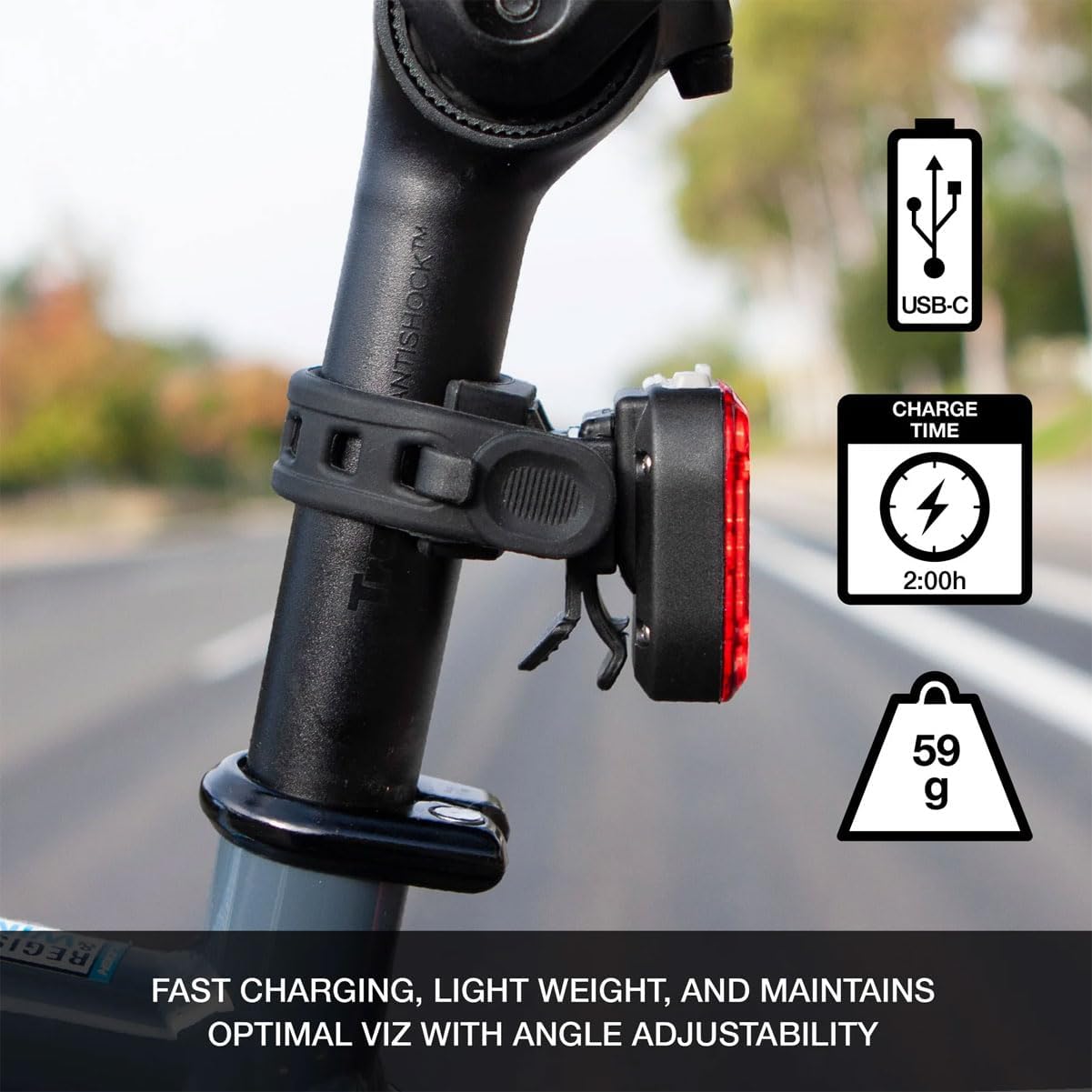
Figure 3: The NiteRider Vmax+ 150 mounted on a bicycle seat post, demonstrating its secure and adjustable fit.
Video 1: Official unboxing and installation guide for the NiteRider Vmax+ 150, demonstrating how to attach the light to its mount and secure it to a bike.
Operating Instructions
The Vmax+ 150 offers multiple lighting modes to suit various riding conditions and preferences. The single button on the top of the light controls all functions.
Power On/Off:
- To turn the light ON, press and hold the power button for approximately 1 second.
- To turn the light OFF, press and hold the power button for approximately 1 second.
Changing Modes:
Once the light is on, short press the power button to cycle through the available lighting modes:
- Fast Flash: High-intensity rapid flashing for maximum visibility (Run time: 13:15h).
- Slow Flash: Slower, consistent flashing (Run time: 10:45h).
- Disco Flash: Dynamic, attention-grabbing flash pattern (Run time: 11:15h).
- Pulse Flash: A pulsating light pattern (Run time: 7:30h).
- Steady High: Constant, high-brightness illumination (Run time: 5:30h).
- Steady Low: Constant, lower-brightness illumination for extended run time (Run time: 27:30h).
Video 2: Demonstration of the NiteRider Vmax+ 150's six bright flash patterns, showcasing each mode's visibility.
Charging the Battery
The NiteRider Vmax+ 150 features convenient USB-C recharging. A full charge takes approximately 2 hours.
- Access Charging Port: Locate the USB-C charging port on the light, typically covered by a dust cap. Gently lift the dust cap to expose the port.
- Connect Cable: Insert the provided USB-C charging cable into the light's port. The USB-C connector is non-directional, allowing for easy insertion.
- Connect to Power: Plug the other end of the USB-C cable into a compatible USB power source (e.g., computer, wall adapter, power bank).
- Monitor Charge Indicator: The power button on the light doubles as a battery level indicator.
- A blue light indicates the battery level is above 20%.
- A red light indicates the battery level is 20% or less, signaling it's time to recharge.
- Disconnect and Seal: Once charging is complete (indicated by the blue light), disconnect the USB-C cable and firmly press the dust cap back into place to maintain the light's IP64 water and dust resistance.

Figure 4: Close-up of the NiteRider Vmax+ 150's power button, which serves as a low battery indicator (blue for >20%, red for <=20%).
Maintenance
To ensure the longevity and optimal performance of your NiteRider Vmax+ 150, follow these simple maintenance guidelines:
- Cleaning: Wipe the light clean with a damp cloth after use, especially if exposed to dirt, mud, or sweat. Avoid using harsh chemicals or abrasive materials.
- Charging Port: Always ensure the USB-C dust cap is securely closed when not charging to maintain the IP64 water and dust resistance.
- Storage: Store the light in a cool, dry place when not in use. For long-term storage, ensure the battery is partially charged (around 50%) to preserve battery health.
- Battery Care: Recharge the battery regularly, even if not fully depleted, to maintain its capacity and lifespan. Avoid completely draining the battery frequently.
Troubleshooting
If you encounter any issues with your NiteRider Vmax+ 150, refer to the following common troubleshooting steps:
- Light Not Turning On:
- Ensure the battery is charged. Connect to a power source and check the battery indicator.
- Press and hold the power button for at least 1 second to ensure it registers the command.
- Light Not Charging:
- Verify the USB-C cable is fully inserted into both the light and the power source.
- Try a different USB-C cable or power source to rule out faulty accessories.
- Ensure the charging port is clean and free of debris.
- Light Not Holding Charge:
- Battery lifespan can decrease over time. Ensure you are fully charging the device.
- Avoid extreme temperatures during charging or storage, as this can affect battery performance.
- Light Detaches from Mount:
- Ensure the light was properly clicked into the mount during installation.
- Verify the rubber strap is securely fastened around the seat post and is not loose.
Specifications
| Feature | Specification |
|---|---|
| Brand | NiteRider |
| Model Name | Vmax+ 150 USB |
| Brightness | 150 Lumens |
| Power Source | Battery Powered (USB Rechargeable) |
| Charge Time | 2:00h |
| Run Times (Fast Flash) | 13:15h |
| Run Times (Slow Flash) | 10:45h |
| Run Times (Disco Flash) | 11:15h |
| Run Times (Pulse Flash) | 7:30h |
| Run Times (Steady High) | 5:30h |
| Run Times (Steady Low) | 27:30h |
| Number of Settings | 6 |
| Water Resistance Level | IP64 (Water Resistant) |
| Item Weight | 59 Grams |
| Material | Plastic |
| Mounting Type | Seat Mount |
| Color | Red/Black |
| Dimensions (LxWxH) | 1.5 x 0.75 x 2 inches (approx.) |

Figure 5: Technical diagram showing the dimensions of the NiteRider Vmax+ 150 USB Tail Light.
Warranty and Support
Warranty: The NiteRider Vmax+ 150 comes with a Limited Lifetime Warranty. This warranty covers any defects in mechanical components (housing, covers, mounts, and fasteners) and LEDs.
Support: For further assistance, technical support, or warranty claims, please visit the official NiteRider website or contact their customer service department. Refer to the product packaging or the NiteRider website for the most current contact information.