
1. Introduction
This manual provides detailed instructions for the installation, operation, and maintenance of your Alpine iLX-407 7-inch Multimedia Receiver and the PAC Audio SWI-CP2 Universal Steering Wheel Control Interface. Please read this manual thoroughly before using the product to ensure proper installation and safe operation. Keep this manual for future reference.
2. Safety Information
- Professional Installation Recommended: Due to the complexity of vehicle electrical systems, professional installation by a qualified technician is highly recommended.
- Avoid Distractions: Do not operate the system in a way that distracts you from driving safely. Always prioritize road safety.
- Power Source: Connect the unit only to a 12V DC power supply with a negative ground.
- Wiring: Ensure all wiring is correctly connected according to the diagrams provided in this manual and the separate installation guides for each component. Incorrect wiring can cause damage or fire.
- Ventilation: Do not block ventilation openings. Ensure adequate airflow around the unit to prevent overheating.
- Volume Levels: Avoid excessively high volume levels that could impair your ability to hear traffic sounds or emergency vehicles.
3. Package Contents
Verify that all items listed below are included in your package:
- Alpine iLX-407 7-inch Multimedia Receiver
- PAC Audio SWI-CP2 Universal Steering Wheel Control Interface
- Wiring Harnesses for iLX-407
- Wiring Harness for SWI-CP2
- Creative Audio Coozy (Accessory)
- Pry Kit (Accessory)
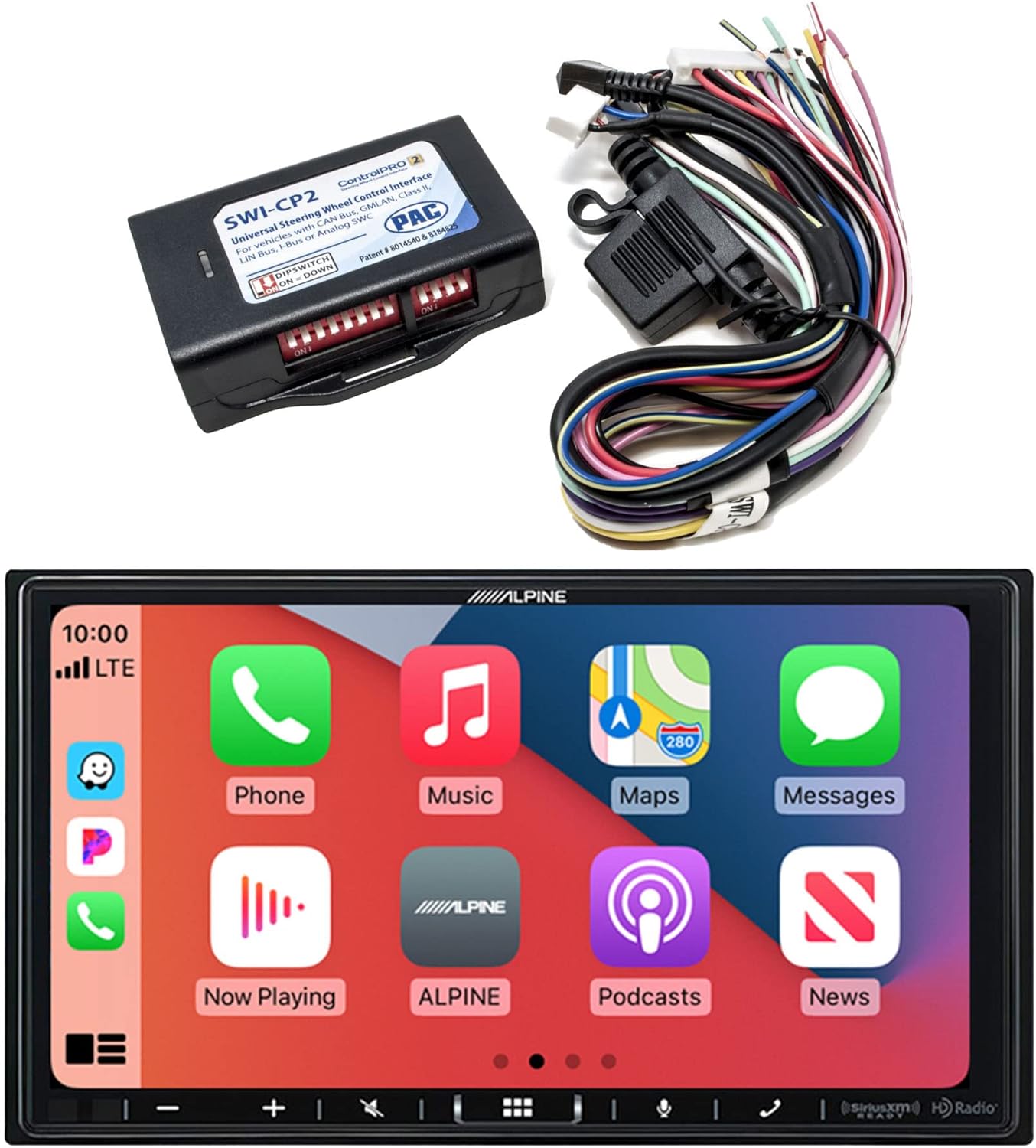
Image showing the Alpine iLX-407 multimedia receiver, the PAC Audio SWI-CP2 steering wheel control interface, and associated wiring harnesses, representing the complete product bundle.
4. Product Overview
4.1 Alpine iLX-407 Multimedia Receiver
The iLX-407 is a 7-inch anti-glare touchscreen multimedia receiver designed for in-car entertainment and connectivity. Its shallow mount design allows for installation in vehicles with limited dashboard space.
- Display: 7-inch Anti-glare 2-DIN Touchscreen
- Design: Shallow Mount (2-6/16" Depth)
- Smartphone Integration: Works with Apple CarPlay and Android Auto for seamless smartphone access.
- Connectivity: Built-in Bluetooth for hands-free calling and audio streaming.
- Radio: SiriusXM-Ready (tuner sold separately) and Built-in HD Radio.
- Inputs: HDMI Input for external video sources.
- Customization: Customizable User Interface with 29 available widgets and customizable wallpaper.
- PowerStack Capable: Optimized for use with KTA-450 or KTA-200M Power Pack Amplifiers (sold separately).

The Alpine iLX-407 display showing the Apple CarPlay interface with various application icons such as Phone, Music, Maps, and Messages.

The Alpine iLX-407 display showing the Android Auto interface with application icons including Maps, Spotify, YouTube Music, and Phone.

Side view of the Alpine iLX-407 multimedia receiver, highlighting its shallow chassis design and connections for power and audio, indicating compatibility with PowerStack amplifiers.
4.2 PAC Audio SWI-CP2 Steering Wheel Control Interface
The SWI-CP2 is designed to retain the factory steering wheel controls when an aftermarket radio like the iLX-407 is installed. It supports various vehicle electronic systems including CAN bus, GMLAN, and Class II.
- Compatibility: Works with Analog (resistive) and Data SWC Systems.
- Configuration: Configurable via DIP switches, USB connected PC, or button learning procedure.
- Features: Customizable button functions, provides 2 Amp, 12V ACC Output (for Data-bus applications).
- Ease of Use: Designed for minimized installation time.

The PAC Audio SWI-CP2 module with its wiring harness, showing DIP switches for configuration and connection points for vehicle integration.
5. Installation
Proper installation is crucial for optimal performance and safety. If you are not experienced with car audio installation, it is strongly recommended to seek professional assistance.
5.1 Alpine iLX-407 Receiver Installation
- Preparation: Disconnect the vehicle's negative battery terminal before starting any electrical work.
- Mounting: Install the iLX-407 into the vehicle's dashboard opening. Its shallow chassis design facilitates installation in tight spaces. Secure the unit using appropriate mounting hardware.
- Wiring Connections:
- Connect the main power harness (constant 12V, accessory 12V, ground).
- Connect speaker wires to the vehicle's speaker wiring.
- Connect the parking brake wire and reverse gear wire as per local regulations for safety features.
- Connect the antenna adapter for radio reception.
- Connect the USB cable for Apple CarPlay/Android Auto and media playback.
- Connect the HDMI cable for external video sources, if applicable.
- Optional PowerStack Amplifier: If using a KTA-450 or KTA-200M amplifier, follow its specific installation instructions for integration with the iLX-407.
- Final Checks: Before reassembling the dashboard, temporarily reconnect the battery and perform a basic function test.
5.2 PAC Audio SWI-CP2 Interface Installation
- Vehicle Compatibility: Use the ControlPRO Web-APP or Mobile APPs (Android/iOS) to determine the correct wiring and DIP switch settings for your specific vehicle.
- Wiring: Connect the SWI-CP2 harness to the vehicle's steering wheel control wires and the aftermarket radio's steering wheel control input. Ensure all connections are secure.
- DIP Switch Configuration: Set the DIP switches on the SWI-CP2 module according to the settings provided by the ControlPRO Web-APP for your vehicle and radio.
- Testing: After installation, test all steering wheel control buttons to ensure they function correctly with the iLX-407. If buttons do not respond, refer to the SWI-CP2's button learning procedure or re-check DIP switch settings and wiring.
6. Operation
6.1 Basic Controls and User Interface
The iLX-407 features a responsive touchscreen interface. You can customize the home screen by dragging and dropping widgets to access frequently used functions quickly.
- Power On/Off: Press and hold the power button (usually located on the front panel or via vehicle ignition).
- Volume Control: Adjust using the on-screen controls or your vehicle's steering wheel controls (if SWI-CP2 is installed).
- Home Screen: Tap the home icon to return to the main menu.
- Settings: Access system settings, audio adjustments, and display options through the settings menu.
6.2 Smartphone Integration (Apple CarPlay / Android Auto)
Connect your compatible iPhone or Android smartphone via the USB port to access Apple CarPlay or Android Auto. This allows you to use navigation, make calls, send messages, and play music through the receiver's interface.
- Connection: Use a certified USB cable to connect your smartphone to the iLX-407's USB port.
- Activation: CarPlay or Android Auto will typically launch automatically upon connection. Follow any on-screen prompts on the receiver or your phone.
- Voice Control: Use Siri (CarPlay) or Google Assistant (Android Auto) for hands-free operation.
6.3 Bluetooth Connectivity
Pair your Bluetooth-enabled device for hands-free calling and wireless audio streaming.
- Pairing: Go to the Bluetooth settings on the iLX-407 and enable pairing mode. On your smartphone, search for available Bluetooth devices and select "Alpine iLX-407".
- Hands-Free Calling: Make and receive calls directly through the receiver.
- Audio Streaming: Play music from your smartphone wirelessly.
6.4 Radio Functions
- HD Radio: Enjoy enhanced sound quality and additional content from compatible HD Radio stations.
- SiriusXM: If a SiriusXM Connect Vehicle Tuner (sold separately) is installed, you can access a wide range of satellite radio channels (subscription required).
6.5 HDMI Input
Connect external video sources, such as a portable media player or smartphone (with appropriate adapter), to the HDMI input for video playback on the iLX-407 screen.
6.6 Steering Wheel Control (with SWI-CP2)
Once the SWI-CP2 is correctly installed and configured, your vehicle's factory steering wheel buttons will control various functions of the iLX-407, such as volume, track skip, and source selection. Refer to the SWI-CP2's specific instructions for customizing button functions.
7. Maintenance
- Screen Cleaning: Use a soft, dry cloth to gently wipe the touchscreen. For stubborn smudges, slightly dampen the cloth with water or a screen-safe cleaner. Avoid harsh chemicals or abrasive materials.
- Unit Cleaning: Keep the main unit and connections free from dust and debris. Use a soft brush or compressed air for hard-to-reach areas.
- Software Updates: Periodically check the Alpine website for any available firmware updates for the iLX-407 to ensure optimal performance and access to new features.
8. Troubleshooting
If you encounter issues with your Alpine iLX-407 or PAC Audio SWI-CP2, refer to the table below for common problems and solutions.
| Problem | Possible Cause | Solution |
|---|---|---|
| No power to the receiver. | Blown fuse, incorrect wiring, loose power connection. | Check vehicle fuses and the fuse on the receiver's power harness. Verify all power and ground connections. |
| No audio output. | Speaker wires disconnected, volume too low, mute activated, incorrect audio source. | Check speaker wire connections. Increase volume. Ensure mute is off. Select the correct audio source. |
| Apple CarPlay/Android Auto not connecting. | Faulty USB cable, phone not compatible, software issue, incorrect settings. | Use a certified USB cable. Ensure your phone's OS is up to date. Check phone and receiver settings for CarPlay/Android Auto. Restart phone and receiver. |
| Steering wheel controls not working. | SWI-CP2 incorrectly wired, DIP switches set wrong, SWI-CP2 not programmed. | Verify SWI-CP2 wiring. Re-check DIP switch settings using the ControlPRO Web-APP. Perform the button learning procedure for the SWI-CP2. |
| Bluetooth pairing issues. | Device not in pairing mode, incorrect PIN, interference. | Ensure both devices are in pairing mode. Confirm the PIN. Try pairing in a different location to rule out interference. |
9. Specifications
Key technical specifications for the Alpine iLX-407 and related components:
| Feature | Specification |
|---|---|
| Product Dimensions | 19 x 9 x 15 inches |
| Item Weight | 6 pounds |
| Brand | Alpine |
| Connectivity Technology | Bluetooth |
| Controller Type | Android, Google Assistant, iOS |
| Special Feature | Spotify, Touchscreen |
| Compatible Devices | Smartphone, Speaker |
| Total HDMI Ports | 2 |
| Connector Type | HDMI, USB |
| Audio Output Mode | Mono |
| Surround Sound Channel Configuration | 4 Channel |
| Visible Screen Diagonal | 7" / 18 cm |
10. Warranty and Support
This product is covered by a manufacturer's warranty. Please refer to the warranty card included with your purchase or visit the Alpine website for detailed warranty terms and conditions. For technical support or service inquiries, please contact Alpine customer service or your authorized dealer.


