
1. Introduction
The Beyution RM-L1593 is a universal infrared replacement remote control designed for use with a wide range of Samsung Smart TVs. This remote control provides immediate functionality upon battery insertion, requiring no complex programming. It includes dedicated shortcut buttons for popular streaming services such as Netflix and Prime Video, as well as a WWW button for web browsing.

Image 1.1: Front view of the Beyution RM-L1593 Universal Remote Control, showing its ergonomic design and button layout.
2. Setup
2.1 Battery Installation
- Locate the battery compartment on the back of the remote control.
- Slide the battery cover downwards or press the latch to open it.
- Insert two (2) AAA batteries (not included) into the compartment, ensuring correct polarity (+ and -) as indicated inside.
- Replace the battery cover, ensuring it clicks securely into place.
The remote control is an infrared (IR) device and does not require pairing. It will function immediately after batteries are correctly installed.

Image 2.1: Back view of the remote control with the battery compartment open, showing where to insert two AAA batteries.
3. Operating Instructions
This remote control provides standard functions for navigating and controlling your Samsung Smart TV, along with dedicated shortcut buttons for quick access to streaming services.
3.1 Button Functions
- Power Button (⏻): Turns the TV on or off.
- 123 Button: Accesses the virtual numeric keypad.
- Menu/List Button: Opens the TV's menu or displays a list of options.
- Extra Button: Provides access to additional TV functions or information.
- Navigation Pad (Up, Down, Left, Right, OK): Used to navigate menus and select items.
- Back Button (↶): Returns to the previous screen or menu.
- Home Button (⌂): Returns to the TV's Smart Hub or home screen.
- Play/Pause Button (⏸): Controls media playback.
- Volume Up/Down (VOL): Adjusts the TV's volume.
- Channel Up/Down (CH): Changes TV channels.
- Netflix Button: Direct access to the Netflix application.
- Prime Video Button: Direct access to the Prime Video application.
- WWW Button: Direct access to the TV's web browser.
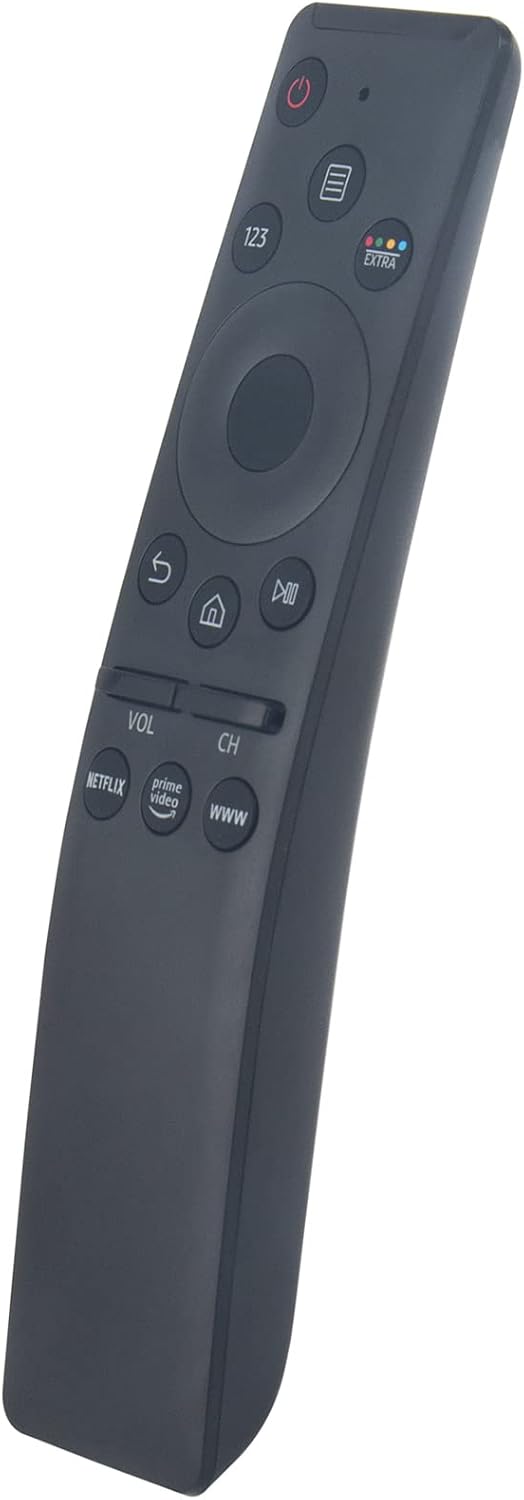
Image 3.1: Angled front view of the remote control, showing the layout of the navigation and shortcut buttons.
4. Compatibility
The RM-L1593 remote control is compatible with a broad range of Samsung Smart TV models and can replace many original Samsung remote controls. This is an infrared (IR) remote and does not support voice control or pointer functions.
4.1 Compatible Samsung TV Models
- Smart TV Series: 6 series, 7 series, 8 series, 9 series
- Specific Models: KU6290, KU6270, KU7000, RU7100, Q60T, TU8000, TU8200, TU8300, TU850D, TU9000, Q70T, Q80T, Q90T, Q800T, Q900TS, Q950TS, LST7, LS05, LS03, RU8000, Q50, Q60, Q70, Q80, Q90, Q900, NU8000, NU8500, MU8000, Q6F, Q7F, Q7C, Q8F, Q9F, N5300, NU6900, NU7100, NU7300, MU630, MU650, MU700, MU800, MU850, MU6300, MU6500, MU7000, MU7500, MU8000, MU9000 Series, LS27AM500NNXZA, LS32AM702UNXZA, LS32AM500NNXZA Series, etc.
4.2 Compatible Samsung Remote Models
- BN59-01266A, BN59-01312A, BN59-01312G, BN59-01310A, BN59-01259E, BN59-01330A, BN59-01329A, BN59-01298A, BN59-01298H, BN59-01292A, BN59-01241A, BN59-01293A, BN59-01199F, BN59-01301A, BN59-01289A, BN59-01298G, BN59-01300G, BN59-01274A, BN59-01298E, BN59-01298D, BN59-01265A, BN59-01270A, BN59-01298C, BN59-01259B, BN59-01259D, BN59-01300F, BN59-01300J, BN59-01300H, BN59-01279A, BN59-01327B, BN59-01242A, BN59-01329B, BN59-01330B, BN59-01312M, BN59-01311B, BN59-01312B, BN59-01242C, BN59-01328A, BN59-01300L, BN59-01311G, BN59-01312D, BN59-01311E, BN59-01312F, BN59-01330C, etc.
5. Troubleshooting
- Remote not responding:
- Ensure batteries are inserted correctly with the proper polarity.
- Replace old batteries with new AAA batteries.
- Ensure there is a clear line of sight between the remote control and the TV's infrared receiver. Remove any obstructions.
- Confirm the remote is pointed directly at the TV.
- Certain functions not working:
- Verify that your specific TV model is listed in the compatibility section. While universal, some advanced features of newer Samsung TVs might require a specific original remote.
- Ensure the TV's firmware is up to date.
- Remote feels sluggish or intermittent:
- This often indicates low battery power. Replace batteries.
If issues persist after following these steps, please refer to the Support section for further assistance.
6. Maintenance
- Cleaning: Wipe the remote control with a soft, dry cloth. Do not use abrasive cleaners or solvents.
- Liquid Exposure: Avoid exposing the remote control to water or other liquids. If it gets wet, remove batteries immediately and allow it to dry completely before reinserting them.
- Battery Replacement: Replace batteries promptly when the remote's performance declines to prevent battery leakage, which can damage the device.
- Storage: Store the remote in a cool, dry place away from direct sunlight and extreme temperatures.
7. Specifications
| Model Number | RM-L1593 |
| Brand | Beyution |
| Connectivity Technology | Infrared (IR) |
| Compatible Devices | Samsung Televisions |
| Max Number of Supported Devices | 1 |
| Batteries Required | 2 x AAA (not included) |
| Product Dimensions | 7 x 2 x 0.6 inches (17.8 x 5.1 x 1.5 cm) |
| Item Weight | 1.44 ounces (40.8 grams) |
8. Support
For further assistance, compatibility inquiries, or if you encounter any issues not covered in this manual, please contact the seller directly through your purchase platform. Providing your TV's exact model number can help expedite support.