
XTRONS TIQ742P
XTRONS Car Radio User Manual
Model: TIQ742P
1. Introduction
Welcome to the XTRONS Car Radio user manual. This guide provides comprehensive instructions for the installation, operation, and maintenance of your new car multimedia player. Please read this manual thoroughly before using the device to ensure proper functionality and to maximize your user experience.
Key Features:
- Qualcomm 665 Universal Dual DIN Car Radio with Android 14 operating system.
- Octa-Core processor, 8GB RAM, and 256GB internal storage.
- Built-in QLED 1024x600 resolution screen.
- Integrated 4G LTE connectivity (Asia and Europe bands supported).
- Wireless CarPlay and Wireless Android Auto support.
- DTS-TON Digital Sound Processing for high-fidelity audio output.
- HDMI Output for sharing content with external displays.
- Dual-Band Wi-Fi (2.4GHz and 5GHz) for stable internet connection.
- Supports Screen Mirroring, AHD Cameras, Steering Wheel Control, GPS Navigation, and Bluetooth 5.0.
2. Setup
Package Contents:
Before installation, please verify that all components are present in the package:
- 1 x ISO Wiring Harness
- 1 x RCA Cables
- 2 x USB Cable
- 1 x 4G+ Antenna
- 1 x 4G- Antenna
- 1 x CANbus Cable
- 1 x GPS Antenna
- 1 x Camera Cable
- 2 x Fitting Kits
- 1 x English Manual
- 1 x German Manual

Image: Contents of the XTRONS Car Radio package, including the main unit, wiring harnesses, antennas, USB cables, and mounting accessories.
Wiring Diagram:
Refer to the following diagram for correct wiring connections. Ensure all connections are secure before powering on the device.

Image: Detailed wiring diagram for the XTRONS Car Radio, showing connections for power, speakers, antennas, USB, HDMI, and other peripherals.
Key Connections:
- Wi-Fi antenna
- GPS antenna
- 3. 4G antenna
- 4. 4G antenna
- USB port1
- USB port2
- USB port3
- Camera-IN, rear camera video input
- BRAKE, brake-in cable
- Wi-Fi antenna
- CAMERA 12V+, camera power cable
- Bluetooth antenna
- REAR OUT R, rear right audio output
- REAR OUT L, rear left audio output
- F CCD+12V, front camera 12v
- CANbus TX-RX
- AUX IN R, audio input right
- SUB OUT, subwoofer output
- AUX CVBS IN, video input
- F CAM IN, front camera input
- MIC, microphone port
- AUX IN L, audio input left
- AMP-CON, amplifier control cable
- FRONT OUT L, front left audio output
- FRONT OUT R, front right audio output
- 4G SIM card slot
- KEY1-5V, Steering wheel control key1
- REVERSE-IN, reverse control cable
- KEY2-5V, Steering wheel control key2
- ANT, automatic antenna control
- ISO wiring harness
- HDMI output
- Optical audio output
- Radio antenna port
3. Operating Instructions
System Overview:
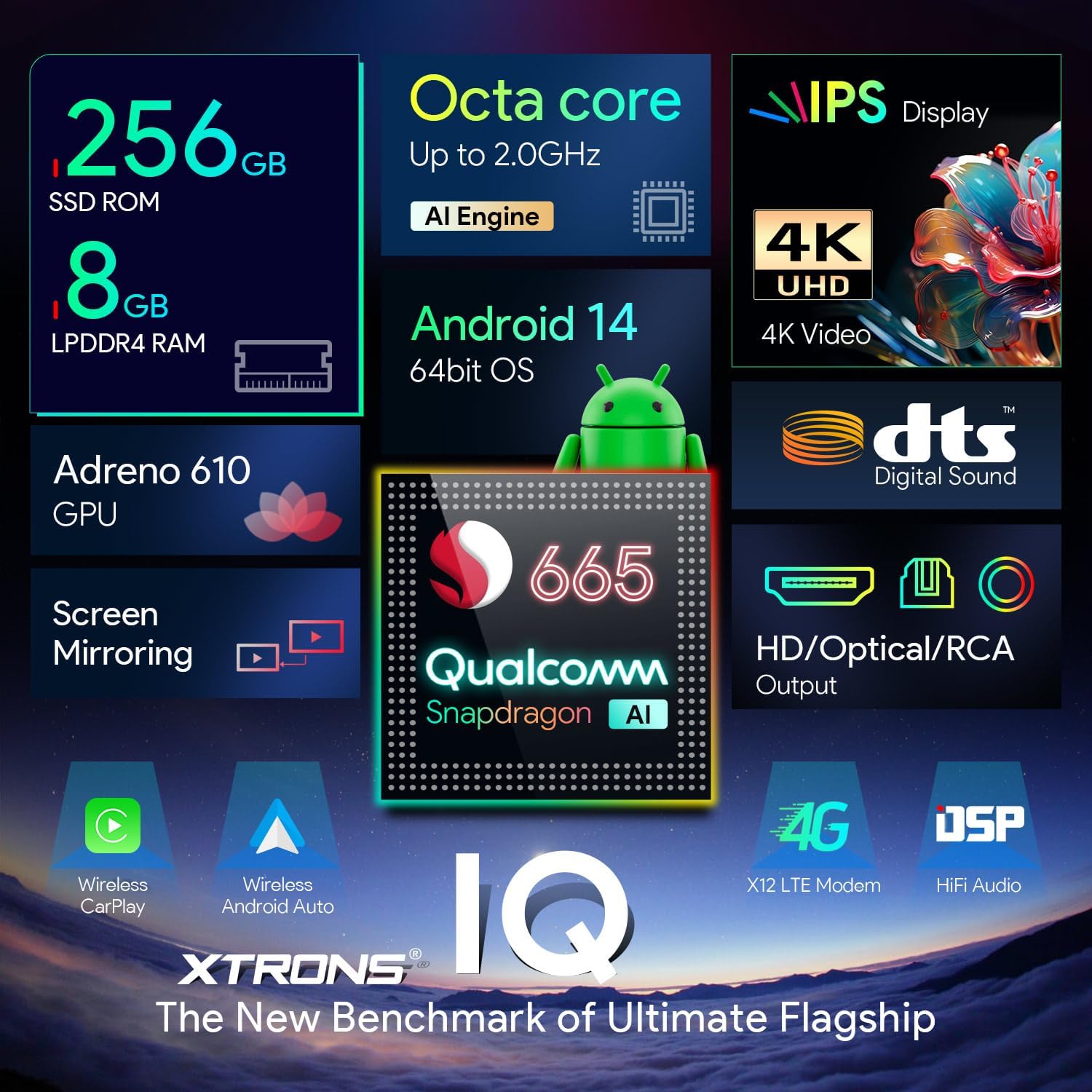
Image: Visual representation of the XTRONS Car Radio's core specifications, including Octa-core processor, 8GB RAM, 256GB ROM, Android 14, QLED display, and Qualcomm 665 chip.
Audio Features (DTS Digital Sound):
Experience studio-quality sound with the integrated DTS Digital Sound processing. The powerful automotive-grade TDA7808 amplifier chip and Si47925 smart audio processor chip ensure high-efficiency digital processing and lossless audio output.

Image: Illustration of the DTS Digital Sound feature, showing an equalizer interface and sound wave patterns, emphasizing enhanced audio quality.
Connectivity:
The unit supports Qualcomm 4G LTE for internet access (Micro-SIM card required, not included). It also features dual-band Wi-Fi (2.4GHz and 5GHz) for stable wireless connections. Bluetooth 5.0 is included for hands-free calling and audio streaming.
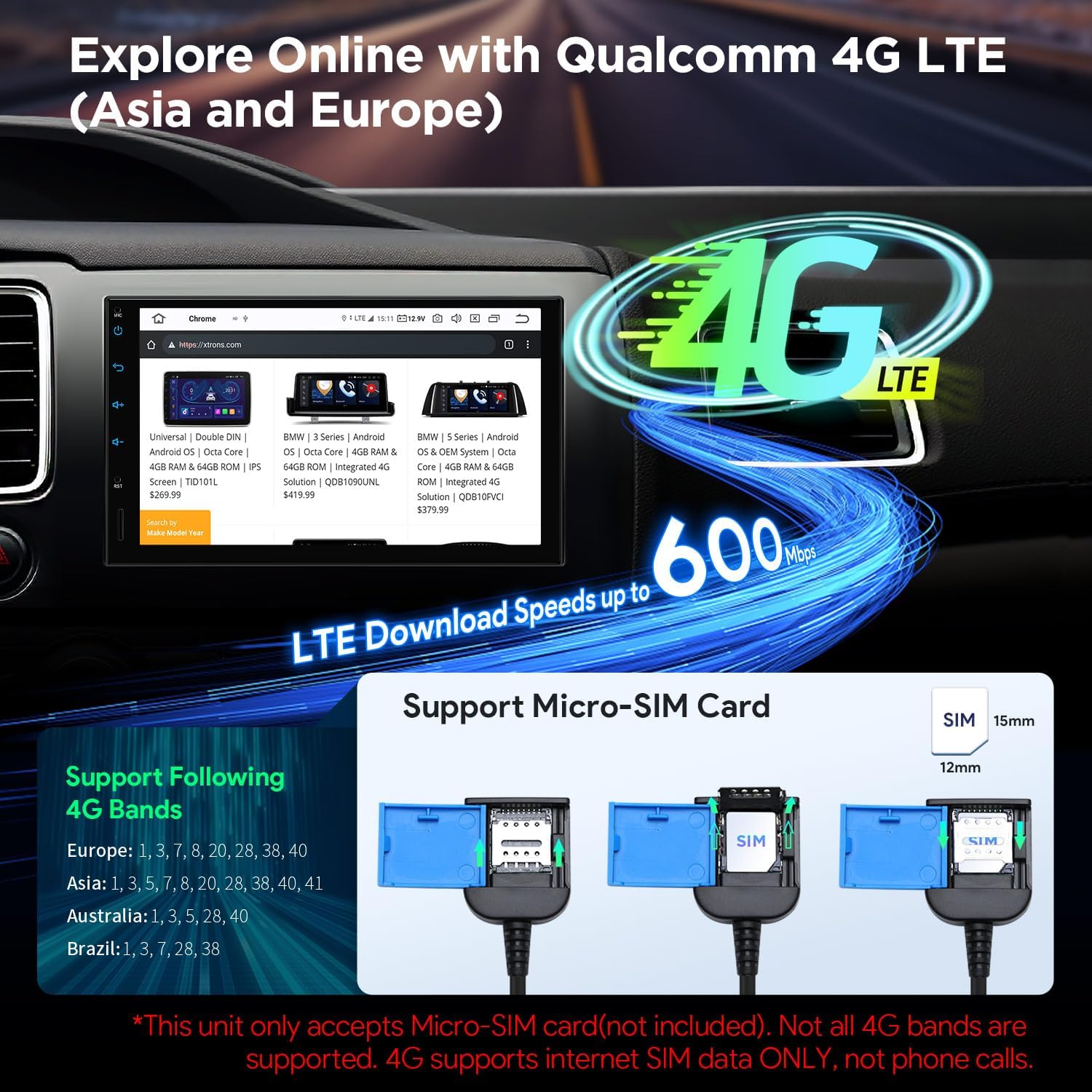
Image: Diagram illustrating 4G LTE connectivity with download speeds up to 600 Mbps and showing support for Micro-SIM cards for various regions.
Smartphone Integration:
Effortlessly sync with your smartphone using Wireless CarPlay and Wireless Android Auto. The device also supports Screen Mirroring for displaying your phone's content directly on the car radio screen.

Image: Screenshots demonstrating Wireless CarPlay and Android Auto interfaces, along with screen mirroring and Bluetooth calling functionalities.
HD Output:
Share high-fidelity content with passengers using the built-in HDMI output. This allows you to display the same or different content on external monitors, such as rear-seat entertainment screens.

Image: Diagram showing the car radio connected via HD Out to an external monitor, illustrating the ability to display identical or different content simultaneously.
User Interface:
The device features a smart and intuitive user interface with a Day/Night mode for optimal visibility in various lighting conditions. Quick access bars and easy volume control enhance usability.

Image: Screenshots of the XTRONS Car Radio's user interface, highlighting features like navigation, music shortcuts, quick access bar, day/night mode, and Bluetooth quick call.
4. Maintenance
To ensure the longevity and optimal performance of your XTRONS Car Radio, follow these maintenance guidelines:
- Cleaning: Use a soft, dry cloth to clean the screen and exterior. For stubborn smudges, slightly dampen the cloth with water or a screen-safe cleaner. Avoid abrasive materials or harsh chemicals.
- Temperature: Do not expose the device to extreme temperatures. Prolonged exposure to direct sunlight or very cold conditions can affect performance and lifespan.
- Ventilation: Ensure the unit has adequate ventilation to prevent overheating. Do not block any vents on the device.
- Software Updates: Periodically check the official XTRONS website for software updates to ensure you have the latest features and bug fixes.
5. Troubleshooting
If you encounter issues with your XTRONS Car Radio, refer to the following common problems and solutions:
| Problem | Possible Cause | Solution |
|---|---|---|
| No power | Incorrect wiring; Blown fuse; Vehicle battery issue. | Check power connections (refer to wiring diagram); Inspect vehicle fuses; Verify car battery health. |
| No sound | Speaker wiring incorrect; Volume too low; Mute function active; Amplifier issue. | Check speaker connections; Increase volume; Disable mute; Verify external amplifier connections if applicable. |
| Bluetooth not connecting | Bluetooth not enabled on device/phone; Device not in pairing mode; Interference. | Ensure Bluetooth is on for both devices; Put car radio in pairing mode; Move closer to the unit; Restart both devices. |
| GPS signal lost/inaccurate | GPS antenna obstructed or disconnected; Poor satellite coverage. | Ensure GPS antenna is properly installed and has a clear view of the sky; Move to an open area. |
| Screen unresponsive | Temporary software glitch; Screen protector interference. | Restart the unit (press RST button if available); Remove and reapply screen protector if present. |
If the problem persists after attempting these solutions, please contact XTRONS customer support for further assistance.
6. Specifications
| Feature | Specification |
|---|---|
| Item Model Number | TIQ742P |
| Brand | XTRONS |
| Connectivity Technology | Bluetooth, 4G LTE, Wi-Fi |
| Control Type | Android, Touchscreen |
| Special Feature | Octa-Core 8GB 256GB, Built-in 4G LTE, Qualcomm 665 |
| Compatible Devices | Universal Dual DIN Car Radio |
| Total HDMI Ports | 1 |
| Connector Type | USB |
| Audio Output Mode | Stereo |
| Surround Sound Channel Configuration | 4.0 |
| Video Encoding | H.264, H.265/HEVC, MPEG-4, etc. |
| Shipment Dimensions | 27.4 x 26.7 x 17.6 cm; 2.06 kg |
| Date First Available | April 21, 2022 |
7. Warranty and Support
XTRONS is committed to providing high-quality products and excellent customer service. Your XTRONS Car Radio comes with the following:
- One-Year Warranty: Covers manufacturing defects and malfunctions under normal use.
- 30-Day Money-Back Guarantee: If you are not satisfied with your purchase, you may return it within 30 days for a full refund.
- Replacement or Repair Service: Available for issues occurring more than 30 days after purchase.
- Professional Technical Support: Dedicated support team available to assist with any technical queries or issues you may encounter.
For further assistance, technical support, or warranty claims, please visit the official XTRONS website: www.xtrons.com
Related documentsTIQ742P

Ask a question about this manual
Ask about setup, troubleshooting, compatibility, parts, safety, or missing instructions. Manuals+ will review the question and use this page’s manual context to help answer it.